How I Migrated a Commercial Unity Editor Tool from IMGUI to UI Toolkit with Codex
What 21 days, 321 prompts, and a closed Unity validation loop taught me about moving Asset Inventory from IMGUI to UI Toolkit with Codex while preserving a mature product.
A UI migration is easy to underestimate. At first, it sounds like a mechanical rewrite: replace OnGUI() with CreateGUI(), translate a few controls, move colors and margins into USS, and continue shipping.
That description is accurate in roughly the same way that “replace the engine while the aircraft is flying” is an accurate maintenance plan.
Asset Inventory is a commercial Unity Editor tool for indexing, previewing, searching, organizing, and maintaining very large asset collections. Its interface had grown over years into dozens of windows, wizards, popups, inspectors, trees, tables, filters, settings pages, preview surfaces, and one especially demanding hero element: a virtualized search grid that can represent huge result sets while previews arrive asynchronously.
The old interface worked. That fact mattered more than its age. Every odd branch in its IMGUI code often represented a product decision, a customer workflow, or a regression fixed years earlier. A migration that merely looked modern while losing saved column layouts, audio autoplay, package thumbnails, drag behavior, advanced filters, keyboard navigation, or scroll position would not be modernization. It would be a feature cut.
So I did not ask Codex to “convert the UI.” I asked it to help preserve a mature product while changing its rendering model, incrementally, with evidence after every meaningful slice. The result was not one heroic prompt or one giant diff. It was a long conversation between architecture, implementation, visual inspection, product memory, and automated validation.
My central lesson was not that AI can write UI Toolkit code. It was that Codex became dramatically more useful once I gave it a way to validate its own work inside the real application.
What this actually took
I expected a large migration. I still underestimated the shape of the work. The retained trace spans 21 days and records 321 prompts, 251 assistant execution turns, and 17,560 tool calls. In the source, 45 C# files containing OnGUI fell to zero.

Figure 1. The scale of the migration, using retained trace data and a before-and-after source audit.
Those are not training hours. The model was not being trained on Asset Inventory. The trace measures runtime: reasoning, repository inspection, editing, Unity compilation and reloads, tests, screenshots, image analysis, waiting, interruptions, and sometimes a sleeping human.
The exact completed agent-execution total is 65 hours and 25 minutes. Another 28 hours and 51 minutes come from incomplete or privacy-sliced intervals, which I keep separate rather than presenting as exact active time. The first end-to-end task alone accounted for 182 of 251 turns, 13,333 of 17,560 tool calls, and almost 51 of the 65 exact hours.
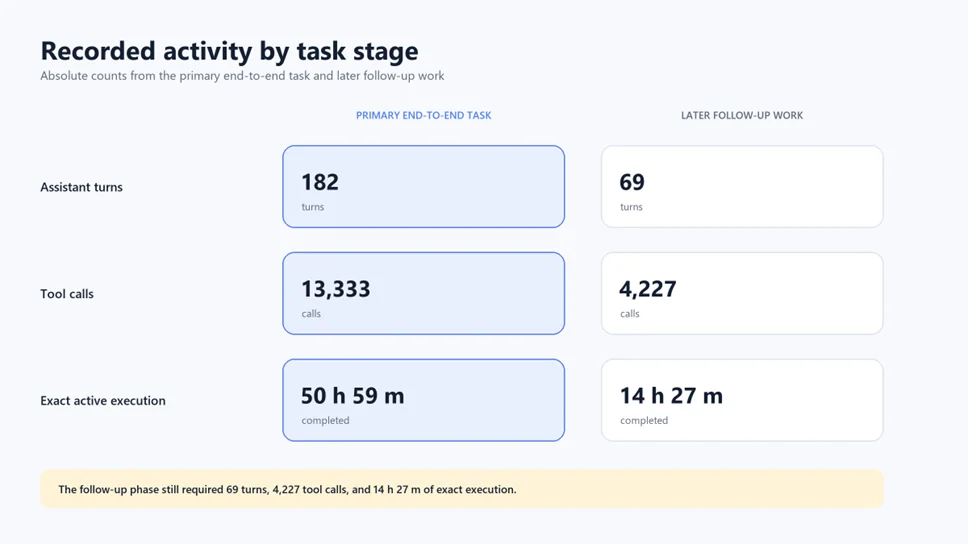
Figure 2. Absolute activity recorded in the primary task and later follow-up work. The units are shown directly because turns, tool calls, and execution time are different measures.
That split is more useful for planning than one combined total. The primary task carried most of the migration, but later follow-up still required 69 assistant turns, 4,227 tool calls, and 14 hours and 27 minutes of exact execution. Reaching a credible first endpoint was not the end of the work.
I report the measurements this way because AI work deserves the same hygiene as performance engineering. Wall-clock duration, exact completed execution, and incomplete intervals are different quantities. The numbers are already striking. They do not need embellishment.
Why migrate a working commercial tool?
IMGUI is immediate mode. On each repaint, the code describes the controls again, reads events, and implicitly reconstructs much of the visible interface. This model is compact and extraordinarily practical for small Editor tools. It also lets state, layout, rendering, and behavior grow together until the only reliable documentation of a screen is the sequence of GUILayout calls that draws it.
UI Toolkit is retained mode. You construct a visual tree, style it, bind or update it, and let the framework retain element identity across frames. That opens the door to reusable components, centralized USS, native events, virtualization, clearer separation of structure and state, and more deliberate responsive behavior.
The important word is identity. A retained button is not recreated conceptually every repaint. A list item can be pooled and rebound. A search field keeps focus. A scroll view has a persistent offset. A foldout has an expansion state. These are advantages, but they also expose mistakes that IMGUI’s redraw loop used to hide.
My business reason for the migration was larger than visual modernization. I wanted a UI foundation that could support Asset Inventory for years and then become the shared language of my other Unity tools. The end state was not simply “Asset Inventory now uses UI Toolkit.” It was “I now have common UI patterns for every tool I ship.”
The first architectural decision: migrate behavior, not screenshots
Before touching the first window, I needed a definition of fidelity. Pixel similarity was useful, but insufficient. The real migration contract included at least five layers.
- Data fidelity. Serialized fields, preferences, customization keys, filter state, saved searches, and per-column settings had to survive.
- Behavior fidelity. Buttons, context menus, drag and drop, double-clicks, keyboard navigation, preview actions, undo behavior, downloads, and destructive confirmations had to remain correct.
- State fidelity. Selection, focus, scroll offset, expanded rows, active tabs, list ordering, and asynchronous loading state had to remain stable during updates.
- Layout fidelity. The UI had to remain readable at narrow, normal, and wide Editor window sizes, not just at the width used by the developer.
- Product fidelity. The interface had to preserve the hierarchy of the product: what is primary, what is advanced, what is dangerous, and what users need to understand next.
This framing changed how I prompted Codex. “Convert this class” was never enough. For each slice, I specified the behavior to preserve, the states to exercise, the visual widths to inspect, and the legacy code that could disappear only after the new path proved itself.
Step 1: prove the path on the smallest real window
I deliberately began with the Welcome window. That choice was modest but real. A Welcome window has branding, text hierarchy, action buttons, links, minimum-size constraints, and Editor styling, but it does not carry the deepest state of the product.
That first slice introduced an Asset Inventory UI Toolkit helper, a USS file, and a CreateGUI() implementation. More importantly, it established my repeatable workflow: build one real window, compile it in Unity, open it, capture it, inspect it, correct it, and only then accept the slice.
private void CreateGUI(){ rootVisualElement.styleSheets.Add(LoadAssetInventoryStyles()); BuildWelcomeContent(rootVisualElement);}That illustrative snippet is simple because the first job of CreateGUI() is simple: construct the persistent structure. It is not a new spelling for OnGUI(). The moment you start clearing and rebuilding the entire root during routine updates, you are using retained mode with an immediate-mode habit.
The Welcome window also gave me the first visual baseline. Typography, button sizing, vertical rhythm, logo treatment, and link behavior could be reviewed without the noise of a complex workflow. The migration began with a customer-visible surface, but one whose blast radius was easy to control.
Step 2: convert simple windows, then stop and harvest patterns
After the Welcome window came operation dialogs, configuration windows, metadata editors, inspection views, saved-search windows, database location screens, dropdowns, selectors, and maintenance utilities. The sequence moved from low state complexity to higher state complexity.
The first temptation in a migration like this is to invent the complete design system upfront. I resisted that. A helper conceived before three real screens often encodes one screen’s accidental structure. A helper extracted after ten screens can be too late, because duplication has already shaped the architecture.
The productive cadence was: migrate a small cluster, observe repetition, extract only the proven common shape, then continue.
One early prompt explicitly paused the migration: “Before continuing, evaluate what helper features can be moved to Common so that other tools that migrate to UI Toolkit can profit from these.” That pause produced CommonUITK, a neutral helper layer that Asset Inventory could delegate to while retaining its own visual classes.
This was the first sign that the project was becoming more than a one-tool rewrite. It also established one of my most important rules for AI-assisted refactoring: periodically ask Codex to stop advancing and audit the work already completed. If I only gave it the next checklist item, it could reproduce the same local solution 30 times. When I explicitly asked it to search for commonality, the 11th repetition could become one durable primitive.
What belonged in Common
The early Common layer focused on neutral mechanics: stylesheet attachment, class management, form-row construction, status presentation, spacing conventions, and reusable element factories. Tool-specific nouns and workflows stayed in Asset Inventory.
That boundary matters. Shared code is not code that happens to look similar. Shared code is code whose semantics are stable across products. A generic progress overlay belongs in Common. “Asset package download state” does not. A resizable split pane belongs in Common. The meaning of the details pane stays in Asset Inventory.
Step 3: use a hybrid shell as a strangler seam
Small windows are encouraging because each one closes cleanly. The main Asset Inventory window was different. It contained tab navigation, reporting, search, packages, code search, settings, inspectors, trees, result views, and page-specific state. Rewriting it as one isolated branch would have delayed user-visible validation and created an enormous merge risk.
The key move was to bridge UI Toolkit into the main shell and temporarily host legacy content behind it. This is the strangler pattern applied to Editor UI: put a new outer structure around the existing system, then replace internal regions one at a time.
The prompt that unlocked this phase was direct: “Would it make sense to add the UI Toolkit bridge to the main index window and wrap the existing IMGUI content?” The answer was yes, with one crucial condition. The bridge was a migration seam, not the destination.
A broad IMGUIContainer can be a useful temporary boundary. It can also become a comfortable prison. If the new shell only hosts the old application forever, the project has changed its frame, not its architecture.
I therefore tracked page-level bridges explicitly. Reporting, code search, settings, search, and package tabs moved to native UI Toolkit shells. Their inner sections followed. Each replacement removed a named piece of legacy presentation and reduced the surface where immediate mode could hide.
Use IMGUIContainer as scaffolding. Scaffolding is successful when it can be removed.
Step 4: preserve invisible contracts
The easiest regression to notice is a missing button. The dangerous regressions are the invisible contracts users depend on without thinking about them.
Early in the shell migration, I asked whether every customization field still used the same key as the IMGUI implementation. This was not cosmetic. Renaming a preference key would silently reset layouts and choices for existing users. The visible UI could look perfect while the migration still broke trust.
SerializedObject binding is not just convenience
For inspectors and serialized settings, UI Toolkit’s binding system can preserve Undo, multi-object editing, prefab override behavior, and value synchronization. But binding must be used intentionally. A bindingPath, BindProperty, or automatically bound PropertyField is valuable because it carries Unity semantics, not because it saves a line of callback code.
SerializedProperty property =    serializedObject.FindProperty("someSetting");
PropertyField field = new PropertyField(property);root.Add(field);
The later hardening work revisited binding and refresh behavior even after the main migration was complete. That was not cleanup trivia. It was recognition that a retained interface must distinguish three events: the visual tree was created, the underlying data changed, and this specific visible element needs an update.
State must have an owner
IMGUI can make selection and expansion feel like incidental integers around a draw loop. In a retained system, every state needs a deliberate owner.
- Selection belongs to a stable model or controller, not to recycled row visuals.
- Scroll position belongs to the view state and must survive incremental refresh.
- Focus must not disappear because a parent container rebuilt.
- Column width and visibility must persist under the same keys as before.
- Expanded state must be restorable after list or tree data changes.
- Preview requests need identity checks because results can arrive after an item is recycled.
Once these ownership rules were explicit, many UI bugs became ordinary state bugs. That is one of retained mode’s greatest architectural benefits: it forces the product to say what should persist.
The hidden clock moved out of OnGUI
A mature IMGUI window often uses OnGUI() for more than drawing. Because Unity calls it regularly, it can become an accidental lifecycle: poll an operation, notice a background result, refresh a preview, advance a progress display, detect that a scan completed, or repaint when a cached value changes. Removing the method also removes that hidden clock.
The retained replacement should not be one giant scheduled callback that recreates the old polling loop. Each changing subsystem needs an explicit update policy. A long-running scan can publish progress. A preview loader can signal completion. A lightweight status display can use a bounded UI Toolkit scheduler. Expensive data queries can set a dirty flag and refresh only when the result actually changes.
root.schedule.Execute(() =>{    if (!_statusDirty)        return;
    _statusDirty = false;    RefreshStatusInPlace();}).Every(250);
The interval in that illustrative example is not universal. The point is that frequency, cost, and invalidation are visible. A progress label might justify periodic updates. A package tree with thousands of nodes should respond to a meaningful event, not rebuild four times per second just because a scheduler exists.
Lifecycle cleanup became equally explicit. Event handlers registered when a visual tree is created must not multiply across domain reloads or window recreation. Async callbacks must not update a disposed window. Schedulers must pause or become harmless when their element is detached. Preview editors and temporary resources need deterministic disposal.
These concerns explain why a direct line-for-line conversion is risky. IMGUI’s call frequency and local variables encode timing assumptions that disappear in retained mode. A migration must identify those assumptions and give them names: event, command, dirty state, scheduled refresh, cancellation, or disposal.
Refresh has a hierarchy
By the end of the project, I thought about refresh in levels. The cheapest level changes a single property, text value, class, or enabled state. The next rebinds one realized list item. Then comes refreshing the realized items in a collection, replacing a data source, or reconstructing one structural section. Rebuilding the entire window root sits at the top and should be rare.
This hierarchy became useful in both code review and prompting. Instead of telling Codex to “refresh the window,” I asked it to identify the smallest container whose structure was invalid, then to name the user state that would be lost if that container were replaced. That one question caught many focus, scroll, preview, and selection regressions before a visual test did.
Step 5: trees, tables, and recycled visuals
The middle of the migration moved into native trees and tables: uninstall views, tag management, reporting, saved searches, package lists, dependency views, and settings sections. These surfaces exposed the semantic difference between drawing rows and binding rows.
UI Toolkit’s ListView and related controls pool visible elements. makeItem creates the visual once. bindItem points that visual at the current data item whenever virtualization reuses it. This is efficient, but it makes stale callbacks and stale visual state possible if binding is careless.
listView.makeItem = CreateRow;listView.bindItem = (element, index) =>{ RowView row = (RowView)element; ItemModel item = items[index]; row.Bind(item.Id, item);};The stable ID is more important than the row index. An asynchronous preview callback should not say “paint the image into row 12.” Row 12 may now represent a different asset. It should say “paint this image only if the recycled visual is still bound to asset ID X.”
Likewise, every bind must reset all state it owns: text, tooltip, visibility, enabled state, icons, classes, selected styling, and progress. If one field is only set in the true branch, a recycled row can carry an old true-state visual into a false-state item.
The repository eventually gained shared wrappers for reorderable lists, serialized lists, multi-column state, overflow behavior, tree cells, searchable line lists, tabbed panes, and scroll-view state. Those primitives came from real failures, not a speculative component catalog.
Step 6: rebuild the hero grid without reducing it
The search grid was the migration’s hardest visual component. It was not merely a grid of thumbnails. It supported multiple display densities, selection, keyboard navigation, context actions, drag behavior, async previews, fallback imagery, huge result sets, responsive column counts, and a details relationship with the surrounding interface.
One prompt stated the acceptance criterion plainly: “The grid view is the hero element.” I was willing to create a custom, highly polished, highly performant grid rather than force the product into a control that reduced its capability.
I evaluated a newer grid option from Unity’s App UI package and rejected it. Its dependency and behavior did not fit my shipping baseline or the product’s needs. This became an important counterexample to the idea that modernization means choosing the newest available control. The right abstraction is the one that matches the supported versions, performance envelope, package boundary, and interaction contract.
Virtualize rows of tiles
The resulting shared CommonSelectableGridView<T> uses a virtualized ListView whose items are rows. Each row binds a range of tiles calculated from the available width. This turns a two-dimensional responsive grid into a one-dimensional virtualized collection without giving up tile behavior.
ListView = new ListView(_rows, 1f, CreateRow, BindRow){ selectionType = SelectionType.None, virtualizationMethod = CollectionVirtualizationMethod.FixedHeight};Selection is intentionally managed outside the ListView, because the list’s items are rows while the product selects tiles. The component retains selected indices, an active index, and a selection anchor. It exposes events for activation, context requests, pointer input, layout changes, and scroll changes.
On geometry changes, it recalculates column count and row height. On an incremental item refresh, it queries only realized elements and verifies which item index each element currently represents before rebinding. This is the retained-mode version of a rule that applies far beyond grids: update the smallest valid surface, and prove its identity before mutating it.
Asynchronous previews need a stale-result policy
Asset previews can arrive after scrolling. They can also be invalidated by a new search, a new display mode, or an item being removed. The migration therefore needed cancellation or generation tokens, stable item IDs, placeholder state, and targeted refresh.
Without those safeguards, the UI can show the right number of cards with the wrong pictures, one of the most deceptive bugs in a virtualized asset browser. It may disappear when scrolling stops, which makes manual reproduction unreliable. Once Codex could drive the window, scroll, wait for previews, and inspect the result itself, that intermittent failure became much easier to chase.
Step 7: compatibility without contaminating every screen
Asset Inventory has a Unity 2022.3 minimum baseline, while development also runs on newer Unity 6 versions. UI Toolkit APIs and Editor integration capabilities evolve across that range. The wrong response is to scatter version checks and fallback UI across every window.
A better response is to centralize compatibility at the narrowest semantic boundary. Editor previews are a good example. Newer Unity versions can offer a retained preview via Editor.CreatePreview. Unity 2022.3 still needs the existing OnPreviewGUI behavior for many editors.
#if UNITY_2023_2_OR_NEWERVisualElement retainedPreview = editor.CreatePreview(previewWindow);if (retainedPreview != null)    return previewWindow;#endif
return new IMGUIContainer(() =>    editor.OnPreviewGUI(previewRect, EditorStyles.whiteLabel));
The finished project therefore has no local Asset Inventory IMGUIContainer, but Common contains one focused compatibility adapter for real Unity Editor previews. That is not a failed migration. It is honest compatibility.
The architectural win is containment. Product code asks Common for a preview surface. Common chooses the best public API available on that Unity version. When the minimum baseline eventually advances, one adapter changes instead of dozens of product screens.
Step 8: remove the legacy presentation layer
Eventually, the remaining search inspector, filter regions, dependency explorer, lifecycle bridges, retained tree cells, and obsolete trees had all moved. Asset Inventory went from 45 C# files containing OnGUI to zero.
That moment was satisfying, but it was not the finish line. A grep result can prove an API is gone. It cannot prove the replacement is pleasant.
Guard the direction of travel
After removing legacy presentation, I added migration-guard tests. Their purpose was not to assert incidental text or class names. They protected an architectural contract: OnGUI, GUILayout, and unauthorized IMGUIContainer usage must not quietly return to Asset Inventory.
Assert.That(assetInventoryOnGuiFiles, Is.Empty);Assert.That(assetInventoryGUILayoutFiles, Is.Empty);Assert.That(unauthorizedImguiContainers, Is.Empty);Architecture tests became especially useful when I worked with Codex. I could miss one convenient fallback introduced during a later task. A guard turned the migration principle into a fast, repeatable rejection.
The migration, side by side
A migration this large can sound abstract when described only through architectural terms. The following images are deliberately like-for-like. Each pair shows the same working surface at a comparable desktop width, first in the IMGUI implementation and then in the current UI Toolkit implementation. They are not mockups. They are the shipped tool at two points in its evolution.
Search: from a repaint loop to a retained workspace
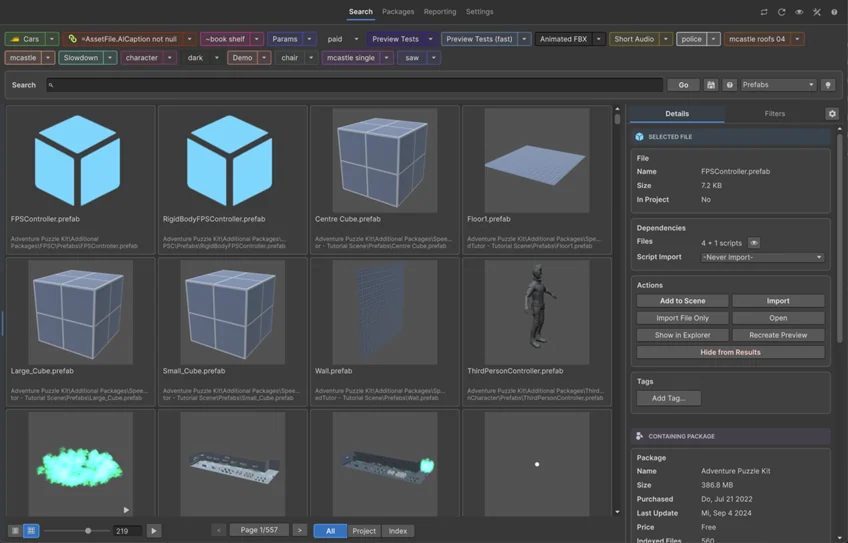
Search was the clearest visual summary of the migration. It combines preview loading, selection, pagination, view controls, context actions, and a right-side inspector. In IMGUI, all of those concerns converged inside the repaint cycle. In UI Toolkit, they became a retained composition with explicit ownership and independent refresh paths.

Figure 3. Before (IMGUI): the Search grid and right-side inspector were composed as immediate drawing operations.
Figure 4. After (UI Toolkit): the same Search workflow uses a virtualized result grid, persistent inspector tabs, shared responsive panes, and retained controls.
The visible result is cleaner, but the deeper change is behavioral. Selection can remain stable while previews finish asynchronously. The inspector can refresh without rebuilding the grid. The footer, toolbar, filters, and result surface can each respond to the state they actually own.
Packages: the inspector became a composition boundary
The Packages surface made the state problem harder. A package can be selected in a tree or grid, it can expose metadata and indexing controls, and the inspector can switch between details, filters, statistics, and view settings. The migration succeeded when the inspector stopped being a region that happened to be drawn on the right and became a real component with a stable identity.
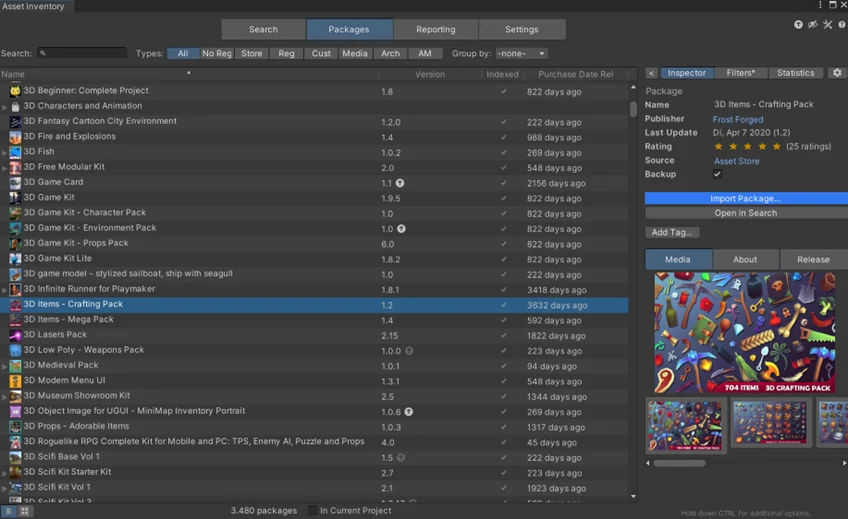
Figure 5. Before (IMGUI): the package list, selection state, metadata, actions, and inspector layout were coupled through the window’s drawing code.
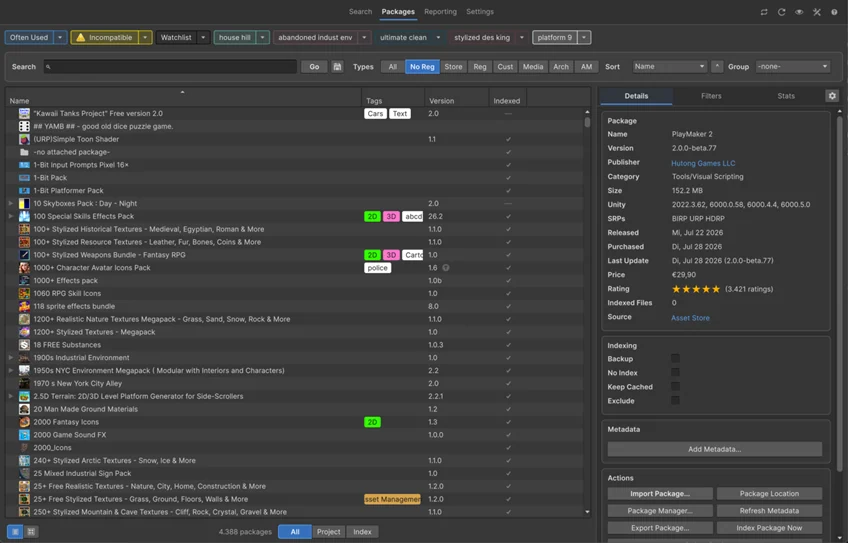
Figure 6. After (UI Toolkit): the package browser and inspector retain their own structure, while selection and refresh events update only the affected elements.
This is where retained mode paid back the migration cost. The package list can virtualize thousands of rows. The inspector can preserve its active tab and scroll position. Common tabbed panes and resizable layouts now provide the same interaction grammar to other tools without importing Asset Inventory’s domain logic.
Settings: from a dense action screen to an operational dashboard
Settings was not merely a form. It was the control room for indexing, maintenance, previews, additional folders, statistics, and long-running actions. A literal one-to-one port would have preserved every field while preserving too much visual noise. The UI Toolkit version keeps the same reachability, but makes status, primary actions, and progressive disclosure explicit.
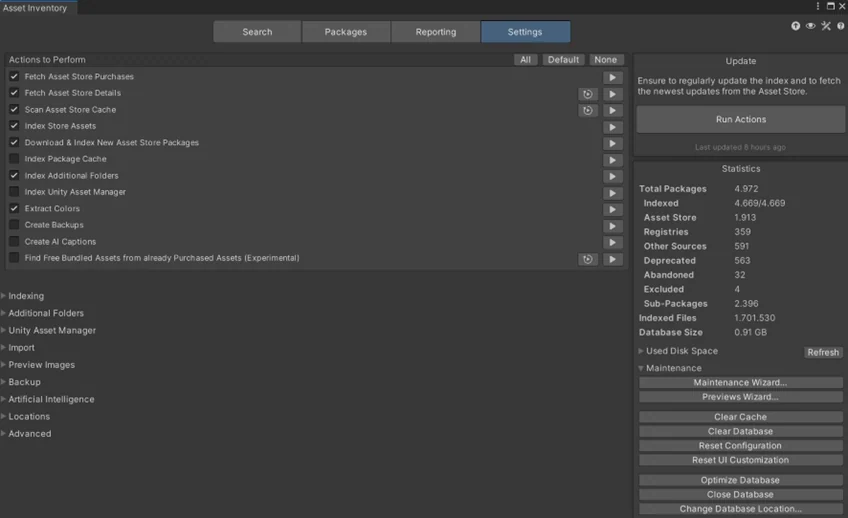
Figure 7. Before (IMGUI): settings and maintenance actions shared a dense, scroll-heavy surface with limited hierarchy.
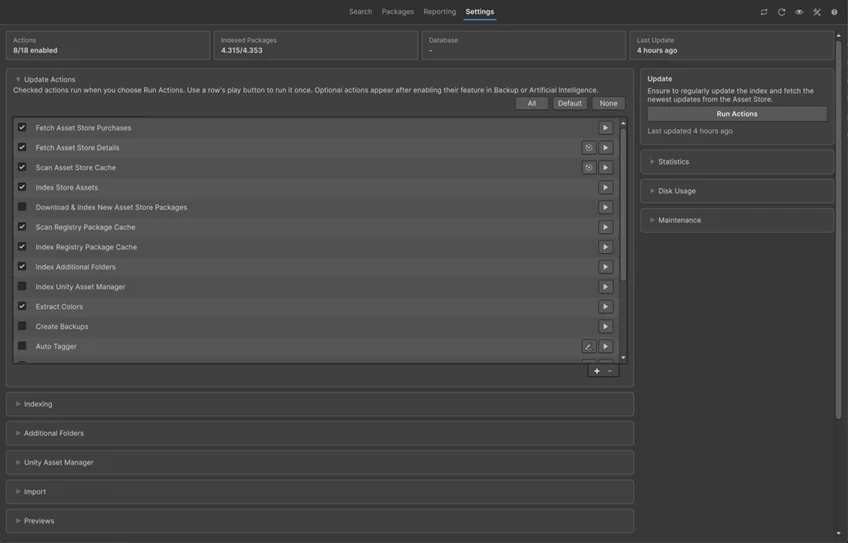
Figure 8. After (UI Toolkit): summary cards, semantic sections, collapsible groups, and a dedicated action rail make the same operational workflow easier to scan.
The settings comparison also captures an important lesson: parity does not mean identical geometry. It means that every capability remains reachable, every consequence stays understandable, and frequent workflows become faster without hiding advanced control. Visual redesign was allowed only after behavioral parity was proven.
The real work began after “complete”
The migration compiled. The main legacy layer was gone. Then came the phase that separates a technical port from a commercial-quality interface.
Visual and behavioral audits found missing package images, fallback images, column menus, resizing behavior, audio autoplay, on-demand download controls, advanced-feature visibility, drag parenting, filter indicators, path wrapping, preview sizing, keyboard navigation, and scroll preservation. None of these problems invalidated UI Toolkit. They showed where the first translation had captured structure but not the complete product contract.
One particularly instructive regression involved scroll position. A routine action rebuilt a container, which returned the user to the top. The code was clean. The result was disruptive. The fix was not “restore the scroll offset after rebuilding” everywhere. The better fix was to stop rebuilding containers whose structure had not changed.
In retained mode, full reconstruction is the most disruptive refresh strategy. Use it only when the structure actually changed.
Later hardening work moved more behavior to incremental updates: change a label, class, binding, visibility flag, list item, status row, or preview in place. This preserves scroll, focus, selection, loaded previews, expanded state, and element identity. It also aligns with Unity’s performance guidance, which emphasizes the cost of style resolution, layout recalculation, geometry changes, and render updates.
What made unattended work possible: Unity MCP
If I had to reduce the entire project to one recommendation for AI-assisted Unity work, it would be this: give Codex a closed validation loop inside Unity.
Without Unity MCP, Codex can inspect source and make plausible edits. It cannot reliably know whether Unity compiled them, whether a domain reload completed, whether the real window opens, whether the correct state is visible, whether text overlaps at 520 pixels, or whether the package cards lost their thumbnails.
With Unity MCP, my workflow became agentic rather than merely generative.
- Edit a bounded slice. Change one window, tab, list, or compatibility adapter.
- Compile and reload in the real Editor. Read the Console, wait for Unity’s state, and check the global Editor log when the visible Console and behavior disagree.
- Open the real surface. Drive menu items or purpose-built commands to show the migrated window and populate representative data.
- Exercise meaningful states. Empty, populated, loading, selected, error, advanced, narrow, typical, and wide are different products from a layout perspective.
- Capture and inspect. Analyze screenshots for clipping, overlap, weak spacing, awkward alignment, inconsistent hierarchy, missing imagery, and uncontained controls.
- Correct and repeat. Shorten a title, move an action, change wrapping, adjust padding, or redesign the arrangement, then capture a cache-busted image and inspect again.
- Run guards and focused tests. Confirm architecture, state transitions, bindings, and behavioral contracts before accepting the slice.
The exported trace contains 692 Unity_RunCommand calls, 472 console reads, 338 Editor management calls, 128 menu-item operations, and smaller numbers of validation and resource calls. Together, they total 1,650 Unity MCP calls. The trace also records 402 image-inspection calls.
Those counts explain how I could tell Codex that I was going to sleep and could not help. Codex did not become autonomous because my prompt sounded confident. It became more autonomous because I had given it observable facts and corrective actions.
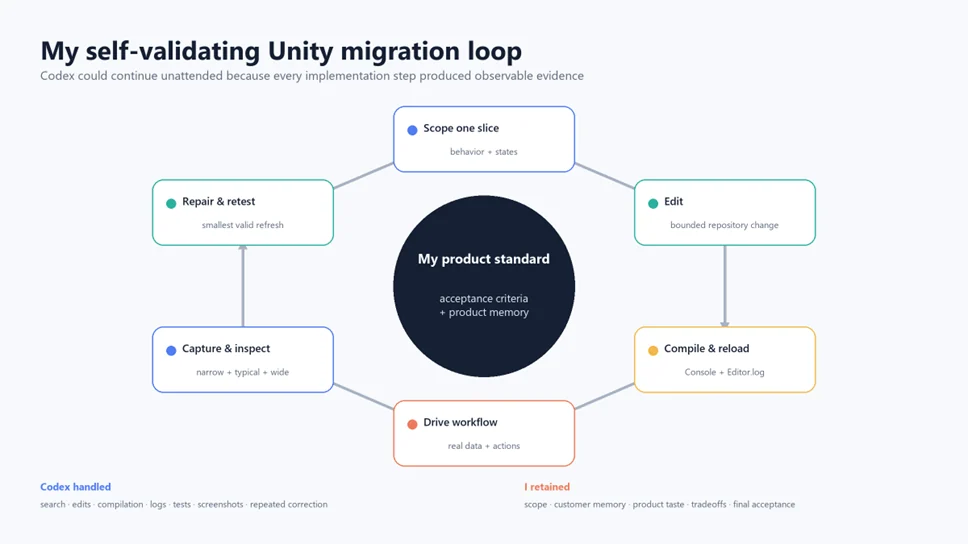
Figure 9. My validation loop kept product acceptance criteria at the center while Codex handled the repeatable engineering cycle.
What I did not delegate
I did not delegate product ownership. I decided which behaviors were non-negotiable, which compromises were acceptable across Unity versions, what counted as premium, and which patterns were mature enough to move into Common.
Codex could see overlap, stale previews, compile failures, repeated code, and missing actions. It could not know the emotional cost of breaking a saved customer layout or whether a technically valid control felt wrong for Asset Inventory. I spent less time typing every implementation, but I remained responsible for the standard the loop had to satisfy.
Visual self-validation is not decorative QA
A screenshot is often treated as final polish. In this migration it was an implementation instrument. Layout is part of behavior in an Editor tool. A clipped path hides information. An overlapped button removes an action. A title that forces the action rail outside a card breaks containment. A narrow inspector that cannot wrap its help text is functionally different from the wide view used during development.
That meant Codex could inspect padding and layout, compare revisions, notice overlap, shorten titles, and try a different arrangement. It could not replace my product taste, but it could turn many objective visual failures into an unattended correction loop.
Contact sheets created a human checkpoint
During attended phases, I asked for contact sheets after each migration slice. A contact sheet made comparison efficient: several windows or states on one canvas, with fresh filenames for each revision. I could sign off, ask for a spacing correction, or point out a missing behavior.
The fresh filename rule came from a real failure. Chat previews sometimes cached an older image even after the file had been regenerated. I adopted cache-busted paths so the image shown to me was the image Codex had actually inspected.
The global Editor log became a second source of truth
Another early failure occurred when Unity’s visible Console appeared clean while reload state and screenshots suggested otherwise. The global Editor log still contained the useful compiler or reload evidence. I turned that observation into a durable instruction for Codex: when Unity behavior looks stale or impossible, inspect the global log before assuming the code is correct.
This is a broader principle for self-validating systems. One observation channel is not enough. Source, compiler state, runtime state, logs, tests, screenshots, and visual inspection catch different classes of error.
How I actually worked with Codex
The trace is useful because it replaces the myth of the perfect prompt with the reality of an evolving working relationship.
The prompts became more architectural over time
My first prompt asked for a non-disruptive, incremental plan to migrate all Asset Inventory windows. The next prompt asked Codex to implement it. I then added contact sheets for manual sign-off and required a safe checkpoint after each accepted slice.
Then my prompts changed. I asked Codex to execute real operations through the new UI, not just open windows. I pointed out padding that looked unprofessional. I paused for a Common extraction. I asked whether customization keys were preserved. I allowed larger slices once the validation loop was trustworthy. I challenged missing images, column behavior, audio autoplay, grid performance, and scroll state.
Near the end, my prompts became audits: What IMGUI tasks remain? What can be reused? Which first-pass decisions should I undo? Does the design follow Unity’s current recommendations? Are bindings and refreshes semantically correct? That change in prompt shape is the story of the migration. Early prompts moved code. Mature prompts tested the architecture.
Model choice and Fast mode
I generally chose the highest-capability Codex model available and ran it in Fast mode. The work was already measured in hours, so reducing latency mattered. I did not use a smaller model simply because the task contained repetitive edits. Repetition was not the hard part. Preserving cross-cutting semantics while changing architecture was.
The export does not retain the product-level Fast mode switch, so that part is my workflow recollection rather than a trace-derived metric. It does retain model and reasoning effort for almost every assistant turn:
- 125 turns: gpt-5.5, xhigh reasoning.
- 112 turns: gpt-5.6-sol, xhigh reasoning.
- 11 turns: gpt-5.6-sol, high reasoning.
- 1 turn: gpt-5.5, medium reasoning.
- 2 turns: model or effort not retained.
Of all 251 turns, 237 used xhigh reasoning and 11 used high reasoning. That 98.8 percent share was deliberate. The migration needed sustained architectural context, repository search, product-behavior reconstruction, and careful validation. Fast mode reduced latency, while high reasoning effort protected quality.
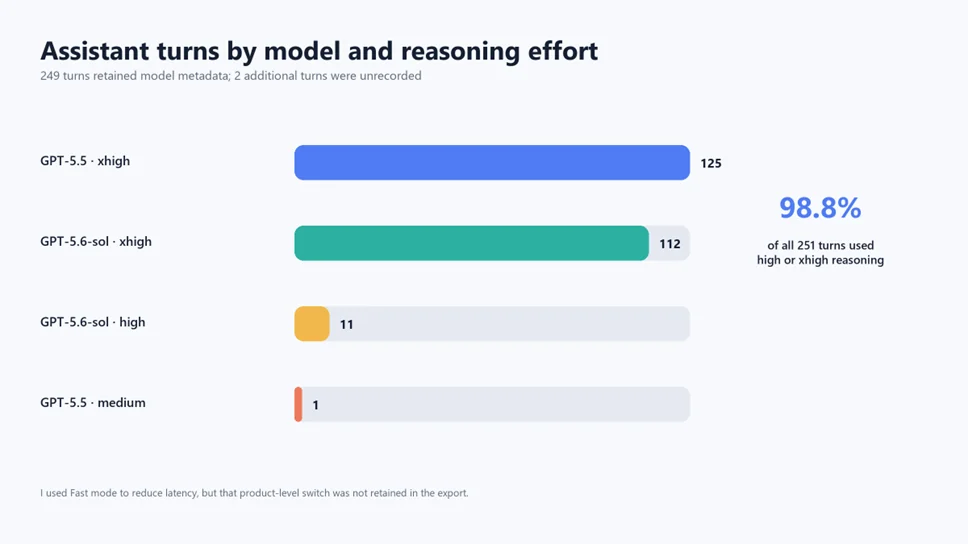
Figure 10. I overwhelmingly used high or xhigh reasoning. Fast mode reduced latency, while the retained trace shows the reasoning effort and model mix.
Long-running turns changed how I delegated
Some tasks stretched across tens of hours of wall-clock time. That required a different style of instruction from interactive pair programming. I had to define terminal conditions, validation evidence, safe stopping points, and what Codex could decide without me.
Telling Codex “I am going to sleep, keep working” was not enough. My useful unattended prompts named the surfaces in scope, the behavior that could not regress, how Unity had to be validated, when to create a safe checkpoint, which failures should trigger repair, and which decisions still required my taste or authority.
Autonomy is not the absence of constraints. It is the presence of executable constraints.
The deliberate refactoring pauses
One of my largest process improvements was to interrupt forward motion periodically. After a run of migrations, I asked Codex to inspect what I had built and look for common patterns, duplicate state handling, misplaced tool-specific helpers, and retained-mode anti-patterns.
These pauses produced reusable form builders, pagination controls, grid-size controls, resizable side panes, scroll-state helpers, selectable grids, serialized list wrappers, empty states, progress overlays, searchable popups, tabbed panes, multi-column helpers, preview bridges, and shared welcome-window infrastructure.
They also caused rework. Some first-pass controls were too specialized. Some screens had rebuilt their roots too aggressively. Some compatibility logic belonged in Common. Some styles used local exceptions where a shared containment rule was better. Re-evaluating those choices was not a sign that the initial migration failed. It was how the codebase learned from its own new evidence.
A practical audit prompt
A reusable audit prompt can be surprisingly simple:
Review every UI Toolkit surface migrated so far. Find repeated mechanics, inconsistent semantics, full-container rebuilds, lost state, compatibility branches, and tool-agnostic components that belong in Common. Compare the implementation with current Unity guidance. Propose the smallest refactors that improve the next migration slices, then validate the changed surfaces in Unity.
The key is timing. Run this after enough screens exist to reveal a pattern, and before the next 20 screens copy it.
Checking Unity’s recommendations across versions
The source told me what the product actually did. Unity’s official documentation told me how the platform was intended to be used. I needed both.
The minimum package baseline remains Unity 2022.3. I cross-checked Editor-window creation, CreateGUI, SerializedObject binding, PropertyField, list virtualization, and custom inspector behavior against the 2022.3 manual. I also compared the retained hierarchy and incremental-update strategy with current UI Toolkit performance guidance.
At the forward edge, I treated Unity 6.7 Alpha as an audit target, not as the stable shipping baseline. That distinction matters. An alpha can reveal upcoming API direction and deprecations. It should not silently redefine what a commercial package promises to support.
Why C# visual trees instead of UXML
Asset Inventory’s migrated UI currently uses C# visual trees plus USS rather than UXML. Unity supports both C# and UXML for structure, while UI Builder naturally favors UXML. For a static screen, UXML can make hierarchy and authoring clearer.
Asset Inventory contains highly dynamic Editor surfaces whose structure depends on feature state, serialized data, search modes, editor capabilities, package metadata, and virtualized collections. C# made the transition from imperative product logic easier to reason about while USS still centralized presentation. This was a deliberate fit, not a claim that UXML is inferior.
The rule I would give another team is: choose UXML when the hierarchy is meaningfully declarative and benefits from visual authoring. Choose C# when the hierarchy itself is highly dynamic or tightly coupled to programmatic composition. Keep styling in USS either way, and do not confuse file format with architecture.
What did not go well
A useful migration story should include its wrong turns. These were the most valuable ones.
First-pass visual fidelity was often incomplete
Controls technically fit but sat too close to card edges. Labels aligned to the wrong column. Checkboxes used native spacing that did not match the surrounding rhythm. Toolbars felt crowded. Long paths clipped. Wide layouts looked good while narrow layouts collapsed.
The fix was not more abstract code. It was opening the real screens at several widths, examining them, and treating spacing as a product requirement.
Some features disappeared because they were embedded in drawing code
Package images, column menus, audio autoplay, download actions, and advanced-state visibility were easy to overlook because the IMGUI implementation interleaved them with row drawing. Converting the obvious controls did not automatically recover every branch.
The corrective shortcut is to inventory behaviors before migrating a surface. Search the old code for every callback, preference key, context menu, drag handler, preview request, conditional block, tooltip, and side effect. Turn those discoveries into an acceptance checklist.
Full rebuilds fought retained mode
Several early implementations rebuilt a card, section, or root after a small action. This was mechanically easy and visually correct in a static screenshot. It also reset scroll, focus, selection, expansion, and loaded state.
The later approach was more precise: update the affected element or list item in place. Rebuild only when the structure genuinely changes. This lesson now lives in project-wide UI guidance so later tools do not repeat it.
A newer control was not automatically a better dependency
The App UI GridView experiment looked promising but did not fit the compatibility and shipping constraints. Time spent evaluating it was not wasted, because it clarified the grid’s real requirements. Still, a requirements matrix earlier in the process would have made the rejection faster.
Version APIs caused avoidable compile corrections
Properties such as a TreeView reorder mode and ambiguous Editor types differed across the supported range. These were ordinary compatibility errors, but they consumed compile cycles.
The shortcut is to check the oldest supported Unity API first, then centralize any necessary version difference in Common. Developing only against the newest Editor makes compatibility debt invisible until late.
A clean Console did not always mean a clean Editor
Stale assemblies and reload failures taught me to inspect the global Editor log. The general lesson is to validate state transitions, not just error lists. Did compilation finish? Did the domain reload? Did the expected assembly load? Did the window instantiate the new code?
What went especially well
The first slice was small enough to teach me
Starting with Welcome made the new stack tangible without betting my product on an unproven architecture. It exposed style loading, Editor theming, visual capture, and sign-off mechanics early.
The migration preserved a runnable product
The hybrid shell let the tool remain usable while I moved tabs individually. This reduced risk, kept each slice reviewable, and let me compare every replacement with the old behavior.
I made Codex execute real workflows
Opening a window is a weak test. I explicitly asked Codex to run the real “Find Candidates” action through the migrated UI. That uncovered an initialization issue that a screenshot could never reveal. My validation improved when it moved from appearance to intent.
Common grew from evidence
Shared infrastructure was extracted after repeated use and refined by later products. The current Common package contains 27 focused UI Toolkit components, covering layout, collection behavior, previews, forms, navigation, status, and reusable product framing.
The process retained honest compatibility
Instead of claiming absolute IMGUI purity, I kept one narrow fallback where Unity 2022.3 genuinely required it. This produced cleaner product code and a more accurate support story.
A migration blueprint you can reuse
If I were starting another commercial Unity Editor migration tomorrow, I would use the following sequence.
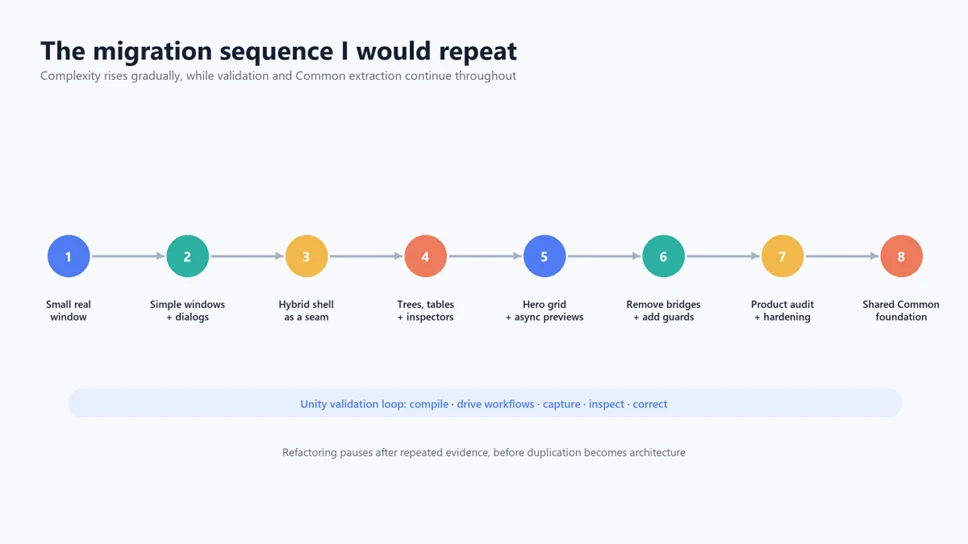
Figure 11. The sequence I would repeat: grow complexity gradually, validate continuously, and pause for Common extraction before duplication hardens.
1. Establish the baseline before changing code
- Count OnGUI, GUILayout, custom drawers, windows, popups, inspectors, and preview paths.
- Map each surface to its data source, preferences, serialized properties, and side effects.
- Capture representative screenshots and record narrow, typical, and wide dimensions.
- List behaviors that are easy to miss: context menus, drag and drop, keyboard input, audio, async previews, and Undo.
- Write down the oldest supported Unity version and validate APIs against it.
2. Build the validation loop before the migration loop
- Connect Codex to Unity through MCP.
- Provide deterministic commands for opening windows and representative states.
- Make compile, domain reload, Console, global log, tests, and screenshots observable.
- Capture images with unique filenames and inspect more than one layout width.
- Define which failures Codex may repair autonomously and which still require my review.
3. Migrate one small, real surface
- Choose a visible window with limited state, not a toy sample.
- Introduce stylesheet loading and the root retained structure.
- Exercise actual actions, not only construction.
- Use the slice to establish naming, spacing, error reporting, and sign-off conventions.
4. Create a temporary seam around the large application
- Move the main shell and navigation first.
- Host legacy regions temporarily where necessary.
- Track every bridge and give it a removal condition.
- Never let the bridge become an unmeasured permanent layer.
5. Move from low-state to high-state surfaces
- Dialogs and forms first.
- Popups, selectors, and reorderable collections next.
- Tabs, trees, tables, and inspectors after the state model is clearer.
- Virtualized hero elements only after shared patterns and validation are mature.
6. Preserve semantics explicitly
- Keep preference and customization keys stable.
- Use SerializedObject binding where Unity semantics matter.
- Assign ownership for selection, focus, scroll, expansion, and asynchronous work.
- Keep stable IDs across virtualization and verify identity in callbacks.
- Exercise domain reload and data refresh paths.
7. Audit and extract Common patterns repeatedly
- Pause after each meaningful cluster.
- Search for repeated mechanics, not merely similar colors.
- Move tool-agnostic behavior into Common and leave product meaning local.
- Revisit earlier helpers when harder screens reveal missing requirements.
8. Remove legacy code and add architectural guards
- Delete obsolete presentation only after replacement behavior is verified.
- Add tests or static guards that reject accidental reintroduction.
- Keep narrowly justified compatibility adapters explicit and centralized.
9. Run a post-migration product audit
- Compare behavior, not just screenshots.
- Test huge data, empty data, slow previews, narrow widths, and interrupted operations.
- Look for full-container rebuilds, stale recycled state, and selection loss.
- Ask existing users or product owners what feels missing even when every control is present.
Dos and don’ts
Do
- Do give Codex Unity control and visual evidence. This was my largest autonomy multiplier.
- Do define fidelity as behavior plus state plus layout. A screenshot alone is not the contract.
- Do migrate in vertical slices. Structure, action, data, validation, and cleanup should travel together.
- Do preserve the oldest supported Unity version continuously. Compatibility is cheapest when checked early.
- Do treat stable identity as a design primitive. It governs lists, previews, selection, and refresh.
- Do pause for architectural audits. Forward speed without consolidation produces a second legacy system.
- Do use real product data. Empty mock windows hide virtualization, wrapping, and performance failures.
- Do keep exact metrics honest. Separate active execution, derived wall time, waiting, and missing events.
Don’t
- Don’t ask for a one-shot rewrite of the largest window. You lose observability and merge safety.
- Don’t treat CreateGUI() as OnGUI() with different controls. Build once, update precisely.
- Don’t store selection in recycled row visuals. The visuals are temporary; product state is not.
- Don’t rebuild a root because one label changed. Preserve focus, scroll, selection, and previews.
- Don’t scatter version checks. Put compatibility behind a semantic Common adapter.
- Don’t simplify the product to fit a convenient widget. Build the control the workflow deserves.
- Don’t confuse zero IMGUI references with completion. The product audit begins where the grep ends.
- Don’t leave AI unattended without executable acceptance criteria. Confidence is not validation.
The shortcuts I wish I had taken earlier
The migration was successful, but hindsight reveals several ways to make the next one faster.
Build a behavior inventory from the old code
Before each surface, I would have Codex extract every event handler, preference key, branch, context action, side effect, drag path, preview request, and state variable into a compact checklist. This would have caught several “missing but not visibly obvious” features before the first UI Toolkit implementation.
Define a state-preservation matrix
For every refresh-triggering action, record which state must survive: scroll, focus, selection, expansion, loaded previews, active tab, and inspector context. The matrix makes full rebuilds look expensive before they ship.
Create narrow, typical, and wide capture presets on day one
I would create a deterministic visual matrix on day one. It reduces late responsive fixes and lets Codex compare the same widths every time.
Add the migration guards before the halfway point
A guard is useful while the bridge still exists, not only after its removal. Maintain an allowlist of temporary compatibility sites and make the test shrink as the migration advances.
Design the Common extraction cadence upfront
Schedule an audit after the first three screens, after the first complex collection, after the main shell, and before legacy removal. The pauses then become part of the plan instead of appearing to interrupt it.
Separate visual validation from screenshot delivery
Codex can inspect many internal captures, while I review one curated, cache-busted contact sheet. This keeps my sign-off efficient without weakening the automated loop.
Test the real hero workflow earlier
The grid did not need to be migrated earlier, but its requirements should have been formalized earlier. Knowing from day one that huge result sets, async previews, multiple density modes, selection, and drag behavior were non-negotiable would have guided Common primitives sooner.
What the migration created beyond Asset Inventory
The most durable result is not the absence of OnGUI. It is the Common foundation that now lets every Wetzold Studios tool speak a consistent Editor UI language.
The shared layer now includes reusable patterns for forms, pagination, grid sizing, progress overlays, empty states, searchable popups, line lists, reorderable collections, serialized lists, multi-column trees, overflow management, scroll persistence, resizable panes, tabbed layouts, preview surfaces, and selectable grids.
It also includes product-level framing. The original Asset Inventory Welcome window started with local helper code. After the migration taught me what a polished welcome experience needed, I added CommonWelcomeWindow to the shared layer. Asset Inventory’s current CreateGUI() supplies product content and actions, then delegates the structure to that shared builder.
CommonWelcomeContent content = new CommonWelcomeContent{    ProductName = "ASSET INVENTORY",    Headline = "Find any asset, right when you need it",    Steps = CreateProductSteps()};
CommonWelcomeWindow.Build(rootVisualElement, content, actions);
About dialogs have followed the same path. Instead of each tool inventing its own dimensions, branding, links, update information, and visual hierarchy, Common provides the behavior and structure while each product supplies its identity.
This is how one expensive migration starts paying rent across a portfolio. My next tool begins with the accumulated answers to spacing, binding, virtualization, previews, compatibility, state, navigation, and validation instead of rediscovering them from scratch.
The larger lesson about AI-assisted engineering
There is a popular picture of AI coding in which a developer writes one brilliant prompt and receives a finished feature. That picture is poorly matched to a mature commercial migration.
For me, the useful unit was not the prompt. It was the validated iteration. A prompt produced a hypothesis. Repository inspection gave it context. Unity compilation tested syntax and API compatibility. Real workflows tested behavior. Screenshots tested layout. My feedback tested product taste. Refactoring audits tested whether a local solution deserved to become architecture.
Codex was valuable to me because it could remain inside that loop for a long time. It searched the repository, edited many related files, waited for Unity, read logs, opened windows, captured states, inspected images, corrected issues, ran tests, and continued. My role moved upward: define the standard, remember the customer, challenge missing semantics, and decide which patterns deserved to become shared.
This did not make the process free. Sixty-five recorded hours of completed agent execution is substantial. So are 321 prompts and 17,560 tool calls. But my relevant comparison was never zero effort. It was manually tracing and rebuilding a large, mature Editor interface while preserving behavior, testing many states, and extracting a foundation for multiple future products.
The most inspirational result for me was not raw speed. It was scope with discipline. Work that would have been exhausting to sustain manually could proceed in small, evidence-backed steps, sometimes through the night, because Codex could see enough of its own consequences to keep correcting course.
Where I go next
Asset Inventory now has a retained UI foundation, but the Common package is the beginning of my next chapter. Welcome and About experiences can be consistent across tools. Inspectors can share containment, wrapping, status, collection, and preview guarantees. Search fields, pagination, grids, panes, and empty states can behave the same way from one product to the next.
Future migrations can start with explicit visual capture presets, architecture guards, shared controls, compatibility bridges, and a proven Unity MCP validation loop. They can spend less time rediscovering fundamentals and more time preserving what makes each tool special.
There will still be revisions. New Unity versions will add APIs. A shared component will meet a harder use case. A visually acceptable layout will reveal an accessibility or performance weakness. The goal is not to stop changing. It is to make change observable, bounded, and reusable.
If you want AI to carry a migration farther, do not only give it more code. Give it more ways to know whether the product still works.
Further reading from Unity
The architecture and recommendations in this article were cross-checked against Unity’s official documentation:
- UI Toolkit overview, including C# or UXML structure, USS styling, Editor UI, testing, and migration guidance.
- Create a custom Editor window in Unity 2022.3, including CreateGUI() and list virtualization.
- SerializedObject data binding in Unity 2022.3, including bindingPath, BindProperty, and serialized-property tracking.
- UI Toolkit performance guidance, including the cost of style, layout, geometry, and rendering changes.
- Unity 6.7 Alpha release page, used as a forward-looking audit reference rather than the stable compatibility baseline.
An earlier version of this article was published on Medium.
Find any Unity asset you own. Import only what you need.
Keep reading
 Article
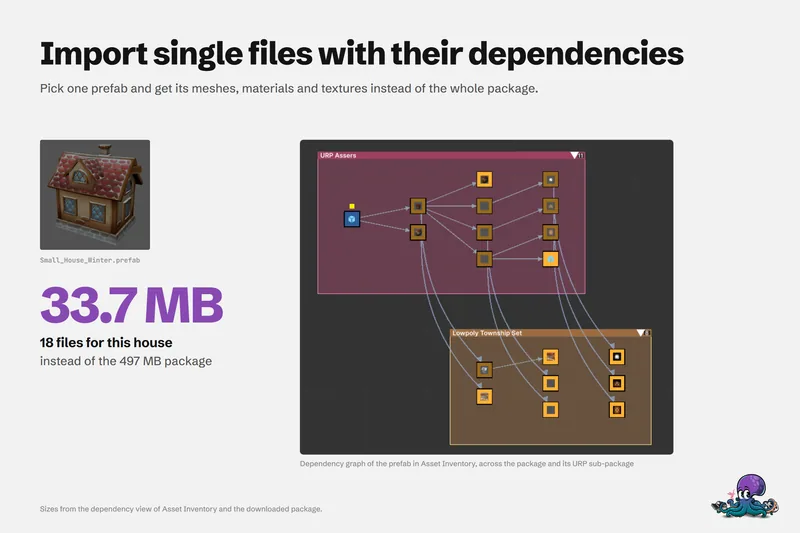
Smaller Unity projects: import assets, not packages
Most project bloat starts with importing a whole package for one asset. Where size and slowness come from, the manual ways to stay lean, and dependency-aware imports that bring 33.7 MB instead of 497 MB.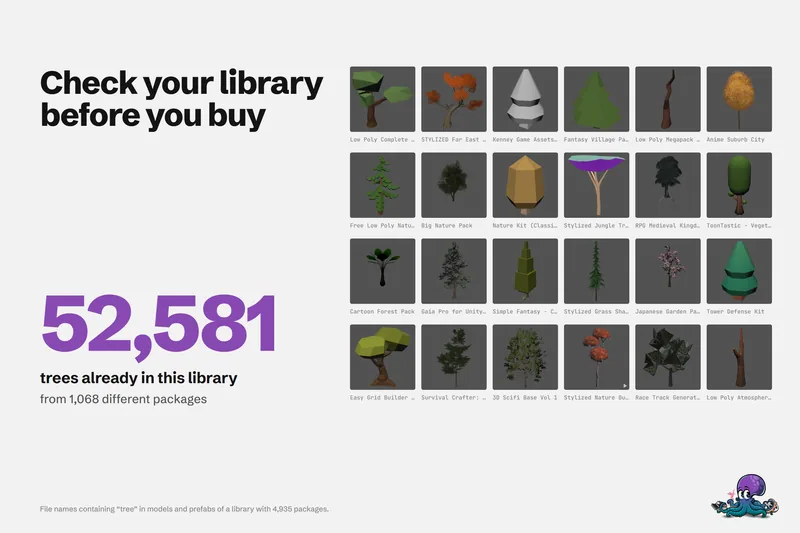 Article
Unity Asset Store sale checklist: buy what you need, not what you own
A checklist for before, during and after an Asset Store sale, so new purchases fill real gaps in your projects instead of duplicating packages you already own. Article