The Case for an Offline-First Unity Asset Library
Cloud and offline-first asset management solve different jobs. Where Unity Asset Manager shines, where a local Unity asset library wins, and how to run both.

Cloud collaboration is powerful. Local-first control can be broader, faster, and far more professional than it sounds.
Asset management is not really cloud versus local. It is a question of where your library lives, which sources belong to it, and what happens between finding an asset and putting it to work.
I should disclose my angle upfront: I created Asset Inventory, an offline-first asset library for Unity. I have a clear point of view. I also think Unity Asset Manager solves a real problem, especially for organizations that deliberately adopt a shared cloud workflow. The interesting question is not which approach wins. It is which job each approach does best.
The cloud case is real
Unity Asset Manager is strongest when collaboration is at the center of the problem. A team gets shared projects, roles and permissions, asset versions and statuses, review comments and annotations, transformations, and APIs for building custom pipelines. That is valuable when artists, developers, reviewers, and external partners need one governed place to work.
It is not limited to a browser. The Asset Manager for Unity package can upload, search, browse, preview, import, re-import, and remove cloud assets from the Editor. Its Asset Store integration can itemize supported purchases and import individual assets with their dependencies. For a distributed team that commits to this workflow, the centrality is a genuine advantage.
Storage changes the equation
As of August 2026, Unity’s published Cloud limits are 10 GB per organization on Personal, 50 GB per Pro seat, and 120 GB per Enterprise seat. Additional storage is listed at $0.75 per GB per month. Paid Unity plans provide much more than storage, so comparing their full price with a local tool license would not be fair.
There is another important exception: Unity says Asset Store assets stored through its integration are free. The storage argument mainly concerns custom uploads, generated transformation output, and libraries from other sources. Those files must first be transferred into the service, and uncached content still depends on connectivity. That can be a reasonable price for central collaboration. For a solo developer or small studio with hundreds of gigabytes of existing media, it can also be unnecessary overhead.
Offline-first means one index, not one folder
An offline-first library starts from a different premise: much of your content may already exist locally. It could be in the Asset Store cache, Unity Asset Manager, registries, Humble Bundle or Synty downloads, custom and development packages, old Unity projects, texture and audio libraries, or ZIP, RAR, and 7z archives.
Asset Inventory can bring those sources into one searchable catalog. Once indexed, browsing and search remain local and responsive. The practical storage ceiling becomes the capacity you choose to own, expand, and back up.
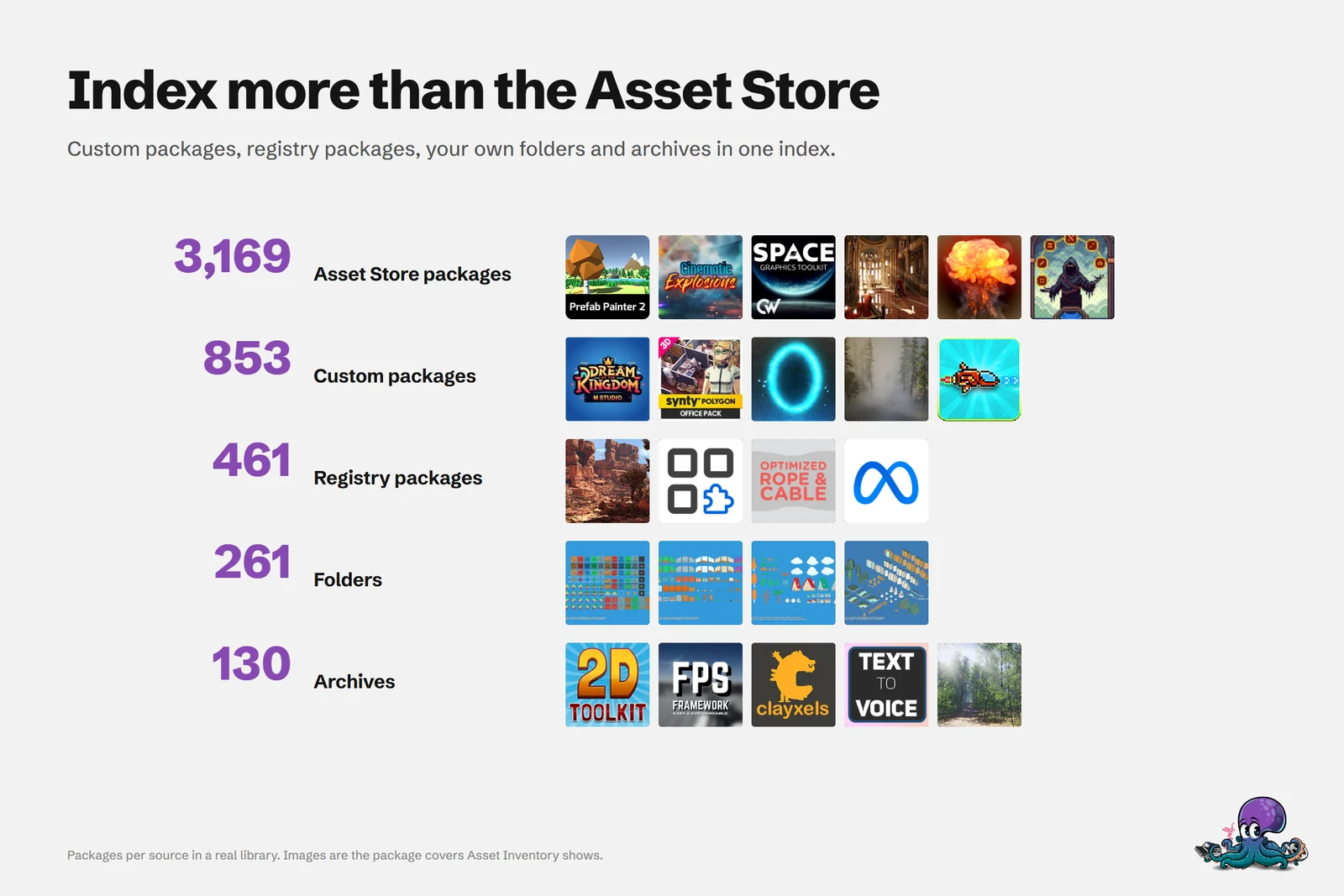 One index across Asset Store purchases, custom and registry packages, folders, archives, online catalogs and Unity Asset Manager.
The difference between beside Unity and inside Unity
Being inside Unity changes the last mile. A catalog beside the Editor can help you find a file. An Editor-native tool can turn that result into a project asset or scene object without leaving the project context.
Asset Inventory can resolve Unity GUID dependencies, import into the selected project folder, preserve or reorganize package structure, and drag assets directly into the Project, Hierarchy, or Scene. It can use Unity to generate previews, show where imported assets are used, and run supported post-import actions such as URP conversion. This reduces the handoffs between search, download, dependency selection, import, placement, and cleanup.
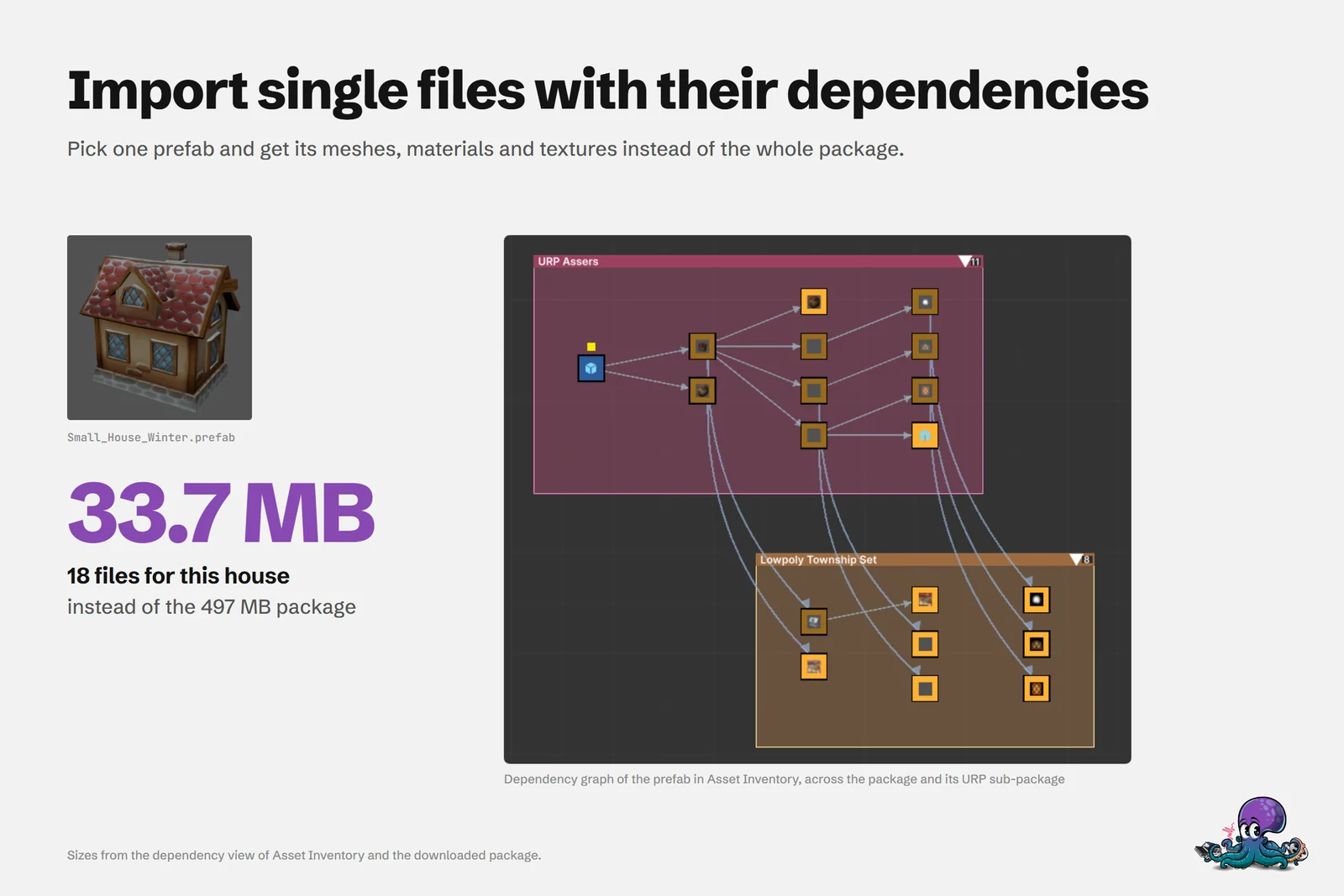 Dependency analysis turns a useful file into a focused import instead of bringing in the entire package.
This is not a claim that cloud means browser-only. Unity Asset Manager has an Editor package and also supports dependency-aware imports. The distinction is how much of the catalog remains available locally, how many sources it spans, and how deeply the workflow can act on the current project through Unity’s supported APIs.
Local can still be professional
Local does not have to mean single-user. Asset Inventory starts with a portable SQLite database that needs no server setup. For light sharing, the database and asset folders can live on mounted network storage, with relative path mappings for different devices. SQLite’s network capabilities are limited, so MySQL or MariaDB is the professional option when several people need reliable concurrent access.
That lets a studio choose its own workstation, NAS, database server, backup policy, and capacity. The application is a one-time Extension Asset purchase under normal Asset Store per-seat licensing, rather than a recurring storage subscription.
There are still costs. Initial indexing takes time. The catalog needs updates. Drives, backups, and database availability become your responsibility. Offline-first does not make infrastructure free. It makes the tradeoff local, predictable, and under your control.
Cloud-first and offline-first at a glance
| Cloud-first (Unity Asset Manager) | Offline-first (Asset Inventory) | |
|---|---|---|
| Where the library lives | Unity Cloud storage for your organization | Your own drives, NAS or database server |
| What it covers | Uploaded assets, plus supported Asset Store purchases through the integration | Asset Store purchases, custom and Synty packages, registries, folders, ZIP, RAR and 7z archives, free online catalogs, and Unity Asset Manager content |
| Storage cost | Included quota by plan, then billed per GB (Asset Store assets through the integration are free) | The disks you already own; no mandatory storage subscription |
| Without a connection | Cached content only | Everything already indexed: search, browse, previews and imports from local files |
| Collaboration | Roles, permissions, versions, statuses, comments and review | Shared SQLite for light use, MySQL or MariaDB for concurrent teams |
| Inside the Editor | Browse, import, re-import and remove cloud assets | Search everything, Unity-rendered previews, dependency-aware import, drag into Project, Hierarchy or Scene |
The table is a summary of the two approaches, not a scorecard. For a detailed, regularly checked comparison, see Asset Inventory vs Unity Asset Manager.
What offline covers, and what still needs a connection
Offline-first describes where the catalog lives, not a promise that nothing ever touches the network. Everything you have indexed stays searchable without a connection: file names, metadata, tags, previews, captions, and the files themselves when they sit on your drives. Some work naturally needs the internet:
- Downloading Asset Store purchases that are not in your local cache yet.
- Refreshing purchase lists, package updates and online catalogs.
- Pulling content from Unity Asset Manager or a free online catalog the first time.
If you use the optional AI captions, they run against a local Ollama or LM Studio model, so describing images and sounds does not send your library to a cloud service either.
Choose the workflow that matches the problem
- Choose cloud-first when governed collaboration, review, versioning, and distributed access are the primary needs.
- Choose offline-first when source breadth, fast local discovery, storage control, and direct Unity workflows matter most.
- Choose hybrid when you need both. Asset Inventory can index Unity Asset Manager content alongside everything that never belonged in the cloud.
That hybrid option is often the most interesting. You do not have to reject a shared cloud library to gain an offline one. You can keep the team assets that benefit from governance in Unity Asset Manager and still make your full working collection searchable inside Unity.
If that sounds closer to the way your asset library actually exists, explore Asset Inventory, browse the use cases, or see how a team can share one library.
Frequently asked questions
Does Asset Inventory work without an internet connection?
Yes, for everything it has already indexed. Searching, browsing, previews and imports from local files work offline. Downloading purchases, refreshing online catalogs and checking for updates need a connection.
Can I use Asset Inventory and Unity Asset Manager together?
Yes. Asset Inventory can index Unity Asset Manager content next to your Asset Store purchases, custom packages, folders and archives, so one search covers both the governed cloud library and everything that never belonged in the cloud.
How does a team share an offline-first library?
Start with the portable SQLite database on shared storage for light use, with relative path mappings per device. When several people need reliable concurrent access, switch the catalog to MySQL or MariaDB.
An earlier version of this article was published on Medium.
Find any Unity asset you own. Import only what you need.
Keep reading
Asset Inventory vs Unity Asset Manager
A cloud DAM built for governed team collaboration versus a local index of everything you own, inside the Editor. They overlap on Asset Store purchases and work well together. Use case
Use one Unity asset library across your team and all your computers
Index once and use the catalog everywhere: SQLite on a network drive for light use, MySQL or MariaDB when several people work at once, shared tags through override files, and a static website for people without Unity. Use case