Asset Inventory vs Adobe Bridge for Unity game assets
Adobe Bridge is a free, mature browser for creative files. For Unity work, Asset Inventory adds package contents, Unity-rendered previews and imports with dependencies.
Adobe Bridge has been the default file browser for designers for two decades, and many game artists already have it installed. Version 17.0 arrived in November 2026, it is a free download, and it runs on Windows and macOS. The question for a game team is what it can do once the files are Unity assets.
What Adobe Bridge does well
- Free and maintained. Adobe offers Bridge as a free download that needs an Adobe ID, and releases new versions every year.
- Folders stay where they are. Nothing is imported or copied. Bridge browses your drives directly and keeps a local cache for thumbnails and search, and collections can span folders and drives.
- Metadata that travels with the files. Hierarchical keywords, star ratings and color labels are written as XMP into the files or sidecar files, so other Adobe apps see them too. Smart collections save a search across several criteria.
- Adobe and Substance formats. Photoshop, Illustrator, InDesign and After Effects files preview natively, Substance materials and Stager scenes preview on a capable GPU, and video and audio play back.
- Batch work. Batch rename, batch export, PDF contact sheets and scripting through the Bridge SDK.
For artists who live in Adobe apps, Bridge is a solid organizer that costs nothing.
Where it stops for Unity projects
- Unity packages stay closed. Bridge can compress and extract ZIP files, but it does not look inside
.unitypackagefiles or RAR and 7z archives. Most Asset Store content arrives as packages. - No previews for game models. Adobe Community experts report no previews for OBJ, FBX or USD, the formats game models come in. Prefabs, Unity materials, particle systems and VFX need Unity to render them.
- No Unity awareness. Bridge does not know your Asset Store purchases, package versions, GUIDs or dependencies, so getting an asset into a project together with its materials and textures stays manual.
- Search depends on what you type in. Bridge has no auto-tagging or semantic search, so files are found by name and by the keywords you add yourself.
At a glance
| Adobe Bridge | Asset Inventory | |
|---|---|---|
| Built for | Designers and photographers in Adobe workflows | Unity developers, inside the Unity Editor |
| Library model | Browses folders in place with a local cache | Indexes packages, archives and folders in place in a local database |
| Unity packages | Not opened | Every file inside indexed and searchable |
| Archives | Compresses and extracts ZIP | ZIP, RAR and 7z contents indexed |
| Asset Store purchases | Not connected | Purchase list synced; packages indexed from your cache |
| Previews | Adobe formats, Substance materials, video, audio | Unity-rendered models, prefabs, materials, particles, VFX, UI, fonts, animated clips |
| Organizing | XMP keywords, ratings and labels written into files | Tags, saved searches, filters for size, audio length, vertex count and color |
| AI | No auto-tagging or semantic search | Optional image and audio descriptions, search by meaning, similar sounds |
| Into the project | Drag files out | Import single assets with dependencies, drag into Project, Hierarchy or Scene |
| Platforms | Windows and macOS | Unity Editor on Windows and macOS; Linux reported to work |
| Price | Free download with an Adobe ID | One-time Asset Store purchase per seat |
Using both
- Keep source art such as PSD, Illustrator and Substance files organized in Bridge, with keywords and ratings in XMP.
- Let Asset Inventory index the Unity side: Asset Store purchases, packages, archives, and the textures, models and sounds you export for the game.
- Add those export folders to Asset Inventory as Additional Folders, so one search inside Unity covers bought and made assets. Nothing is moved or copied.
When the job is “find the right asset and get it into the scene”, Asset Inventory covers the steps Bridge leaves to you: looking inside the package, seeing what Unity renders and importing only what the asset depends on.
Read on: previewing Unity packages without importing them, importing single assets with their dependencies, or the comparison with Eagle, another general-purpose library.
Frequently asked questions
Is Adobe Bridge free?
Adobe offers Bridge as a free download that needs an Adobe ID to install. Editing raw photos through Camera Raw needs a Photoshop subscription. Asset Inventory is a one-time Asset Store purchase per seat.
Can Adobe Bridge open .unitypackage files?
No. Bridge browses folders and can compress and extract ZIP files, but it does not look inside .unitypackage files or RAR and 7z archives. Asset Inventory indexes every file inside Unity packages and those archives.
Does Adobe Bridge preview FBX or OBJ models?
Adobe Community experts report that Bridge shows no previews for OBJ, FBX or USD files, while Substance materials and Stager scenes do preview. Asset Inventory renders models, prefabs and materials through Unity.
Can I use Adobe Bridge and Asset Inventory together?
Yes. Keep keywords and ratings on your source art in Bridge, and let Asset Inventory index the Unity side, including your export folders as Additional Folders next to your Asset Store packages.
Find any Unity asset you own. Import only what you need.
Keep reading
Asset Inventory vs Eagle for game assets and sound libraries
Eagle organizes images, video, fonts, sounds and references beautifully. Unity packages are opaque to it, and every import is a copy. Where each tool fits for art and sound libraries, and how game teams use both.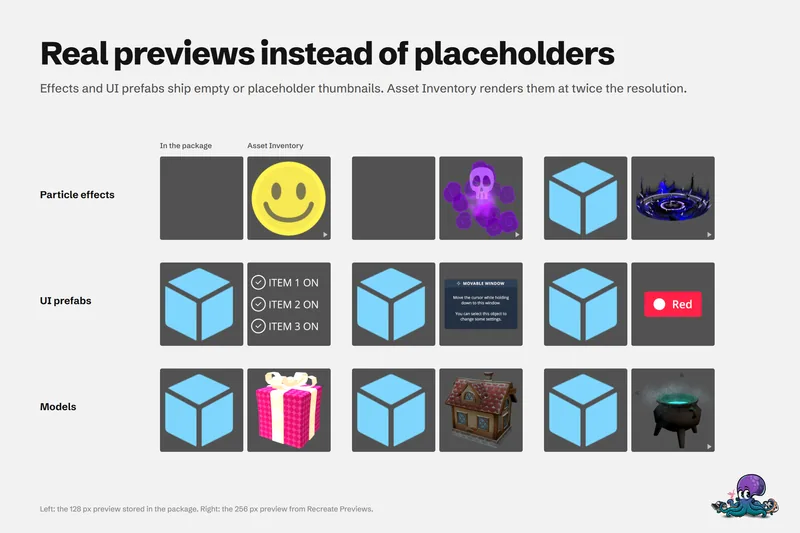 Use case
Preview Unity package contents without importing
Unity's embedded previews are small, often badly lit and missing for effects, UI and fonts. Asset Inventory indexes package contents and renders its own previews, animated where it helps, before anything is imported.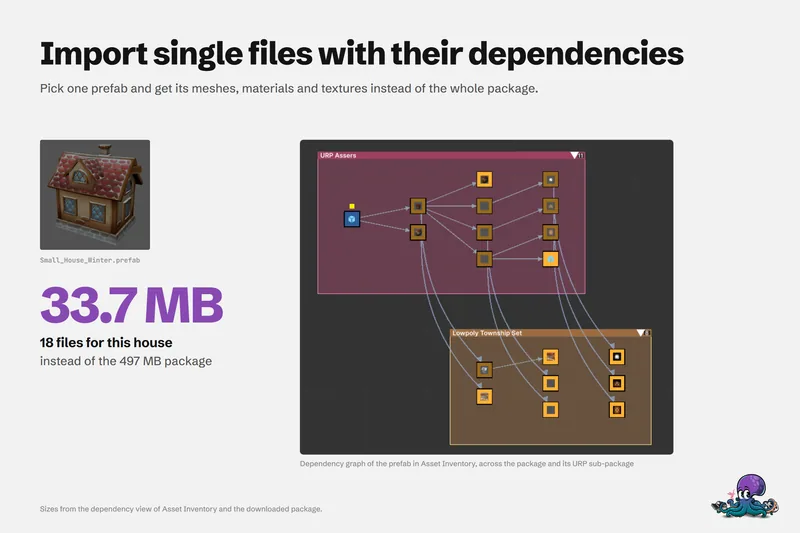 Use case