Asset Inventory vs AssetHoard
AssetHoard is a standalone, multi-engine asset library. Asset Inventory works inside Unity. How they compare on Unity packages, previews, imports, AI and price.
Both tools share a philosophy we agree with: your library belongs on your own machine, it should work offline, and you should not rent access to assets you already bought. The difference is where each tool sits. AssetHoard sits next to your engines. Asset Inventory sits inside Unity. Everything below follows from that.
AssetHoard is young and moves quickly, with a new build every week or two. The facts here come from its own website and documentation as checked on the date above, at version 0.3.1.
At a glance
| AssetHoard | Asset Inventory | |
|---|---|---|
| Runs as | Standalone app for Windows, macOS (Apple Silicon) and Linux | Unity Editor extension, Unity 2022.3 or newer |
| Engines | Unity, Godot, Unreal, GameMaker | Unity |
| Unity packages | Reads .unitypackage files and the Asset Store cache without Unity | Indexes every file in every package, plus registries, folders and archives |
| Asset Store account | Not connected; packages identified from cache folder names | Purchase list, store details, updates, orders and invoices |
| Prefabs and effects | Stored thumbnail at most; prefabs not rendered; no particle or VFX previews documented | Rendered in Unity, including particles, VFX Graph, UI and animated previews |
| Materials | Text-serialized .mat on a generic PBR sphere | Rendered with the project’s actual shaders and render pipeline |
| Into a Unity project | Drag files out; docs advise importing the package to use an asset | Single files with GUID dependencies, optional script analysis, drag into Project, Hierarchy or Scene |
| AI search | Built-in local semantic search (about 450 MB of models) | Optional image and audio descriptions, search by meaning, similar sounds; local or hosted models |
| Coding assistants | MCP server in the app, works with Unity closed | 41 tools through Unity’s MCP server and CLI, inside the running Editor |
| Teams | Personal licenses; no shared library | Shared database on network storage, or MySQL/MariaDB |
| Maturity | Open beta, version 0.3.1 | In development since 2022, version 4, 209 Asset Store reviews, Unity Awards nominee |
| Price | Free to use during the beta; license US$29 now, US$49 at 1.0, for two devices | One-time Asset Store purchase per seat |
Where AssetHoard is stronger
Being fair matters in a comparison, so here is what AssetHoard does better:
- No Unity required. It browses and previews packages from any Unity version with the Editor closed, and it never writes to a project. If you want to look through your library on a laptop without Unity installed, that is convenient.
- Several engines in one library. Godot resources with a free editor plugin that imports with dependencies, Unreal .uasset and .umap files from UE 4.10 to 5.5, and GameMaker packages all live next to your Unity content.
- Formats outside Unity. Krita, Aseprite with frame playback, Spine atlases, Substance materials, MIDI, PDF and Office documents preview without engine importers.
- Semantic search out of the box. Two local embedding models give text-to-image search on your own GPU, with no API key. Asset Inventory’s search by meaning is optional and still marked experimental in the tool.
- Creative utilities. Sprite sheet slicing, 3D turntable exports, audio format export, and a set of free browser tools on its website.
- Price. A low one-time price for two devices across three operating systems, and free during the beta.
If you split your time between Unity and Godot or Unreal, or you mostly need a visual browser for art files, AssetHoard is a sensible choice.
Where Asset Inventory is stronger for Unity work
- It shows what Unity will actually render. Most Asset Store content that matters visually is prefabs, materials, particle systems, VFX and UI. AssetHoard’s documentation says prefabs are not parsed or rendered and binary materials are not shown. Asset Inventory renders all of them in Unity, with your render pipeline, including animated previews of clips and effects. See previews without importing.
- Imports keep their dependencies. A prefab is only useful with its meshes, materials and textures, connected by GUIDs in
.metafiles. AssetHoard documents no.metaor GUID handling for Unity and its own Unity docs recommend importing the package normally. Asset Inventory analyzes the dependencies and imports exactly that set: in one real case 18 files and 33.7 MB instead of a 497 MB package. See importing single assets. - Your Asset Store account is in the catalog. Asset Inventory knows what you bought, including packages you have not downloaded yet, fetches store details, flags updates and deprecations, keeps backups of older versions, and lists your orders and invoices. AssetHoard sees only packages that are already on disk.
- Search lives where you work. No switching apps: the Asset Inventory window, the Unity Search (Ctrl+K) provider and drag and drop into the Scene or Hierarchy.
- More ways to find things. Filters for dimensions, audio length, vertex count, color and image type, SQL expressions, saved searches, AI descriptions for images and sounds, Find Similar Sounds, and free online catalogs such as Poly Haven and ambientCG in the same results.
- Built for teams too. Share one database on network storage or move to MySQL/MariaDB. Report licenses for a project and export third-party notices.
- Proven at scale. Asset Inventory has been developed since 2022, was nominated for Best Development Tool at the 16th Unity Awards in 2024, holds a 4.8 rating from 209 Asset Store reviews, and the library behind our screenshots has 4,935 packages and 3.2 million files.
The bottom line
Both tools keep your library local and avoid subscriptions. For developers who work across engines, AssetHoard’s breadth is a real advantage. For Unity developers, the deciding question is what happens after you find an asset: Asset Inventory shows it as Unity renders it and brings it into the project with everything it depends on, which a tool outside the Editor cannot do.
Still deciding? Compare with Unity Asset Manager and the Unity Package Manager, or see all comparisons.
Frequently asked questions
Can AssetHoard render Unity prefabs?
No. According to its own documentation, prefabs are listed with the thumbnail stored in the package when one exists, but they are not parsed or rendered, and binary materials are not shown. Asset Inventory renders prefabs, materials, particles, VFX and UI inside Unity.
Does AssetHoard import Unity assets with their dependencies?
Its documentation describes dragging files out, with textures following for FBX, OBJ, glTF and DAE models, and its Unity docs advise importing the package normally to use an asset. No page describes handling .meta files or GUID references. Asset Inventory imports a selected file with its detected dependencies.
Which one is better if I also use Godot or Unreal?
AssetHoard. It reads Godot, Unreal and GameMaker formats in one library and has a Godot editor plugin. Asset Inventory is built for Unity only.
Do both work offline without a subscription?
Yes. Both keep the library in a local SQLite database and are one-time purchases. AssetHoard is free to use during its beta, with a license at US$29 now and US$49 at 1.0 for two devices; Asset Inventory is a one-time Asset Store purchase per seat.
Find any Unity asset you own. Import only what you need.
Keep reading
Asset Inventory vs Unity Asset Manager
A cloud DAM built for governed team collaboration versus a local index of everything you own, inside the Editor. They overlap on Asset Store purchases and work well together.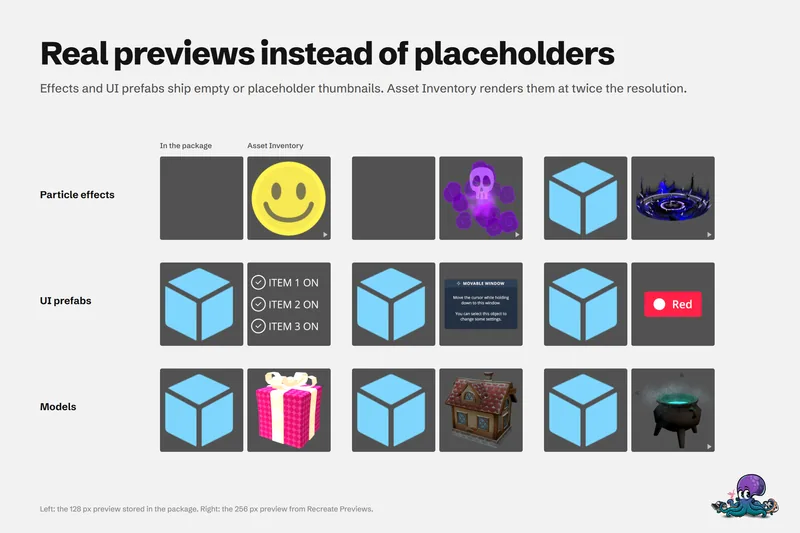 Use case
Preview Unity package contents without importing
Unity's embedded previews are small, often badly lit and missing for effects, UI and fonts. Asset Inventory indexes package contents and renders its own previews, animated where it helps, before anything is imported.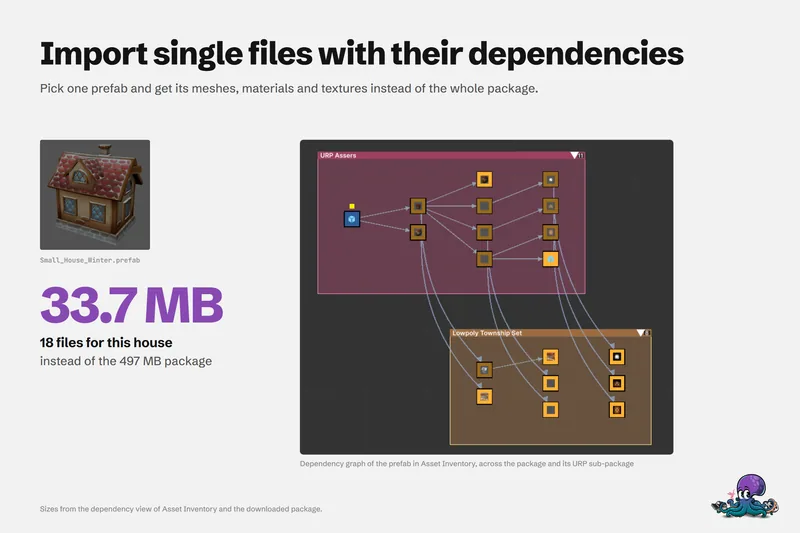 Use case