Asset Inventory vs Connecter for 3D game assets
Connecter is a free Windows asset manager with strong 3D previews and DCC integrations, but no Unity integration. Asset Inventory covers Unity packages, previews and imports.
Connecter, made by Design Connected, comes up whenever 3D artists and visualization studios look for a free asset browser. Version 8 arrived in June 2026 with USD thumbnails and Gaussian splat previews, and an update followed in October. It indexes files where they are and keeps their metadata in a workspace database. For a Unity team, the deciding question is what happens between finding a model and using it in a scene.
What Connecter does well
- 3D previews without the original app. An interactive viewer for FBX, OBJ, glTF and GLB, USD, Alembic, DAE, 3DS, C4D, PLY and STL, with animation playback for FBX, glTF, USD and Alembic. Blender, 3ds Max and SketchUp files get static previews.
- Material previews. Substance SBSAR files with editable parameters, MDL and MaterialX node graphs.
- Files stay where they are. Connecter indexes local drives and NAS shares in place; only metadata lives in its workspace.
- A generous free tier. The desktop app is free for individual use, with tags, batch rename, a duplicate finder, Boolean search and saved Dynamic Subsets.
- 3D app integrations. 3ds Max, Maya, Cinema 4D, Blender, Rhino, Revit and Unreal. For Unreal, it packages an asset with its dependencies and loads it into an open project, skipping duplicates.
- Team features in Suite. Shared metadata, version control, mixed local and cloud storage, web catalogs for partners, single sign-on and an API, at 16 euros per person per month.
For visualization and 3D studios that move models between 3ds Max, Blender and Unreal, Connecter is a strong choice.
Where it stops for Unity projects
- No Unity integration. We found no Unity plugin, so models reach Unity as plain files, without prefabs, Unity materials or their dependencies.
- Unity packages stay closed. Connecter can browse ZIP contents, but
.unitypackage, RAR and 7z are not on its list. Asset Store content arrives as packages. - Previews are not Unity renders. Prefabs, Unity materials, particle systems, VFX Graph assets and UI only look right when Unity renders them, with your render pipeline.
- Windows only. There is no macOS or Linux version, and in 2023 the developer said a macOS version would not happen in the near future.
- Key features are paid. Collections, ratings, custom fields, indexed team search and AI tagging need Suite. AI Studio sends previews to a cloud service and is billed in prepaid credits.
At a glance
| Connecter | Asset Inventory | |
|---|---|---|
| Built for | 3D artists and visualization studios | Unity developers, inside the Unity Editor |
| Library model | Indexes files in place; metadata in a workspace database | Indexes packages, archives and folders in place in a local database |
| Unity packages | Not opened | Every file inside indexed and searchable |
| Archives | ZIP contents in the preview panel | ZIP, RAR and 7z contents indexed |
| Asset Store purchases | Not connected | Purchase list synced; packages indexed from your cache |
| 3D previews | Interactive FBX, OBJ, glTF, USD and Alembic with animation | Unity-rendered models, prefabs, materials, particles, VFX and animated clips |
| Engine integration | Unreal with dependencies; 3ds Max, Maya, Cinema 4D, Blender, Rhino, Revit | Unity: import single assets with dependencies, drag into Project, Hierarchy or Scene |
| AI | Cloud AI Studio in Suite, prepaid credits | Optional image and audio descriptions with local or hosted models, search by meaning, similar sounds |
| Teams | Suite workspace in the cloud or on your own PostgreSQL server | Shared database on network storage, or MySQL/MariaDB |
| Platforms | Windows | Unity Editor on Windows and macOS; Linux reported to work |
| Price | Free for individuals; Suite 16 euros per person per month | One-time Asset Store purchase per seat |
Using both
- Keep 3D source files and studio libraries for 3ds Max, Blender or Unreal in Connecter.
- Let Asset Inventory index everything that ends up in Unity: Asset Store purchases, packages, archives, and the models, textures and sounds you export.
- Add shared export folders to Asset Inventory as Additional Folders. Nothing is moved or copied.
If your pipeline ends in Unreal or a visualization renderer, Connecter fits well. If it ends in Unity, Asset Inventory does the part Connecter cannot: opening Unity packages, showing what Unity renders and importing exactly what an asset needs.
Read on: previewing Unity packages without importing them, importing single assets with their dependencies, or the comparison with Adobe Bridge.
Frequently asked questions
Is Connecter free?
The Connecter desktop app is free for individual use with a local Personal Workspace. Collections, ratings, custom fields, team workspaces and AI tagging need Connecter Suite at 16 euros per person per month.
Does Connecter work with Unity?
Connecter integrates with 3ds Max, Maya, Cinema 4D, Blender, Rhino, Revit and Unreal, where it packages assets with their dependencies. We found no Unity integration. Asset Inventory works inside the Unity Editor.
Can Connecter open .unitypackage files?
Connecter can browse ZIP contents in its preview panel, but RAR, 7z and .unitypackage files are not on its list. Asset Inventory indexes every file inside Unity packages and those archives.
Does Connecter run on macOS?
No. Connecter is Windows only, and its developer said in 2023 that a macOS version would not happen in the near future. Asset Inventory runs wherever the Unity Editor runs on Windows and macOS.
Find any Unity asset you own. Import only what you need.
Keep reading
Asset Inventory vs Adobe Bridge for Unity game assets
Bridge browses folders in place, writes keywords into your files and previews Adobe and Substance formats. It cannot look inside Unity packages or show what Unity renders. Where each fits in a game pipeline.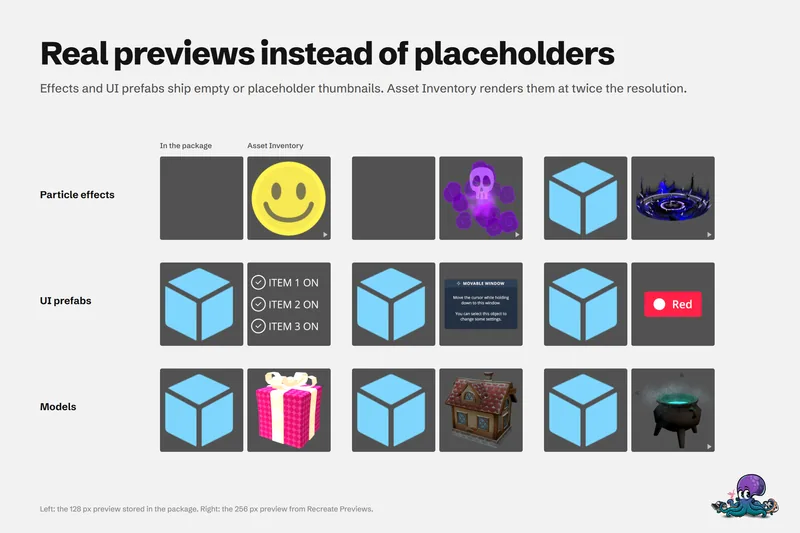 Use case
Preview Unity package contents without importing
Unity's embedded previews are small, often badly lit and missing for effects, UI and fonts. Asset Inventory indexes package contents and renders its own previews, animated where it helps, before anything is imported.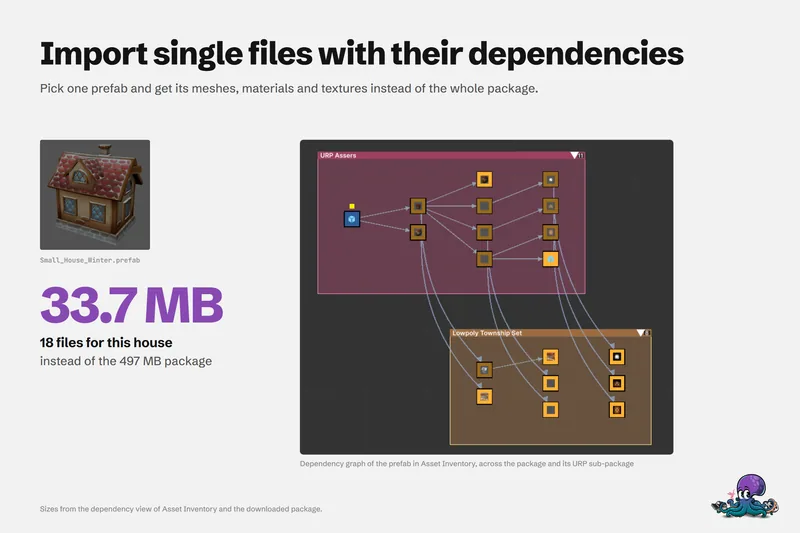 Use case