Asset Inventory vs Eagle for game assets and sound libraries
Eagle is a fast, general asset library, also popular for sound effects. For Unity work, Asset Inventory adds package contents, Unity previews, sound search and imports.
Eagle comes up whenever game developers ask for an asset manager, and for good reason. It is fast, it looks good, it costs a one-time US$34.95 for two devices on Windows and macOS, and it organizes almost any file type. Many developers keep their sound effects in it too. The question is what happens when the asset you need is inside a Unity package and has to end up in a scene.
What Eagle does well
- Any file, organized quickly. Eagle imports any file format, with previews for images, GIFs, video, fonts and audio, and a rebuilt 3D viewer in Eagle 4 for formats such as GLB, STL, PLY and 3MF. FBX and OBJ previews come from a community plugin.
- Quick audio auditioning. Waveform thumbnails, hover playback that loops while the cursor stays on a file, Space to preview, playback speed from 0.5x to 2x, and automatic BPM detection with a BPM range filter since Eagle 4.
- Collecting references from the web. Browser extensions for Chrome, Edge, Firefox, Safari, Opera and Brave save images and pages straight into the library.
- Visual organization. Tags, smart folders by name, tag, color or format, and color search.
- AI that runs locally. Since March 2026, the free AI Search plugin offers reverse image search and natural-language search on your own machine, and AI Action plugins rename, describe, tag and sort images by your rules. MCP and Skills plugins exist for coding assistants.
- A plugin ecosystem. JavaScript plugins, a Plugin Center and a web API.
For mood boards, UI references, concept art, fonts and marketing material, Eagle is hard to beat.
Where it stops for Unity projects
- Unity packages are opaque. Eagle itself cannot preview archives or
.unitypackagefiles, and we found no plugin for Unity packages; they import as files you cannot look inside. Most Asset Store content arrives exactly in that form. - No Unity awareness. Eagle does not know your Asset Store purchases, registry packages, GUIDs or dependencies. A prefab without its materials and textures is not useful in a project.
- Previews are not Unity renders. Prefabs, materials, particle systems, VFX Graph assets and UI prefabs only look right when Unity renders them.
- Teams share by file location. Eagle has no built-in sharing; libraries can sit on a LAN or NAS. Eagle 5, in development without a release date, plans accounts and permissions.
Eagle or Asset Inventory for a sound library
Eagle is good at auditioning loose sound files, which is why several game developers keep their sound effects in it. The differences show up with Asset Store audio, with large collections and on the way into Unity:
- Sounds inside packages. Most Asset Store audio arrives as
.unitypackagefiles, which Eagle cannot open. Asset Inventory indexes every sound inside your purchases, custom packages and ZIP, RAR or 7z archives without extracting them first. - No second copy of your library. Eagle’s support site states that it cannot import files by referencing their original paths. Every import is a copy, and Auto-Import moves files out of one watched local folder. A 300 GB sound collection therefore needs another 300 GB inside the Eagle library. Asset Inventory indexes files where they are and extracts a sound from a package only temporarily when you play it.
- Room to grow. Eagle recommends fewer than 250,000 items per library, or 400,000 on fast storage, and opens one library at a time. The Asset Inventory index behind these guides holds 3.2 million files from 4,935 packages, including 906 hours of audio, in one searchable database.
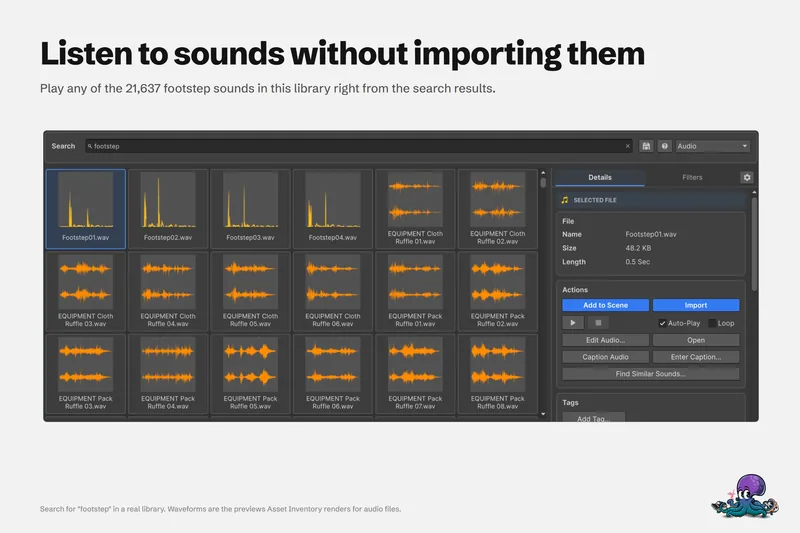
- Search by length and by sound. Eagle filters audio by BPM, and duration only appears through a plugin. Asset Inventory filters and sorts by length, and optional AI writes descriptions and tags for what a sound contains and finds sounds that sound alike. Eagle’s AI plugins work on images and on text such as names and notes, not on the audio itself.
- Trim, then import. Edit Audio… keeps only the part you need and trims silence, and the import lands in your project with its original folder structure. In Eagle, trimming needs a third-party plugin, and getting a sound into Unity means dragging the library copy out by hand.
- Where a sound came from. Every result shows its package and publisher, which matters when you credit a sound or check its license before release. A copy in an Eagle library only carries the notes you add yourself.
If your sounds are loose files that you also use in a DAW or video editor, and the collection stays well below Eagle’s item limit, Eagle is a pleasant way to browse them, and Asset Inventory can index the original folders at the same time without copying anything. If the sounds come from the Asset Store or have to end up in Unity, Asset Inventory covers what Eagle cannot. The guide to searching a Unity sound library shows the workflow, and dedicated sound managers such as Soundly and Sononym are compared on their own page.
At a glance
| Eagle | Asset Inventory | |
|---|---|---|
| Built for | Designers and creative teams, any app | Unity developers, inside the Unity Editor |
| Unity packages | Stored as files; contents not browsed | Every file inside indexed and searchable |
| Library storage | Copies every imported file into the library | Indexes files where they are |
| Library size | Fewer than 250,000 items per library recommended | 3.2 million files in one index in our own library |
| Asset Store purchases | Not connected | Purchase list synced; packages indexed from your cache |
| Previews | Images, video, fonts, audio, many 3D formats | Unity-rendered prefabs, materials, particles, VFX, UI, fonts, animated clips |
| Audio | Waveforms, hover playback, speed control, BPM filter | Waveforms, playback with scrubbing, length filter, trim before import, similar sounds |
| Audio formats | Plays AAC, FLAC, M4A, MP3, OGG and WAV | Treats WAV, MP3, OGG, AIFF, FLAC and tracker modules as audio |
| Into the project | Drag files out | Import single files with dependencies, drag into Project, Hierarchy or Scene |
| AI | Local AI Search and AI Action plugins for images and text | Optional image and audio descriptions, search by meaning, similar sounds |
| Teams | Shared library on LAN or NAS | Shared database on network storage or MySQL/MariaDB |
| Platforms | Windows and macOS | Unity Editor on Windows and macOS; Linux reported to work |
| Price | US$34.95 one-time, two devices | One-time Asset Store purchase per seat |
Using both
Many studios already do this, and it works:
- Keep references, inspiration, UI mockups and marketing material in Eagle.
- Let Asset Inventory index production content: Asset Store purchases, bundles, registry packages, archives and the sound and texture libraries you actually ship with.
- If a texture or sound folder is useful in both places, point Asset Inventory at the original folder as an Additional Folder. Nothing is moved or copied.
When the job is “find the right asset and get it into the scene”, Asset Inventory covers the steps Eagle leaves to you: looking inside the package, seeing what Unity renders, and importing only what the asset depends on.
Read on: searching a Unity sound library, previewing Unity packages without importing them, or the comparison with AssetHoard, another standalone manager.
Frequently asked questions
Can Eagle open .unitypackage files?
No. Eagle's list of supported formats has no preview for archives or Unity packages, so a .unitypackage is stored as a file you cannot look inside. Asset Inventory indexes every file inside Unity packages and renders previews for them.
Is Eagle or Asset Inventory better for a Unity sound effects library?
Eagle is pleasant for auditioning loose files and filters by BPM, but it copies every import into its library and cannot open Unity packages. Asset Inventory indexes sounds inside packages and archives where they are, filters by length, finds similar sounds and trims or imports straight into Unity.
Does Eagle copy files into its library?
Yes. Eagle's support site says it cannot import files by referencing their original paths, so every import is a copy, and Auto-Import moves files out of its watched folder. Asset Inventory indexes files where they are.
Is Eagle a good asset manager for game developers?
For 2D art, references, fonts, video and many 3D formats it is excellent and affordable. It has no Unity integration, no dependency handling and no awareness of Asset Store purchases, which matter once assets have to go into a Unity project.
Can I use Eagle and Asset Inventory together?
Yes. Keep inspiration and design references in Eagle, and let Asset Inventory index production assets, including the original texture or sound folders if you add them as Additional Folders.
Find any Unity asset you own. Import only what you need.
Keep reading
 Use case
Search your whole Unity sound effects library without importing
Package names say little about the sounds inside. Search every audio file you own by name and length, listen in the results, trim before import, and let a local model caption, tag and match sounds.ComparisonAsset Inventory vs AssetHoard
Both are local-first and avoid subscriptions. AssetHoard browses packages outside Unity across several engines; Asset Inventory renders, searches and imports inside the Unity Editor.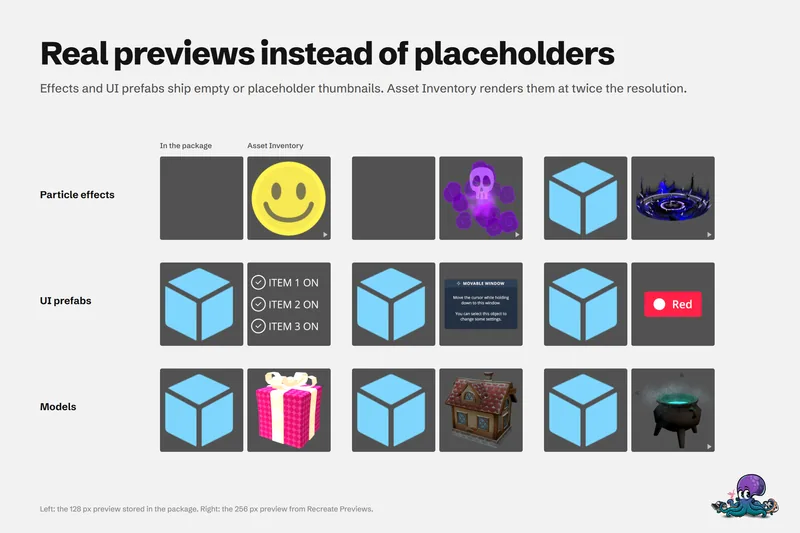 Use case