Asset Inventory vs Unity Asset Manager
Unity Asset Manager is a cloud DAM for your team's own assets. Asset Inventory indexes everything you own inside Unity. Where each one wins, and how to use both.
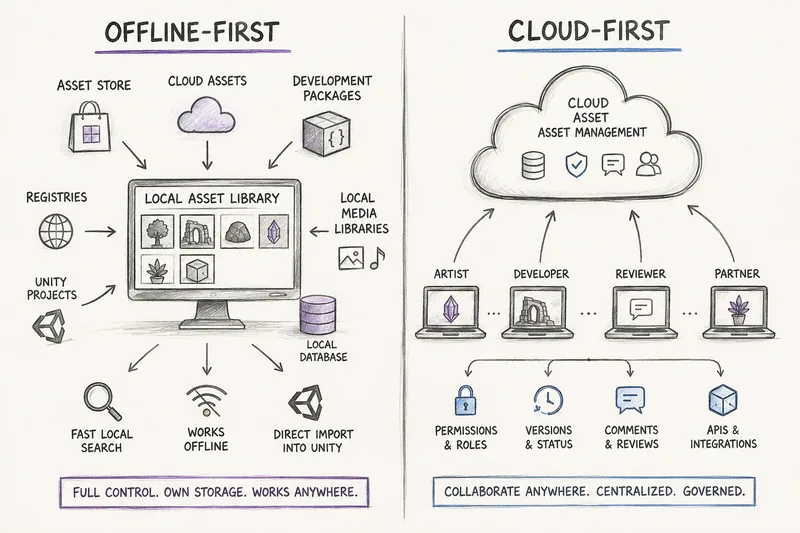
Unity describes the split itself. Its FAQ calls the Asset Store the place to browse and buy third-party assets and Asset Manager the place to store and manage your own, first-party assets. Most Unity developers have plenty of both, which is why this comparison is less about picking a winner than about knowing which job each tool does best.
At a glance
| Unity Asset Manager | Asset Inventory | |
|---|---|---|
| What it is | Cloud DAM with a web app, APIs and the Asset Manager for Unity Editor package | Unity Editor extension with a local catalog |
| Where files live | Unity Cloud, or self-hosted private cloud deployments | Your own drives or NAS; catalog in SQLite or MySQL/MariaDB |
| Asset Store purchases | Per Unity’s docs: lists purchases and itemizes 3D, 2D and Audio packs into single cloud assets; latest version only; no automatic updates | Every purchased package from every category once downloaded, including tools; backups keep older versions |
| Other sources | Uploads from the web, the Editor, the Python SDK, Blender and Unity Version Control | Custom and Synty packages, registries, folders, ZIP/RAR/7z archives, 11 online catalogs, and Asset Manager itself |
| Search | Names and tags with partial matches, metadata filters, saved views | Every file name and path; filters for type, size, dimensions, length, color, vertices and tags; SQL expert search; optional search by meaning |
| Previews | Generated for many 2D, 3D, video and audio formats, 3D web viewer; Asset Store packs use the pack’s own images | Rendered by Unity for prefabs, materials, particles, VFX, UI, fonts and animations, including animated previews |
| Import into Unity | Single assets with their full dependency tree; reimport and update | Single files with dependencies and script analysis modes; choose folder and structure; drag into Project, Hierarchy or Scene |
| Collaboration | Roles, permissions, versions, statuses, comments, annotations, Jira | Shared database on network storage or MySQL/MariaDB; shared override files; static website export |
| AI | AI tags from preview images on upload | Optional image and audio descriptions with local or hosted models, search by meaning, similar sounds |
| Offline | No offline mode documented; local Editor cache of 2 GB by default | Everything indexed stays searchable offline |
| Cost model | Storage included per plan, extra storage and egress billed | One-time Asset Store purchase per seat; storage is hardware you own |
Facts about Unity Asset Manager come from Unity’s documentation and pricing pages as checked on the date above. Unity changes its cloud products frequently, so verify plan details before deciding.
Where Unity Asset Manager is the better choice
Asset Manager is built for governed collaboration, and it is good at it. Choose it, or keep it, when:
- Several people need controlled access to the same files. Organization and project roles separate who can add, edit, download or only view. Seats are enforced, and private projects limit visibility to invited users.
- Assets move through review. Versions start as pending and freeze when saved, carry statuses such as Draft or Approved, and status flows define the allowed transitions. Comments, annotations and a Jira integration support review.
- People outside Unity need to browse. Producers, clients or artists can open the web app and inspect models in a 3D viewer without installing the Editor.
- You run pipelines. APIs, a Python SDK, event-triggered automation and transformations make it a backbone for larger content pipelines, including CAD data in industrial projects.
Asset Inventory does not try to replace any of this. It has no approval states or per-asset permissions, and it does not host files for you.
Where Asset Inventory is the better choice
- Your library is mostly bought and downloaded content. Asset Store purchases from every category (not only 3D, 2D and Audio), Synty and Humble Bundle packages, registry packages, archives and media folders all land in one index. In a real library that is 4,935 packages and 3.2 million files.
- You want to search inside files, not just find an asset by name. Asset Inventory filters by image dimensions, audio length, vertex count, color, type and tags, supports exact phrases and SQL expressions, and can optionally caption images and sounds so badly named files become findable. Asset Manager’s search matches names and tags.
- You want to see what Unity will render. Asset Inventory renders previews of prefabs, materials, particle systems, VFX Graph, UI and fonts inside Unity, and animates clips and effects. Asset Store packs in Asset Manager show the pack’s own marketing images.
- You do not want quotas for a library you already own. Personal organizations have a fixed 10 GB of Asset Manager storage that cannot be extended. Pro and Enterprise include more per seat and bill extra storage per gigabyte. Asset Inventory stores nothing in the cloud; your disks set the limit.
- You work offline or on slow connections. Once indexed, search, browsing, previews and imports from local files need no connection.
- You need older versions. The Asset Store, and the Asset Manager integration with it, only offer the latest version of a package. Asset Inventory can back up every version you download and import from any of them later.
The overlap: Asset Store purchases
Since December 2024, Asset Manager has an Asset Store integration. According to Unity’s documentation, it displays the packages you bought with your Unity ID under External libraries, you choose which ones to add to a cloud project, and Asset Manager unpacks each pack into individual assets while tracking their dependencies. The one example Unity gives is prefabs whose 3D models and materials are mapped as dependencies. Unity’s release notes from that time said storage for Asset Store assets is free. The Editor package then imports single assets with their dependency trees.
The documented limits are worth knowing:
- Only packs in the 3D, 2D and Audio categories are supported, so tools, templates, VFX and other categories are not itemized.
- Only the latest version of an asset is displayed, and updates on the Asset Store are not applied automatically.
- Previews are the pack’s own images rather than renders of each asset.
- It is a cloud workflow that requires a Unity Cloud organization.
How complete the itemization is in practice is harder to judge from the outside. In Unity’s announcement thread, several users reported that only a small part of their purchases appeared, and the documentation does not list which asset types or references are preserved beyond the prefab example. If this integration is central to your decision, test it with a few of your own packages first.
Asset Inventory approaches the same purchases from your local Asset Store cache. Once a package is downloaded and indexed, every file is searchable with real previews, and you can delete the download again if disk space matters, because indexed content stays searchable. Imports then use dependency analysis on the original package files, with optional script analysis.
Using both together
You do not have to choose. Asset Inventory treats Unity Asset Manager as one more source: the Index Unity Asset Manager action synchronizes your Asset Manager projects so their assets are searchable next to everything else, with projects shown as packages. From Asset Inventory you can also upload single files with their dependencies and preview images, sync tags, and import cloud assets into the open project. It needs Unity 2022.3 or newer and installs Unity’s Cloud Assets and Identity packages on request.
A practical split for a studio:
- Keep the assets you create and review together in Unity Asset Manager, where roles and statuses matter.
- Index everything else locally in Asset Inventory: purchases, bundles, registries, archives, sound libraries and free catalogs.
- Search both from one window inside Unity, and import only the files a scene needs.
Bottom line
If you are a solo developer or a small studio whose library is mostly content you bought, downloaded or collected, Asset Inventory covers more of it, keeps it on storage you control, and does more inside the Editor, from Unity-rendered previews to dependency-aware imports. If your organization needs governed cloud collaboration, Unity Asset Manager is built for exactly that, and Asset Inventory can sit on top of it as the single search for everything you own.
For the reasoning behind a local-first library, read The Case for an Offline-First Unity Asset Library. To see how a team shares one catalog, see sharing one asset library across your team.
Frequently asked questions
Is Asset Inventory a replacement for Unity Asset Manager?
Not for teams that need cloud governance with roles, versions, statuses and reviews. It is the broader choice for searching, previewing and importing everything you own, and it can index Asset Manager projects so one search covers both.
Does Unity Asset Manager include my Asset Store purchases?
Its Asset Store integration lists purchases and can itemize packs from the 3D, 2D and Audio categories into single cloud assets with dependencies. It shows only the latest version and does not update automatically. Asset Inventory indexes purchases from every category, including tools, from your local cache.
Which one works offline?
Asset Inventory searches and previews everything it has indexed without a connection. Unity Asset Manager is a cloud service; its Editor package keeps a local cache, and Unity notes that asset details may be incomplete when you work offline.
What does each one cost?
Asset Inventory is a one-time Asset Store purchase per seat and uses your own storage. Unity Asset Manager is part of Unity's cloud offering with storage included per plan and extra storage billed per gigabyte; Unity's product page ties it to the Unity Industry and Unity Studio subscriptions.
Find any Unity asset you own. Import only what you need.
Keep reading
 Article
The Case for an Offline-First Unity Asset Library
Cloud collaboration is powerful, but most Unity libraries already live on local drives. Why an offline-first index can be broader, faster and cheaper, and how it works alongside Unity Asset Manager.ComparisonAsset Inventory vs the Unity Package Manager
Everyone has the Package Manager, and since Unity 6 it handles updates and removals well. What it cannot do is look inside your packages. That is where Asset Inventory starts.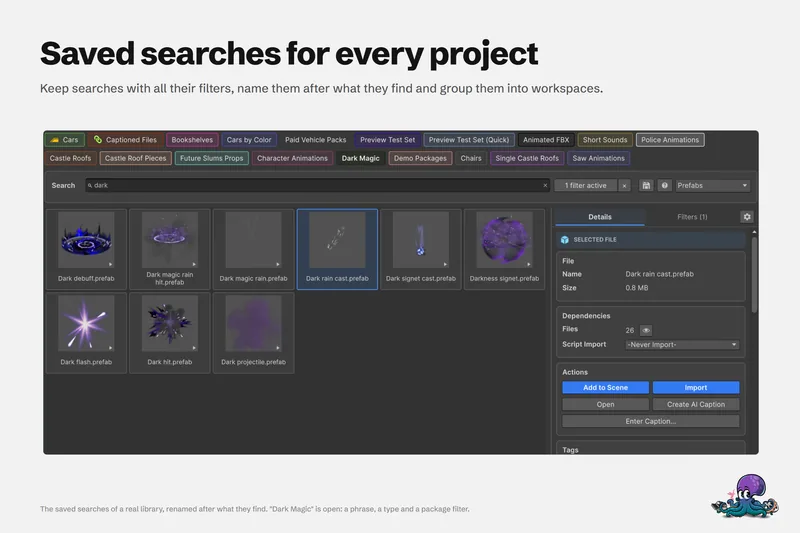 Use case