Asset Inventory vs the Unity Package Manager
The Package Manager lists your Asset Store purchases by name. Asset Inventory searches inside them, previews each file and imports single assets with dependencies.
If you own twenty packages, the Package Manager is enough. Somewhere past a hundred, the question changes from “which package was it” to “which of my packages has a stone doorway, a 2-second whoosh or a 4K grass texture”, and a list of package names cannot answer that.
What the Package Manager does well
The Package Manager’s My Assets context lists every Asset Store package bought with your Unity ID. Since Unity 6 it has become noticeably better:
- Filters for status (downloaded, imported, update available, unlabeled, hidden, deprecated), category and labels, plus sorting by name, purchase date or last update.
- Bulk download and update by selecting several packages.
- Imported Assets tab after an import, and a Remove assets from project dialog that removes all or selected files (from Unity 2023.1).
- Update imports a newer version, with the release notes in the Releases tab.
It costs nothing, ships with every Editor, and stays the right tool for UPM packages from the Unity registry. Asset Inventory does not compete with it there.
Where it stops
Unity’s own documentation draws the lines:
- Search matches package display names. It cannot search file names or contents inside packages.
- Previews are marketing media. The details panel shows the publisher’s images, audio and video from the Asset Store, not previews of the files inside.
- Imports start with everything selected. You clear what you do not want, and Unity documents no dependency check for that selection. When removing assets, Unity warns that scenes depending on deleted assets are not reported as errors.
- Labels live on the website. You create and apply labels, and hide packages, on the Asset Store website; the Editor can only filter by them.
- It needs a connection. Without sign-in, My Assets shows no packages.
- It only knows Asset Store purchases and registry packages. A Humble Bundle download, a Synty package, a sound library in a ZIP file or an old project folder does not appear.
At a glance
| Unity Package Manager (My Assets) | Asset Inventory | |
|---|---|---|
| You search for | Packages, by display name | Every file in every indexed package, by name, path, type and properties |
| Filters | Status, category, labels | Type, size, width, height, length, vertices, color, image type, package, tags, in project, and more |
| Previews | Publisher’s marketing images and media | Per-file previews; Unity renders prefabs, materials, particles, VFX, UI and fonts; animated previews |
| Importing | Whole package, deselect files manually | Single files with their dependencies, optional script analysis, chosen folder, drag into the scene |
| Organizing | Labels and hiding on the Asset Store website | Imported labels plus local hierarchical tags, colors, custom metadata, saved searches |
| Sources | Asset Store purchases and registries | Plus custom and Synty packages, folders, ZIP/RAR/7z archives, online catalogs, Unity Asset Manager |
| Older versions | Latest version only | Optional backups of every version you download |
| Offline | Requires sign-in | Indexed content works offline |
| Extras | Licenses and project reports, orders and invoices, AI captions, coding-assistant tools | |
| Price | Free with Unity | One-time Asset Store purchase per seat |
How they work together
Both tools read the same Asset Store cache, so there is nothing to migrate and nothing to give up:
- Keep downloading with the Package Manager if you like, or let Asset Inventory download in bulk. Either way the packages land in the same cache folder.
- Asset Inventory indexes what is in the cache. Once indexed, a package stays searchable even if you delete its download to save space.
- Search inside everything from the Asset Inventory window, preview the files and import only what the scene needs, with its dependencies.
- Use the Package Manager for UPM packages and quick whole-package updates. Asset Inventory can also install and update registry packages, with per-package update strategies, if you prefer one place for both.
Asset Store labels you already created become tags in Asset Inventory, so your existing organization carries over.
Which one do you need
- A handful of packages, and you import them whole anyway: the Package Manager is enough.
- Hundreds or thousands of packages, sound or texture libraries, bundles and archives: you need an index of the contents. That is the problem Asset Inventory was built for, and why one Asset Store reviewer called it “Google for your asset library”.
- Projects that grow slow and large from whole-package imports: importing single assets with their dependencies keeps projects lean. In one real example, a house prefab arrives as 18 files and 33.7 MB instead of a 497 MB package.
Start with searching inside every package you own, or compare with Unity Asset Manager, Unity’s cloud alternative.
Frequently asked questions
Can the Unity Package Manager search inside Asset Store packages?
No. Its search matches package display names, and its filters cover status, category and labels. It cannot search file names or contents inside packages, which is what Asset Inventory indexes.
Does Asset Inventory replace the Package Manager?
It works next to it. Both read the same Asset Store cache, so nothing needs to be migrated. Asset Inventory adds search inside packages, per-file previews, dependency-aware imports and more sources, and it can also manage registry packages with update strategies.
Can the Package Manager import a single asset with its dependencies?
The import window opens with everything selected and you clear what you do not want; Unity documents no dependency check for that selection. Asset Inventory analyzes the dependencies of the file you pick and imports exactly those files.
Where do I edit Asset Store labels?
Labels are created and applied on the Asset Store website; the Editor can only filter by them. Asset Inventory imports those labels as tags and adds local tags with hierarchy and colors that you edit inside Unity.
Find any Unity asset you own. Import only what you need.
Keep reading
 Use case
Search inside every Unity package you own
The Package Manager searches package names. Asset Inventory indexes every file in every package you own, with filters, saved searches and Unity Search integration, so you search for the asset itself.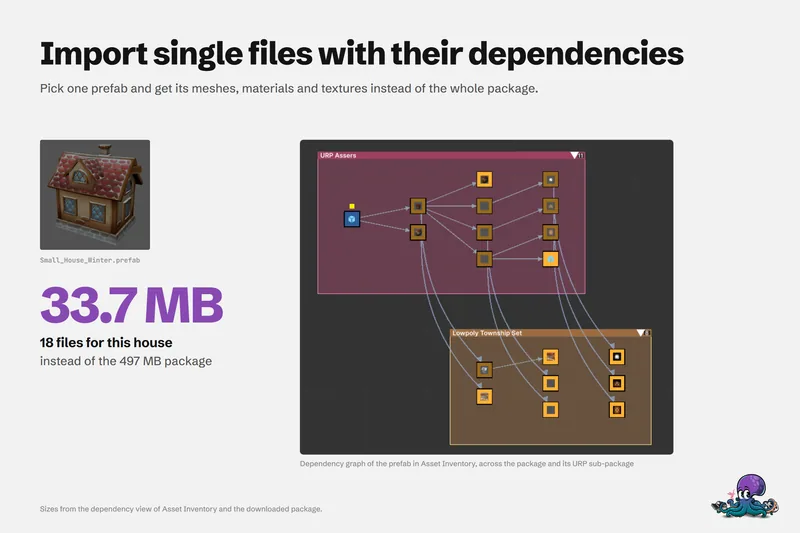 Use case