Asset Inventory vs free .unitypackage viewers
Free tools open one .unitypackage at a time. How Packyderm, UnityPackageBrowser, EasyExtract, UView, PackageLens and our web viewer compare with an indexed library.
A .unitypackage is a gzip-compressed tar archive. Inside, every asset has a folder named after its GUID with the file itself (asset), its asset.meta, a pathname with the project path, and often a small preview.png. Unity offers no API to list a package’s contents, so a small ecosystem of viewers has grown around the format.
The tools
| Tool | Runs on | Price | What it does |
|---|---|---|---|
| Our Unitypackage viewer | Any modern browser | Free | Opens a package locally without uploading it; file tree, sizes, embedded previews, meta files, extract single files |
| Packyderm | Windows | US$10 or more | Browses and extracts all or selected files, optionally with meta files; thumbnails when available; opens packages from the Asset Store cache; in development |
| Unity Package Browser (LITE) | Desktop, no Unity needed | Free, MIT | Extracts the whole package or checked items; previews planned; pre-release |
| EasyExtract | Web, Windows, macOS, Linux, Discord | Web extractor with free quota, desktop app free | Desktop app with image, PDF, text, audio and 3D previews; the web extractor is metered |
| UView | Java desktop app | Free, Apache 2.0 | Views, extracts and edits package contents; early stage |
| PackageLens | Inside the Unity Editor | Free | Reviews package contents against your project before importing |
| AssetHoard | Windows, macOS, Linux | Free beta, then paid | Standalone asset manager that browses and inspects packages, with FBX, glTF and OBJ previews; see the full comparison |
Details as listed by each project on the date above.
What every viewer has in common
- One package at a time. You open a file, look, close it. Nothing remembers what was inside last week’s package.
- Embedded previews only. A viewer can show the
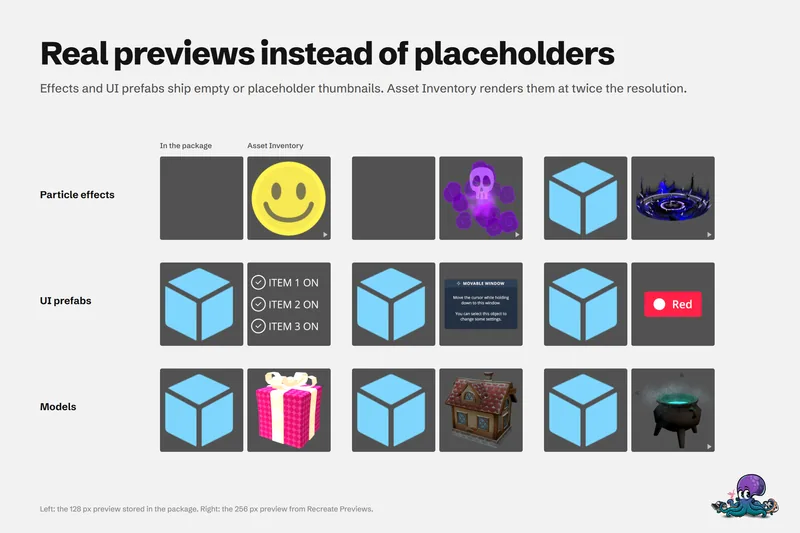
preview.pngUnity stored at export time. Those images are small, often 128 pixels, and many assets have none at all. Prefabs, materials, particle effects and UI are the usual gaps. - Extraction, not import. Copying a prefab out of a package does not bring its materials, textures and meshes. In a Unity project, those dependencies decide whether the asset works.
- The package has to be at hand. Asset Store purchases first need to be downloaded into your cache.
None of this makes viewers bad. For a quick look, they are exactly right.
When an index is the better tool
Asset Inventory indexes packages instead of opening them. The difference shows the moment your question is not about one package:
- Search across everything. “Every stone doorway I own” searches inside all indexed packages at once, together with archives, media folders, registry packages and free online catalogs. A real library holds 4,935 packages and 3.2 million files.
- Previews made by Unity. Asset Inventory renders prefabs, materials, particle systems, VFX Graph, UI and fonts in Unity, upscales images and animates clips and effects. See previews without importing.
- Import with dependencies. Pick one prefab and get its meshes, materials and textures, nothing else: in one real case 18 files and 33.7 MB instead of a 497 MB package. See importing single assets.
- It remembers. Once indexed, a package stays searchable even after you delete the download.
A simple rule
- Peeking into a package you just downloaded: use a viewer, for example our browser viewer.
- Looking for something you know you own somewhere: use an index.
- Bringing an asset into a project: use a tool that understands Unity dependencies.
Asset Inventory covers the last two inside the Unity Editor, and the free viewer covers the first one without installing anything.
Frequently asked questions
How do I open a .unitypackage without Unity?
A .unitypackage is a gzip-compressed tar archive with one folder per asset. Any of the viewers on this page can list and extract its files, and our free browser viewer does it without uploading the file.
Why do some files in a .unitypackage have no preview?
Viewers can only show the preview.png that Unity stored when the package was exported. Those previews are small, and many assets have none. Asset Inventory renders its own previews in Unity instead.
Can a viewer import a single asset with its dependencies?
Viewers extract files, but they do not resolve which materials, textures and meshes an asset needs in a Unity project. Asset Inventory analyzes the dependencies and imports exactly those files.
Find any Unity asset you own. Import only what you need.
Keep reading
 Use case
Preview Unity package contents without importing
Unity's embedded previews are small, often badly lit and missing for effects, UI and fonts. Asset Inventory indexes package contents and renders its own previews, animated where it helps, before anything is imported.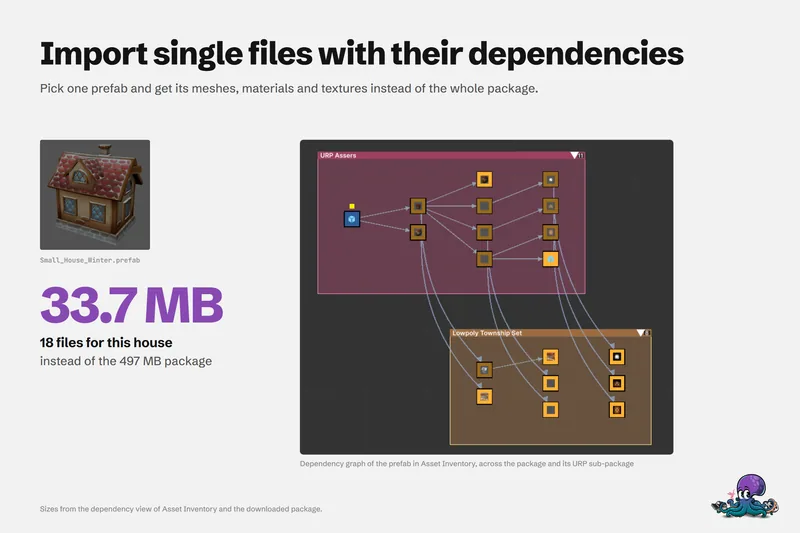 Use case