Building a responsive waveform editor in UI Toolkit
How Audio Tools draws waveforms in UI Toolkit: a min and max peak cache, one line per pixel column, previews from the original samples, and Undo.
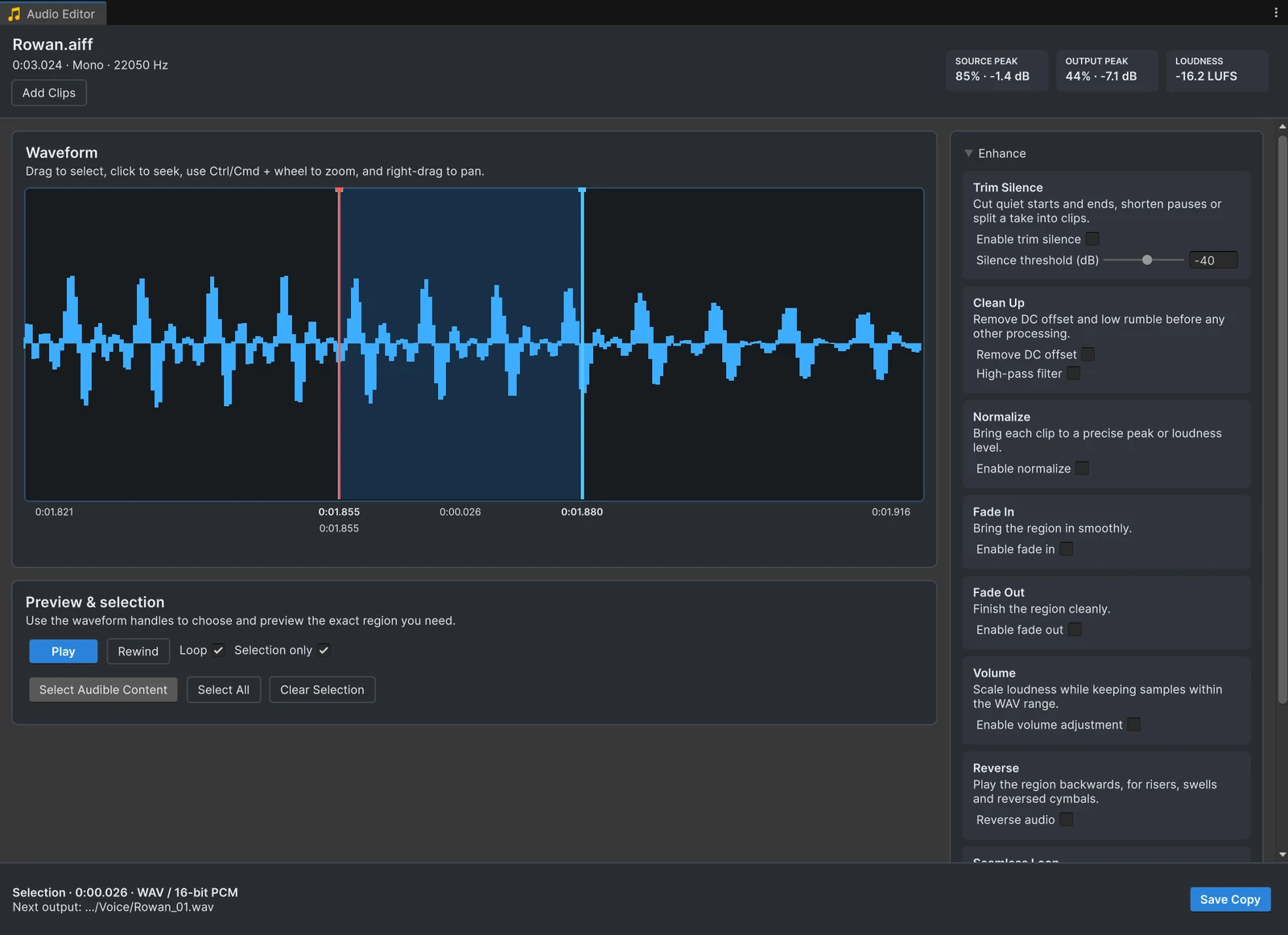
The first version of Audio Tools, released in January 2026, was an IMGUI window: a waveform texture, a selection, a few sliders. It worked, but IMGUI repaints the whole window for every change, and the layout was hard to make responsive. Version 1.1 in July 2026 rebuilt the editor in UI Toolkit. These are the parts that made the biggest difference, in case you are building something similar.
A peak cache, built once and off the main thread
A three-minute stereo clip at 48 kHz has more than 17 million samples. Reading all of them for every frame of a zoom gesture is not an option. Audio Tools reads the samples once and builds a peak cache: for each channel, the clip is split into 8,192 buckets, and each bucket stores the minimum and maximum sample value inside it. Short clips with fewer samples get one bucket per sample.
The cache is built in a background task right after the clip is decoded, so the window stays responsive while long files load. Asking for the peaks of any range is then a loop over the buckets that fall inside it, cheap enough to run for every pixel.
One line per pixel column
The waveform is a VisualElement that draws in generateVisualContent. For each pixel column of the visible range, up to 4,096 columns, it asks the cache for the minimum and maximum in that column’s time range and adds a vertical line from one to the other. Columns where the signal reaches the clipping limit are drawn in a warning color, so clipped regions stand out without a separate analysis.
On top of that the same mesh gets the selection rectangle and its handles, the fade envelopes and the playhead. Because the cost depends on the width of the window and not the length of the clip, zooming up to 32 times around the pointer and panning with the wheel stay smooth even on long recordings.
Previews from the original samples
The editor keeps the decoded original samples and never processes a processed buffer. Every change to a fade, the normalization target or the volume increments a version number and schedules processing of the original samples. When the result arrives, it is applied only if its version is still the latest, so dragging a slider quickly never shows a stale preview and never stacks effects on top of each other. Nothing touches the file until you save.
Undo for a window’s own state
The selection, the zoom, the enabled effects and their settings live in a ScriptableObject with HideFlags.HideAndDontSave. Before every change the window calls Undo.RecordObject on it, and edit gestures on the waveform record once when they start. When Undo.undoRedoPerformed fires, the window rebuilds the view from the session. The same session object is also what lets an editing session survive script recompiles and opening other scenes.
Audio backends behind one interface
Playback and decoding go through a small backend interface. Unity’s audio system is the default; when a project disables Unity audio for FMOD, an FMOD backend takes over for playback, waveforms, processing and export. The editor code above does not know which one is active. The same layer handles MP3 gapless headers: it reads the LAME or FFmpeg information frame and trims the encoder delay and padding from the decoded samples, which the MP3 loop gap article explains.
Reused in Asset Inventory
Because the audio layer is independent of the window, Asset Inventory uses it too: sound playback and scrubbing in its search results run through Audio Tools, and its Edit Audio… button opens this editor for sounds inside packages. If you are planning a similar migration from IMGUI, the Asset Inventory article on migrating IMGUI to UI Toolkit covers the larger version of that journey.
Frequently asked questions
How do you draw a waveform in UI Toolkit?
Audio Tools draws it in generateVisualContent: for every pixel column of the visible range, it looks up the minimum and maximum sample value and adds a vertical line between them to the mesh.
How do you keep a large audio file responsive while zooming?
Compute a peak cache once, off the main thread: minimum and maximum values for a fixed number of buckets per channel. Drawing then reads that cache instead of the raw samples, so the cost depends on the window width, not on the length of the clip.
How does Undo work for an editor window's own settings?
Keep the settings in a ScriptableObject that is never saved, record it with Undo.RecordObject before every change, and rebuild the view when undoRedoPerformed fires.
Trim, fade and normalize audio without leaving Unity.
Keep reading
 Use case