Free audio editors for Unity compared
Free in-editor audio editors for Unity compared by what they trim, fade, normalize and batch-process, plus when a paid editor is worth the money.
The Asset Store has a long tail of small audio editors, and new ones appear every few months. This comparison covers the free ones that edit audio inside the Unity Editor and were updated recently, using what each listing says. We have not tested every feature of every tool, so check a listing’s reviews before you rely on a feature.
The free editors
| Tool | What its listing says it does | Notes |
|---|---|---|
| Audio Tools (Impossible Robert) | Waveform selection with zoom, silence trimming, pause shortening and splitting, curve fades, peak or LUFS normalization, volume, seamless loops, reverse, high-pass and DC offset removal, mono and sample-rate output, batch processing of clips and folders with Analyze, non-destructive preview, backups when replacing | WAV output in 16, 24 or 32-bit float; FMOD projects; source included |
| Easy Audio Cutter (Eys Store) | Trim, curve fades, reverse, merge clips, batch level changes, live preview, Undo and Redo, saves a new 16-bit WAV | 4.8 stars from 8 ratings; no normalize or silence detection listed |
| Audio Adjust (Intuitive Creative) | Automatic silence trim, fades, normalize, gain, speed, reverse, preview; overwrite, backup or copy | The listing calls its edits destructive; batch needs the paid version |
| Bro Audio (Ami Production) | An audio manager whose Clip Editor trims, fades, adds delay, sets volume, reverses and converts to mono | 5.0 stars from 39 ratings, mostly for its playback features; MIT licensed |
| Lyte Audio Editor | Peak normalize, WAV and OGG export, runtime C# API, folder batch | New, few or no ratings |
| Instant AudioTools | Silence removal, normalize, noise reduction | New, few or no ratings; MIT licensed |
| Simblend Editor (GitHub) | Trim, linear fades, volume up to 2x, writes an edited 16-bit WAV | No license file in the repository |
Details as listed by each project on the date above.
Where Audio Tools leads
- Breadth in one editor. Silence, fades, levels, loops, clean-up and output format sit in one panel, and every setting previews from the original samples before anything is written.
- Many files. Open clips or folders together, check every file with Analyze, and save all the copies or replace all the WAVs in one pass, with each file keeping its own selection. Lyte also lists folder batch processing.
- Precision. Zoom in up to 32 times, see the exact start, end and duration of every selection, and step through the clip one sample at a time from the keyboard.
- Safety. Copies keep their import settings, replaced WAVs are backed up, and Unity’s Undo covers the edit settings.
- Formats and projects. It reads what Unity reads, removes MP3 encoder padding, and works when Unity audio is disabled for FMOD.
- Maintenance. Five releases since January 2026, tested from Unity 2022.3 up to 6.7, and used inside Asset Inventory.
Where others are the better pick
- Merging clips: Easy Audio Cutter.
- Speed changes: Audio Adjust.
- Noise reduction: Instant AudioTools lists it.
- OGG output or a runtime API: Lyte Audio Editor.
- A full audio manager: Bro Audio, if you also want a runtime system for playing your sounds.
When a paid editor is worth it
| Tool | Price | Why you might pay |
|---|---|---|
| AudioClip Editor (Gradient Overload) | US$15 | Established multi-clip batch trimming, normalizing and fading with backups; 5.0 stars from 18 ratings |
| NyxAudio Waveform Editor | US$15 | Peak, RMS and LUFS meters, a compressor and filters |
| SoundShifter Pro | US$16 | 34 effects, loudness matching and folder batch processing |
| FC Audio Tools | US$25 | Per-channel editing, crossfades, loop markers, up to 7.1 channels, sold since 2015 |
If none of these fit, Audacity is free and covers repair and effects outside Unity.
Frequently asked questions
What is the best free audio editor for Unity?
It depends on the job. For silence, fades, loudness, loops and batch processing in one editor, Audio Tools. For reversing and merging clips, Easy Audio Cutter. For OGG export or a runtime API, Lyte Audio Editor. Bro Audio suits projects that also want a full audio manager.
Which Unity audio editors can process many clips at once?
Among the free tools, Audio Tools and Lyte Audio Editor process folders, and Easy Audio Cutter lists batch level changes. Paid tools with batch processing include AudioClip Editor by Gradient Overload, Audio Adjust Batch, NyxAudio Waveform Editor and SoundShifter Pro.
Which free Unity audio editor normalizes loudness in LUFS?
Audio Tools has a Loudness (LUFS) mode that measures integrated loudness per ITU-R BS.1770. Among paid tools, NyxAudio Waveform Editor shows LUFS meters and SoundShifter Pro lists loudness matching.
Trim, fade and normalize audio without leaving Unity.
Keep reading
 Comparison
Audio Tools vs Audacity for Unity audio
Audacity is free, deep and the usual answer when someone asks how to edit audio for Unity. Audio Tools covers the everyday game fixes inside the Editor, for one clip or a folder. Which jobs belong where, and how online cutters and ocenaudio compare.ComparisonWhat Unity can do with audio clips on its own
Unity has no audio editor, but it has several ways to change what a clip sounds like in the game. What import settings, Timeline, scripting and the AI Assistant can and cannot do, and when editing the file is simpler.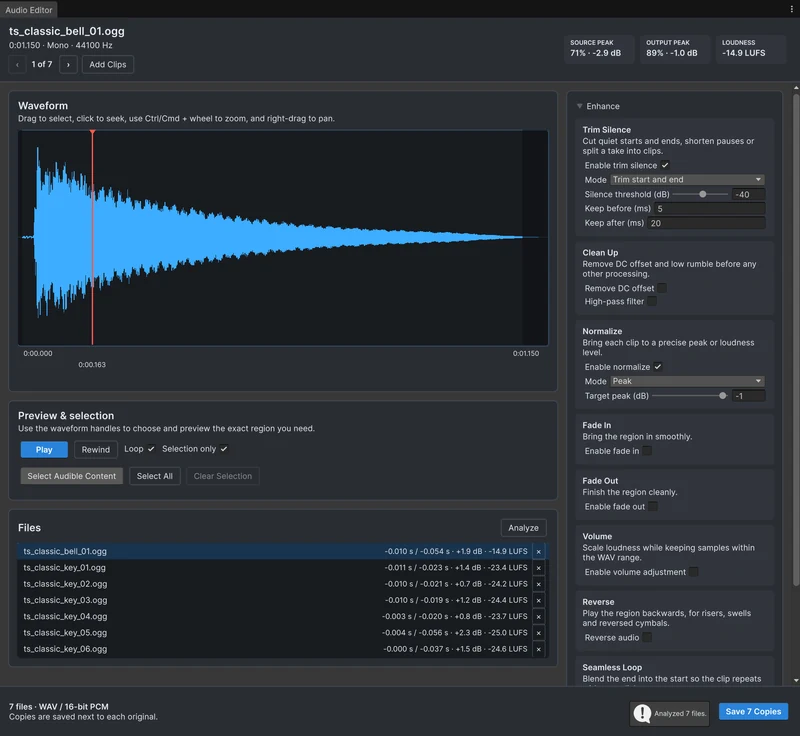 Use case