LED Studio vs building an LED screen yourself
Unity gives you render textures, the Video Player, Shader Graph and bloom. When a hand-built LED screen is enough, and what LED Studio adds beyond one flat screen.
This is the most common alternative to buying an LED asset, so it deserves an honest look. Here is what Unity gives you, what a typical hand-built screen covers, and where the effort goes after the first good screenshot.
What Unity gives you
Unity has no LED or dot-matrix display feature, and we found no official sample or Unity Learn course for one. It does ship the pieces a hand-built screen needs:
- Render textures: Unity’s own manual uses a live arena camera as its example of rendering a camera into a texture.
- The Video Player: plays clips or URLs into a render texture or a material property.
- Shader Graph: its Procedural Patterns sample includes dots, grids and hex lattices you can use as an emitter mask.
- Bloom: in the URP and HDRP volume systems, or the post-processing stack in the Built-in pipeline.
The usual hand-built recipe
Most tutorials and free shaders follow the same pattern: render the content into a texture, snap the texture coordinates to a grid, multiply by a dot or subpixel mask, raise the emission and let bloom do the rest. Alan Zucconi’s LCD shader article (2016) and Keijiro Takahashi’s LightGridShader for URP are good starting points, and the free LEDScreenShader goes further with honeycomb patterns, cabinet seams and distance fading.
For a single flat screen that the camera sees from one distance, this works well and costs nothing but an afternoon.
Where the effort goes after the first screenshot
The Unity forums show where hand-built screens run into trouble, often in threads that were never resolved:
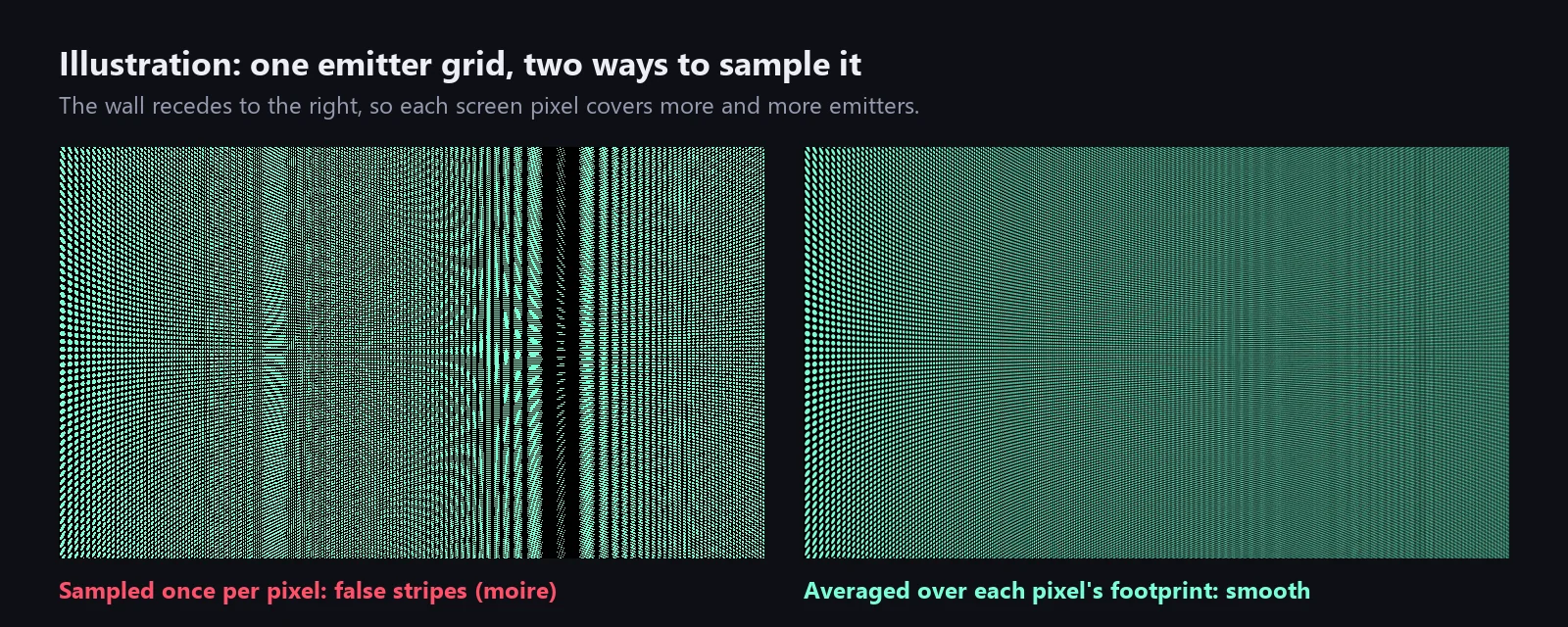
- Moire and shimmer: a fine dot mask aliases against the screen’s pixel grid as soon as the camera moves or backs away. A 2015 thread on moire in an LED panel shader ended with suggestions for derivative-based antialiasing and distance fading, and no confirmed fix. The moire article explains the problem in detail.
- Light on the surroundings: emission and bloom make the screen glow on camera, but they do not light the room. A 2017 LED display thread asked exactly that.
- Scrolling text: a scrolling banner needed custom texture wrapping and mipmap fixes in a 2019 thread, and pixel fonts blur when text lands between emitters.
- Curved and round screens: video on curved surfaces is a recurring unanswered question, because the mesh, its texture coordinates and the content’s aspect ratio all have to agree.
- Live content plumbing: scores, clocks, rotating sponsor content, transitions and a camera feed each need code, and they need it again for every screen.
- Many panels: a perimeter ribbon or a video wall made of separate panels has to share one content stream and stay in sync.
- Physical scale: without pitch and cabinet sizes, every screen is tuned by eye, and two screens built from the same panel type do not match.
Illustration, not a product render: one emitter grid sampled once per pixel (left) and averaged over each pixel’s footprint (right).
At a glance
| Build it yourself | LED Studio | |
|---|---|---|
| Cost | Free, plus your time | US$15, one-time |
| Display model | Artistic sliders on a material | Pixel pitch, emitter counts, cabinets, seams and depth |
| Emitter look | Your dot or subpixel mask | Circle, square, hex or LCD RGB emitters with fill, falloff, brightness response and close-up diode detail |
| Distance and moire | Shimmers unless you add filtering | Distance-aware emitters, far blending that keeps average brightness, content reduction |
| Content | Whatever you wire into the texture | Text, image, video, timer, score, render texture, Canvas and UI Toolkit sources |
| Text | Render it into the texture yourself | Scrolling, wrapping, blinking, crisp pixel fonts, multilingual text |
| Shapes | Your own mesh and UVs | Generated flat, curved, corner, cylinder, pipe-wrap, sphere and honeycomb boards |
| Many panels | Write the sync yourself | Board groups with shared canvas, layouts and sync |
| Defects | Write them yourself | Seven defect types on nine targets, severity set from code |
| Pipelines | Usually one at a time | Built-in, URP and HDRP from Unity 2022.3 |
Using both
LED Studio does not ask you to throw your own work away. A camera you already render into a texture becomes a render texture source, a video clip becomes a video source, and a board can render onto an existing renderer and material slot, so a screen mesh you modeled yourself or bought in an environment pack can carry an LED Studio board.
Verdict
Build it yourself for one flat screen at a fixed distance. Choose LED Studio when the screen has to hold up while the camera moves, show live information, take an unusual shape or work as one of many panels, because each of those is a project of its own when you start from a material. The realistic LED screen guide shows the LED Studio side step by step.
Frequently asked questions
Does Unity have a built-in LED screen shader?
No. Unity offers no LED or dot-matrix display feature, sample or Unity Learn course. It provides the building blocks: render textures, the Video Player, Shader Graph with its Procedural Patterns sample and bloom in the render pipelines.
Is a hand-built LED shader good enough?
For one flat screen that plays a video at a fixed distance, often yes. It gets expensive once the camera moves, the screen needs text, scores or several sources, the shape is curved, or many panels must stay in sync.
Can I keep my own render textures and meshes with LED Studio?
Yes. Render textures from any camera and video clips are regular LED Studio sources, and a board can render onto an existing renderer and material slot instead of a generated mesh.
LED screens, walls and signs that look like real hardware.
Keep reading
 Use case
Make a realistic LED screen in Unity
An emissive texture with a dot mask stops looking like an LED wall once the camera moves. LED Studio models pitch, emitters and cabinets first, then its LED Board shader presents them from close-ups to the far end of a venue. Article