LED Studio vs LEDScreenShader
LEDScreenShader is a free, MIT-licensed LED material for URP and HDRP. LED Studio is a full LED display system. What each does well, and when the free one is enough.
LEDScreenShader by llcheesell is the closest free alternative to LED Studio, and it is good work. It is MIT-licensed, had 298 stars on GitHub when we checked, and its README describes version 2.0 as current. A packaged version is sold on the Asset Store as LED Screen Shader for US$18.90.
What LEDScreenShader does well
- Subpixel masks: the red, green and blue channels of an LED texture act as per-subpixel masks.
- Procedural layouts: stripe, grid and honeycomb patterns.
- Distance handling: a screen-space LED fade plus derivative-based automatic fading reduce detail at a distance to fight moire.
- Cabinets: configurable seam width and depth with brightness variation per cabinet.
- HDR output: an intensity multiplier for bright scenes, with bloom recommended, and motion vectors to reduce temporal antialiasing ghosting.
- Price and license: free, open source and easy to modify.
Its README lists URP and HDRP as supported and tested on Unity 2021 and Unity 6000.3, with a simplified Built-in fallback that is not officially supported. The shader takes a texture or render texture as input and applies to a surface you provide.
What LED Studio adds
- A display model in real units: pixel pitch in millimeters, emitter counts and cabinet grids define the board, and its physical size follows from them, so two boards built from the same panel type match.
- Generated shapes: flat, curved, corner, 360-degree cylinder, pipe-wrap and sphere boards, hexagonal cabinets and honeycomb walls with cut-out edges, plus generated rear bodies and front frames. See curved, cylinder and spherical screens.
- Content sources: text with scrolling, wrapping, blinking and crisp pixel fonts, timer and score sources, images, video clips and URLs, render textures, uGUI Canvas and UI Toolkit panels.
- Compositions and playlists: layer sources on one board and sequence them with 38 transitions plus hard cuts.
- Many panels: board groups share one canvas across panels, with layouts, gaps, honeycomb arrangements and synchronized timing.
- Defects: seven defect types from dead emitters to cabinet outages, with severity set from code.
- Control: a runtime API with named content ports, a Timeline track and seven included AI skills for coding assistants.
- Pipelines: the Built-in Render Pipeline, URP and HDRP from Unity 2022.3.
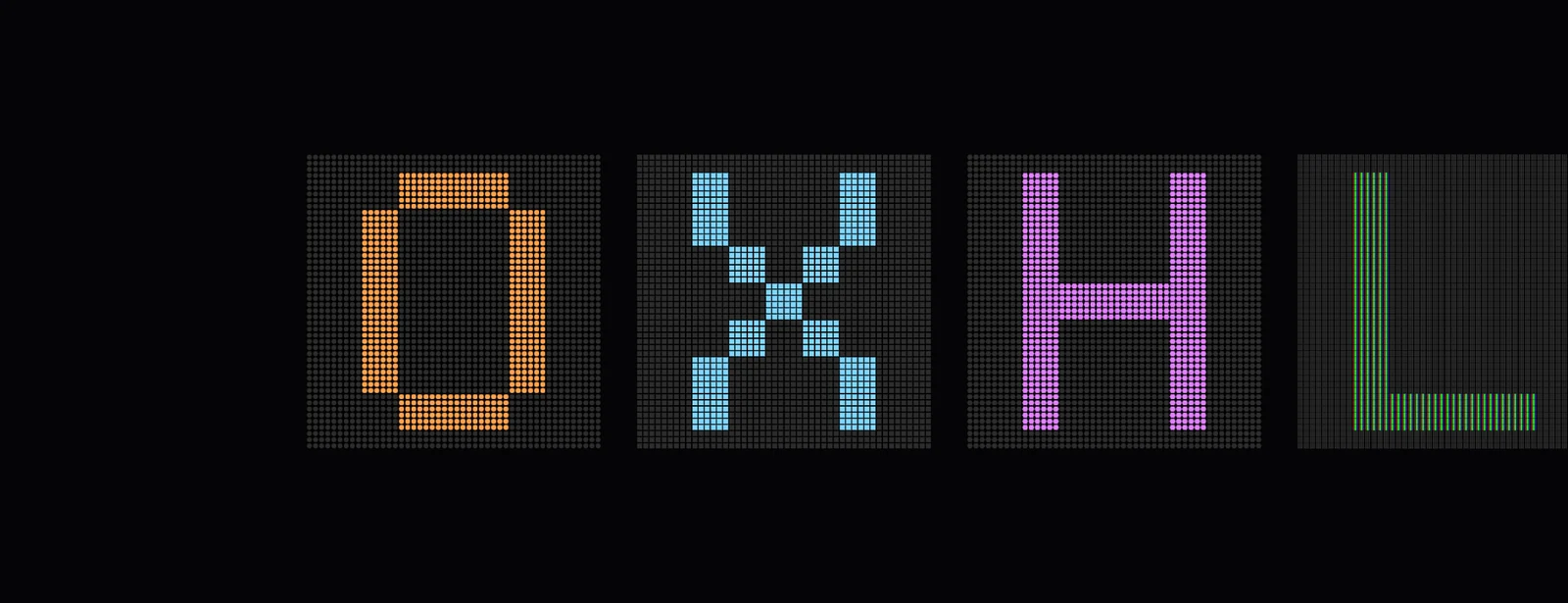 The same text on four boards with different emitter shapes in LED Studio.
At a glance
| LEDScreenShader | LED Studio | |
|---|---|---|
| What it is | An LED material for your mesh | An LED display system with board generation, sources and playback |
| Price | Free (MIT); US$18.90 on the Asset Store | US$15, one-time |
| Pipelines | URP and HDRP; Built-in fallback not officially supported | Built-in, URP and HDRP |
| Display units | Cabinet seams and variation | Pitch, emitter counts, cabinets, seams, depth |
| Emitter look | RGB subpixel masks, stripe, grid, honeycomb | Circle, square, hex and LCD RGB emitters, fill, falloff, brightness response, close-up detail |
| Distance and moire | Screen-space and derivative fade | Distance-aware emitters, far blending that keeps average brightness, content reduction |
| Content | Your texture or render texture | Text, timer, score, image, video, render texture, Canvas and UI Toolkit sources |
| Playback | Not included | Compositions, playlists, transitions, Timeline |
| Shapes | Your mesh | Generated flat, curved, corner, cylinder, sphere and honeycomb boards |
| Many panels | Not included | Board groups with shared canvas and sync |
| Defects | Not included | Seven types on nine targets |
Facts about LEDScreenShader come from its GitHub README and Asset Store listing, checked on the date above.
Which one to choose
Choose LEDScreenShader for a background screen or a single hero surface in URP or HDRP when you already have the mesh and the content, and especially when the budget is zero. Choose LED Studio when the screen has to carry live information, take a shape other than your own mesh, run as one of many synchronized panels, fail convincingly, or work in the Built-in pipeline. The two do not conflict, so mixing them in one project is fine.
Frequently asked questions
Is LEDScreenShader really free?
Yes. The GitHub version is MIT-licensed and free for commercial use, with credit appreciated but not required. A packaged version is also sold on the Unity Asset Store.
Does LEDScreenShader support the Built-in Render Pipeline?
Its README lists URP and HDRP as supported and tested, with a simplified Built-in fallback that is not officially supported. LED Studio supports the Built-in Render Pipeline, URP and HDRP.
Can LEDScreenShader show scrolling text or scores?
Not by itself. It displays whatever texture or render texture you give it, so text, scores, playlists and transitions are yours to build. LED Studio has text, timer and score sources, compositions and playlists.
Can I use both in one project?
Yes. They are independent. Some teams use a free material for background screens and LED Studio for the screens that carry live content or need special shapes.
LED screens, walls and signs that look like real hardware.
Keep reading
 Comparison
LED Studio vs building an LED screen yourself
Unity has no LED display feature, only building blocks. A hand-built shader is fine for one flat screen; moire, text, curved shapes, live data and many panels are where LED Studio saves the work. Use case
Make a realistic LED screen in Unity
An emissive texture with a dot mask stops looking like an LED wall once the camera moves. LED Studio models pitch, emitters and cabinets first, then its LED Board shader presents them from close-ups to the far end of a venue.Article