LED displays in UI Toolkit panels
Show LED boards and news tickers inside Unity UI Toolkit panels with LedBoardElement, from mirroring a scene board to panel boards that play their own content.
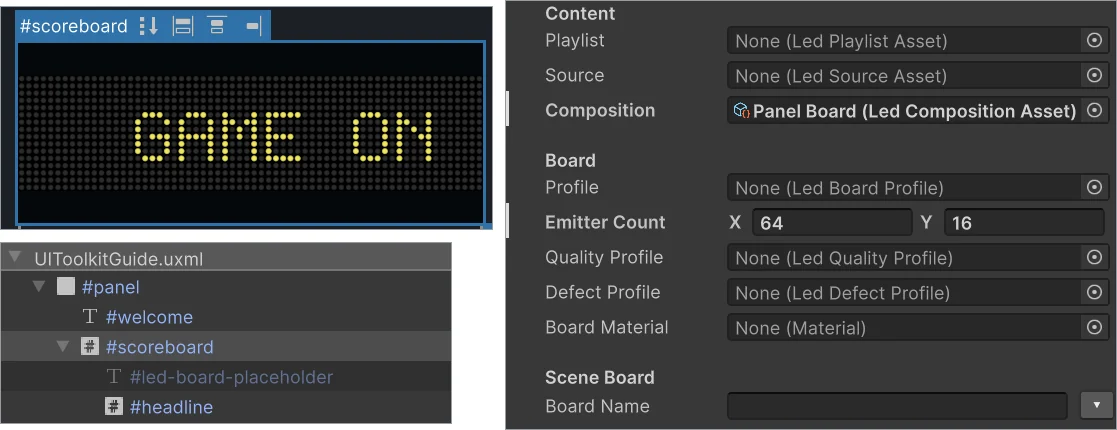
HUDs, menus and in-game terminals often need an LED readout: a score strip, a status board or a news ticker. UI Toolkit has no LED look of its own, and a texture fakes the dots without the glow, the scrolling or the live updates. LedBoardElement brings an LED Studio board into a UI Toolkit panel. In version 1.6.0 it mirrors a board from the scene, and from LED Studio 1.7.0 it can also play its own content right in UI Builder.
Mirror a scene board (LED Studio 1.6.0)
In the store version, LedBoardElement shows the output of a scene board, or a texture, with LED presentation. The simplest route needs no code: add LedBoardElementBinder to a GameObject, assign its board and its UI Panel, which takes a UIDocument or, on Unity 6.5 or newer, a PanelRenderer, and fill in Target Element Name when the document holds more than one LED element. Scripts can bind directly:
// Sketch: show a scene board in a UI Toolkit panelLedBoardElement element = document.rootVisualElement.Q<LedBoardElement>("ticker");element.Bind(tickerBoard); // a LedBoardController in the scenePresentation mode shows the hardware-style LED look in the panel, while Logical Output shows the raw composed board texture for debugging or custom UI. Auto Refresh, Refresh Rate, Scale Mode, Tint and Placeholder Text can be set from UXML or C#. A news ticker is then a Ribbon Board with scrolling text in the scene, shown in the HUD.
Panel boards with their own content (from LED Studio 1.7.0)
From version 1.7.0, the element can run its own board, so the panel needs no board object in the scene. The image at the top shows this setup: a board reading GAME ON on the UI Builder canvas, fed by a headline input. To build one:
- In UI Builder, open Library > Project > Custom Controls (C#) > LEDStudio, drag LedBoardElement into the Hierarchy and give it a height.
- Under Content, assign a Composition, Playlist or Source. Under Board, set Emitter Count or assign a Profile. The board starts playing on the canvas.
- Add LedBoardInput children named after Source IDs. An input’s Text replaces that source’s text, and its Texture fills the image source and the live input of the same name.
- Show the document with a UIDocument or, on Unity 6.5 or newer, a PanelRenderer.
Inputs apply again whenever the board prepares its sources, for example on the next playlist entry, and the authored content returns when an input is cleared, renamed or removed. On Unity 6, Text and Texture support UI Toolkit data binding. On older versions, set them from code:
document.rootVisualElement.Q<LedBoardInput>("headline").Text = "DOORS OPEN 19:00";Board Name mirrors a scene board by name instead. Instantiated prefabs match without their clone suffix, and a missing or shared name shows nothing, with a warning in UI Builder. A board bound from code or a binder takes precedence over Board Name, which takes precedence over the element’s own content. The panel board plays on unscaled time at the element’s Refresh Rate and releases its resources when the element leaves the panel. Commands such as SetSourceText, SetPlaylist and SetScore reach it, while ports, topology and scene-component live inputs need a bound scene board.
Version requirements
| Feature | Needs |
|---|---|
| LedBoardElement showing a scene board or texture, LedBoardElementBinder | LED Studio 1.6.0, Unity 2022.3 or newer |
| PanelRenderer as the UI Panel | Unity 6.5 or newer |
| Panel boards with their own content, LedBoardInput, Board Name | LED Studio 1.7.0 |
| Assigning content assets in UXML or UI Builder | Unity 2023.2 or newer, otherwise from C# |
| Data binding for LedBoardInput | Unity 6 or newer |
After upgrading older UI Toolkit setups, reassign missing panel references in the UI Panel field, and use UIPanel in scripts instead of the previous document-only interface.
The other direction: UI on 3D boards
UI can also flow the other way. A UI Toolkit source captures a UI Toolkit panel, from a UIDocument or, on Unity 6.5 or newer, a PanelRenderer, into a render texture, and a Canvas source renders a uGUI Canvas through a camera. Menus, dashboards and HUD graphics then appear on an LED board in the world with the full LED presentation. For a world-space UI Toolkit source, LED Studio captures the authored UXML in a separate document, so controls created only at runtime and later changes to the live visual tree are not mirrored.
Installation and Quick Start walks through a UI Builder board, Multi-Panel Boards and Sync explains board selection and the binder, and Content Sources covers the UI Toolkit and Canvas sources. For the ticker content itself, see scrolling LED text and tickers.
Frequently asked questions
How do I make a news ticker in UI Toolkit?
Add a LedBoardElement to the panel. In LED Studio 1.6.0 it shows a scene board, such as a Ribbon Board with scrolling text, through LedBoardElementBinder. From version 1.7.0 the element can play a scrolling text source itself, without a scene object.
Which Unity versions do UI Toolkit LED boards need?
LED Studio runs in Unity 2022.3 or newer. Assigning content assets in UXML or UI Builder needs 2023.2, UI Toolkit data binding needs Unity 6 and UI Panel Renderer support needs Unity 6.5. On older versions, assign content from C#.
Can UI Toolkit or uGUI content appear on a 3D LED board?
Yes. A UI Toolkit source captures a UI panel into a render texture for a board in the scene, and a Canvas source renders a uGUI Canvas through a camera. Both then get the full LED presentation.
LED screens, walls and signs that look like real hardware.
Keep reading
 Use case
Scrolling LED text and news tickers in Unity
Build a ticker or marquee on a real LED emitter grid: horizontal or vertical scrolling with seamless wrapping, blinking, sizing and crisp rasterization for pixel fonts, four text renderers, zones under a score, runtime text updates and playlists. Use case