Simulate live data in Unity without a backend
Feed dashboards and listeners with live mock data in Edit Mode or Play Mode: constant, random, burst or drip rhythms on game time, real time or manual steps.
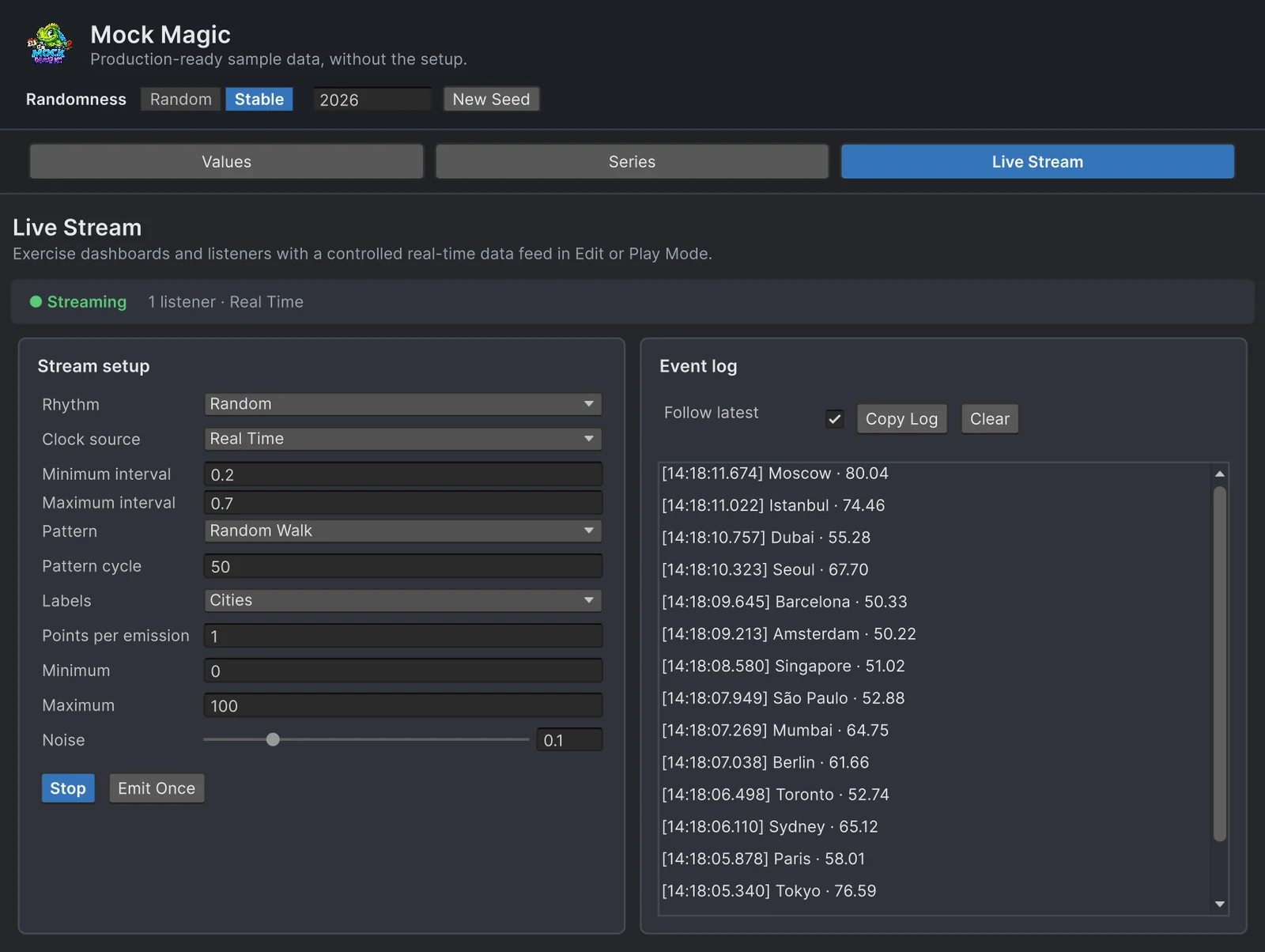
Live UI fails in ways that static test data never triggers. Two updates arrive within 50 milliseconds and an animation restarts halfway. The feed goes quiet for five seconds and the “last updated” label keeps claiming everything is fine. The pause menu opens and a ticker that should freeze keeps scrolling. Usually all of this surfaces only after the backend goes live.
Mock Magic’s stream calls your listeners with labeled values on a schedule you choose, in Edit Mode and in Play Mode, with no server, broker or script outside Unity. Build the receiving side now and plug the real feed into the same listener later.
What one emission contains
Each emission is an array of MockDataPoint values: as many as Points per emission asks for, or exactly one with the Drip rhythm. The values follow the selected Pattern between Minimum and Maximum, with Noise on top, and continue from one emission to the next. Pattern cycle sets how many points one cycle lasts, 50 by default, so a Sine stream with one point per emission draws a full wave every 50 emissions. Random Walk has no cycle and keeps wandering from its last value.
Sine and Cosine flow from one cycle into the next, while climbing shapes such as Linear or Trending Up jump back to their starting level. Labels continue too, from a preset or your own Custom list: with Months and one point per emission, the first emission is January, the next February. Starting the stream again begins pattern and labels anew.
Four rhythms
- Constant emits every Interval seconds.
- Random waits a random time between Minimum interval and Maximum interval before each emission, spread evenly.
- Burst sends Burst count emissions in quick succession, a tenth of the Burst interval apart, then pauses for Delay between bursts. With the defaults, that is five emissions 0.1 seconds apart followed by a three-second pause.
- Drip sends single points at irregular gaps around the Average interval, the way sensor reads or trades arrive. About two gaps in three are shorter than the average, about one in twenty is more than three times as long, and none is shorter than a twentieth or longer than five times the average.
Four clock sources
- Game Time (
ClockMode.Scaledin code) waits in scaled time during Play Mode.Time.timeScalespeeds it up or slows it down, and a time scale of 0 holds the next emission until the game resumes. - Unscaled Game Time and Real Time (
ClockMode.UnscaledandClockMode.Realtime) both wait in real seconds during Play Mode and ignore the time scale, which suits a feed that must keep running behind a pause menu. - Manual schedules nothing. Each Emit Once click or
EmitOnce()call sends one emission, which makes test steps and debug buttons predictable.
Outside Play Mode there is no game time, so all three timed sources follow the Editor clock.
The Live Stream workspace
- Open Tools > Mock Magic > Generator and select Live Stream.
- Pick the Rhythm, the Clock source and the interval fields that the rhythm shows. Intervals go down to 0.05 seconds.
- Choose a Pattern, its Pattern cycle (2 to 1,000 points), Labels (Custom shows a Custom labels field for your own list), Points per emission (1 to 100), Minimum, Maximum and Noise.
- Click Emit Once to check the configuration, then Start. The status line shows Streaming, the number of listeners and the clock.
The Event log lists each value with a millisecond timestamp and its label, newest first, and keeps the latest 100 entries. The window is a listener itself, which is why the status line shows one listener before your own code registers. It drives the same shared stream that MockStreaming exposes in code, so a script registered through MockStreaming.Register receives the workspace’s emissions, a remote control for your own listeners while you design the UI.
Stream from code
This component turns the shared stream into a price ticker: a random walk between 90 and 110 that continues from its last value, sent as single trades at irregular gaps that average half a second. It registers a listener and cleans up after itself:
using ImpossibleRobert.Common.Timing;using MockMagic;using UnityEngine;
public class PriceTickerPreview : MonoBehaviour{    MockStream stream;
    void OnEnable()    {        MockStreaming.Configure(SeriesPattern.RandomWalk, min: 90f, max: 110f, noise: 0.02f,            labelPreset: LabelPreset.Numeric);
        stream = MockStreaming.Stream;        stream.ClockMode = ClockMode.Unscaled; // keeps ticking while the game is paused
        MockStreaming.Register(OnTrades);        MockStreaming.Start(interval: 0.5f, rhythm: StreamRhythm.Drip);    }
    void OnDisable()    {        if (stream == null) return; // the shared stream is already gone, for example on exit        stream.Unregister(OnTrades);        stream.StopStream();    }
    void OnTrades(MockDataPoint[] points)    {        foreach (MockDataPoint point in points)            Debug.Log($"Trade {point.Label}: {point.Value:F2}");    }}
Register ignores a listener that is already registered, so a second OnEnable does not double the calls. Listeners run on Unity’s main thread and can update UI elements directly. A listener may unregister itself inside the callback without the others missing that emission, and if one throws, the stream logs the error and still calls the rest. Changing MinValue and MaxValue while the stream runs takes effect with the next value, an easy way to simulate a spike. Because the stream is shared, Stop and Configure affect every listener, including the Generator window.
MockStreaming wraps one shared MockStream on a hidden object of its own. For an independent feed, add your own MockStream component and set its properties in code, since they are not Inspector fields; the shared stream never takes over such components. The digital twin guide runs one stream per sensor that way, and the streaming documentation lists every setting.
Edit Mode and Play Mode
In Play Mode the stream runs as a coroutine on a hidden GameObject that survives scene loads, and the first emission happens as soon as you start it. In Edit Mode it runs on the Editor’s update loop, and the first emission comes after one interval. For Edit Mode listeners, mark the script [ExecuteAlways], register in OnEnable, unregister in OnDisable, and start the stream from the Live Stream workspace.
Entering Play Mode resets the shared stream: it stops and forgets its listeners. Register from OnEnable in the scripts that run in Play Mode instead of relying on a registration made in Edit Mode.
Why bursts and gaps break UIs
A steady one-second feed is the easiest case a live UI will ever see. Three settings cover most of the harder ones:
- Burst with a Burst count of 20 and a Burst interval of 0.05 sends a quick run of emissions, about one per frame, then goes quiet. Watch for animations that restart on every value, layouts rebuilt per update and stacking sounds, and apply collected values once per frame.
- Drip with an Average interval of 1 mixes quick successions with pauses of three seconds or more, the way real events cluster. Check stale indicators, “updated 4 s ago” labels and timeouts.
- Random with a Minimum interval of 0.05 and a Maximum interval of 5 spreads the gaps evenly across that span.
Then test the pause menu with both Game Time and Unscaled Game Time to confirm which one your UI expects, and switch to Manual to step through a sequence one emission at a time.
Draw the data
Mock Magic produces the values; drawing them is a charting job. Real-time graphs in Unity covers scrolling windows, ring buffers and update performance with Chart Guru, whose Mock Chart Data Source streams test data straight into a chart. For fixed datasets rather than a feed, see testing charts and dashboards with patterned data.
Why real feeds arrive steadily, in bursts or as irregular drips, and what each rhythm does to a dashboard, is the subject of how live data really arrives.
Frequently asked questions
Can I simulate real-time data in Unity without entering Play Mode?
Yes. The Live Stream workspace and the runtime stream also run in Edit Mode, driven by the Editor's update loop, so a listener registered from an [ExecuteAlways] script receives data without Play Mode.
Does the mock stream pause when the game is paused?
With the Game Time clock, ClockMode.Scaled in code, it does: in Play Mode each wait uses scaled time, so Time.timeScale at 0 holds the next emission. Unscaled Game Time and Real Time keep emitting.
Does Mock Magic connect to MQTT, WebSockets or a REST API?
No. It generates data inside Unity and calls your listeners directly, with no network transport. Use it to build and test the receiving side, then connect your real client to the same code.
Does a mock stream continue its pattern between emissions?
Yes. Each emission picks up where the previous one ended. Pattern cycle sets how many points one cycle lasts, Random Walk keeps wandering from its last value, and starting the stream again begins the pattern anew.
Realistic fake data for Unity, from one value to a live stream.
Keep reading
 Use case
Simulate sensor telemetry for a Unity digital twin
Build the twin before the hardware talks to it. Stream live readings per sensor inside Unity with jitter, drift, cycles, faults, irregular timing and batched uploads, and draw histories that the live values continue. Article