How we benchmark 3D text against other Unity tools
How the Performance Lab compares Text Studio 3D with UniText 3D and Modular 3D Text in matched Unity workloads, with every result, including the three we do not win.
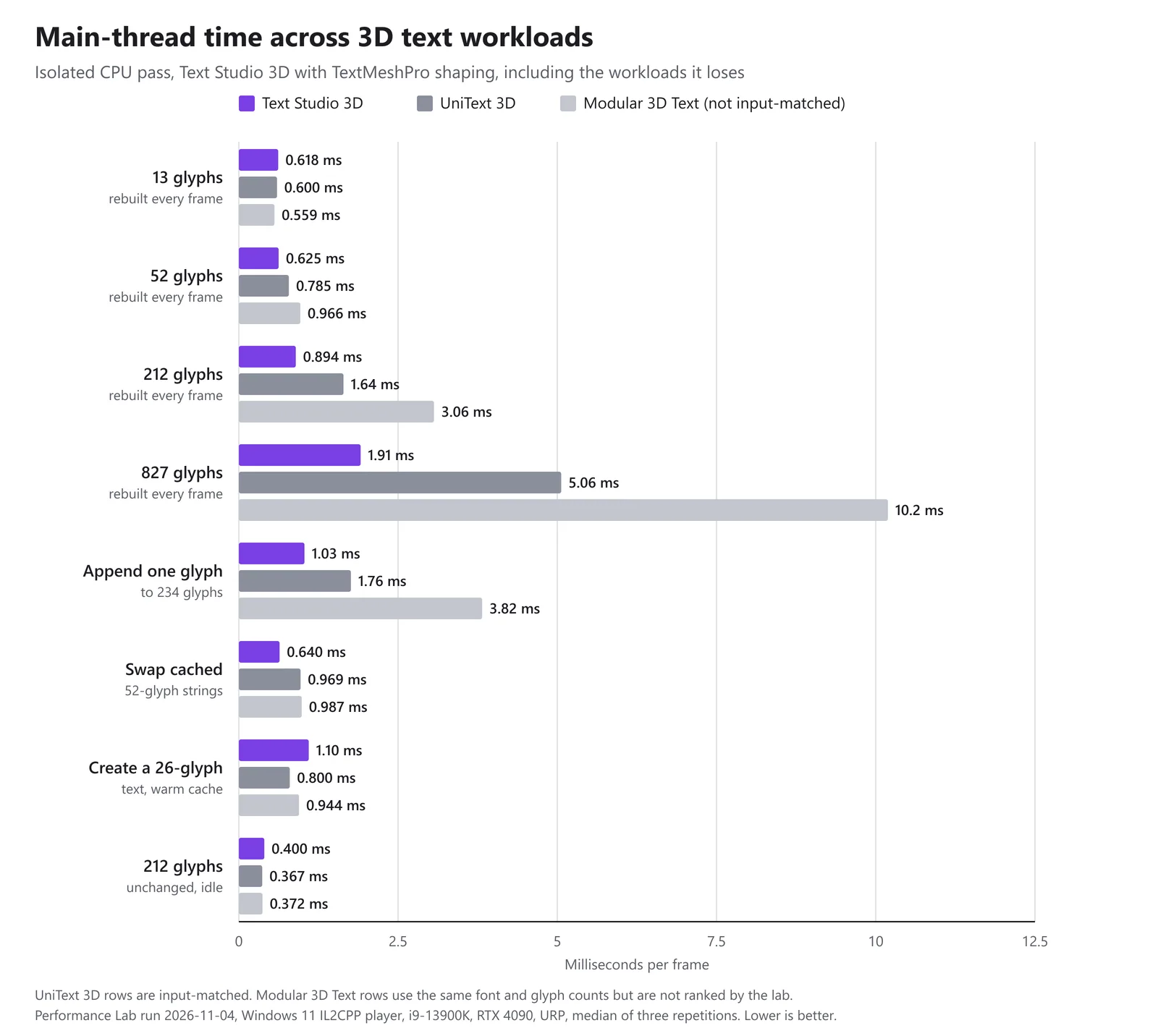
Benchmarks of 3D text tools are easy to get wrong. One tool extrudes at a different size, another flattens curves more finely and builds more geometry, a third adds a bevel by default, and the chart ends up measuring the setup instead of the tool.
This is how the Text Studio Performance Lab compares Text Studio 3D with UniText 3D and Modular 3D Text, and what its run of 4 November 2026 found. In matched lab workloads, Text Studio 3D rebuilt 827 glyphs every frame in 1.95 ms of main-thread time against 5.17 ms for UniText 3D, and it does not win three of the eight workloads in the chart above. I built Text Studio 3D, so read this as the maker’s account; the method and every number are here so you can check it.
What the Performance Lab compares
The Performance Lab is a Unity player that drives each tool through its public API with the same workloads. The method it shares with the flat text comparisons, including the verdict rules, is described in How we benchmark Unity text animation tools; this article covers what is specific to 3D. The run compared:
- Text Studio 3D 1.4.0, still in development at the time, with TextMeshPro shaping
- UniText 3D from UniText 3.40.0, with matched inputs
- Modular 3D Text 4.9.2, measured with the same font and glyph count but not ranked
The machine: Windows 11, Intel Core i9-13900K, NVIDIA GeForce RTX 4090, Direct3D 11, URP and Unity 6000.3.27f1, running a clean IL2CPP release player at 1280 x 720.
How a 3D text benchmark run works
- Clean release players. The lab builds a clean IL2CPP player without development options, the way games ship, not the Editor.
- Two passes. A CPU-isolated pass disables the text renderers, a rendered pass draws every frame, and their results are never mixed. Creating and appending text run only in the CPU-isolated pass.
- One operation per frame. Every measured frame performs one complete operation, such as a rebuild: 120 measured frames after 30 warmup frames per workload.
- Three repetitions. Each tool runs each workload three times. The published value is the median of the three repetition medians.
- A stability rule. A workload counts as unstable when its repetition medians vary by more than 12% (coefficient of variation) and also spread by more than 0.15 ms. The absolute floor keeps sub-millisecond rows from failing on timer noise. Unstable groups rerun automatically; in this run, one Modular 3D Text workload needed two reruns before its repetitions agreed.
- Metrics. Main-thread time comes from Unity’s CPU Main Thread Frame Time counter and covers the whole frame, not only the text. GPU time skips frames whose timer did not resolve. Before every rendered execution, the GPU is kept busy for half a second, because desktop GPUs switch clock levels on light frames and would otherwise start some executions slow.
- Parity. Differences within 5% count as parity, and so do desktop GPU differences under 0.3 ms, where timer noise is larger than the work.
Matched inputs between Text Studio 3D and UniText 3D
3D comparisons go wrong in the geometry, so the UniText 3D rows follow a fixed input contract. Both tools receive:
- the same font file, its first face and default variation, with no fallback face
- the same ASCII text and visible glyph count
- the same world size and extrusion depth
- the same contour tolerance, fixed at 0.02 em
- one unbeveled layer with an opaque material
- the same cache state, warm unless the workload says otherwise
What the contract does not force is equal triangle counts. Two valid tessellators produce different meshes from the same outline, so the lab records each tool’s actual triangle count instead of treating a difference as a failure.
Scheduling is the one declared difference. UniText 3D completes its work through its own native scheduling, the way it runs in a game. Main-thread time covers the whole frame, so work deferred to later in the frame still counts. Work on other threads does not appear in main-thread time; the lab records total CPU time across all threads next to it as a diagnostic, outside the verdicts.
Some workloads have no UniText 3D row at all. UniText 3D builds one combined solid, so there is no per-letter output to compare, and the lab’s adapter cannot create UniText 3D text from a cleared cache. Those rows stay in the record as unavailable instead of being filled with an estimate.
Why Modular 3D Text is measured but not ranked
Modular 3D Text builds letters from its own font format, converted from TTF, with its own world size and tessellation. The lab gives it the same font file and the same glyph count, but its adapter cannot yet map the world size, depth, contour tolerance and material, so the rows are measured and never ranked. They are useful orientation, not a verdict. Creating text from an empty cache is not compared either, because Modular 3D Text starts from prebuilt font data.
The workloads
The static workloads are not unchanged text: every frame regenerates the geometry of a new string of the same length. They measure the cost of building 3D text, frame after frame.
| Workload | What each measured frame does |
|---|---|
| Rebuild 13, 52, 212 or 827 glyphs | Regenerates a new string of 16, 64, 256 or 1,000 characters |
| Append | Adds one glyph to a 256-character base (234 visible glyphs) |
| Replace | Swaps cached 64-character strings of the same length (52 glyphs) |
| Warm create | Recreates a 32-character text (26 glyphs) while warmed reusable geometry is kept |
| Idle | Nothing changes: an unchanged 256-character text (212 glyphs), no rebuild |
| Per-letter | Rebuilds a 128-character text (105 glyphs) with one object per letter |
A finished title in a game rebuilds rarely, so the idle row is the closest to what it costs once it is on screen.
Rebuilding 827 glyphs every frame
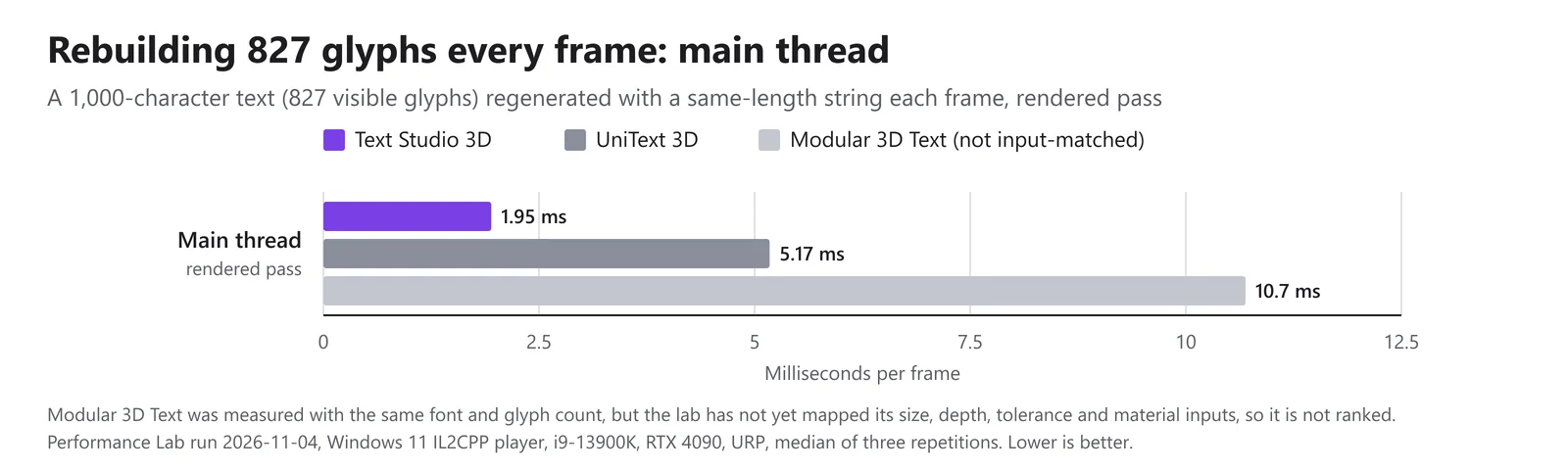 Rendered-pass main-thread time for rebuilding 827 glyphs every frame. Modular 3D Text is not input-matched.
In the rendered pass, Text Studio 3D needed 1.95 ms of main-thread time per frame, UniText 3D 5.17 ms, 2.7 times as much, and Modular 3D Text 10.7 ms.
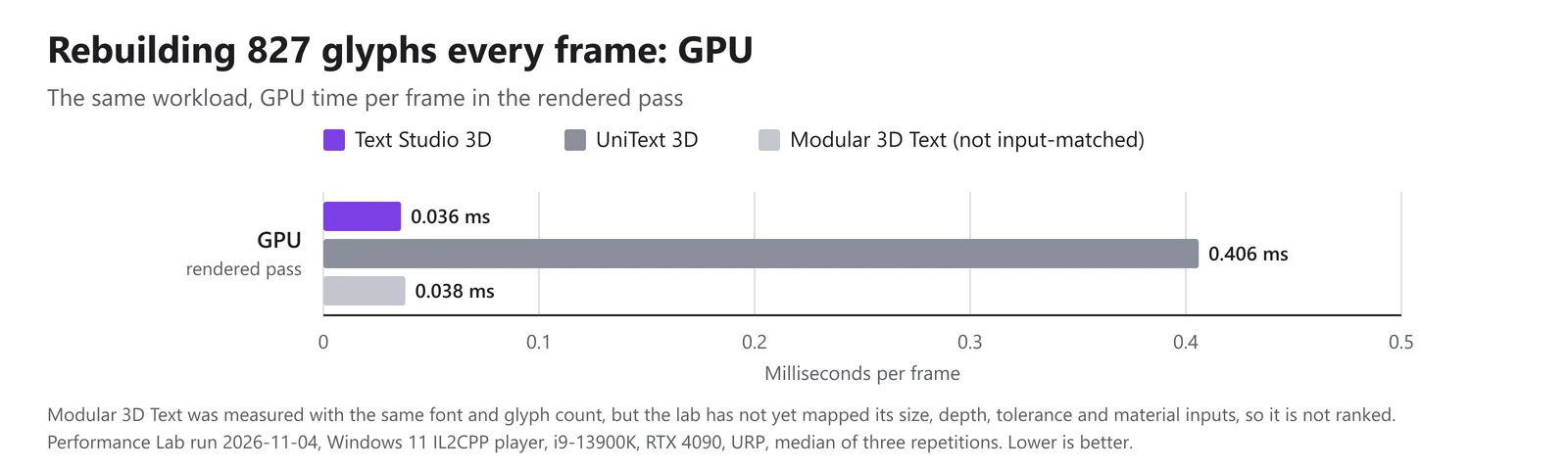 GPU time for the same workload in the rendered pass.
On the GPU the gap is wider. Text Studio 3D drew the frame in 0.036 ms, UniText 3D in 0.406 ms, eleven times as much, and Modular 3D Text in 0.038 ms. At 0.37 ms, the UniText 3D difference clears the 0.3 ms desktop parity floor, so it is a real result, not timer noise.
Results across the eight workloads
Main-thread time per frame in milliseconds, CPU-isolated pass, lower is better:
| Workload | Text Studio 3D | UniText 3D | Modular 3D Text (unranked) |
|---|---|---|---|
| Rebuild 13 glyphs | 0.618 | 0.600 | 0.559 |
| Rebuild 52 glyphs | 0.625 | 0.785 | 0.966 |
| Rebuild 212 glyphs | 0.894 | 1.643 | 3.065 |
| Rebuild 827 glyphs | 1.912 | 5.061 | 10.192 |
| Append one glyph to 234 | 1.031 | 1.760 | 3.820 |
| Swap cached 52-glyph strings | 0.640 | 0.969 | 0.987 |
| Create 26 glyphs, warm cache | 1.098 | 0.800 | 0.944 |
| 212 glyphs unchanged (idle) | 0.400 | 0.367 | 0.372 |
Per-letter output has no UniText 3D row. Rebuilding 105 glyphs every frame as one object per letter took Text Studio 3D 0.836 ms against 2.687 ms for Modular 3D Text, and 0.966 against 2.609 ms in the rendered pass.
From 13 to 827 glyphs, Text Studio 3D’s time rises from 0.618 to 1.912 ms and UniText 3D’s from 0.600 to 5.061 ms. Main-thread time includes the rest of the frame, and the idle row shows that an unchanged 212-glyph text already costs every tool about 0.37 to 0.40 ms, so the small rebuilds differ by hundredths of a millisecond on top of a shared baseline.
Where Text Studio 3D does not win
- Rebuilding 13 glyphs. UniText 3D was 0.018 ms ahead, about 3% and inside the lab’s 5% parity band; Modular 3D Text was 0.059 ms ahead. Text Studio 3D’s time barely moves between 13 and 52 glyphs, which points to a fixed cost per rebuild that matters on short strings and fades as text grows.
- Creating a text with a warm cache. 1.098 ms against 0.800 for UniText 3D and 0.944 for Modular 3D Text is the clearest loss. Every frame here creates a complete new text object. For text that appears often, reuse objects instead: TextStudioEmitter keeps complete 3D hosts in a pool, and prewarming builds characters before they are needed.
- Idle text. 0.400 ms against 0.367 and 0.372: an unchanged text costs Text Studio 3D about 0.03 ms more per frame. Small, but outside the parity band.
What UniText shaping costs
Text Studio 3D can also shape text through the optional UniText integration, which adds Arabic and Hebrew shaping, bidirectional order and ligatures (UniText is a separate paid text engine). That route costs more: rebuilding 827 glyphs every frame took 15.9 ms of main-thread time with UniText shaping, against 1.9 ms with TextMeshPro shaping. Use it where the language needs it, and keep text that changes often on TextMeshPro shaping where you can.
The diagnostic that failed
The batch as a whole was marked failed. Besides the comparisons, every run includes internal diagnostic rows that measure the cost of single features and never enter a ranking. One group of them, the stroke-source diagnostics, times how the centerlines that Writing draws along are derived from a glyph. Two of its rows failed validation because the requested stroke was not published: once because a raster trace had too little resolution, once because a rounded authored path left the letter’s filled area. Validation rejects such a row instead of recording a cheap, empty sample. Every comparison row in this article completed, validated and passed the stability rule.
Limits of these numbers
- Desktop only. This is one PC and one run. Phones, tablets and standalone headsets usually run out of GPU time and heat headroom before CPU time, and they are measured in separate device runs; see 3D text on mobile and Quest.
- Versions move. Text Studio 3D 1.4.0 was still in development when it was measured, and UniText ships new versions often (3.42.2 came out on 10 November 2026).
- The Performance page is a different selection. The Performance page shows a few workloads where Text Studio 3D leads, from earlier targeted runs that name workloads by character count, so its numbers differ from the tables here.
Measure your own scene
Benchmarks show where a tool stands; your scene shows what you need. Build a release player for the device you ship to, read GPU time as well as main-thread time, and use the Unity Profiler on a development build to see which Text Studio 3D markers take the time. The Choose Output and Performance chapter covers the settings that decide most of the cost, and changing 3D text at runtime shows how to keep rebuilds cheap.
Frequently asked questions
Is Text Studio 3D faster than UniText 3D?
In matched lab workloads on a desktop PC, Text Studio 3D was faster when 52 or more glyphs were rebuilt every frame, when text was appended or swapped, and on the GPU at 827 glyphs: 1.95 ms of main-thread time against 5.17 ms, and 0.036 ms of GPU time against 0.406 ms. UniText 3D was ahead when creating a text with a warm cache and for unchanged idle text, and the two were within 3% at 13 glyphs.
Why is Modular 3D Text not ranked?
Its rows use the same font file and glyph count, but Modular 3D Text builds from its own font format with its own world size and tessellation, and the lab cannot yet give it the same size, depth, contour tolerance and material. Its numbers are shown for orientation and never enter a ranking.
Can I run the Performance Lab myself?
No. The lab is an internal test harness and is not part of the package, because it bundles adapters for other products. Measure your own scene in a release build on the device you ship to, and use the Unity Profiler on a development build for detail.
Do these numbers apply to phones and Quest?
No. They come from one desktop PC. Mobile devices and standalone headsets usually run out of GPU time and heat headroom before CPU time, so they are measured in separate device runs.
Real 3D text for Unity, built from your TextMeshPro text.
Keep reading
 Comparison
Text Studio 3D vs UniText 3D
UniText 3D is the 3D module of a full text engine with the best script coverage in Unity. Text Studio 3D builds deeper geometry, more styles, spatial UI and Physical Letters on TextMeshPro text, and the UniText integration combines the two. Comparison
Text Studio 3D vs Modular 3D Text
Modular 3D Text costs less, supports Unity 2020.3 and has a mature 3D UI kit. Text Studio 3D adds bevels, layered materials, 111 styles and 29 native 3D effects to the TextMeshPro text you already have. Use case