How to make 3D text in Unity: every method compared
How to make 3D text in Unity, flat or with real depth: TextMeshPro, UI Toolkit, shader fakes, Blender exports and runtime mesh tools compared, with steps and a table.
“3D text” means two different things in Unity. Most tutorials, and Unity’s own menus, use it for flat text placed in the 3D world: a TextMeshPro label above a door, a name over a character, a price on a shelf. That text has a position and rotation in 3D space, but every letter is a flat card with no sides and no thickness. If that is what you need, TextMeshPro is free, sharp and already in your project.
3D text with depth is different: solid letters with beveled edges that catch the light, cast shadows and still look like letters from the side. Unity has no built-in way to make it. You can fake the depth in a shader, model the text in Blender and import the mesh, or let a runtime mesh tool build the geometry inside Unity. Below, every method gets steps, strengths and limits, then one table compares them and a decision guide picks one.
I built Text Studio 3D, one of the runtime mesh tools on this page, so I have a point of view. I have tried to say plainly where another method is the better choice. Facts about other products were checked on November 11, 2026.
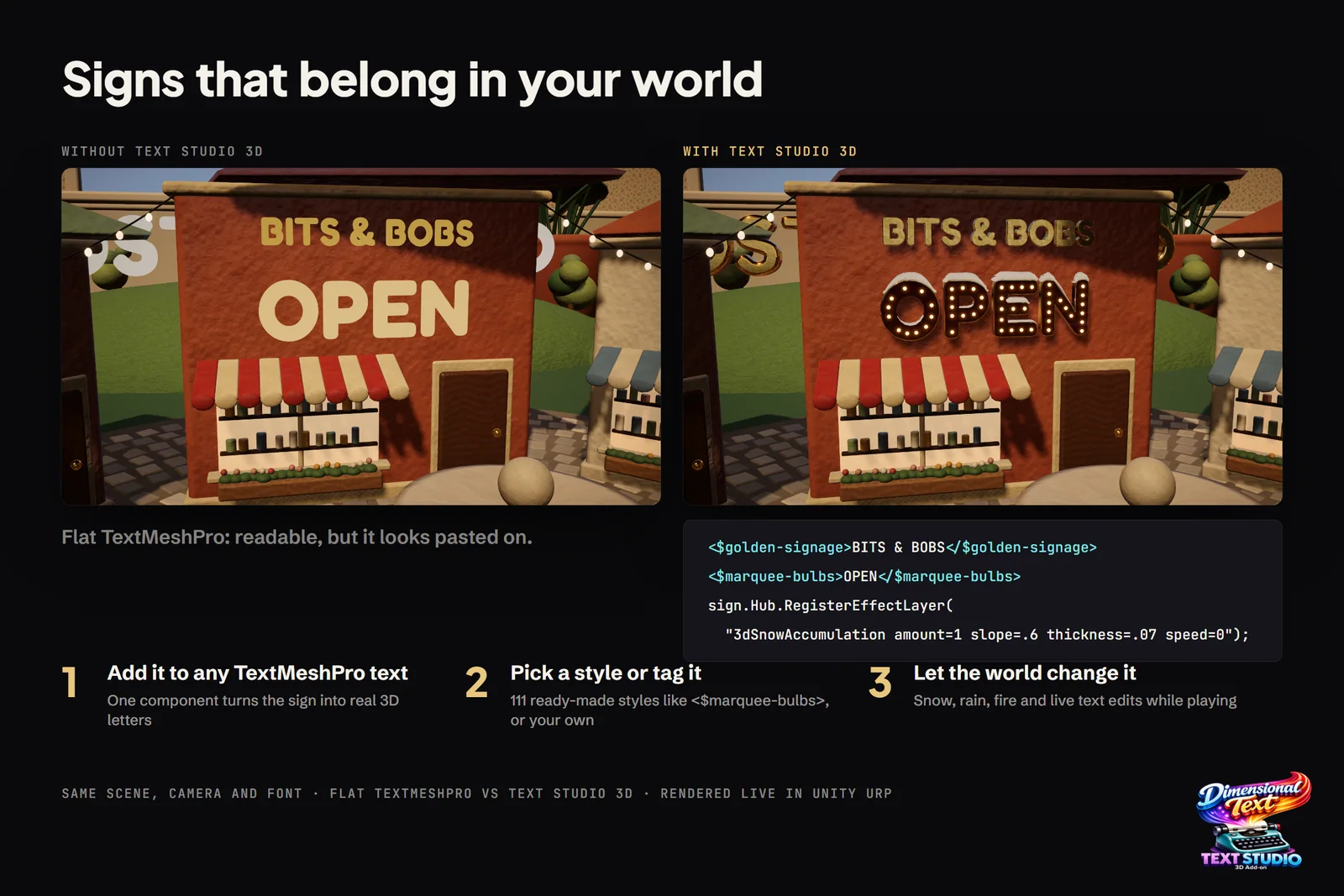 Same scene, camera and font: flat TextMeshPro on the left, Text Studio 3D on the right, rendered live in Unity URP.
Unity 3D text with depth: every method at a glance
| Method | Real depth | Lit and shadows | Runtime changes | Localization | Per-letter animation | Cost | Effort |
|---|---|---|---|---|---|---|---|
| Legacy TextMesh | No, flat quads | No | Yes | Basic | Script it | Free | Low |
| TextMeshPro | No, bevel is shading | Unlit by default; lit shaders shade a flat card | Yes | Broad; Arabic needs a plugin | Vertex scripting | Free | Low |
| UI Toolkit world space | No, flat panel | No, UI rendering | Yes | Broad | Script or USS | Free | Low |
| Shader fakes | Illusion only | Faked in the shader | Yes | As TextMeshPro | As TextMeshPro | Free to US$24.97 | Low |
| Blender export | Yes | Yes | No, re-export | One export per language | Separate objects | Free | High per change |
| Runtime mesh tools | Yes | Yes | Yes | Varies by tool | Most tools | US$29.99 to US$144.50 | Low |
Legacy TextMesh (3D Text)
The Text Mesh component is Unity’s oldest way to put text in a scene. Its manual page says it generates geometry for text, but that geometry is one flat quad per character drawn from a font texture, and the page itself notes the component’s limited functionality (Text Mesh).
- Add Component > Mesh > Text Mesh to an empty GameObject.
- Type the text and assign a font.
- Keep it sharp by raising Font Size and lowering Character Size, instead of scaling a small font up.
It needs no setup and costs very little. It is also unlit, blurry unless sized with care, and Unity’s default font material ignores occlusion, so the text shows through walls (Microsoft’s Text in Unity covers both problems). Use TextMeshPro for anything new.
TextMeshPro in world space
TextMeshPro is the right default for most text in a 3D scene: labels, nameplates, signs painted on a surface and world-space menus. It draws each character on a quad and shades it from a signed distance field, so it stays crisp at any size and costs little (3D text objects).
- Choose GameObject > 3D Object > Text - TextMeshPro and import the TMP Essential Resources when Unity asks.
- Type the text, pick a font asset and size it with the font size rather than non-uniform scale.
- For apparent depth, turn on the material’s Lighting section and set its Bevel; Local Lighting sets the direction of the simulated light.
- To react to scene lights, switch the material to Distance Field (Surface) in the Built-in Render Pipeline, TMP_SDF-URP Lit in URP or TMP_SDF-HDRP LIT in HDRP.
All of that depth is shading. The default Distance Field shader ignores scene lighting and simulates its own, and its documentation presents the bevel as an illusion of depth (Distance Field shader). The lit shaders respond to your lights but still shade a flat card: there are no sides to catch a rim light, the text vanishes edge-on, and pronounced bevels show artifacts. Lit 3D text in URP and HDRP covers the lit shaders, and the TextMeshPro comparison shows what real geometry changes.
UI Toolkit world-space panels (Unity 6.2 and newer)
Since Unity 6.2, a UI Toolkit panel can sit in the scene beside 3D objects, which suits menus and XR panels built with UXML and USS (World Space UI).
- Create a Panel Settings asset and set its Render Mode to World Space.
- Add a UI Document to a GameObject and assign the Panel Settings and your UXML.
- Set the size and pivot under World-Space Dimensions, then place the GameObject with the transform tools.
- Add a Panel Input Configuration (GameObject > UI Toolkit) for pointer input.
You get UI Toolkit’s layout, styling and data binding in world space. The panel is still flat: its text has no depth and is drawn by the UI renderer rather than lit by the scene.
Shader fakes: TMP3D and All In 1 Text Toolkit
Shader tricks keep your TextMeshPro text and add the look of depth on the GPU.
TMP3D is a free, open source package that raymarches a volume from TextMeshPro glyphs with a geometry shader. At version 0.1.2 it offers an unlit and a surface shader, UI text is not supported yet, OpenGL ES 2 is excluded, several HDRP graphics APIs are marked unsupported, and bevels are still planned.
All In 1 Text Toolkit (US$24.97 on sale, list US$49.95) lights a bevel inside the font atlas padding and extrudes by drawing a second copy of every letter behind it for the sides and drop shadow: one draw call, twice the vertices. Its documentation is candid that no draw order keeps every side behind every letter on curved or diagonal text (Bevel, Extrude and Lighting). It supports Built-in and URP, not HDRP.
- Import the package into a project that already uses TextMeshPro.
- Switch the text’s material to the package’s shader and enable its depth or extrude feature.
- Set depth, light direction and colors, then check the text from every camera angle your game uses.
Both are cheap and fine for titles seen from the front. From the side the illusion breaks, because there is no geometry behind it.
Blender or another 3D tool
Modeling the text in Blender gives you real geometry with complete control, for free.
- In Blender, choose Add > Text, press Tab and type the words.
- In the Object Data properties, choose the font, then set Extrude for depth and a bevel depth for rounded edges in the Geometry panel (Blender manual).
- Convert it with Object > Convert > Mesh, check the normals and unwrap UVs if you plan to texture it.
- Export with File > Export > FBX, import it into Unity and assign materials; enable Generate Lightmap UVs in the import settings if it will be lightmapped.
For a hero logo you want to sculpt by hand, this is hard to beat, and Cinema 4D, Maya and 3ds Max work the same way at subscription prices. The catch is that the result is frozen. Every wording, language or copy change means a new export, scores and player names are out of reach, and per-letter animation means exporting each letter separately. The Blender comparison covers when each route wins.
Runtime mesh tools
These tools turn font outlines into real meshes inside Unity, in the editor and at runtime, so the words can change, animate and take light like any other object. They differ more than their store pages suggest:
- Text Studio 3D (US$24, requires Text Studio at US$38; Unity 2023.2 or newer): adds 3D to the TextMeshPro text you already have. 22 bevel profiles plus custom curves, layer stacks, materials per surface region, 111 styles and 25 hero designs, 29 native 3D effects, physical letters and spatial UI. Arabic and Hebrew shaping needs the optional UniText integration, and export is OBJ, not FBX.
- Modular 3D Text (US$29.99; Unity 2020.3 to 6.5): the category veteran, with 50 reviews averaging 4.9, a complete 3D UI kit and an XR Interaction Toolkit package. It converts TTF fonts into its own format and has no bevels (its developer said in November 2025 that beveled or rounded fonts are not possible), no per-surface materials and no connected scripts such as Arabic.
- UniText with UniText 3D (US$99 for the whole text engine; Unity 2022.3 or newer): bevels in eight cross-sections or a custom curve, materials for faces, bevels and sides, HarfBuzz shaping for every Unicode script and FBX export. It replaces TextMeshPro with its own components, the 3D module arrived in October 2026, and under HDRP its 3D shader draws unlit unless you copy in a Shader Graph.
- 3D Text Suite (US$35; Unity 6.0.77 or newer): layered bevel modeling, a timeline animation editor with audio and text input with IME. Static TTF fonts only, limited scripts, and no documented physics, path text or export.
- Dynamic 3D Text (US$144.50, version 0.9.5): runtime meshes straight from TTF and OTF files with bevels, right-to-left and partial Indic shaping, but no animation, styles, UI or physics.
Speed differs too. In matched lab workloads on a desktop PC, rebuilding 827 glyphs every frame (a 1,000-character string) cost Text Studio 3D 1.95 ms of main-thread time in the rendered pass against 5.17 ms for UniText 3D. With only 13 glyphs, UniText 3D was slightly ahead (0.600 against 0.618 ms of isolated main-thread time). Benchmarking 3D text has every row, including the ones Text Studio 3D loses.
How to make real 3D text with Text Studio 3D
Text Studio 3D is my answer to the depth problem: the TextMeshPro text you already use becomes solid, beveled, lit geometry, live in the editor and at runtime. One Asset Store reviewer, Alexandru_Gheorghe, summed it up as “Makes creating lively 3D text a breeze, no external software needed.”
- Install Text Studio first, then Text Studio 3D, in Unity 2023.2 or newer with the Built-in Render Pipeline, URP or HDRP.
- Choose GameObject > Text Studio > 3D > Text (since 1.4.0 it creates a centered, single-line 3D Text object), or select an existing world-space TextMeshPro object and add Text Studio 3D from its setup card. Your text, font and layout stay as they are.
- Type the words in the Text Studio Text component, which remains the source of truth for content and animation.
- Pick a look in Tools > Text Studio > 3D Gallery or the Style Browser in the inspector, then adjust Body Depth, the Front Bevel and Back Bevel, and the region materials.
- Check the result in Live 3D Preview, then open Tools > Text Studio > Runtime Preparation so player builds have outline data for every glyph they show.
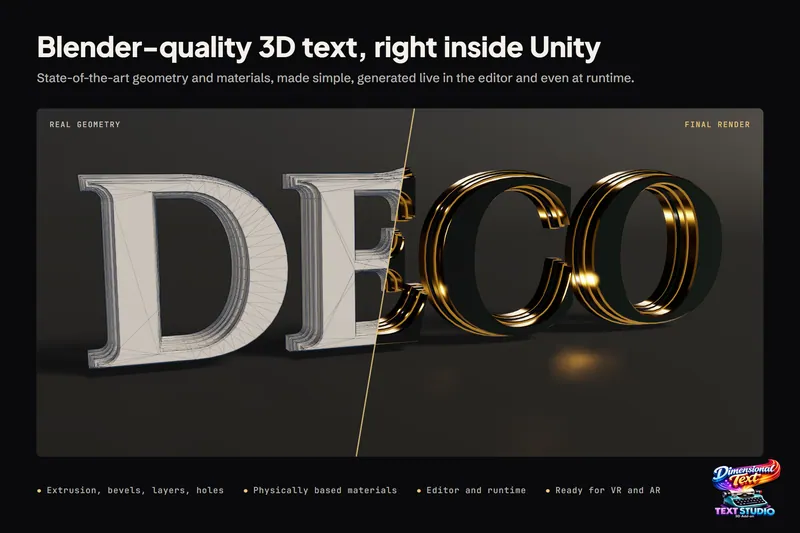
 The geometry behind a title: triangulated front caps, bevel rings and side walls, generated from the font outline.
The manual chapter Create Your First 3D Title walks through the same steps, and 3D text with depth shows what the geometry can do.
Which method should you use
- Labels, nameplates, prices and signs read at a glance: TextMeshPro. Free, sharp and cheap.
- Menus built with UI Toolkit in Unity 6.2 or newer, including XR panels: UI Toolkit world space.
- A title seen only from the front that needs a beveled look in Built-in or URP: a shader fake such as All In 1 Text Toolkit, or TextMeshPro’s own bevel.
- One fixed logo that never changes and needs hand modeling: Blender.
- Text that changes, gets localized, animates per letter, must cast shadows or is seen from the side: a runtime mesh tool. Choose Text Studio 3D to keep TextMeshPro and get the deepest geometry and the largest style library; UniText 3D if you need Arabic, Hebrew or Indic shaping in 3D or FBX export and are ready to switch text engines; Modular 3D Text for Unity versions before 2023.2 or simple 3D menus without bevels.
The comparison hub has a detailed page for each alternative.
Frequently asked questions
Does Unity have built-in 3D text with depth?
No. The legacy Text Mesh component, TextMeshPro and UI Toolkit all draw flat glyphs: TextMeshPro puts each character on a quad, and its bevel is shading. Real depth needs geometry, either a mesh modeled in Blender or another 3D tool, or a runtime mesh tool that builds it inside Unity.
Can TextMeshPro make extruded 3D text?
Not on its own. Its Bevel setting adds apparent depth inside the flat glyph, and shader packages such as TMP3D raymarch a volume without real geometry. Text Studio 3D keeps your TextMeshPro text, font and layout and builds solid, beveled meshes from them.
Should I use Blender or a Unity tool for 3D text?
Use Blender for a fixed logo or title that never changes and needs hand modeling. Use a runtime mesh tool when the words change, get localized, animate per letter or appear in many places, because every change in Blender means a new export.
How do I make 3D text in Unity for free?
For flat text in a 3D scene, TextMeshPro is free and built in. For real depth at no cost, model the text in Blender and import the mesh, accepting one export per wording and language. TMP3D is a free, experimental shader that raymarches depth for TextMeshPro text.
Real 3D text for Unity, built from your TextMeshPro text.
Keep reading
 Comparison
Text Studio 3D vs 3D text made in Blender
Blender is free and gives unlimited modeling freedom for a sculpted hero logo. Text Studio 3D keeps every other string live in Unity: edit, translate and animate it per letter without a re-export loop. Use case