How Text Studio 3D keeps builds small
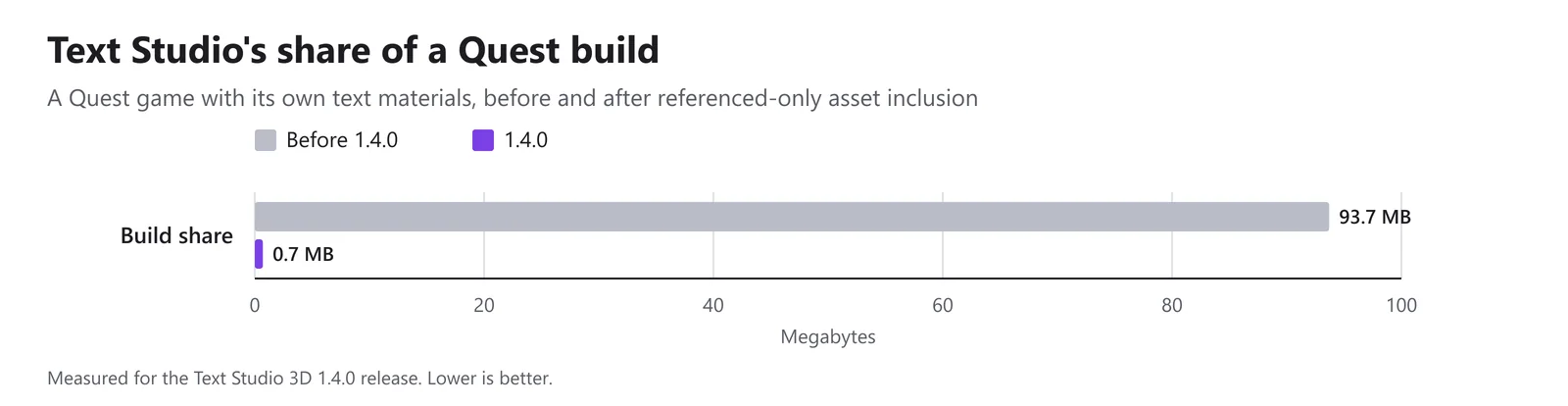
Text Studio 3D 1.4.0 strips unused shader programs and ships built-in assets only when referenced: in a Quest game, Text Studio's share fell from 93.7 MB to 0.7 MB.
A text tool should cost a game the text it shows, not the whole library it ships with. Before 1.4.0, Text Studio 3D did not meet that bar: its built-in materials, material sets, style textures and fonts lived in a Resources folder, so every player build carried all of them, whether the game used them or not.
Text Studio 3D 1.4.0 changes how builds are assembled. Built-in assets ship only when a text, style or material set references them, shader programs for unused render pipelines and variants are skipped, and optional features ship only when the build’s texts use them. In a Quest game with its own text materials, Text Studio’s share of the build fell from 93.7 MB to 0.7 MB. I built Text Studio 3D; this is what changed, why it works and how to check your own build.
Why Resources folders make Unity builds bigger
Unity builds a player from the scenes in the build and everything they reference, directly or through other assets. A material that no scene, prefab or referenced asset uses never ships.
Resources folders are the exception. A script can load any asset in a Resources folder by name at runtime with Resources.Load, and Unity cannot know at build time which names a script will ask for, so it includes everything in every Resources folder. Unity’s documentation states it directly: assets in Resources folders always go into the player build, even when nothing references them. It also warns that a lot of content there slows down application startup and builds.
For Text Studio 3D, that meant every built-in material, material set, style texture and font, in every build.
Built-in assets now ship only when referenced
In 1.4.0, those assets moved out of the Resources folder into an ordinary folder. Their GUIDs did not change, so existing references keep working, and no runtime code looks them up by name any more. A player now contains exactly the built-in materials, material sets, style textures and fonts that its texts, styles and material sets reference. A Quest game that brings its own text materials references very little of that content, which is how Text Studio’s share of its build fell from 93.7 MB to 0.7 MB.
Two details complete the picture:
- A 3D text without a style or layers now draws the plain Clean shape instead of the Porcelain look, and every 3D text references the Lit shader, so every build contains that one shader.
- The by-name catalogs of built-in styles, materials and material sets (BuiltInExtrudeStyles, BuiltInMaterials and BuiltInMaterialSets) are editor-only now. At runtime, reference a style asset and link it with ApplyStyle, or copy its layers into editable inline layers with CopyLayersFrom.
Optional features ship only when used
The same rule covers large optional features. Emoji and default-font outlines, the GPU effect variants with their detail atlas, and the Writing presentation ship only when the build’s texts use them.
A build can only judge the texts it contains. For text that your scripts create at runtime, open Runtime Preparation > Settings > Shown at runtime and set the feature to Always include. If a runtime text asks for a feature that was left out, it keeps its CPU or unchanged output and logs one warning instead of failing.
Shader programs for pipelines and variants you do not use
Text Studio 3D’s Lit and Glass shaders support the Built-in Render Pipeline, URP and HDRP, so they carry programs for all three. Since 1.4.0, player builds skip shader programs for render pipelines that no configured quality level uses, and they remove the 3D Writing variants a build does not need. URP projects that render with Forward or Forward+ also drop deferred variants they never use, while materials that reuse shader passes keep working. In a Forward URP project, Text Studio 3D shader compilation falls by about a third, with identical rendering.
Two related notes from the manual: URP builds for OpenGL ES 3 skip the deferred GBuffer passes, because URP renders forward there, and the first player build after updating Text Studio compiles more specialized variants and takes longer, while later builds reuse Unity’s shader cache.
A smaller package
The package is about 30 MB smaller because the bundled TextMeshPro font assets no longer carry font-feature data that had been stored by accident; the Inter fonts alone account for 22 MB of it. Builds that include those fonts also get smaller and load faster. TextMeshPro reads the kerning it needs from the font file instead, through Get Font Features at Runtime, which is enabled by default.
The Atelier sample’s textures now use high-quality platform compression, which cuts their footprint in a build that includes them from about 60 MB to about 31 MB. Font licenses and source notes no longer become text assets in a player.
Check your own build size
Unity writes a report to the Editor log after every build. To read it:
- Build your player as usual.
- Open the Console window (Window > General > Console), open its More menu (⋮) and choose Open Editor Log.
- Find the report of the latest build. Unity lists the build’s size by asset type, then every asset in order of its contribution.
- Search that list for the Text Studio and Text Studio 3D folders, and for any Resources folder of your own: everything in a Resources folder appears there whether it is used or not.
- For shaders, search the log for
Compiling shader "TextStudio/3D Lit"andCompiling shader "TextStudio/3D Glass". Each pass reports its full variant space, what remains after Unity’s built-in and scriptable stripping, and how many variants were compiled.
Unity’s pages on reducing the file size of a build and checking how many shader variants you have explain both reports. Comparing a build from before the update with one after it is the quickest way to see what 1.4.0 removed from yours.
Where this matters most
On Quest and phones, build size shows up in download size, and a large Resources folder also slows startup. For the rest of the mobile picture, see 3D text on mobile and Quest; for the first frame after loading, see how the first frame of 3D text on Quest 3 fell from 74 to 18 ms. The Prepare Fonts, Glyphs, and Builds chapter covers Runtime Preparation in detail.
Frequently asked questions
Why do Resources folders make Unity builds bigger?
Unity includes every asset in a Resources folder in the player, even if nothing references it, because scripts can load those assets by name at runtime. Assets outside Resources folders ship only when a scene or a referenced asset uses them.
Do I need to change anything after updating to Text Studio 3D 1.4.0?
Existing references keep working because the moved assets kept their GUIDs. Scripts that applied built-in presets by name at runtime need a reference to a style asset instead, linked with ApplyStyle or copied with CopyLayersFrom. Texts created only at runtime that need emoji outlines, GPU effects or Writing need those features set to Always include in Runtime Preparation.
How do I see what Text Studio adds to my build?
Build, then open the Editor log from the Console window's More menu with Open Editor Log. Unity lists the build's assets by type and every asset by size, so you can search for the Text Studio folders. Search the log for Compiling shader to see the variant counts of the TextStudio/3D Lit and TextStudio/3D Glass shaders.
Real 3D text for Unity, built from your TextMeshPro text.
Keep reading
 Use case
Fast 3D text on mobile and Quest, with small builds
Phones and headsets run out of GPU time and heat before CPU. How to pick output, mesh detail and prepared geometry for them, and what Text Studio 3D 1.4.0 changed: Quest 3 first frame 74 to about 18 ms, build share 93.7 to 0.7 MB.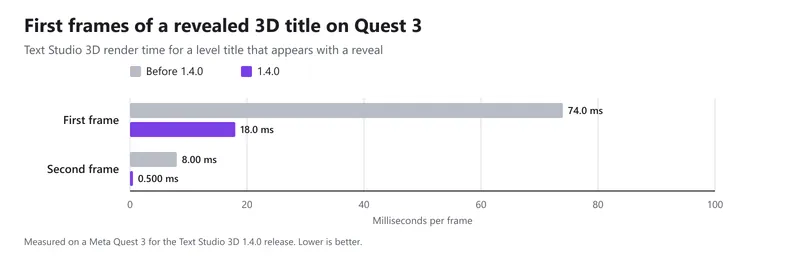 Article
Cutting the first frame of 3D text on Quest 3 from 74 to 18 ms
A revealed level title used to cost 74 ms of Text Studio 3D render time on its first frame on Quest 3. Version 1.4.0 reads fonts and prepared geometry in the background and assembles the mesh once: about 18 ms, and 0.5 ms on the next frame. Article