Text Studio 3D vs UniText 3D
UniText 3D extrudes text inside a complete US$99 text engine. Text Studio 3D adds deeper 3D to TextMeshPro text. Features, matched benchmarks and using both together.
Light Side added UniText 3D to UniText in version 3.30.0 on 2026-10-12, so it is a module of a full text engine rather than a standalone 3D tool. In short, UniText 3D wins on languages and breadth, Text Studio 3D on the depth of the 3D itself, and in matched lab workloads Text Studio 3D rebuilt large text with less main-thread and GPU time.
The facts below come from UniText’s Asset Store listing, website and changelog, checked on 2026-11-11 at version 3.42.2. It updates almost weekly, so check the changelog before deciding. For UniText as a 2D text engine, see Text Studio and UniText.
At a glance
| UniText 3D | Text Studio 3D | |
|---|---|---|
| Price | US$99 for the whole engine, 3D included | US$24 plus Text Studio (US$38): US$62 for a new buyer |
| Store record | 5.0 from 28 reviews; 3D module since 2026-10-12 | 5.0 from 7 reviews since 2026-08-06 |
| Unity | 2022.3 or newer | 2023.2 or newer |
| Pipelines | Built-in, URP, HDRP (lit HDRP text through a copied Shader Graph) | Built-in, URP, HDRP |
| Text component | UniText’s own components and fonts | Your TextMeshPro or Text Studio text |
| Scripts and emoji | Every Unicode script; color and extruded emoji | What TextMeshPro lays out, plus Arabic and Hebrew through UniText; monochrome emoji outlines |
| Bevels | Front and back, eight cross-sections or a custom curve | Front and back, 22 profiles or a custom Bezier curve |
| Layers and faces | Extra solid layers; depth and bevel per text range | Layer stacks with their own depth, bevel and material; shaped faces; hollow bodies |
| Materials | Faces, bevels and sides | Nine regions, reusable Material Sets |
| Looks | 7 looks | 111 styles and 25 hero designs |
| Animation | 3D modifiers, 3D reveals, typewriter | Compatible Text Studio effects plus 29 native 3D effects |
| Export | OBJ, or FBX with the FBX Exporter package | OBJ |
Where UniText 3D is stronger
- Every script. HarfBuzz shaping, bidirectional text and every Unicode script, with dictionary line breaking for Thai, Lao, Khmer and Myanmar, system font fallback and a Unity Localization integration. Text Studio 3D reaches Arabic and Hebrew only through UniText.
- Emoji. Color emoji and extruded emoji stickers. Text Studio 3D builds emoji from a monochrome Noto Emoji outline font.
- FBX export. OBJ, or FBX with Unity’s FBX Exporter package. Text Studio 3D exports OBJ only.
- Unity 2022.3. UniText supports 2022.3 LTS and newer; Text Studio 3D needs 2023.2.
- One engine for everything. UI text, input fields, documents and 3D solids share one engine and one set of fonts. If your team is replacing TextMeshPro anyway, US$99 buys more than 3D.
- Reviews and release pace. 28 reviews, all five stars, 124 releases since 2.0.0 on 2026-04-01, and a 30-day free trial on its website. None of the reviews mentions the four-week-old 3D module yet.
- Short and unchanged text. It was ahead in three of our lab workloads, shown below.
Where Text Studio 3D is stronger
- No engine switch. UniText 3D needs UniText’s components and fonts instead of TextMeshPro, with a migration tool to help. Text Studio 3D adds one component to the TextMeshPro text you already have; as far as we know, it is the only tool that builds real 3D geometry this way (shader fakes such as All In 1 Text Toolkit also keep TextMeshPro, but draw no geometry).
- Deeper geometry. 22 bevel profiles plus custom curves, layer stacks in which every layer has its own depth, bevel and material, chiseled and inflated faces, hollow bodies and spline depth sweeps. Tubes, marquee bulbs, stitches and rivets follow every contour, which as far as we know no other Unity 3D text tool offers.
- Styles and effects. 111 ready-made styles and 25 hero designs against seven looks, and 29 native 3D effects on top of Text Studio’s. Snow, frost, moss, rust and rain grow over the generated geometry. See the online Style Gallery.
- Spatial UI and XR. A spatial UI kit with a spatial keyboard, an optional XR Interaction Toolkit integration and single-pass instanced stereo for the Lit and Glass shaders, measured on Meta Quest 3. We found no 3D widget kit for UniText 3D.
- Physical Letters. Every glyph gets a rigid body and collider with Release and Reset actions. UniText 3D offers colliders and a shatter into one object per glyph.
- HDRP lighting. Text Studio 3D’s Lit and Glass shaders support HDRP directly. Under HDRP, UniText 3D’s own shader draws unlit, and lit text relies on a Shader Graph that UniText copies into Assets/LightSide/HDRP.
Performance in matched lab workloads
Both tools ran in the Performance Lab run of 2026-11-04: a Windows 11 IL2CPP release player on an i9-13900K with an RTX 4090, Direct3D 11, URP and Unity 6000.3.27f1, Text Studio 3D 1.4.0 (then in development) against UniText 3.40.0, median of three repetitions. Inputs are matched: same font, size, depth and contour tolerance, one unbeveled layer, an opaque material, and TextMeshPro shaping for Text Studio 3D. Each workload runs one operation per frame for 120 frames; lower is better.
The first two rows are from the rendered pass, the rest isolated main-thread time.
| Workload | Text Studio 3D | UniText 3D |
|---|---|---|
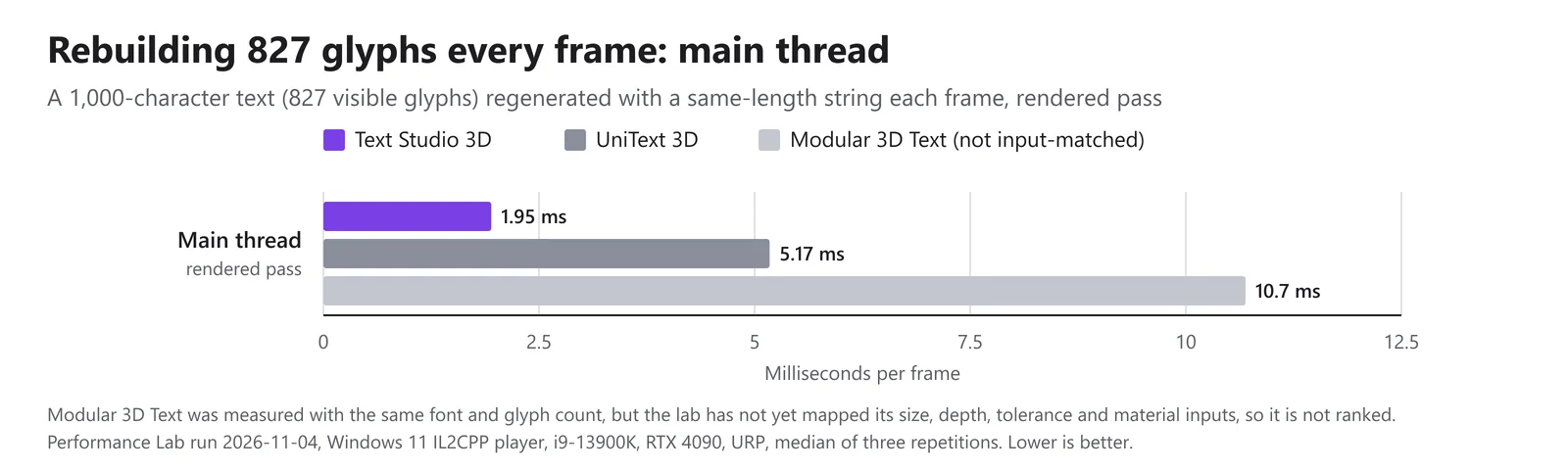
| Rebuilding 827 glyphs every frame, main thread | 1.95 ms | 5.17 ms |
| Rebuilding 827 glyphs every frame, GPU | 0.036 ms | 0.406 ms |
| Rebuilding 13 glyphs every frame | 0.618 ms | 0.600 ms |
| Rebuilding 212 glyphs every frame | 0.894 ms | 1.64 ms |
| Rebuilding 827 glyphs every frame | 1.91 ms | 5.06 ms |
| Appending one glyph per frame to 234 glyphs | 1.03 ms | 1.76 ms |
| Swapping cached 52-glyph strings | 0.640 ms | 0.969 ms |
| Creating a 26-glyph text every frame, warm cache | 1.10 ms | 0.800 ms |
| 212 glyphs unchanged (idle) | 0.400 ms | 0.367 ms |
Text Studio 3D used less time in five of the eight isolated workloads on the performance page, and the gap grows with text length: 2.7 times less main-thread time and about a tenth of the GPU time for the 827-glyph rebuild.
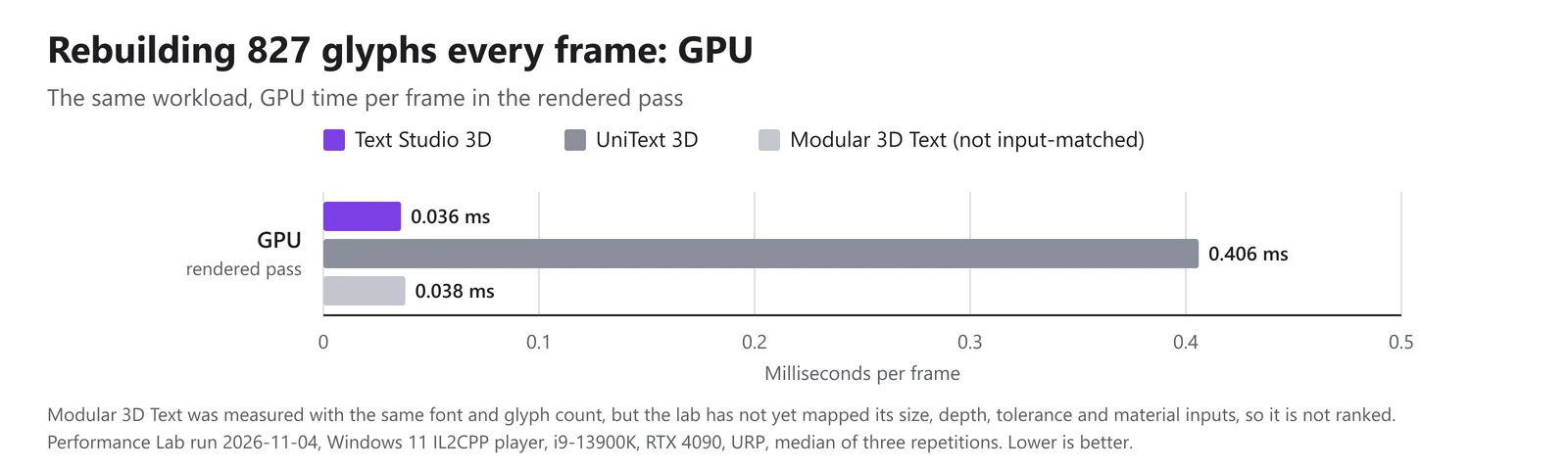 GPU time per frame for the same rebuild in the rendered pass. Modular 3D Text is shown but not input-matched.
UniText 3D was ahead in three workloads: 13 glyphs (0.600 against 0.618 ms), creating a 26-glyph text with a warm cache (0.80 against 1.10 ms) and idle (0.367 against 0.400 ms).
Combining them has a cost. When Text Studio 3D takes its glyphs from UniText’s shaping instead of TextMeshPro’s, rebuilding 827 glyphs every frame took 15.9 ms on the main thread in the isolated pass, against 1.91 ms with TextMeshPro shaping and 5.06 ms for UniText 3D on its own. For long shaped text that changes every frame, UniText 3D alone is the lighter route; titles that rarely change pay the shaping cost only when they rebuild. Benchmarking 3D text explains the method.
Using UniText and Text Studio 3D together
Through Text Studio’s optional UniText integration, Text Studio 3D extrudes UniText’s shaped glyphs, including Arabic and Hebrew, bidirectional order and ligatures, and adds its own styles, effects and output.
- Install Text Studio, Text Studio 3D and UniText, either the paid UniText 3.x or the free UniText Open Source 1.x.
- Import TextStudio_UniText_Integration.unitypackage once; the Integrations window checks the backend and edition.
- Add Text Studio 3D to a world-space UniText text. Text Studio selects the UniText backend, and no TextMeshPro component is needed.
UniText strokes, shadows and layer blends stay flat effects, and bitmap-only glyphs and color emoji layers do not become solid geometry. See Learn from the Shipped Samples for setup and Prepare Fonts, Glyphs, and Builds for glyph coverage in builds.
The bottom line
If your project lives in UniText, or needs scripts and emoji that TextMeshPro cannot shape, UniText 3D is the natural choice. If your project runs on TextMeshPro and the 3D lettering is the point, Text Studio 3D gives deeper geometry, more styles and effects, spatial UI and physics, at a lower measured cost for large rebuilding text. If you need both, the integration combines them. For localization details, see localized 3D text.
Frequently asked questions
Is UniText 3D a separate purchase?
No. The 3D module ships inside the US$99 UniText package since version 3.30.0 (2026-10-12). You turn it on with the UniText 3D toggle under Project Settings > LightSide > UniText > Modules.
Can Text Studio 3D extrude UniText text?
Yes. With Text Studio's optional UniText integration, Text Studio 3D builds solid geometry from UniText's shaped glyphs, including Arabic, Hebrew, bidirectional order and ligatures, without a TextMeshPro component. UniText strokes, shadows and color emoji layers stay flat.
Which one is faster?
In matched lab workloads, Text Studio 3D used less main-thread time in five of eight workloads and about a tenth of UniText 3D's GPU time when rebuilding 827 glyphs every frame. UniText 3D was ahead for 13 glyphs, for creating a short text with a warm cache and while idle, and its own path beat Text Studio 3D running on UniText shaping.
Which one suits a game in many languages?
If you ship Arabic, Indic or Thai text, color emoji or rely on system font fallback, UniText covers more. For Latin, Greek, Cyrillic and prepared CJK ranges, Text Studio 3D works with TextMeshPro, and the UniText integration adds Arabic and Hebrew.
Real 3D text for Unity, built from your TextMeshPro text.
Keep reading
 Use case
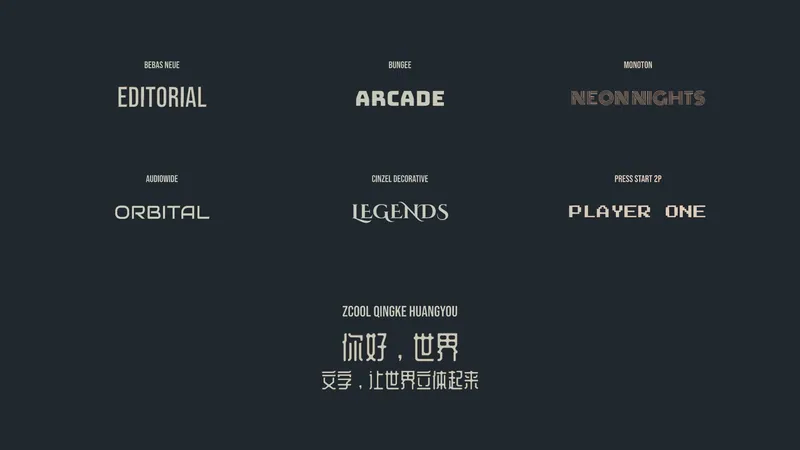
Localized 3D titles: Chinese, Arabic, Hebrew and emoji
Localizing a generated 3D title means changing the string, not remodeling it. Chinese works with the bundled ZCOOL family or your own font, Arabic and Hebrew need the optional UniText integration, and emoji become monochrome outlines.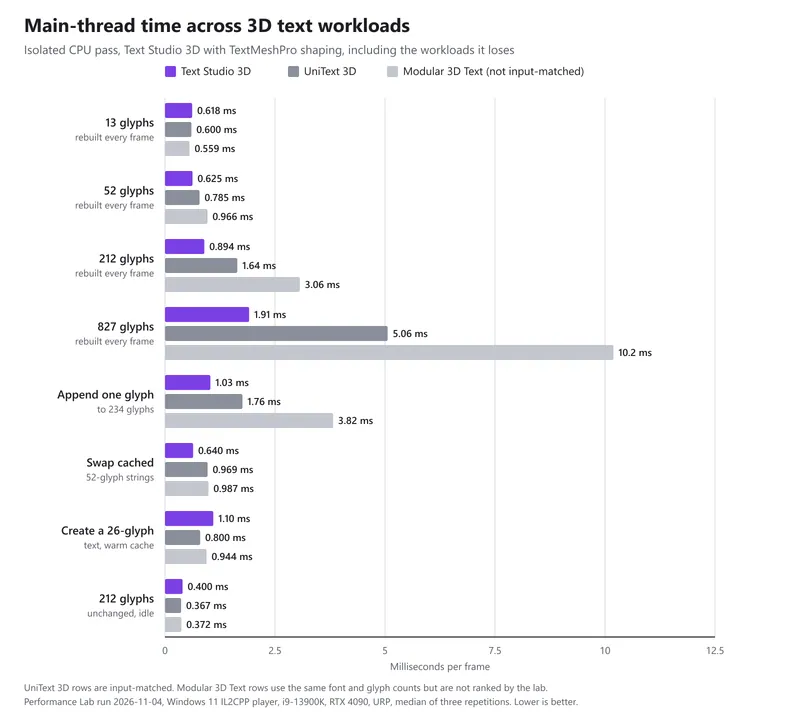 Article
How we benchmark 3D text against other Unity tools
Clean IL2CPP players, matched inputs, three repetitions and a stability rule. The November 2026 desktop run in full: where Text Studio 3D leads, the three workloads it does not win, and why Modular 3D Text is measured but not ranked.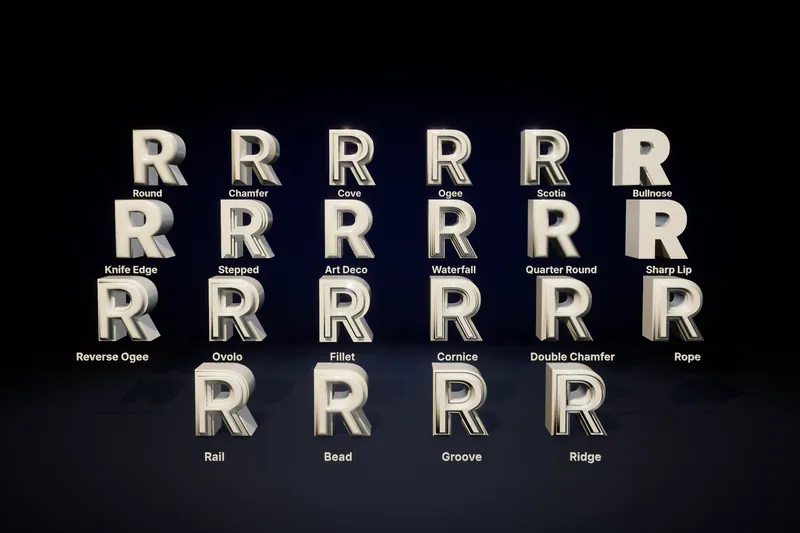 Comparison