3D letters with real physics
Make Unity 3D letters with physics: Physical Letters gives every glyph its own Rigidbody and collider, with Release and Reset, forces, raycasts, sockets and reactions.

Knocking over a title with a ball, scattering a word in an explosion or lining letters up as dominoes needs every letter to be its own physical object. In Unity that usually means modeling each letter in Blender, importing it, adding a collider and a Rigidbody, and doing it all again when the wording changes. TextMeshPro cannot help, because it draws the whole text as flat quads in one mesh.
Text Studio 3D’s Physical Letters output turns any 3D text into one Rigidbody and convex collider per visible glyph, built from the live text. Press Release and Unity physics takes over; press Reset and every letter returns to its authored pose. Scripts reach each body directly, so forces and raycasts use the Unity APIs you already know.
How Physical Letters builds one body per glyph
- Physical output creates one Rigidbody root per visible glyph and parents every layer mesh and collider of that glyph beneath it, so a beveled face, its outline and its back move as one body.
- The colliders are convex collision proxies generated from each glyph. Decorations such as tubes or bulbs stay visible but are left out of the proxies.
- Selecting Physical Letters prepares kinematic bodies without releasing them, so nothing falls until you decide.
- The letters are pooled, and rebuilds keep each glyph’s existing container, collider and Rigidbody.
- Text Studio position, rotation and scale effects still apply to each glyph object.
3D letters with physics in Unity, step by step
- Create GameObject > Text Studio > 3D > Text, or add Text Studio 3D to an existing world-space TextMeshPro text.
- In the Physical Letters section, choose Use Physical Letters Output, or apply the Physical performance profile, which prepares pooled independent letters.
- Enter Play Mode and press Release. The letters become dynamic bodies and the simulation runs normally.
- Press Reset to return every body to its authored pose, kinematic again.
From a script, ReleasePhysicalLetters takes an optional mass and initial velocity, TryGetPhysicalBody returns the Rigidbody of a visible glyph, and ResetPhysicalLetters restores the authored poses. Both commands act only on text whose output is explicitly Physical Letters.
using TextStudio.ThreeD;using UnityEngine;
public class TitleKnockdown : MonoBehaviour{    [SerializeField] TextStudio3DText title;
    public void Knock(Vector3 hitPoint)    {        title.ReleasePhysicalLetters(mass: 0.5f);        for (int i = 0; i < title.PhysicalBodyCount; i++)            if (title.TryGetPhysicalBody(i, out Rigidbody body))                body.AddExplosionForce(300f, hitPoint, 2f);    }
    public void Restore() => title.ResetPhysicalLetters();}
Forces, raycasts and sockets
- Forces: every body is an ordinary Unity Rigidbody, so
AddForce,AddExplosionForceand velocity changes work as usual. - Raycasts: a normal
Physics.Raycasthits a letter’s collider, andTryGetGlyphHandlemaps the hit Rigidbody back to its glyph. Surface queries throughAcquireSurfaceAccessandRaycastSurfacetest the exact geometry on screen, physical letters included. On combined output,RaycastGlyphreports the glyph and material region afterEnsureMeshCollider. - Per-letter materials:
SetGlyphMaterialworks on Physical output because each letter owns its renderer, so the letter that was hit can switch material. - Sockets and attachments: named glyph sockets give stable attachment points, and
TryCreateSurfaceAttachmentkeeps a point that follows a moving letter for sparks, trails or labels.
Reactions: sparks, flashes, shards and counters
The base Text Studio Reactions section adds finite responses to the text lifecycle, and its 3D Built-In catalog offers four starting points: Typing Sparks as each letter is revealed, Completion Flash when a letter finishes its reveal, Outgoing Shards when letters hide or are replaced, and Counter Outgoing for digits that leave a changing counter. Choose Built-In for a starter recipe, Custom for a shared Reaction Set or Inline for one object. A reaction layer picks When, Which and Action, and it can target a semantic or named 3D socket so particles follow the rendered letter. Test reactions in Play Mode, including replacement, interruption, repeated use and disable.
Letter Domino Workshop and the Physical Letters sample
Letter Domino Workshop, in the 04_CompleteDemo folder, is the complete playable physics demo. Fourteen letter hosts stand in a tabletop chain, one impulse starts real collisions, the observed completion triggers the finale once, and reset restores every body and pose.
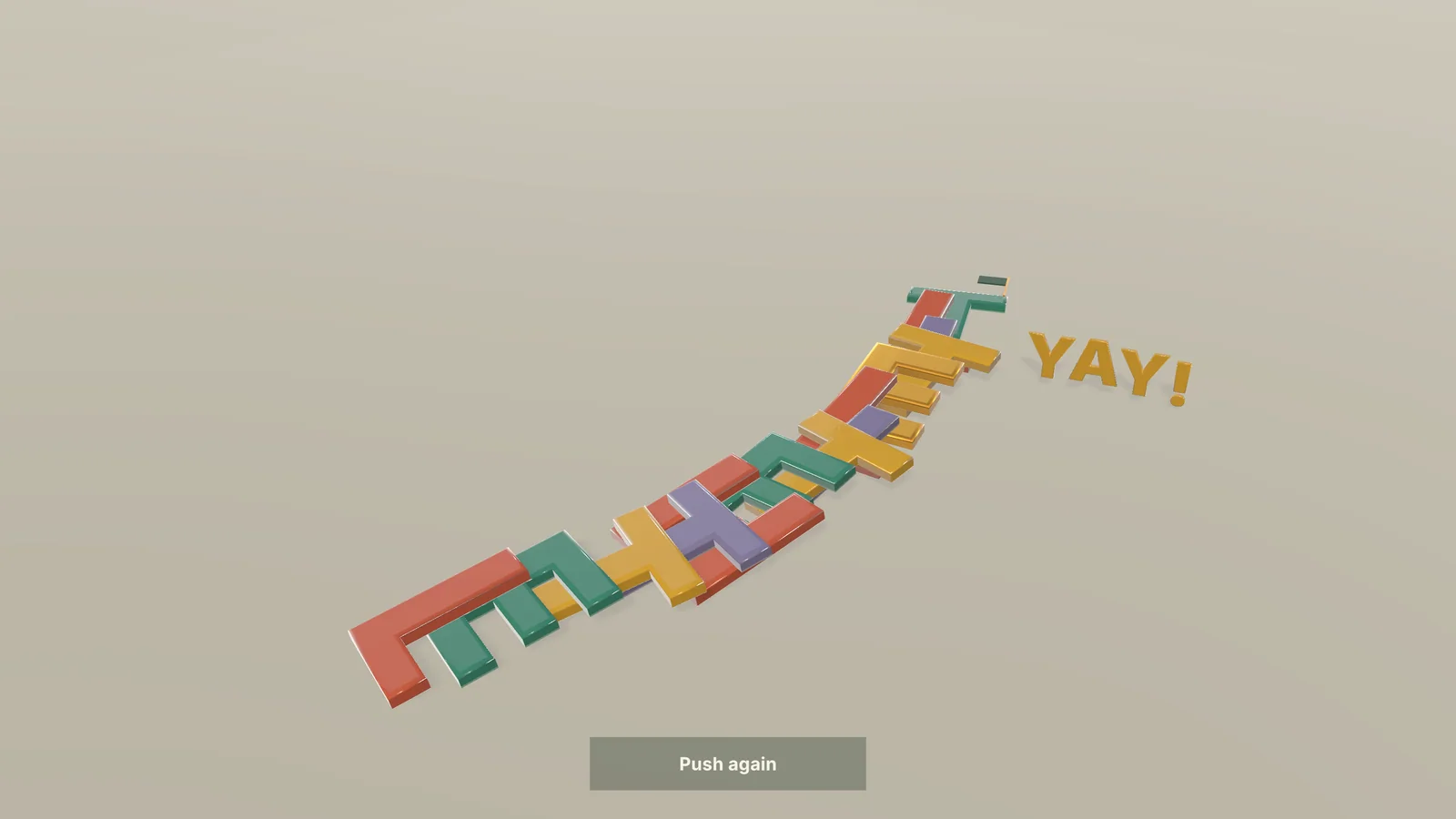 The end of a Letter Domino Workshop run: the chain has fallen and the finale reads YAY!
The Physical Letters sample in the Effects track combines real Rigidbody behavior with native geometry effects, then resets the authored poses. Open both from Tools > Text Studio > Examples.
Pooling and performance notes
- Each visible glyph is a body with a convex collider, so the cost grows with the number of letters. Use physics for titles, words and short phrases, and keep paragraphs in combined output.
- Prefer Reset over destroying and recreating text: the bodies are pooled, and rebuilds reuse each glyph’s container, collider and Rigidbody.
- Prepare fonts with Runtime Preparation and prewarm the characters during loading, so the first release does not wait for geometry.
- Physical output supports position, rotation and scale effects per glyph. Color and material channels of a Composed Effect need combined, chunked, hybrid or LOD output, and renderer diagnostics report a channel the current output cannot show.
The manual chapter on animation and physical letters and the scripting reference list every option. For letters that only need to move, not collide, see animated 3D text.
Frequently asked questions
Can TextMeshPro letters have colliders and rigidbodies?
Not on their own: TextMeshPro draws a text as flat quads in one mesh. With Text Studio 3D's Physical Letters output, each visible glyph of your text becomes a solid body with its own Rigidbody and convex collider.
Do the letters fall as soon as I press Play?
No. Physical Letters prepares kinematic bodies. They move only after Release, from the inspector or ReleasePhysicalLetters in a script, and Reset returns every letter to its authored pose.
Do decorations such as tubes and bulbs collide?
Decoration geometry stays visible and moves with its letter, but it is left out of the generated convex collision proxies, so collisions follow the letter shapes.
Is there a ready-made physics demo?
Yes. Letter Domino Workshop is a complete demo in which a chain of fourteen letters topples after one push, and the Physical Letters sample combines real rigid bodies with geometry effects.
Real 3D text for Unity, built from your TextMeshPro text.
Keep reading
 Use case
Animate 3D text: reveals, weather and energy effects
Every compatible Text Studio effect animates the 3D mesh, and 29 native effects use what flat text lacks: depth, bevels and surfaces. Weather grows over the letters, energy runs along them, and scripts can drive the growth. Use case
3D game titles and logos in Unity
Start from one of 25 complete hero designs, shape it layer by layer, frame it with a generated backing or your own SVG logo, reveal it in 3D and export stills or video for the trailer, while the title stays editable text. Use case