Fast 3D text on mobile and Quest, with small builds
3D text performance in Unity on phones and Meta Quest: choose output and mesh detail, prepare geometry, keep builds small and measure on the device, with 1.4.0 results.
Real 3D text has more triangles than flat text, and phones, tablets and standalone headsets usually run out of GPU time and heat headroom before CPU time. A title that costs nothing on a desktop can stall the first frame on a Quest, and an asset that ships every material and font it owns bloats the APK. Good 3D text performance in Unity on these devices comes from a few choices: output mode, mesh detail, prepared geometry and what goes into the build.
Text Studio 3D 1.4.0 targets exactly these costs. On a Quest 3, the first frame of a revealed level title fell from 74 ms to about 18 ms of Text Studio 3D render time, and in a Quest game Text Studio’s share of the build fell from 93.7 MB to 0.7 MB. That is not a lab exercise for us: Snowball Party, our own mixed reality snowball fight for Meta Quest, uses Text Studio for lots of real-time 3D text.
Choose output and mesh detail per text
Mesh detail and output are separate decisions. The Authored Detail presets set how finely geometry is built: Draft while shaping, Balanced for ordinary real-time content and new text, High for close readable text and Hero for captures or unusually close shots. The performance profile sets how that geometry is owned and updated:
| Text | Profile and output |
|---|---|
| Static title or sign | Static Quality, Combined Mesh, prepared or frozen |
| Score, timer or short changing label | Realtime, Chunked Combined Mesh |
| Many glyphs or long passages | Massive Text with a measured chunk size |
| Raycastable signs and controls | Interactive, one combined mesh |
| Falling letters | Physical, Physical Letters |
Keep effects in budget too. Contour Bloom and Bevel Pulse rebuild geometry, so cap them with Geometry Effect Rate and Geometry Value Steps in the Performance section before cutting ordinary transform or material effects. Styles with many layers or decorations such as bulbs and tubes add geometry, so distant labels deserve simpler styles.
LOD and automatic quality
LOD Group output keeps the authored mesh plus up to two reduced detail levels, and Automatic Quality switches only when it can prove the visible error stays within your budget. Turn it on in Mesh Detail, set Surface Error (px) and Normal Error (degrees), and add the Reduced Detail Levels, each with its own Bevel Segments and Curve Tolerance. GeneratedLodOverride holds a level from a script.
One honest limit: reduced levels can currently be certified only for straight, solid extrusions with closed front and back faces and no bevel, contour expansion, trim or extrusion path. Beveled and decorated styles keep the authored mesh, so for those, choose the mesh-detail preset by viewing distance.
Prepare geometry instead of generating it on the device
- Runtime Preparation (Tools > Text Studio > Runtime Preparation) saves outline data and reusable glyph geometry before the build, and Prepared only forbids surprise generation on the device.
- Prepare this text stores an exact static title. Since 1.4.0 that includes word, line and whole-text outline solids and settled Snow or Frost, while reveals, tags and events stay live.
- Strict Freeze turns a finished title into static meshes when nothing needs to stay live.
- Prewarm characters during loading with
PrewarmCharactersorPrewarmCurrentOutput. Since 1.4.0, compatible hidden text also keeps its meshes for the next time it appears.
What 1.4.0 changed for 3D text on Quest
Players now read and validate fonts and prepared geometry in the background before the first scene loads, and a text that appears with a reveal assembles its mesh once instead of twice.
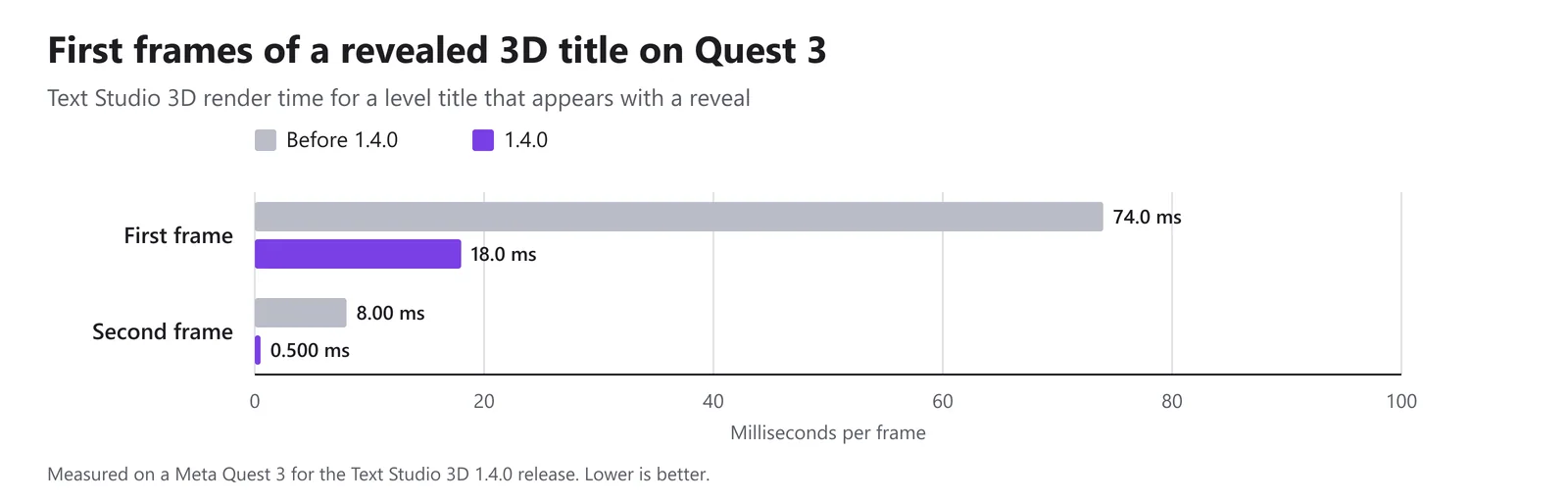 Text Studio 3D render time for a level title that appears with a reveal, measured on a Meta Quest 3.
Builds shrank because built-in materials, material sets, style textures and fonts moved from Resources to a Packaged folder and are included only when a text, style or material set references them. Emoji outlines, 3D GPU effect variants with their detail atlas, and 3D Writing ship only when a build’s texts use them; the Shown at runtime settings in Runtime Preparation can set each to Always include for text your scripts create.
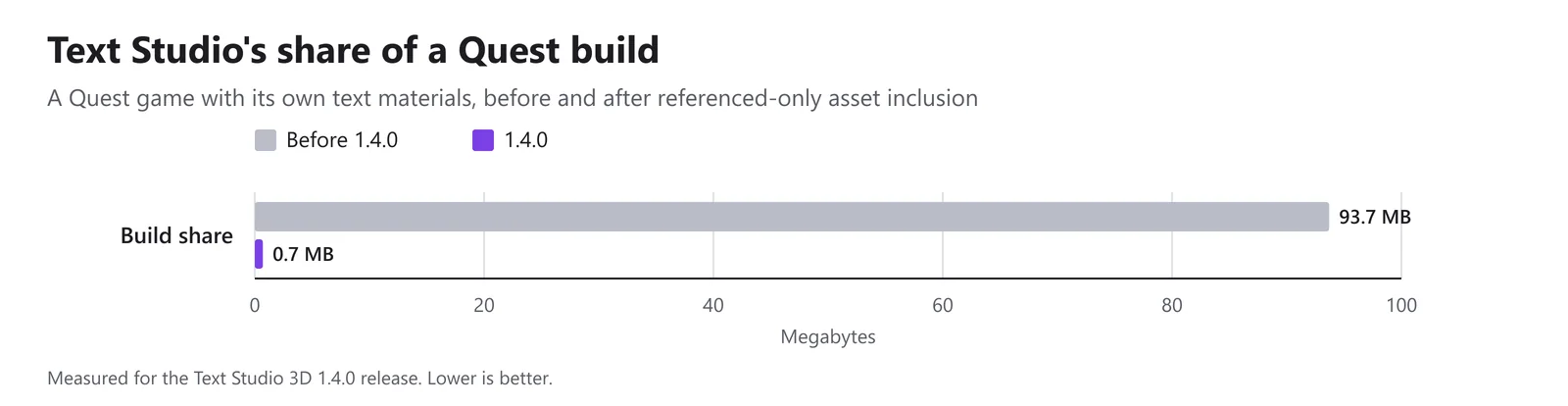 A Quest game with its own text materials, before and after referenced-only asset inclusion.
Shader stripping does the rest. Player builds skip shader programs for render pipelines that no quality level uses and remove unused 3D Writing variants, and URP Forward and Forward+ builds drop unused deferred variants, which cuts Forward URP 3D shader compilation by about a third with identical rendering. The package itself is about 30 MB smaller, 22 MB of it from the Inter fonts, and the Atelier sample textures take about 31 MB in a build instead of about 60 MB. The articles on the first frame on Quest and on small builds and shader stripping explain both changes.
WebGL 2, OpenGL ES 3 and headsets
Devices without structured-buffer support in shaders, such as WebGL 2 and many OpenGL ES 3 phones, read prepared 3D effect and URP Writing data from textures instead, and URP OpenGL ES 3 builds skip the deferred GBuffer passes because URP renders forward there. On headsets, the Lit and Glass shaders support single-pass instanced stereo. Keep Mesh Output’s Vertex Upload on the default, Float; the packed option is an experimental prototype.
Measure 3D text performance on the device
- Build a release player and run it on the target device; Editor timings do not transfer.
- Check the render pipeline first. HDR, MSAA and the camera opaque texture in a mobile URP asset can cost more GPU time than the text, so turn them off unless the game needs them.
- Let the device run for a minute before reading numbers, because heat lowers its clock speed.
- Read GPU time as well as main-thread time.
- Use Runtime Statistics in the inspector for glyph, vertex, triangle, mesh and renderer counts, update times and cache hits, and the Unity Profiler markers for glyph generation, mesh building, Writing, retained effects and geometry uploads.
- Expect the first player build after an update to take longer while Unity compiles the specialized shader variants; later builds reuse the shader cache.
For desktop reference, the Performance Lab run of 2026-11-04 (Windows IL2CPP player, i9-13900K, RTX 4090, URP) measured rebuilding 827 glyphs every frame at 1.95 ms of main-thread time in the rendered pass and 0.036 ms of GPU time for Text Studio 3D, against 5.17 ms and 0.406 ms for UniText 3D in matched lab workloads. Modular 3D Text took 10.7 ms and 0.038 ms, measured with the same font and glyph count, but not input-matched; the lab does not rank it. The performance page collects the lab results, and the Text Studio article on animated text on mobile and Quest covers budgets for flat text.
The manual chapters on output and performance and fonts, glyphs and builds list every setting.
Frequently asked questions
Does Text Studio 3D run on Meta Quest?
Yes. The Lit and Glass shaders support single-pass instanced stereo, and Text Studio 3D 1.4.0 was measured on a Quest 3: the first frame of a revealed level title fell from 74 ms to about 18 ms of Text Studio 3D render time, and the next frame from 8 ms to 0.5 ms.
How much does Text Studio 3D add to a build?
Since 1.4.0, built-in materials, material sets, style textures and fonts are included only when a text, style or material set references them. In a Quest game with its own text materials, Text Studio's share of the build fell from 93.7 MB to 0.7 MB.
Does it work with WebGL 2 and OpenGL ES 3?
Yes. Devices without structured buffers in shaders, such as WebGL 2 and many OpenGL ES 3 phones, read prepared 3D effect data from textures instead, and URP OpenGL ES 3 builds skip the deferred passes because URP renders forward there.
Which mesh detail should I use on mobile?
Balanced for ordinary real-time text, High for text read up close, such as headset menus, and Draft while authoring. Keep Hero for captures and unusually close shots, and measure on the device before going lower.
Real 3D text for Unity, built from your TextMeshPro text.
Keep reading
 Article
Cutting the first frame of 3D text on Quest 3 from 74 to 18 ms
A revealed level title used to cost 74 ms of Text Studio 3D render time on its first frame on Quest 3. Version 1.4.0 reads fonts and prepared geometry in the background and assembles the mesh once: about 18 ms, and 0.5 ms on the next frame.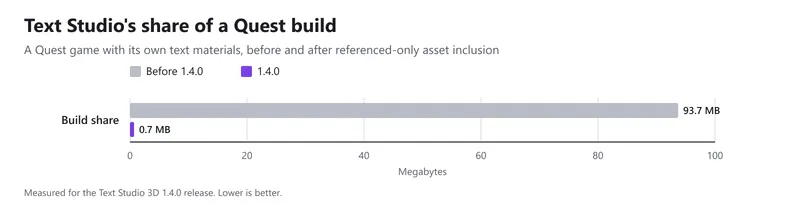 Article
How Text Studio 3D keeps builds small
What 1.4.0 changed to make builds smaller: shader programs for unused pipelines and variants are skipped, built-in assets left the Resources folder, optional features ship only when used, and the package lost about 30 MB. Plus how to check your own build. Use case