Localized 3D titles: Chinese, Arabic, Hebrew and emoji
Unity 3D text in Chinese, Arabic and Hebrew: the geometry follows each translation, CJK fonts ship through Runtime Preparation, and Arabic shaping comes through UniText.
A 3D logo or title modeled in Blender has to be modeled again for every language. With eight languages that is eight assets per title, and the Chinese or Arabic version needs someone who can set that script. Text Studio 3D generates the geometry from the text, so localizing a 3D title in Unity is changing the string: the same style, bevels and materials apply to every translation.
Unity 3D text in Chinese works with the bundled ZCOOL QingKe HuangYou family or any CJK font with TrueType or CFF outlines, prepared for builds through Runtime Preparation. Arabic and Hebrew need shaping and right-to-left order, which TextMeshPro does not provide, so Text Studio 3D gets them through the optional UniText integration. Emoji become monochrome outlines. If a project needs every script and color emoji, UniText 3D is the stronger choice, as the last section explains.
Localizing a 3D title is changing the string
The base Text Studio component owns the text, and Text Studio 3D builds whatever it shows, so a locale switch rebuilds the same design in the new language. With Text Studio’s optional Unity Localization integration, a Localize String component feeds the text from string tables, and Runtime Preparation reads every locale’s entry for that text when it prepares the build. For the flat-text side, including locale switches and right-to-left flow, see animated text in every language.
Fonts need real outlines. TrueType and CFF1 OpenType fonts work, including bold and italic faces, fallbacks and rich-text font changes, and a variable TrueType font uses its default instance. CFF2, color-only, dynamic OS and atlas-only fonts need an imported outline source. Font Source stays on Text Object, so TextMeshPro keeps choosing typography and fallbacks; Font3D is only the matching technical data for the outlines.
Chinese 3D text in Unity
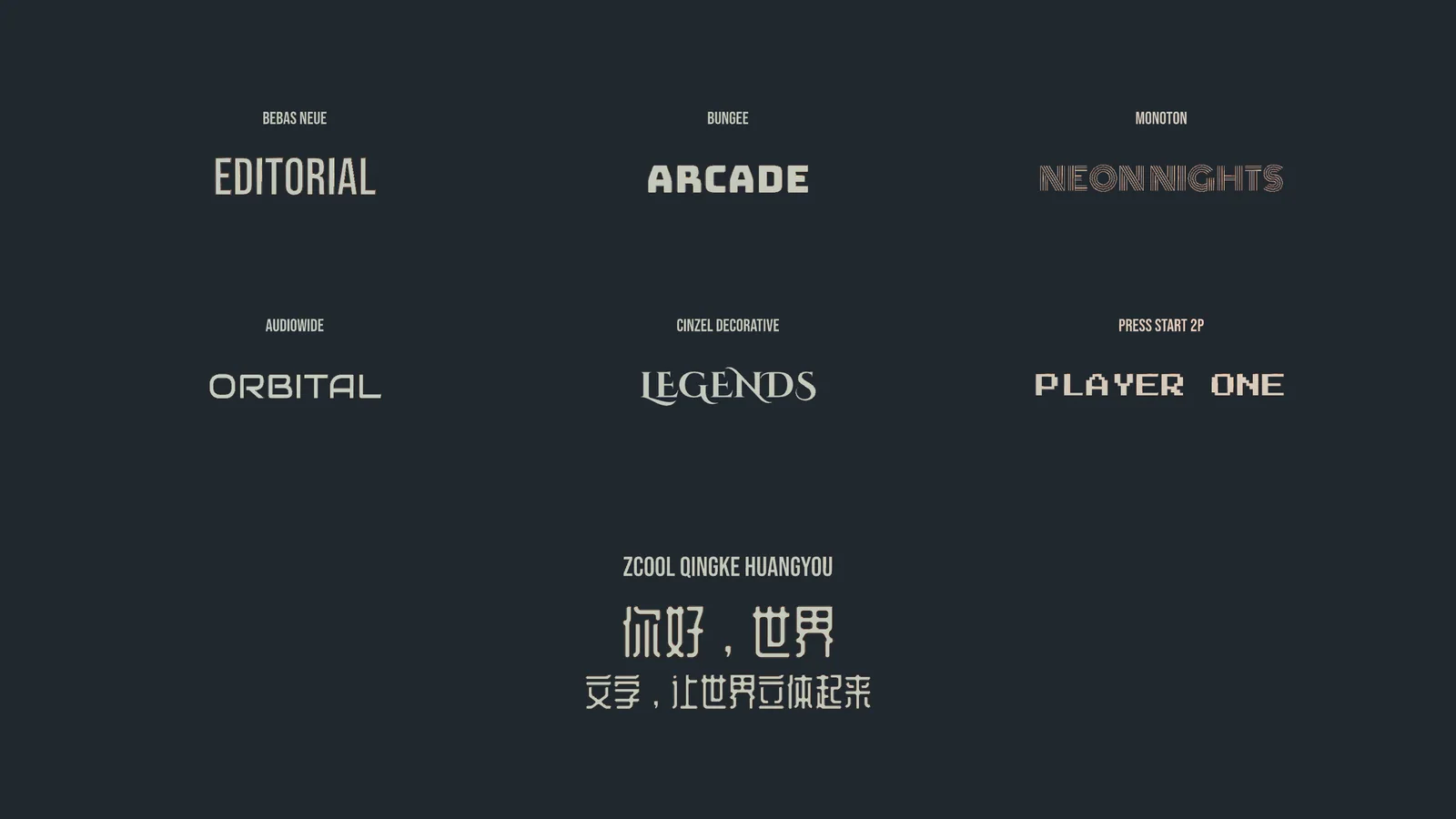
Text Studio 3D bundles ZCOOL QingKe HuangYou under the OFL, with its source, matching dynamic TextMeshPro data and prepared player-ready 3D outline data. The Typography sample on the cover renders genuine Chinese lettering from the complete font, not a phrase subset or a replacement mesh, next to the six other bundled families: Bebas Neue, Bungee, Monoton, Audiowide, Cinzel Decorative and Press Start 2P.
A CJK font holds thousands of glyphs, so plan the coverage deliberately instead of preparing everything:
- Open Tools > Text Studio > Runtime Preparation. It finds the text in your scenes and, with the Localization integration, in your string tables.
- Under Settings > Shown at runtime, add the text only your scripts create, such as player names or server messages, as representative lines in Phrases and special characters.
- Choose a runtime policy. Prepared only checks the exact visible text before a build and never generates surprise geometry. Generate if missing lets the player build glyphs it was not prepared for, as long as it has durable access to the font outlines, which suits typed player names.
- Check the font license. Runtime Preparation saves font outlines by default, and Settings > Permission > Use existing data only stops it from creating new outline data.
- Look at representative lines at the smallest display size in a player build. Preparation proves that glyphs are available, not that the typography is good.
Preparation tracks more than characters: it records the resolved glyph, the fallback face and the shaped identity, so ligatures, combining marks and fallback transitions prepare the geometry the text will actually request.
Arabic and Hebrew 3D text through UniText
Arabic letters change shape with their neighbors, ligatures merge them, and Arabic and Hebrew lines run right to left around left-to-right numbers. TextMeshPro does none of that shaping, so Text Studio 3D relies on UniText, a separate paid text engine, through an optional integration. UniText shapes the line, and Text Studio 3D extrudes the shaped glyphs with stable identities, so shaped Latin, Arabic and Hebrew, mixed direction, ligatures and fallback fonts become solid geometry with the usual styles and effects.
Install Text Studio, Text Studio 3D and UniText, then import TextStudio_UniText_Integration.unitypackage once. Text Studio 3D extrudes UniText’s shaped output without a second bridge, and an optional Text Studio 3D UniText sample package shows it working; the Integrations window checks the backend and edition before it enables the sample. Test every script you ship, fallback faces, ligatures, live edits, build preparation and two Play Mode sessions in a row. Two limits are worth knowing:
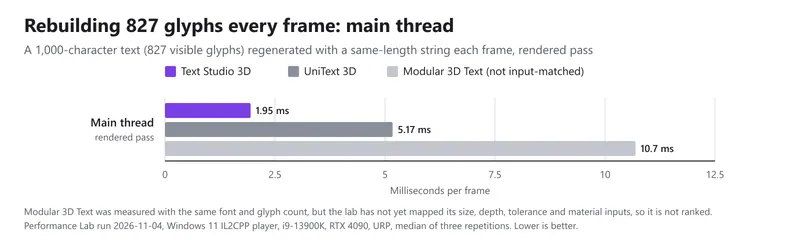
- Cost. In the Performance Lab, rebuilding 827 glyphs every frame took 15.9 ms of main-thread time with UniText shaping, against 1.9 ms with TextMeshPro shaping. A title that changes rarely does not notice; for shaped text that changes every frame, keep the strings short.
- What stays flat. UniText strokes, shadows and layer blends remain flat renderer effects rather than 3D shells, and sprite, bitmap-only and color-only glyph layers do not become solid geometry.
Emoji in 3D text
Color emoji fonts store bitmaps or color layers, not outlines a mesh can be built from. Text Studio 3D bundles a monochrome Noto Emoji fallback that supplies vector outlines, so an emoji becomes a solid shape without its colors. Since 1.4.0, emoji outlines ship only when a build’s texts use them. If players can type emoji at runtime, set Emoji in 3D text to Always include under Runtime Preparation’s Settings > Shown at runtime.
When UniText 3D is the stronger choice
UniText 3D is the stronger choice when a project needs every script and color emoji. UniText with its 3D module shapes every Unicode script through HarfBuzz, extrudes color emoji, connects to Unity Localization and handles UI and 3D text in one engine, for US$99 and from Unity 2022.3. It also fits better when shaped text must change every frame. The trade-offs: it replaces TextMeshPro with its own components, its 3D module is new (added in UniText 3.30.0 in October 2026), and under HDRP its 3D shader draws unlit unless you copy in a Shader Graph.
Text Studio 3D fits projects that already run on TextMeshPro and want the deepest 3D text geometry in Unity with a large style library. Latin, Greek, Cyrillic and CJK text work directly, and Arabic and Hebrew join through the integration when a project needs them. The full comparison is in Text Studio 3D vs UniText 3D.
The manual chapters on fonts, glyphs and builds and the shipped samples cover preparation and the UniText integration in detail. If your title starts as TextMeshPro text, TextMeshPro text to 3D shows the first step.
Frequently asked questions
Can Text Studio 3D render Arabic or Hebrew text in 3D?
Yes, through the optional UniText integration: UniText, a separate paid text engine, shapes the text, joins the letters and orders the line right to left, and Text Studio 3D extrudes the shaped glyphs. TextMeshPro alone does not shape Arabic.
Does Chinese 3D text work in player builds?
Yes. The bundled ZCOOL QingKe HuangYou family ships with prepared outline data, and for your own CJK font Runtime Preparation prepares the text your game ships. Plan deliberate character ranges instead of preparing a whole CJK font.
Are color emoji supported?
No. A bundled monochrome Noto Emoji fallback supplies emoji outlines, so emoji become solid shapes without their colors. UniText 3D extrudes color emoji if you need them.
Do I need a separate 3D model for every language?
No. The geometry is generated from the text, so a translation is a new string with the same style, bevels and materials.
Real 3D text for Unity, built from your TextMeshPro text.
Keep reading
 Comparison
Text Studio 3D vs UniText 3D
UniText 3D is the 3D module of a full text engine with the best script coverage in Unity. Text Studio 3D builds deeper geometry, more styles, spatial UI and Physical Letters on TextMeshPro text, and the UniText integration combines the two.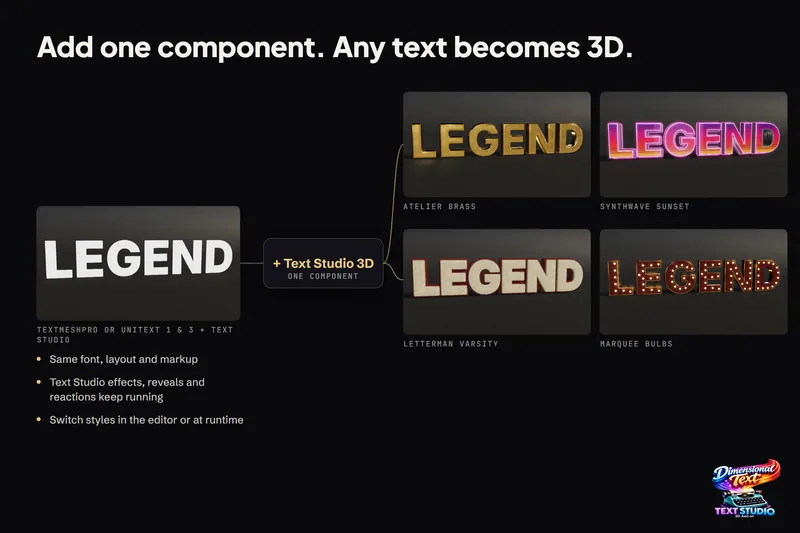 Use case
Turn TextMeshPro text into real 3D geometry
Text Studio 3D adds depth to the TextMeshPro text you already have instead of replacing it. Font, layout, rich text and Text Studio effects carry over, and Runtime Preparation makes sure the same letters build in a player. Use case