Styled text on phones and Quest: what we measured
How Text Studio runs on phones, tablets and Meta Quest 3: the 1.2 slowdown, what 1.3 changed, device results against TextMeshPro and UniText, and setup advice.
In October 2026 a reviewer reported that Text Studio 1.2 cost far too much frame rate on phones, even with a single static label: older phones barely ran, and a recent flagship lost about a fifth of its frame rate and heated up. The report was fair, and it started a performance campaign across five devices.
What went wrong in 1.2
Part of it was a packaging mistake: the 1.2 package went out in the wrong state. The larger part was real work that had not been done yet. Text Studio’s styled 2D text had mainly been measured on desktop GPUs, and a desktop GPU forgives what a phone GPU does not: on a mid-range mobile GPU, every layer of a style costs time on every pixel it covers.
So the Performance Lab grew a device lane. Since October, the core comparisons that run on PC also run on a Samsung Galaxy Tab S7 FE (Adreno 619, Vulkan), an iPad (10th generation, Apple A14, Metal) and Meta Quest 3 (Adreno 740, Vulkan), as release IL2CPP players.
What 1.3 changed
Text Studio 1.3 shipped on 20 October 2026 with these changes for mobile and standalone headsets:
- Lighter rendering for common styles. Solid and gradient layers, glyph samples and simple decorations use lighter shader programs, and material, graphic and animated effects run only where a style uses them.
- TextMeshPro’s own rendering where it is enough. Simple styles with one solid fill, a round outline and a Distance Field outer shadow at Native quality now draw through TextMeshPro’s SDF material by default. Exact Layering keeps Text Studio’s precise layer order for styles that need it.
- Measured on Quest 3: 200 labels with a fill, an outline and a shadow rendered about 18 times faster than in 1.2, plain styled labels about 9 times faster, and composited titles about 10 times faster.
- Composited titles reuse their static layers. On the tablet’s Adreno 619, an eight-layer title 1400 pixels wide fell from 649 to 42 ms of GPU time per frame, for about 5.5 MiB more peak appearance memory.
- Fixes for mobile drivers. Vulkan shader failures on the Adreno 619 that left layered labels, dashes, decorations or effect layers missing are fixed, and so is an invalid GPU read on Metal.
- Less CPU work. Settled text skips Text Studio’s per-frame updates until something changes, styled text can sleep, and animated, revealing and hiding text skips unchanged preparation, effect work and mesh uploads.
Where it stands: the October device results
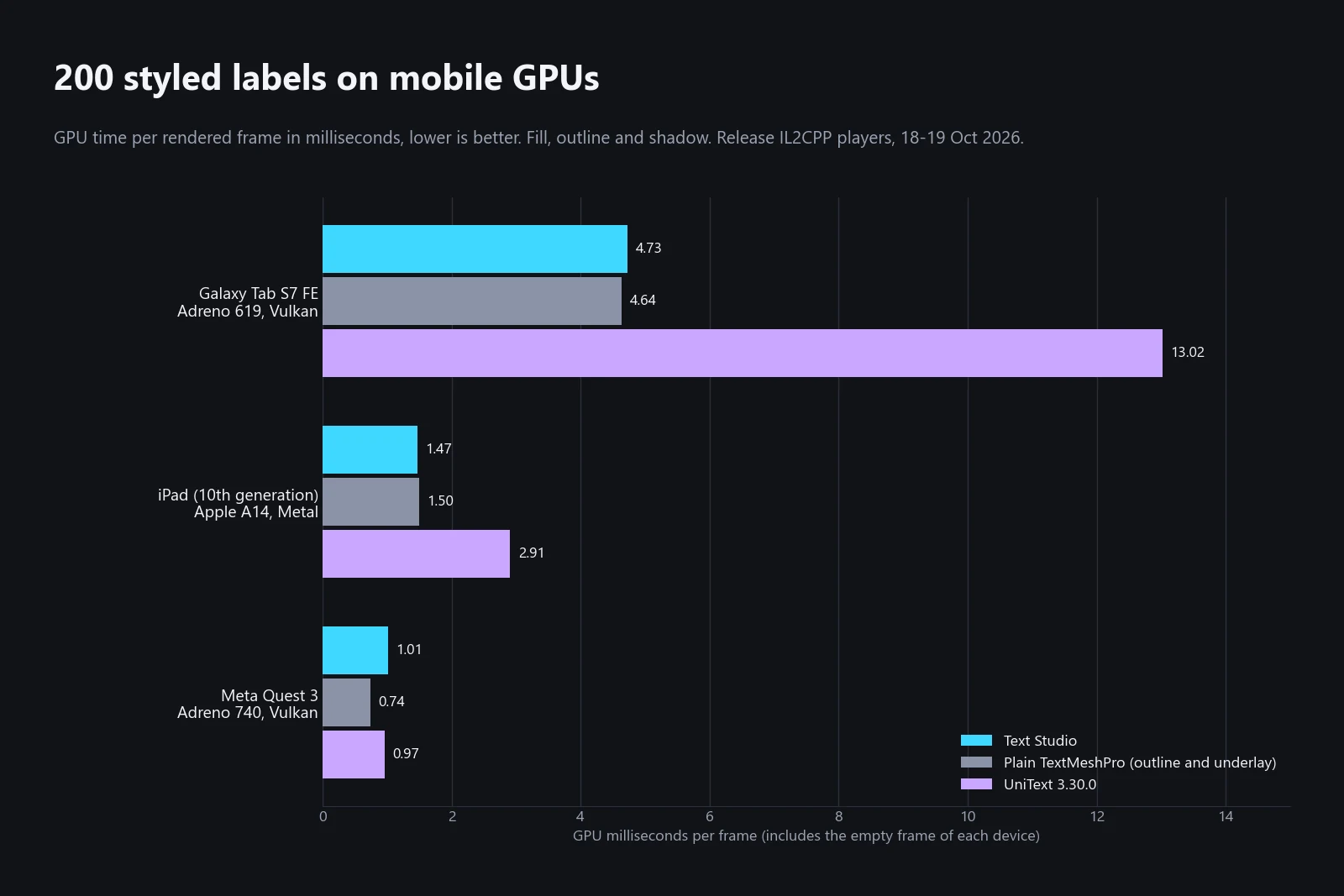
The chart shows GPU time for 200 labels with a white face, a black outline and a hard shadow, measured on 18 and 19 October 2026. The plain TextMeshPro version uses TextMeshPro’s own outline and underlay material, the cheapest way to get that look. GPU times include each device’s empty frame, which is about 4 ms on the tablet at 2560 x 1600.
- Galaxy Tab S7 FE: 4.73 ms for Text Studio, 4.64 ms for TextMeshPro and 13.02 ms for UniText.
- iPad (10th generation): 1.47 ms for Text Studio, 1.50 ms for TextMeshPro and 2.91 ms for UniText.
- Meta Quest 3: 1.01 ms for Text Studio, 0.74 ms for TextMeshPro and 0.97 ms for UniText. Quest 3 is the one device where Text Studio’s styled labels still cost visibly more GPU time than TextMeshPro’s material.
Main-thread time per rendered frame, in milliseconds:
| Device | 200 styled labels: Text Studio / TextMeshPro / UniText | 500 idle labels: Text Studio / TextMeshPro |
|---|---|---|
| Galaxy Tab S7 FE | 3.35 / 3.38 / 2.92 | 3.33 / 3.65 |
| iPad (10th generation) | 2.00 / 1.85 / 1.56 | 2.12 / 2.77 |
| Meta Quest 3 | 2.09 / 2.00 / 1.76 | 1.86 / 1.84 |
Settled labels cost no more than plain TextMeshPro labels, because Text Studio stops updating text that does not change. UniText draws styled labels with less main-thread time on every device, and Text Studio draws them with less GPU time on the tablet and the iPad.
Where mobile is still slower
Honest results include the losses. In the same device runs:
- Reveal and hide on the tablet’s GPU. The reveal-and-hide cycle of 128 labels took 6.25 ms of GPU time against 3.72 ms for Text Animator, and 50 active labels 7.10 ms against 5.96 ms. On the main thread, Text Studio led that cycle clearly: 7.25 ms against 10.23 ms for Text Animator and 14.42 ms for UniText.
- Chat logs. Two growing chat logs took 7.99 ms of main-thread time on Quest 3 against 4.25 ms for plain TextMeshPro, and 11.04 ms against 8.74 ms for UniText on the tablet.
- Mass damage numbers on Quest 3. A pool of 128 popups took 10.03 ms on the main thread against 7.40 ms for Damage Numbers Pro. On the tablet and the iPad the two were at parity.
- UniText-rendered labels on Quest 3. When Text Studio drives UniText’s output, it takes up to about 1.8 times the main-thread time of UniText alone.
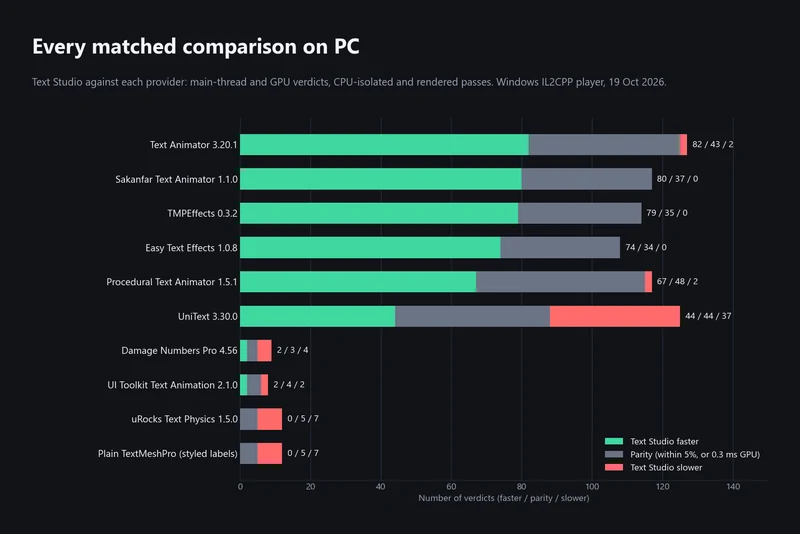
How we benchmark Unity text animation tools explains the method and lists the complete PC results.
Smaller builds in 1.4
Text Studio 1.4 makes player builds contain only the Text Studio content they use, with nothing to configure. Before every player build, Runtime Preparation checks which optional features your texts and assets use, such as 2D appearance styles, and leaves the others out of the player together with their shader variants: about 11.5 MB for 2D appearance alone. Open Tools > Text Studio > Runtime Preparation to see the Build contents card in the Overview, and use Settings > Shown at runtime to include a feature that only texts created by your scripts use.
Players also compile fewer 2D text shader programs, round-join handwriting styles use about two thirds less geometry, and the first automatic pen-path preparation is about four times faster, which reduces handwriting start-up hitches on phones and standalone headsets.
A real game on Quest
Our own mixed reality game Snowball Party for Meta Quest turns a wall of your room into a snowy landscape, and it uses Text Studio for lots of real-time 3D text on a standalone headset. That is the kind of scene the Quest lane exists for. For dimensional text, see Text Studio 3D. Snowball Party is on the Meta Horizon Store.
Practical advice for mobile
The Plan for Performance chapter of the manual goes into detail. The short version:
- Set up the render pipeline first. Turn off HDR, MSAA and the opaque and depth textures in the mobile URP asset unless the game needs them. On the tablet that took the empty frame from about 25 ms to about 4 ms.
- Keep repeated labels simple. For damage numbers, nameplates and list items, use a solid fill, a round outline and a Distance Field outer shadow, and set the style’s Source Field Quality to Native. Such a style costs about as much as TextMeshPro’s outline and underlay. Keep gradients, textures, bevels and other material layers for headings.
- Use composited titles deliberately. Prefer one glowing title over many glowing labels, and use the Balanced or Responsive Quality Tier on phones and tablets.
- Keep changing text cheap. Use
SetTextDeferredfor counters and timers,AppendTextorAppendTextDeferredfor logs, and avoid changing text or colors every frame when nothing visible changes. Prewarm damage-number emitters during loading. - Measure a release build on the device. Look at GPU time as well as main-thread time, and let a phone run for a minute before comparing numbers, because heat lowers its clock speed.
For outline, glow and gradient choices with their cost in mind, see Outlines, glows, gradients and bevels for TextMeshPro, and for pooled popups, Damage numbers and floating combat text.
Frequently asked questions
Does Text Studio run well on phones and tablets?
Since 1.3, yes for typical games. On a Galaxy Tab S7 FE and an iPad (10th generation), 200 labels with an outline and a shadow cost about the same GPU time as TextMeshPro's own outline and underlay, and at most about 8% more main-thread time. Rich styles, large composited titles and constantly changing text still cost more, so keep repeated labels simple.
What made Text Studio 1.2 slow on mobile?
Two things. The 1.2 package went out in the wrong state, and styled 2D text had mainly been tuned on desktop GPUs, while phone GPUs pay for every layer on every pixel. Version 1.3 fixed both after measurements on an Android tablet, Meta Quest 3, an iPad, a Mac and a PC.
Does it work on Meta Quest 3?
We measure every release on Quest 3, and our own mixed reality game Snowball Party uses Text Studio for lots of real-time 3D text on Meta Quest. In the October 2026 lab run, 200 styled labels took 1.01 ms of GPU time on Quest 3 against 0.74 ms for plain TextMeshPro.
Why is my frame rate low as soon as I add styled text?
Check the render pipeline first. On a Galaxy Tab S7 FE at 2560 x 1600, HDR, 4x MSAA and the camera opaque texture took about 25 ms of GPU time per frame before any text was drawn, and about 4 ms with them off. Then simplify repeated labels and measure a release build on the device.
Style and animate every word in Unity.
Keep reading
 Article
How we benchmark Unity text animation tools
Matched workloads, clean IL2CPP players, three repetitions and a fixed verdict rule. The October 2026 PC run in full: where Text Studio leads, where it ties and where UniText, uRocks and Damage Numbers Pro are faster.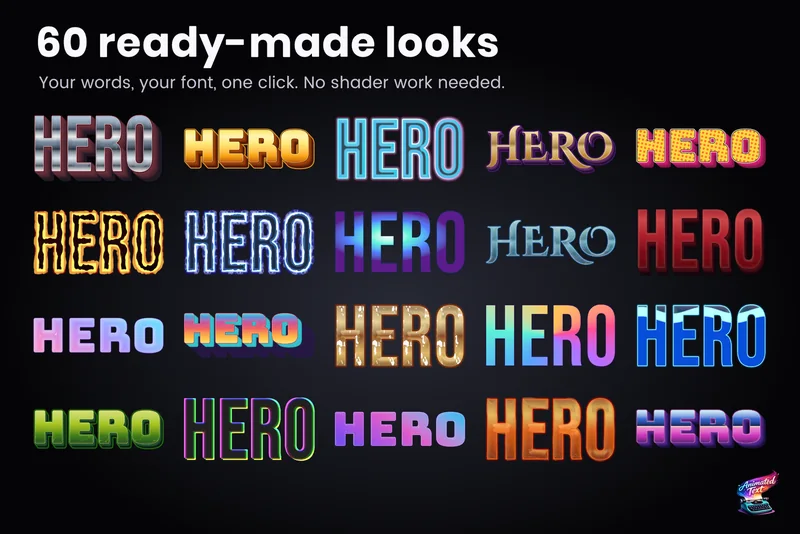 Use case
Outlines, glows, gradients and bevels for TextMeshPro
Layered 2D looks for TextMeshPro: outside and multiple strokes, glows, shadows, gradients mapped per word or line, bevels, materials and faux depth, from 60+ ready-made styles or your own stack. Use case