How we benchmark Unity text animation tools
How the Text Studio Performance Lab compares Text Animator, UniText, TMPEffects and others in matched Unity workloads, with every result, including the ones we lose.
Benchmarks of text animation tools are easy to get wrong. A “wave” in one tool is not the same work as a “wave” in another: one moves four vertices per letter on the CPU, another rebuilds the whole mesh, a third runs on its own text engine. If the tools receive different text, fonts or frame budgets, the chart measures the setup, not the tool.
This is how we measure Text Studio against the alternatives, and what the most recent complete run on PC found, including every comparison we lose.
What the Performance Lab measures
The Text Studio Performance Lab is a Unity player that drives each tool through its public API with the same workloads. The October 2026 run compared Text Studio with these tools, each in the version that was current at the time:
- Text Animator for Unity 3.20.1
- UniText 3.30.0
- TMPEffects 0.3.2
- Easy Text Effects 1.0.8
- Procedural Text Animator 1.5.1
- Sakanfar Text Animator 1.1.0
- UI Toolkit Text Animation 2.1.0
- Damage Numbers Pro 4.56, for floating combat text
- uRocks Text Physics 1.5.0, for letters with 2D physics
- plain TextMeshPro, as an unranked baseline and as the reference for styled labels
The workloads cover what games do with text: single effects such as Wave, Shake and Rainbow, stacks of two to eight effects, reveal and hide cycles, restarting and skipping a typewriter, 128 dialogue typewriters at once, 10 to 200 active labels, 500 and 1,000 idle labels, appending, replacing and creating text, chat logs, live counters, long documents, rich text with Unicode, damage numbers, UI Toolkit labels and 2D text physics.
How a comparison stays fair
Every provider receives the same visible text and character count, the same Noto Sans source font, the same TextMeshPro surface, scale and material count, and the same warm-up and measurement budget. Effects only take part where the intent maps cleanly: Text Studio’s Wave is compared with each tool’s own wave, not with something that merely looks similar. Each tool keeps its own pipeline, so a tool that mutates vertices per character, or a complete text engine like UniText, does exactly what it does in a game.
Where tools differ in a way that cannot be matched, the comparison records a declared difference instead of hiding it. Workloads only one tool can run, such as Text Studio’s styled titles or UniText’s document scrolling, are measured as capability costs and never enter a ranking.
Runs, repetitions and verdicts
- Clean release players. Every run builds a clean IL2CPP player, the way games ship, not the Editor.
- Two passes. A CPU-isolated pass with the text renderers disabled, and a rendered pass that draws every frame. They are never mixed.
- Frames. Most workloads warm up for 60 frames and then record 240. The dialogue lane records 600 frames after 180, and the first text assignment records the one frame where it happens.
- Three repetitions. Each provider runs every workload three times. The result is the median of the three repetition medians, and the lab reruns a workload whose repetitions disagree too much before accepting it.
- Metrics. Main-thread time comes from Unity’s CPU Main Thread Frame Time counter, next to GPU time, render-thread time and wall-clock time.
- Verdicts. Text Studio’s median is compared with each reference. Within 5% counts as parity, and so does a GPU difference under 0.3 ms on desktop or 0.05 ms on mobile, where timer noise is larger than the work.
Memory needs a different setup. Allocation counters do not work in release players, and retained memory is only trustworthy when one provider runs alone in a fresh process. Memory claims therefore come from separate development players, one provider per process, with one cold and two warm repetitions.
The October 2026 results on PC
The complete run finished on 19 October 2026, on a development build of what shipped as Text Studio 1.3 the next day. The machine: Windows 11, Intel Core i9-13900K, NVIDIA GeForce RTX 4090, Direct3D 11, URP, Unity 6000.3.26f1, 1280 x 720, vSync off.
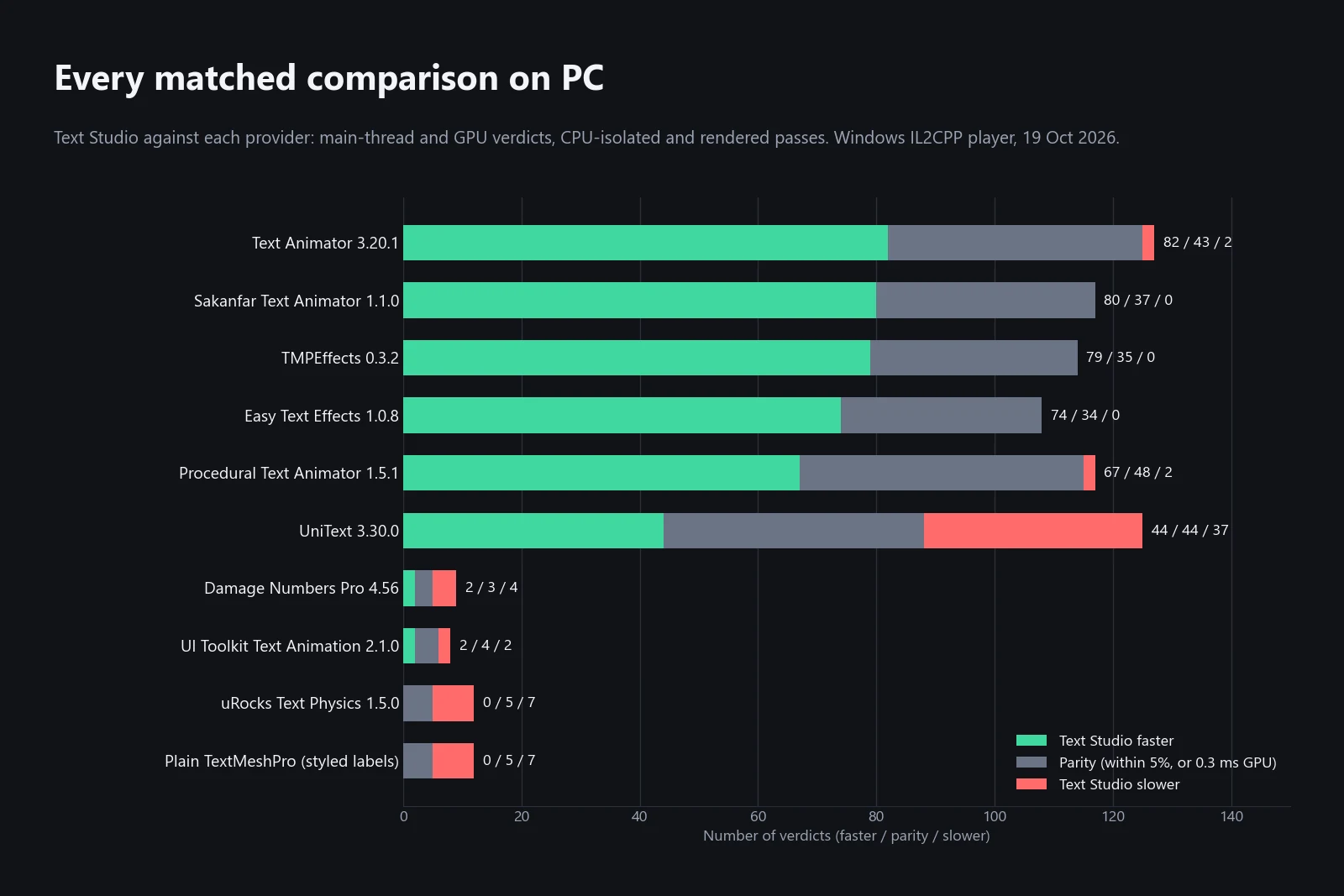
Across 750 main-thread and GPU verdicts in both passes, Text Studio was faster in 430, tied in 258 and slower in 61. The chart above breaks them down by provider. Against the text animators the result is clear: no losses against Sakanfar, TMPEffects or Easy Text Effects, and two each against Text Animator and Procedural Text Animator. Against UniText it is close to even, and the specialists for physics and damage numbers win more often than they lose.
Where Text Studio leads, the gaps are large. Rendered main-thread time per frame, in milliseconds:
| Workload | Text Studio | Text Animator 3.20.1 | UniText 3.30.0 | TMPEffects 0.3.2 |
|---|---|---|---|---|
| Restart and skip, 128 labels | 0.51 | 28.66 | 1.73 | 114.42 |
| Reveal and hide cycle, 128 labels | 0.50 | 1.95 | 1.61 | 7.16 |
| 200 animated TMP UGUI labels | 1.30 | 2.28 | 2.44 | 6.01 |
| 200 animated TMP world labels | 1.09 | 2.02 | 2.58 | 6.88 |
| Idle Wave animation, 128 labels | 1.17 | 2.57 | 1.71 | 7.20 |
| Four-effect motion stack | 0.63 | 0.91 | 1.06 | 5.11 |
| Single Wave effect | 0.34 | 0.56 | 0.78 | 2.06 |
On the main thread, Text Studio also led every single-effect workload against every provider that supports the effect, and all effect stacks, in both passes; it led 128 concurrent dialogue typewriters against everyone except UniText, and 500 idle labels against all text animators (0.31 ms against 0.46 ms for Text Animator).
Where Text Studio is slower
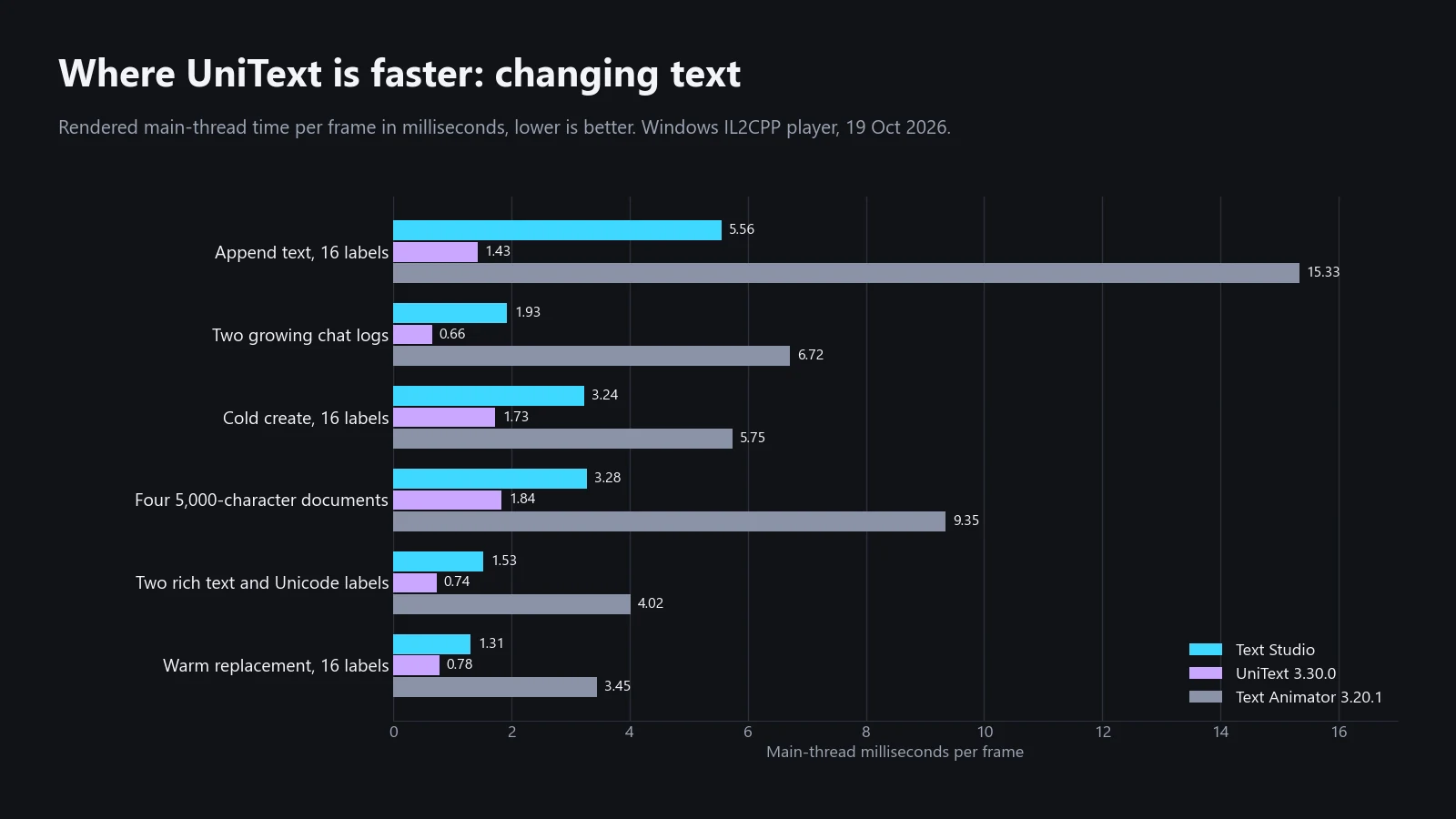
- UniText when text changes. Appending text to 16 labels took 5.56 ms against 1.43 ms, two growing chat logs 1.93 against 0.66, creating 16 labels 3.24 against 1.73, four 5,000-character documents 3.28 against 1.84, two rich text and Unicode labels 1.53 against 0.74, and warm replacement 1.31 against 0.78. UniText is a complete text engine that shapes and builds its own meshes and moves part of the work to worker threads; Text Studio sits on TextMeshPro, and in these workloads TextMeshPro itself takes most of the frame. Plain TextMeshPro needed 5.23 ms for the append, 3.14 for the documents and 1.24 for the replacement. Counted over all threads, UniText used more CPU than Text Studio when appending, creating and replacing, and less in chat logs, documents and rich text.
- UniText in large populations. 200 active labels took 0.80 ms against 0.52, 500 idle labels 0.31 against 0.23, and the 128 dialogue typewriters 2.01 against 1.60 on the main thread and 0.92 against 0.12 ms on the GPU.
- uRocks Text Physics with 2D physics. 128 active physics letters took 0.51 ms against 0.26, with wind 0.53 against 0.28, and 32 letters 0.30 against 0.23.
- Damage Numbers Pro with pooled popups. A pool of 128 took 1.23 ms against 1.03 and a pool of 32 took 0.58 against 0.50. Text Studio was faster when rapid hits merge into one number: 0.32 ms against 0.64.
- Text Animator on the GPU with many labels. 200 active labels cost 1.40 ms of GPU time against 0.54, and one CPU-isolated UI Toolkit row took 0.34 ms against 0.28.
- UI Toolkit Text Animation in two rows. Wave labels on the native UI Toolkit scheduler took 1.67 ms against 1.58, and manually stepped counters 1.05 against 0.95. Text Studio led in the other two UI Toolkit rows.
- Plain TextMeshPro for styled labels. 200 labels with an outline and a shadow took 0.28 ms on the main thread against 0.22 for TextMeshPro’s own outline and underlay material: the price of Text Studio’s layered styles.
These comparisons feed straight back into development. The chat-log rows, for example, exposed a case where appended text was prepared again from the start; the fix landed later the same day, after the PC measurements, so the append and chat-log rows above predate it.
Phones, tablets, Quest and Mac
The same comparisons run on an Apple M4 Max Mac and, with a smaller set of workloads, on a Galaxy Tab S7 FE, an iPad (10th generation) and Meta Quest 3. On the Mac, Text Studio was faster in 420 verdicts, tied in 304 and slower in 26. On the mobile devices the picture is tighter: 72 wins, 40 ties and 35 losses on the tablet, 60, 46 and 41 on the iPad, and 56, 35 and 32 on Quest 3. The largest gaps there are GPU time for the reveal-and-hide cycle and 50 labels against Text Animator on the tablet, and main-thread time for UniText-rendered labels on Quest 3. Styled text on phones and Quest covers those devices in detail.
Why the product page shows only four cards
The Performance page works differently on purpose. Its four cards come from a fixed, reviewed list of workloads, and the generator that builds them refuses a card unless the run is a clean build with three stable repetitions in one environment and Text Studio beats every provider shown on that card. The cards therefore show where Text Studio leads, never a cherry-picked repetition, and each headline names the next-fastest tool rather than the slowest. They come from the same October run as this article: restart and skip and the reveal-and-hide cycle against UniText, Text Animator and TMPEffects, 200 animated labels, and 50 native UI Toolkit counters. Until August the page also showed a memory card; the October release players record no allocation counters, so that card was retired rather than mixed with a different environment. This article is where the full picture lives, losses included.
How old these numbers are
Every tool in this list changes, and so do we: Text Studio 1.4 changed parts of the pipeline after these runs, and UniText releases new versions often. We repeat the complete suite before major releases and date every result. For comparisons with each tool beyond speed, see Text Studio vs Text Animator, Text Studio and UniText, TMPEffects and other free tools and Damage Numbers Pro.
Measure your own project
Benchmarks tell you where a tool stands; your scene tells you what you need. Measure in a release build on the device you ship to, look at GPU time as well as main-thread time, and let phones run for a minute before comparing numbers. The Plan for Performance chapter lists the settings that decide most of the cost.
Frequently asked questions
Is Text Studio faster than Text Animator?
In the October 2026 PC run, Text Studio was faster than Text Animator 3.20.1 in 82 of 127 main-thread and GPU verdicts, tied in 43 and slower in 2: GPU time for 200 active labels and one CPU-isolated UI Toolkit row. On the Galaxy Tab S7 FE tablet, Text Animator drew the reveal-and-hide cycle and 50 labels with less GPU time.
Is UniText faster than Text Studio?
When text changes, usually yes. UniText 3.30.0 is a complete text engine and was faster on the main thread when appending, replacing and creating text, in chat logs, documents and large idle populations. Text Studio was faster in effects, reveal and hide, skip and restart and animated surfaces: 44 wins, 44 ties and 37 losses in total.
Why does the Performance page only show wins?
Its four cards come from a fixed, reviewed list of workloads, and a card is only published when Text Studio beats every provider on it in clean builds with three stable repetitions. This article shows the complete matched set instead, including the losses.
Can I run the Performance Lab myself?
No. The lab is our internal test harness and is not part of the package, because it bundles adapters for competing products. The Plan for Performance chapter of the manual explains how to measure your own scenes in a release build on your target device.
Style and animate every word in Unity.
Keep reading
 Article
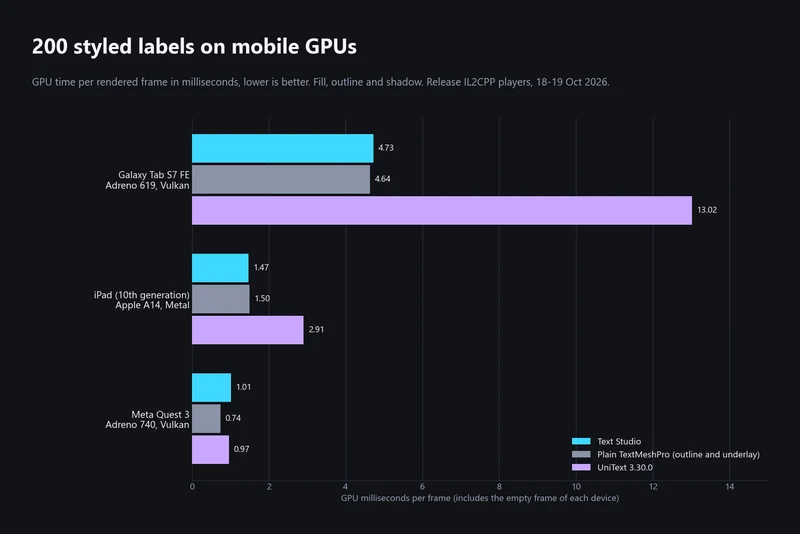
Styled text on phones and Quest: what we measured
A reviewer found Text Studio 1.2 slow on phones. Here is what went wrong, what 1.3 and 1.4 changed, how styled labels now compare with TextMeshPro and UniText on a tablet, an iPad and Quest 3, and where mobile is still slower. Comparison
Text Studio vs Text Animator for Unity
Text Animator 3 is mature, focused and supports Unity 2022.3. Text Studio covers more of the text job, from looks and damage numbers to paths and handwriting, costs less and converts Text Animator 3 markup. Comparison