Text Studio vs TextMeshPro and your own scripts
TextMeshPro is free and built into Unity. When a short script is enough for animated text, and when typewriter timing, effects and looks need Text Studio.
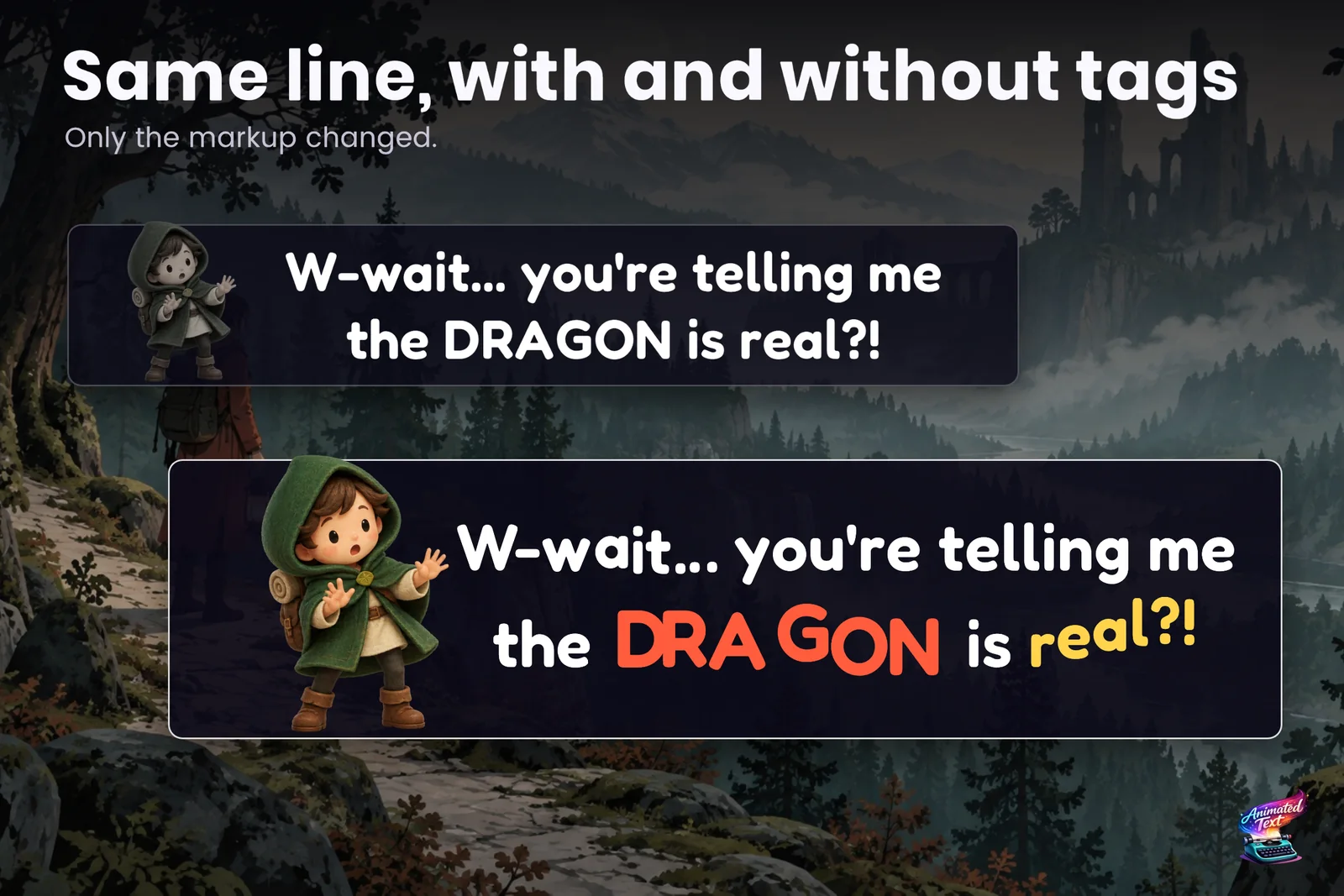
Unity’s own documentation describes TextMeshPro as included in the Editor, with more than thirty rich text tags, sprites, styles and custom shaders. Outline, underlay, bevel and glow are material settings for a whole text object. Animation is not part of the core: the optional TMP Examples and Extras contain sample scripts such as vertex jitter and warped text, and everything else is your code. The facts here come from Unity’s TextMeshPro and UI Toolkit documentation, checked on 2026-11-11.
The script you start with
Most projects begin with a coroutine like this one, and for a prototype it is fine:
using System.Collections;using TMPro;using UnityEngine;
public class SimpleTypewriter : MonoBehaviour{    [SerializeField] TMP_Text text;    [SerializeField] float charactersPerSecond = 40f;
    IEnumerator Start()    {        text.ForceMeshUpdate();        int total = text.textInfo.characterCount;        for (int visible = 0; visible <= total; visible++)        {            text.maxVisibleCharacters = visible;            yield return new WaitForSeconds(1f / charactersPerSecond);        }    }}
It reveals one character at a time and respects rich text tags. Then the feature requests arrive.
Where the script stops scaling
- Timing that reads like speech. Pauses after commas and full stops, slower words for emphasis, a wait before a reveal. Each needs parsing and special cases. See typewriter timing that reads like speech.
- Skipping. The first click should finish the line, the second should advance, and a held button must not skip the next line too. Unity Discussions has years of threads about exactly this.
- Sounds and events. A voice blip per letter that stops when the player skips, an event when a word appears, a portrait change mid-sentence.
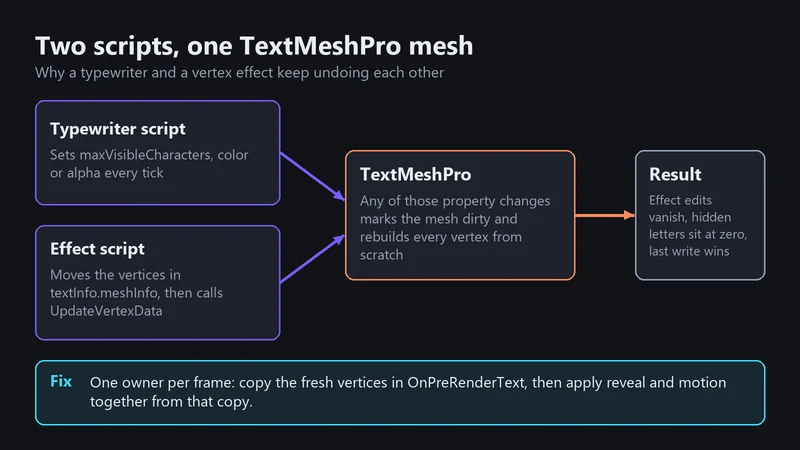
- Effects that fight each other. Vertex effects such as a wave get reset whenever TextMeshPro regenerates the mesh, and changing visible characters or alpha does exactly that. The article on why a typewriter breaks your text effects explains the mechanics.
- UI Toolkit. UI Toolkit has no maxVisibleCharacters. Since Unity 6000.3, PostProcessTextVertices lets code edit glyph vertices, and Unity 6.5 made the Advanced Text Generator the default. Your TextMeshPro script does not carry over.
- Looks. One outline and one glow per material are fine for a label. Two outlines, a bevel with depth, a gradient per word or a look that animates need more materials, more objects or custom shaders.
- Many texts at once. Damage numbers, combo counters and HUD values need pooling, stacking and merging, or the frame time climbs with every enemy.
A middle route: DOTween Pro
DOTween Pro (US$15, 818 reviews on the Asset Store) has a script-only DOTweenTMPAnimator that tweens individual characters: offset, rotation, scale, color, fade and skew. DOText can scramble text while it changes, and DOCounter counts numbers up or down. If you already use DOTween and like building systems, it covers per-character motion nicely. Its documentation describes no tag parsing or typewriter tooling, so timing, skipping and authoring stay your job.
What Text Studio adds on top of TextMeshPro
| TextMeshPro alone | Text Studio on TextMeshPro | |
|---|---|---|
| Typewriter | Script it with maxVisibleCharacters | 15+ presets, punctuation-aware timing, waits, speed tags, input gates, skip and advance |
| Effects | Sample scripts in TMP Examples and Extras | 40+ tag effects such as <wave> and <shake>, plus Composed Effects without code |
| Looks | One outline, underlay, bevel and glow per material | 60+ layered looks with several outlines, glows, shadows, bevels and faux depth |
| Sounds and events | Your code | Typing sounds, markers, events and waits inside the text |
| Gameplay text | Your pooling code | Text Emitters with presets, pooling, stacking and merging |
| UI Toolkit and legacy UI Text | Separate code paths | The same tags and timing on both |
| Editing | Enter Play Mode to see animation | Live preview and scrubbing in the Inspector and Scene view |
Text Studio keeps TextMeshPro as the renderer, so fonts, materials, sprites and styles you already have keep working. Native TextMeshPro tags such as <color> and <b> stay valid next to Text Studio tags.
Where TextMeshPro alone is the better choice
- Static text. Labels, menus and descriptions that never move need no animation tool.
- One effect, once. A single title that wobbles in a game jam is quicker to script than to learn a tool.
- Zero dependencies. Some teams keep third-party code out of a project on principle, and TextMeshPro alone keeps it that way.
- The cheapest simple style. For a plain outline and shadow, TextMeshPro’s own material is a little faster: in our lab, 200 such labels took 0.22 ms of main-thread time with the material against 0.28 ms with Text Studio’s layered style. The benchmark article has the details.
How to choose
If you are writing the third special case into your typewriter script, or copying the same wobble code into a second project, a tool starts to pay for itself. The typewriter guide shows what the same job looks like in Text Studio, and the comparison with Text Animator covers the other established tool.
Sources, checked 2026-11-11: TextMeshPro documentation, TextMeshPro distance field shaders, UI Toolkit custom text animation, What’s new in Unity 6.5, DOTween Pro.
Frequently asked questions
Does Text Studio replace TextMeshPro?
No. Text Studio builds on TextMeshPro, which ships with Unity, and adds animation, timing, looks and gameplay text on top. Your TextMeshPro objects, fonts and materials stay; Text Studio also works with UI Toolkit, legacy UI Text and UniText.
Can TextMeshPro do a typewriter effect without an asset?
Yes. Raising maxVisibleCharacters over time reveals the text, and TextMeshPro's sample scripts show more. You then write punctuation pauses, skipping, sounds, events and the interaction with other effects yourself.
What about DOTween Pro?
DOTween Pro's DOTweenTMPAnimator tweens individual characters by script, and DOText can scramble text. It is a good middle route if you already own it and are comfortable building tags, timing and skipping yourself.
Does TextMeshPro support outlines and glow?
Yes, as material settings: outline, underlay, bevel and glow apply to the whole text object, and material presets switch between looks. Several outlines, different looks per word or animated looks need more than one material or a tool.
Style and animate every word in Unity.
Keep reading
 Article
Why a TextMeshPro typewriter breaks your text effects
maxVisibleCharacters, color and alpha changes make TextMeshPro rebuild its mesh and wipe vertex edits. The mechanics, a plain TMP fix with one owner per frame, and how Text Studio avoids the conflict.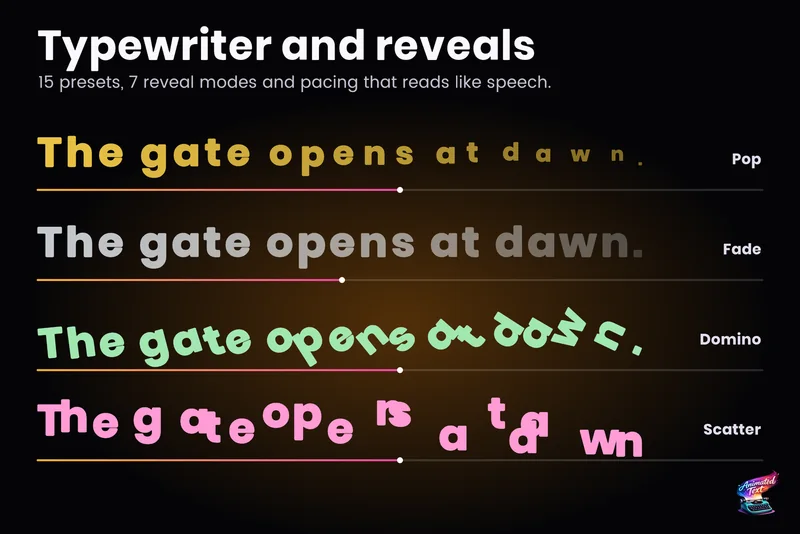 Use case
Typewriter effect for TextMeshPro and UI Toolkit
Reveal text by glyph, word or line with timing that understands punctuation, then add waits, skipping, sounds and events without writing a coroutine. Comparison