Mock Magic vs Bogus
Bogus is the leading C# fake data library with 50 locales. Mock Magic is built for Unity. How they compare on editor use, data, series, streams, builds and price.

Bogus is a mature fake data library for .NET. It started as a C# port of faker.js, is MIT licensed, has about 9,800 stars on GitHub and about 293 million downloads on NuGet, and its current version, 35.6.5, came out in October 2025. Mock Magic covers part of the same ground from the other side: it began as the test data generator behind Chart Guru and grew around the Unity Editor. Here is where each one is the better tool.
What Bogus does best
- Locales. 50 locales for names, addresses, phone numbers and more, with English as the fallback when a locale has no data for a field. Mock Magic has no locale setting: its names come from many regions, but addresses, phone numbers, ZIP codes and SSN-style values follow US formats, and reviews, job titles and company names are English.
- Catalog depth. The
Fakerfacade groups data into data sets such as Name, Address, Internet, Company, Commerce, Finance, Date, Lorem, Vehicle and Hacker. Extension methods add country-specific identifiers such as Brazil’s CPF, Poland’s PESEL and the UK’s National Insurance number. - Rules for typed objects.
Faker<T>describes a class withRuleForrules, a rule can read values that earlier rules produced, andStrictMode(true)fails when a member has no rule. - Reach. The same code runs in any .NET project, so a game server, a backend test suite and a command line tool can share one generator. Version 35 and hundreds of millions of downloads also mean a long issue history to search when something behaves oddly.
How Bogus gets into a Unity project
Unity does not install NuGet packages by itself, so there are two common routes:
- Download the package from nuget.org, open it as a zip archive and copy
lib/netstandard2.0/Bogus.dllintoAssets/Plugins. The DLL is about 2.3 MB because all locale data is embedded in it. - Install NuGetForUnity, an open source editor extension, and add Bogus from its window.
Neither the Bogus documentation nor its issue tracker mentions Unity or IL2CPP. Bogus finds the fields and properties of your classes through reflection, and Unity’s managed code stripping cannot always tell that code reached only through reflection is in use. Build for each target platform and check the generated data there before you rely on it outside the Editor.
What Mock Magic adds for Unity
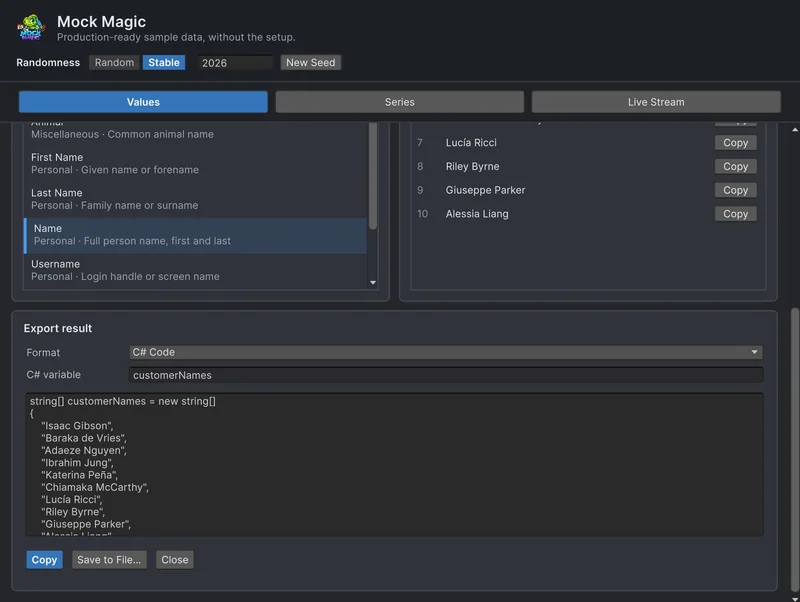
- An Editor window. Tools > Mock Magic > Generator opens three workspaces. Values lists 57 data types in 11 categories with a search field, generates up to 1,000 values at once and copies or exports them, so designers and testers can fill a table without writing code.
- Stable mode. Switch Randomness from Random to Stable, and every Regenerate repeats the result for the seed in the header. In code,
Mock.Seed(42)does the same and also seedsUnityEngine.Random. - Series for charts. The Series workspace shapes up to 10 series of 3 to 1,000 points with 15 patterns, from Linear and Seasonal to Random Walk and Gaussian Noise, and 17 label presets such as months, quarters or cities, with a preview chart.
- Live streams. The Live Stream workspace emits points on a Constant, Random, Burst or Drip rhythm in Edit Mode and Play Mode, continues its pattern from one emission to the next and logs every event.
- Export. Values and series export as Text, CSV, JSON or C# code, ready to paste into a test or a demo scene.
- Unity-native code. The runtime API has no Editor dependency,
Mock.Color()returns aUnityEngine.Color, andMockOf<T>fills objects through explicit setters instead of reflection. - Chart Guru and coding assistants. Chart Guru’s Mock Chart Data Source component feeds charts from Mock Magic, and six skill files teach coding assistants the API.
At a glance
| Bogus | Mock Magic | |
|---|---|---|
| Built for | Any .NET project | Unity 2022.3 to 6.7 |
| Price and license | Free, MIT | Free on the Asset Store with source code, included with Chart Guru |
| Installing in Unity | DLL from NuGet or NuGetForUnity | Asset Store package |
| Editor window | None | Generator with Values, Series and Live Stream |
| Locales | 50 | None: names from many regions, US addresses and formats, English reviews and titles |
| Catalog | Many data sets plus country identifiers | 57 data types |
| Typed objects | Faker<T> with RuleFor | MockOf<T> with Set |
| Seeds | Global and per-faker seeds, date reference | Mock.Seed, MockOf<T>.UseSeed, Stable mode, date reference |
| Chart series | None | 15 patterns, 17 label presets |
| Live streams | None | 4 rhythms, Edit Mode and Play Mode |
| Export | Write your own | Text, CSV, JSON and C# code |
The same task in both: ten users
Both libraries describe a typed object step by step. Bogus uses expressions that name each member:
using System.Collections.Generic;using Bogus;
public class User{    public int Id;    public string FirstName;    public string LastName;    public string Email;}
public static class BogusUsers{    public static List<User> Create() => new Faker<User>()        .UseSeed(42)        .RuleFor(u => u.Id, f => f.IndexFaker + 1)        .RuleFor(u => u.FirstName, f => f.Name.FirstName())        .RuleFor(u => u.LastName, f => f.Name.LastName())        .RuleFor(u => u.Email, (f, u) => f.Internet.Email(u.FirstName, u.LastName))        .Generate(10);}
Mock Magic uses plain setters that run in order, with the item index for IDs:
using MockMagic;
public static class MockMagicUsers{    public static User[] Create() => MockOf<User>.New(() => new User())        .UseSeed(42)        .Set((u, i) => u.Id = i + 1)        .Set(u =>        {            MockPerson person = MockPerson.New();            u.FirstName = person.FirstName;            u.LastName = person.LastName;            u.Email = person.Email; // built from the same name        })        .Generate(10);}
Both return the same ten users on every run, as long as the library version and the order of calls stay the same. The Bogus README warns that updates can change seeded output, and the same caution applies to any generator, Mock Magic included. When a fixture must never change, export it as a C# array.
Using both together
Mock Magic’s templates accept custom tokens, and a token can call anything, including Bogus. That gives you localized strings inside Mock Magic’s IDs, seeds and templates:
using Bogus;using MockMagic;
public static class GermanCustomers{    public static string[] Create(int count)    {        var german = new Faker("de") { Random = new Randomizer(2026) }; // Bogus has its own seed
        Mock.RegisterToken("germanName", () => german.Name.FullName());        Mock.RegisterToken("germanCity", () => german.Address.City());
        Mock.Seed(2026);        string[] rows = Mock.Parse("{{germanName}}, {{germanCity}}, customer {{id}}", count);        Mock.ResetSeed();        return rows;    }}
The templates and custom data types guide covers tokens and typed generators in detail.
Sources
- Bogus on GitHub: README, locales, seeds, date reference and the note on determinism across versions.
- Bogus on NuGet: version, release date, downloads and target frameworks.
- Mock Magic’s scripting API and key features manual pages.
Which one to choose
Choose Bogus when the data must look right in many countries, when you need national identifiers or a data set Mock Magic lacks, or when the same generator should also run in a .NET backend. Budget time for adding the DLL and for testing it in your player builds.
Choose Mock Magic when the data lives in Unity: filling UI and charts from an Editor window, repeating a result with Stable mode, shaping chart series, simulating live data or exporting fixtures as C# code. It is free on the Unity Asset Store and already included with Chart Guru.
Use both when you need localized text inside Unity-shaped data: register Bogus as a token and let Mock Magic handle structure, seeds, series and streams.
Frequently asked questions
Does Bogus work in Unity?
Bogus does not document Unity support, but it ships a .NET Standard 2.0 build that Unity can load. Developers add Bogus.dll from the NuGet package or install it with NuGetForUnity. Test it on every target platform, especially IL2CPP builds, before you depend on it at runtime.
Is Mock Magic based on Bogus?
No. Mock Magic is separate code written for Unity, with an Editor window, chart series and live streams. Its catalog of 57 data types is much smaller than the one in Bogus, and it has no locales: names come from many regions, while addresses and other formats are US and text such as reviews is English.
Can I use Bogus and Mock Magic in the same project?
Yes. Register a Mock Magic token that calls a Bogus Faker, and Mock.Parse templates can then mix localized Bogus values with Mock Magic's own tokens and IDs.
Which one is free?
Both. Bogus is MIT licensed. Mock Magic is free on the Unity Asset Store with full source code, and Chart Guru includes it.
Realistic fake data for Unity, from one value to a live stream.
Keep reading
 Comparison
Mock Magic vs Mockaroo and online generators
Mockaroo designs a schema in the browser, downloads CSV, JSON, SQL or Excel files and serves mock APIs. Mock Magic generates data where a Unity project uses it, with seeds, chart series and live streams. When each one fits.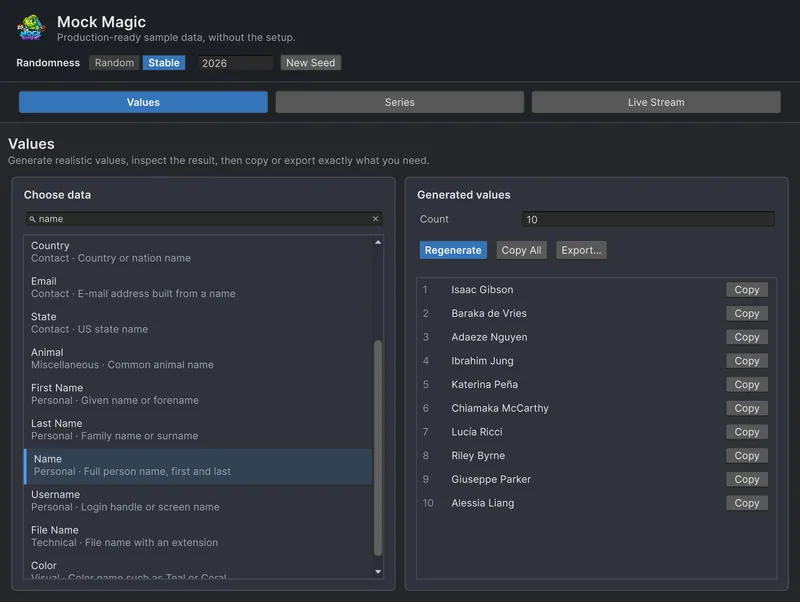 Use case
Templates and custom data types
Mock.Format fills masks such as ORD-#####, Mock.Parse fills {{token}} templates from 58 built-in tokens, and RegisterToken and RegisterGenerator add your own, from loot names to typed values or other locales through Bogus. Use case
Reproducible fake data for Unity tests
Random test data only helps when a failure can be repeated. Seed Mock Magic, pin the date it counts from, keep IDs predictable, and return to fresh random output when the test ends. Article