Exporting Data
Export is available beside generated Values and Series results. Choose Text, CSV, JSON, or C# output, preview it, copy it to the clipboard, or save it directly to a file.
Export turns a generated scenario into reusable data for spreadsheets, APIs, C# prototypes, automated tests, and Chart Guru.
Using Export
- Format dropdown - Select the output format: Text, CSV, JSON, or C# Code.
- C# variable - Shown for C# Code output. Enter a valid C# identifier for the generated array declarations.
- Copy - Copy the formatted output to the clipboard.
- Preview and Save to File - Review the full formatted output, then choose Save to File to select a destination.
If no data has been generated yet, the export action explains which workspace needs a result first.
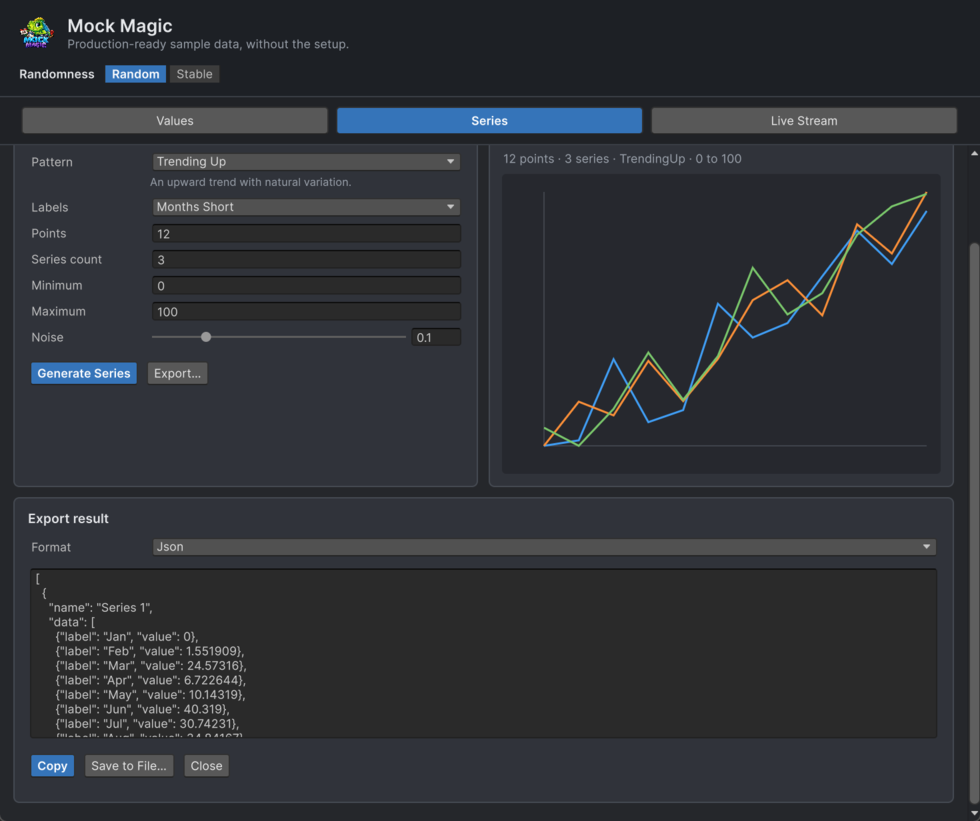
Explicit Export Source
Open Export from Values or Series. Mock Magic keeps the selected result explicit and never switches export sources automatically.
- Values exports the current generated value batch.
- Series exports the current single-series or multi-series result.
- The export panel stays beside the result that opened it.