Using MockMagic with Chart Guru
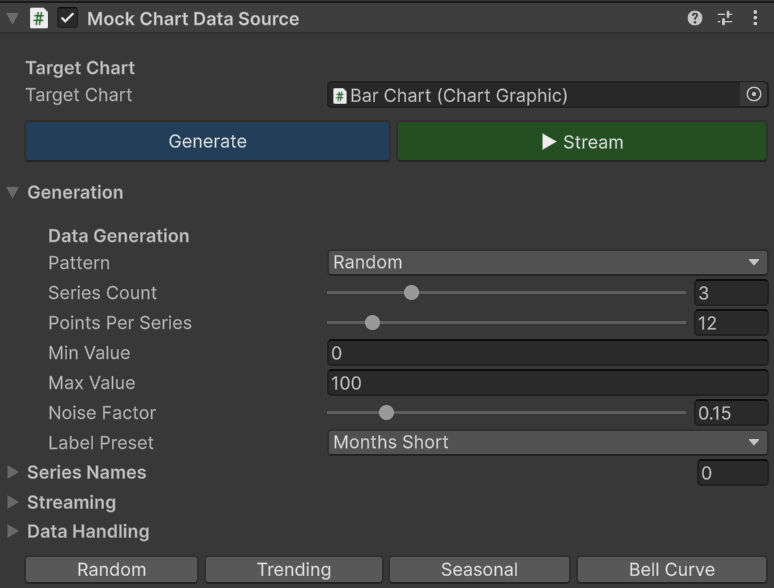
Chart Guru is a released charting tool that ships with Mock Magic fully included. It includes a built-in component called MockChartDataSource that is powered entirely by MockMagic. You do not need to open the MockMagic Generator window, export data, or write any code - just add the component to your chart and configure it in the Inspector.
Adding MockChartDataSource
There are two ways to add it:
- From the ChartGraphic Inspector - When a ChartGraphic component has no data source attached, the Inspector shows an "Add Mock Data Source" button. Click it to add MockChartDataSource automatically.
- From the Add Component menu - Select Add Component → ChartGuru → Mock Chart Data Source.
Works in Edit Mode
MockChartDataSource works in both Edit Mode and Play Mode. You can:
- Click Generate to preview chart data without entering Play Mode
- Start streaming to see live chart updates in the Scene view
- Swap patterns and label presets with instant visual feedback
This makes it an excellent rapid prototyping tool - configure your chart's look and feel with realistic data before writing a single line of code.
Under the Hood
MockChartDataSource uses MockMagic's MockSeries class internally:
- One-shot generation calls MockSeries.Generate() (single series) or MockSeries.GenerateMultiSeries() (multi-series)
- Streaming calls MockSeries.GenerateLabels() and MockSeries.GenerateValues() to produce incremental data points
- Labels continue sequentially across emissions (same continuity behavior as MockMagic's Streaming tab)
Alternative Workflow: Export and Paste
If you prefer to use Chart Guru's ManualChartDataSource instead, you can:
- Open the MockMagic Generator window (Tools → Mock Magic → Generator)
- Generate series data in the Series Data tab
- Switch to the Export tab and select CSV or JSON
- Copy to Clipboard
- Paste into your data source, configuration file, or script
This workflow gives you more control over the exact data, but requires an extra step compared to the integrated MockChartDataSource component.