Getting Started
Installation
Requirement: Unity 2022.3 or newer.
- Import Mock Magic from your Asset Store purchases using Package Manager > My Assets.
- The Asset Store package includes the shared files required by Mock Magic. Chart Guru already includes a bundled copy of Mock Magic.
- Verify installation: open Tools → Mock Magic → Generator from the Unity menu bar.
A welcome guide opens once for standalone installations and remains available from Tools > Mock Magic > Welcome. Copies bundled with Chart Guru keep automatic onboarding quiet. On Unity 6.3 or newer, the main toolbar also provides a shortcut to the Generator.
Your First Mock Data - 30 Seconds
- Open Tools → Mock Magic → Generator.
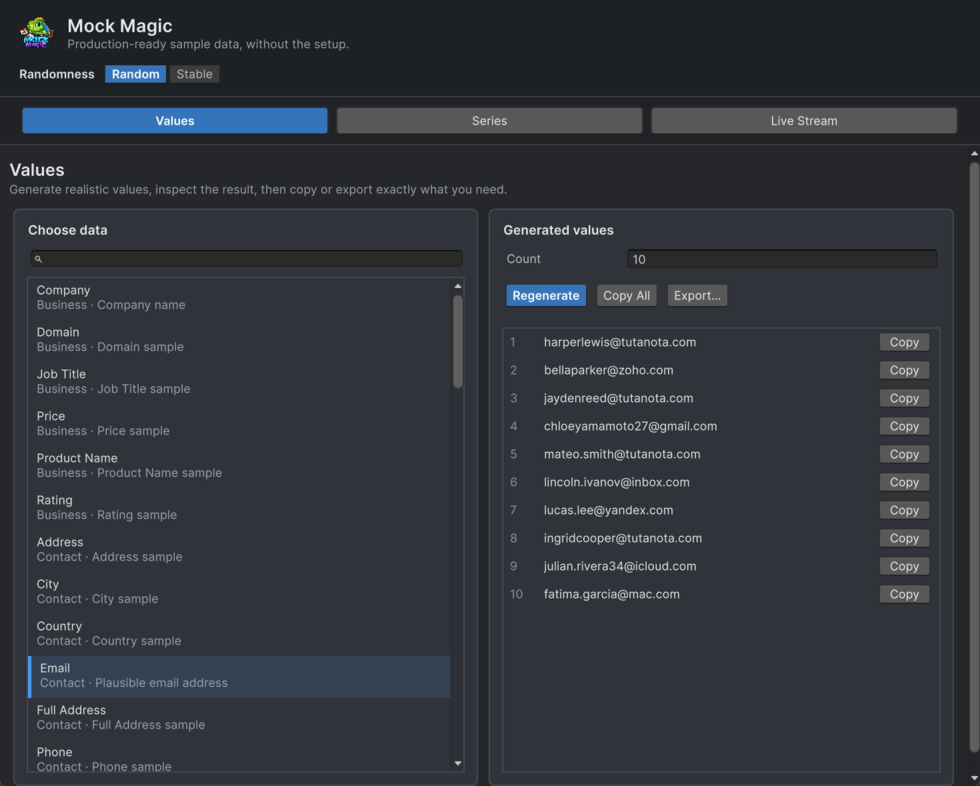
- Choose Values. The Generator remembers the workspace you last used.
- Type Email in the search field under Choose data. Search matches the type name, category, and description.
- Select Email in the search results.
- Click Copy All to copy everything to your clipboard.
That's it. You now have 10 fake email addresses ready to paste wherever you need them.
AI Assistant Workflows
Mock Magic includes six optional Markdown skills in AI/Skills for setup, scalar values and templates, typed objects, series, live streams, and exports. Point a compatible coding assistant at that folder and load only the skill that fits your request. AI/README.md lists the available workflows. Review proposed changes before applying them; the skills add no AI service, subscription, or runtime dependency.
Workspaces and Export
The Generator has three focused workspaces. Export stays beside the generated Values or Series result, so the source is always clear.
Tab | Purpose |
|---|---|
Values | Search and generate names, emails, dates, colors, UUIDs, and more. |
Series | Generate and preview patterned, multi-series, and negative-value datasets. |
Live Stream | Emit mock data in real time with clear status and an event log. |
Export Action | Preview, copy, or save Text, CSV, JSON, or C# beside a generated result. |