Simple Data
The Welcome screen provides direct access to the Generator, the manual, and the example scene. In the Generator, search data types by name, category, or description and use New Seed when you want the visible seed and current result to change together.
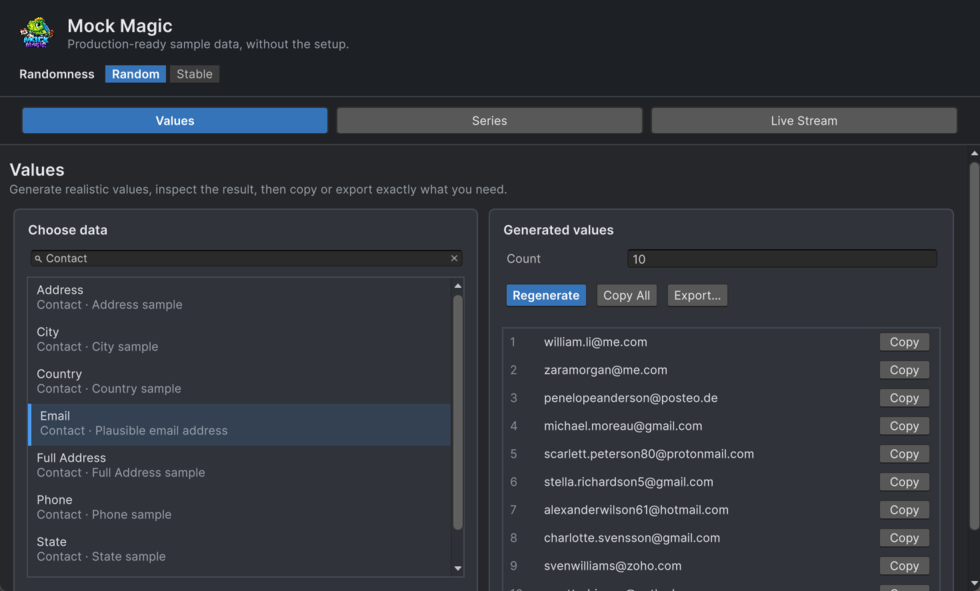
The Values workspace generates individual fake values or batches from 57 built-in data types. Search by name, category, or description, then select a type and generate the required batch. Every value comes from realistic embedded datasets.
Use it to remove placeholder-data busywork from forms, lists, user profiles, tables, and test fixtures. A realistic value is available immediately, from one quick label to a batch large enough to exercise a complete screen.
Using the Values Workspace
- Data type browser - Search by name, category, or description, then select a type from the list. Each entry includes its category and a short explanation.
- Count - Enter how many values to generate (1–1000), then click Regenerate.
- Regenerate - Generate a fresh batch or apply a changed Count. Selecting a different data type also generates a new batch.
- Copy All - Copies all generated values to the clipboard, separated by newlines.
- Preview list - A scrollable list showing all generated values, numbered. Each item has its own Copy button for copying a single value.
Narrow windows stack the controls and results. If a long value is shortened visually, hover over it or use Copy or Export to inspect the full text.
Note: All generated data is fake. Credit card numbers pass the Luhn check but are not real. ISBN check digits are valid. Passwords use Fisher-Yates shuffling with guaranteed uppercase, lowercase, digit, and special character.
Tips
- Combine types for realistic records. Generate 10 names, 10 emails, and 10 cities separately, then pair them together for a mock user database.
Values generates each field independently. Use MockPerson from the scripting API to derive a record’s email and username from its chosen name.
- Use Copy All for bulk pasting. The clipboard output is newline-separated - paste directly into spreadsheets, text files, or code editors.
- Use Count for anything from one quick placeholder to 1000 values for testing larger lists.