Add Tubes, Repeats, and Attachments
Contour Tubes
Run a round or custom tube around the outline or along the letter's stroke (see Follow the Letter's Stroke), on the front, back, or both. Control holes, clearance, path detail, and the tube material independently from the letter body.
Contour Repeats
Choose Dash, Stitch, Bulb, Marquee, Rivet, Rail, Bead, Spike, Gem, Bolt, Leaf, or Prefab. Control spacing, count, density, phase, corner behavior, overlap avoidance, and repeatable position, scale, and rotation variation. Prefab repeats accept ordinary nested model prefabs, including models whose visible mesh is stored on a child object.
Named Glyph Sockets
Create sockets at the center, front, back, top, bottom, or a contour fraction. Give each a stable name, position and orient it with scene handles, then attach particles, props, lights, gameplay objects, or accessibility markers.
Contour Tubes
ContourTube3DSpec sweeps a round or custom closed profile around front, back, or both transformed cap boundaries. It can include counters, maintain clearance from the letter surface, and bound path work by physical spacing and maximum samples. An unassigned profile uses an analytic round section. A custom tube profile contains 3 to 64 validated points.
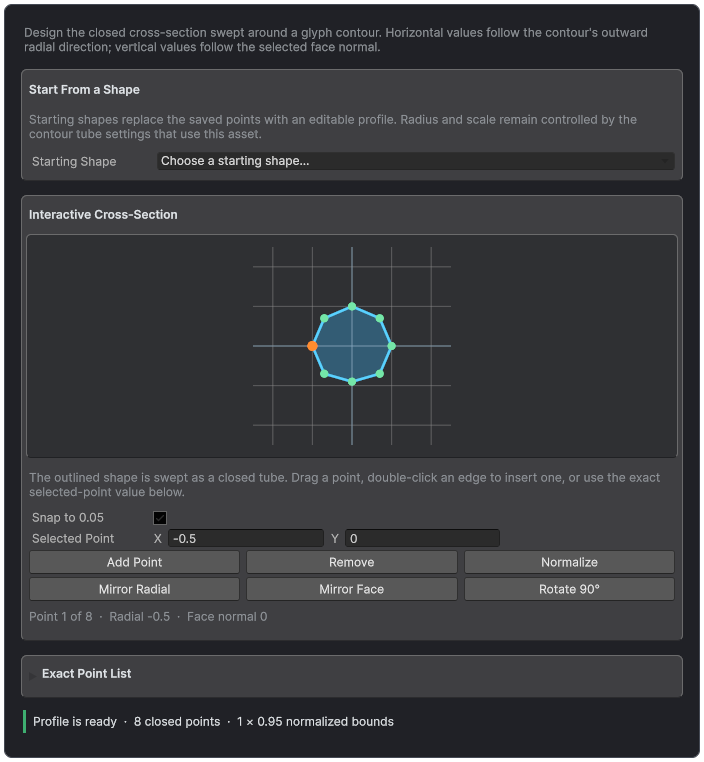
Contour Tube Profiles expose a directly editable cross-section with exact point controls and validation.
Contour Repeats
Repeats place Dash, Stitch, Bulb, Marquee, Rivet, Rail, Bead, Spike, Gem, Bolt, Leaf, or readable root-prefab mesh providers along contour distance or along the letter's stroke. Distribution can use physical Spacing, exact Count per loop, or Density per unit. Phase offsets the resolved interval.
- Uniform places providers continuously.
- Avoid Sharp Corners removes instances near hard turns; Corner Clearance sets the distance kept.
- Sharp Corners Only places instances at literal hard vertices.
- Structural Corners groups rounded or clipped turns into one location each; Corner Span sets how far each side is examined.
- Structural Corners And Edges keeps those corner locations and fills long edges using the chosen distribution; smooth loops keep uniform repeats.
- Avoid Overlap uses authored size and orientation.
- Seeded position, scale, and rotation variation remains deterministic.
Choose Face, Tangent, Outward Normal, or Custom orientation. Repeats can include counters or both cap surfaces and use the independent Decorations material region. Prefab repeats accept a normal nested model whose visible mesh is stored on a child object.
Follow the Letter's Stroke
Contour Tube and Contour Repeats each have a Path Source. Perimeter follows the glyph outline and can include counters. Automatic Stroke extracts centerlines from the current glyph outline. Authored Stroke uses exact glyph paths from a Writing Style.
- Perimeter: borders, outlines, and marquee rows around the letter shape.
- Automatic Stroke: neon tubes or bulb rows along the middle of each stroke. Choose Opposing Boundaries or Adaptive Raster as the Automatic Method and review the result, because extraction can be unavailable for some glyphs.
- Authored Stroke: hand-drawn paths stored in a Writing Style. Font Identity Bindings connect each prepared font to its Writing font, and Missing Authored Path chooses Reject or Automatic Stroke for glyphs without a path.
When a tube or repeat uses a stroke, the layer shows Stroke Source settings shared by both. Stroke Build Limits bound extraction work; zero uses the built-in limit, except Refinement Limit, where zero turns refinement off. Stroke tubes add Bend Limit (degrees), where zero uses 12 degrees and other values are clamped to 2 to 45, and Vertex Limit. Repeat counts and maximums apply per stroke component instead of per contour.
Marquee Tutorial
- Enable Contour Repeats and choose Marquee or Bulb.
- Start with Spacing, then tune size so adjacent bulbs remain separate at corners.
- Choose Avoid Sharp Corners and set Corner Clearance, or choose Structural Corners, and enable Avoid Overlap for a clean border.
- Assign an emissive Decorations material while keeping the letter Front Face readable.
- Change the seed only when variation is enabled and verify the result remains stable after reload.
Glyph Sockets
Sockets can target Center, Front, Back, Top, Bottom, or a normalized Contour Fraction. Give each socket a stable project name and use scene handles to adjust its local pose. Runtime code can locate sockets without depending on generated hierarchy details.
- Attach particles to a named impact point.
- Place a light on the front of a sign.
- Attach a gameplay object to a letter while preserving glyph identity.
- Expose accessibility or navigation markers independently from visible geometry.