Animate 3D Text and Add Interaction
Text Studio 3D combines native surface and geometry effects with compatible Text Studio motion. Built-in effects, custom Code Effects, and native 3D effects are programmable leaf primitives. Composed Effects are the only reusable no-code Effect assets and own lifecycle, playback, curves, timing, sequencing, scope, and combinations. Use native effects when depth, bevels, contours, or material regions should participate in the animation. The complete visual gallery appears in the appendix.
Compatible Text Studio effects
Position, full XYZ rotation, scale including Z, color, transparency, corner deformation, spatial motion, semantic Areas, sequences, motion policy, and Effect Code continue through the normal Text Studio workflow. Existing Effect parameters appear immediately as typed controls without override checkboxes. A new layer snapshots the published defaults, and Reset or Reset All adopts later source defaults explicitly. Combined, chunked, hybrid, and LOD output support the complete compatible channel set. Per-letter and Physical output support position, rotation, and scale on their individual glyph objects.
Text Studio 3D also registers emission, metallic, smoothness, dissolve, and depth-scale channels. These are evaluated through the same Composed Effect rather than through a second animation system. Existing Effect and channel layers share the same Reveal, Active, and Hide envelope, including playback, curves, timing, and sequence. Duplicate a layer when lifecycle stages need different values or envelopes. The renderer applies only the channels and semantic surfaces supported by the current output and material family.
Spatial effects in depth
Base Text Studio owns spatial-field meaning. Area first decides which semantic glyphs may receive a layer. The field then evaluates per-glyph strength from Linear, Sphere, Box, Cylinder, Torus, Target Distance, or deterministic Noise in Source Layout, Source Text Normalized, Placed Text, or World space. Text Studio 3D contributes depth-aware transform channels, material channels, and semantic extrusion surfaces.
- Front, Front Relief, and Front Bevel isolate the readable face and its shaping.
- Sides and Inner Sides isolate the exterior body and counters or hollow interiors.
- Back Bevel and Back isolate the rear transition and rear cap.
- Edges and Decorations address registered outline, trim, tube, repeat, and decorative regions.
Surface masks and fields are independent. A Sphere can raise emission only on Front Relief. Target Distance can rotate complete glyphs while a second field dissolves Sides. A broad Box multiplied by Noise can produce a readable transition with non-uniform detail. Use source-normalized space for a layout-independent art direction, Placed Text for spatial forms, and World for a player or scene-driven influence.
Share one target across several effects
Assign the Shared Spatial Target in the base Placement tab. Text Studio 3D reads the same target for every compatible Composed Effect and reports the consuming layers. Each effect keeps its own field shape, radius, falloff, space, combine mode, channel, and surface mask. The Composer target preview is a framing aid only and does not rewrite the runtime target or authored values.
Study Lesson 7: Spatial Fields in Depth
The lesson persists one shared target and four reusable examples: Depth Scale and Emission, Facet Focus Field, Full Rotation Field, and Target Distance x Noise. Drag the target, pause the effect, and inspect each Composed Effect asset to see how one spatial concept produces very different dimensional results.
Composed Effect timing
Three-dimensional Composed Effects use the same Timing view as base Text Studio. Switch Visual Layers from Layers to Timing to align native surface and geometry effects with compatible transform, color, alpha, material, and placement channels. Scrub the shared lifecycle, drag bars to move their start, and drag finite end handles to change playback speed while joined phases continue without restarting.
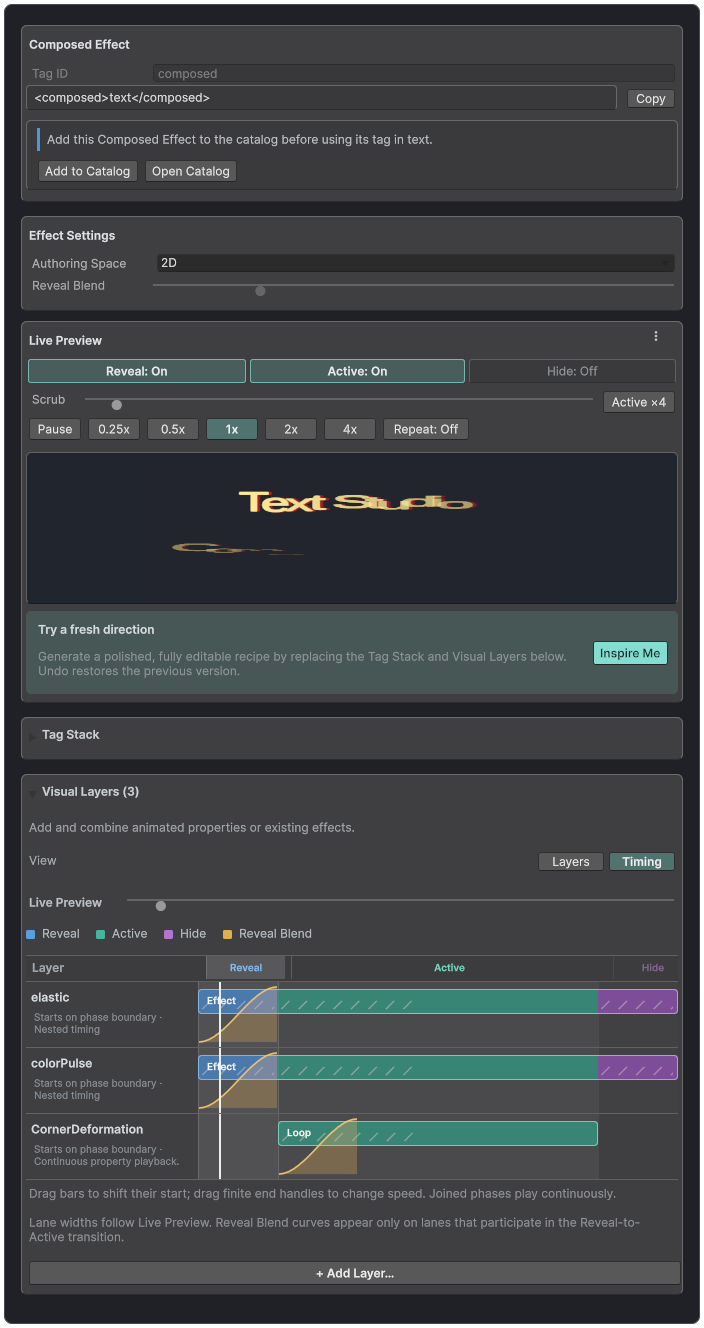
The shared Timing view coordinates compatible Text Studio layers and native 3D channels against one Live Preview lifecycle.
No-code interaction
Hover Lift, Cursor Repel, Magnet Pull, Impact Ripple, Blast and Return, and Gravity Exit react to a shared spatial target, strength, radius, and motion policy. Use Preview Interaction before connecting gameplay input.
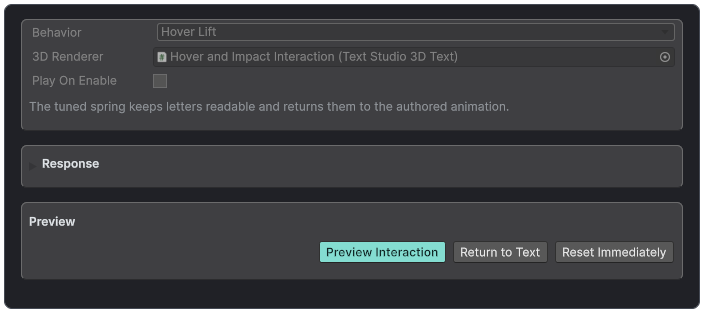
The Interaction controller previews a chosen response before runtime input is connected.
Base effects and output compatibility
Text Studio continues to evaluate position, rotation, scale, color, alpha, corner deformation, areas, sequences, influence fields, and motion policy. Combined, Chunked, Hybrid, and LOD output report the complete shared channel set. Per Letter and Physical output currently support position, rotation, and scale through their isolated object paths.
Use renderer diagnostics when a Composed Effect contains a channel that the selected output cannot represent. Do not assume that switching output is a performance-only choice, because it can also change interaction and channel capabilities.
Native 3D effects
- Neon Chase: travelling emission and color highlight without material instances.
- Chrome Sweep: metallic, smoothness, and emissive highlight across polished text.
- Hologram Scan: emission, transparency, color, and restrained depth shimmer.
- Facet Pulse: bevel or edge illumination selected by a surface mask.
- Glass Reveal: shader dissolve, smoothness, and luminous reveal edge.
- Depth Wave: topology-stable scaling of existing extrusion depth.
- Contour Bloom: quantized topology refresh that expands the glyph contour.
- Bevel Pulse: quantized topology refresh that scales authored bevel geometry.
Contour Bloom and Bevel Pulse are rebuild channels. Topology Effect Refresh Rate and Quantization Steps cap their update cost. Use lower frequency and fewer visible hosts before reducing ordinary transform or material effects.
Interaction Controller
TextStudio3DInteractionController resolves a sibling renderer by default and can follow an explicit world-space target or the base hub's Influence Target. Hover Lift, Cursor Repel, Magnet Pull, Impact Ripple, Blast and Return, and Gravity Exit share Strength, Radius, Play On Enable, Reduced Motion, Preview, and Reset controls.
Forces
Forces can apply gravity, wind, radial blast, vortex, or attraction to retained glyph state. Gravity Drop uses Text Studio force simulation and can be previewed in Edit Mode or Play Mode. Physics Drop switches to Physical Letters, creates Rigidbody and collider letters, and releases them to Unity physics, which advances in Play Mode; the output-mode change supports Undo. Reset Forces stops simulation and returns letters to their authored positions.
Physical Letters
Physical output creates pooled independent letters with convex collision proxies. Use it only when collisions, release, gravity, or per-letter rigidbody behavior are the product feature. Decoration geometry remains visible but is excluded from generated convex proxies. Reset, pause, containment, and return behavior must be tested with the real maximum letter count.
Runtime overrides
Runtime overrides can change visibility, depth, tint, material, and quality without rewriting the authored style. Material and tint changes can remain visual updates. Text, font, contour, bevel, body, sweep, decoration, grouped scope, and topology modules may require a topology build. Property setters request the correct work; explicit in-place asset edits finish with RebuildGeometry.