Animate 3D Text and Use Physical Letters
Text Studio 3D combines native surface and geometry effects with compatible Text Studio motion. Built-in effects, custom Code Effects, and native 3D effects are programmable leaf primitives. Composed Effects are the only reusable no-code Effect assets and own lifecycle, playback, curves, timing, sequencing, scope, and combinations. Use native effects when depth, bevels, contours, or material regions should participate in the animation. The complete visual gallery appears in the appendix.
Add Finite 3D Reactions
Use the base Text Studio Reactions section for particles, completion flashes, marker or signal responses, and outgoing letter motion. The 3D Built-In catalog offers Typing Sparks, Completion Flash, Outgoing Shards, and Counter Outgoing. Select Built-In for a starter recipe, Custom for a shared Reaction Set, or Inline for a host-local response. Behavior Profiles can share Reactions independently from Default Effects and Typewriter.
A Reaction layer chooses When, Which, and Action. Select a semantic or named 3D socket when a particle or cue should follow the actual rendered letter. Reveal and hide responses observe the same text lifecycle across output modes. Topology decorations remain modules; native 3D effects remain in the normal effect stack.
Test particles, audio, and detached letters in Play Mode, including replacement, interruption, repeated use, and disable. Retained outgoing capture has explicit limits for Writing, prepared GPU effects, and LOD switching. Unsupported capture reports a reason and preserves a single output owner. Keep the scene's readable native text as the starting point before tuning secondary effects.
Compatible Text Studio Effects
Position, full XYZ rotation, scale including Z, color, transparency, corner deformation, spatial motion, semantic Areas, sequences, motion policy, and Effect Code continue through the normal Text Studio workflow. Existing Effect parameters appear immediately as typed controls without override checkboxes. A new layer snapshots the published defaults, and Reset or Reset All adopts later source defaults explicitly. Combined, chunked, hybrid, and LOD output support the complete compatible channel set. Per-letter and Physical output support position, rotation, and scale on their individual glyph objects.
Text Studio 3D also registers emission, metallic, smoothness, dissolve, and depth-scale channels. These are evaluated through the same Composed Effect rather than through a second animation system. Existing Effect and channel layers share the same Reveal, Active, and Hide envelope, including playback, curves, timing, and sequence. Duplicate a layer when lifecycle stages need different values or envelopes. The renderer applies only the channels and semantic surfaces supported by the current output and material family.
Spatial Effects in Depth
Base Text Studio owns spatial-field meaning. Area first decides which semantic glyphs may receive a layer. The field then evaluates per-glyph strength from Linear, Sphere, Box, Cylinder, Torus, Target Distance, or deterministic Noise in Source Layout, Source Text Normalized, Placed Text, or World space. Text Studio 3D contributes depth-aware transform channels, material channels, and semantic extrusion surfaces.
- Front, Front Relief, and Front Bevel isolate the readable face and its shaping.
- Sides and Inner Sides isolate the exterior body and counters or hollow interiors.
- Back Bevel and Back isolate the rear transition and rear cap.
- Edges and Decorations address registered outline, trim, tube, repeat, and decorative regions.
Surface masks and fields are independent. A Sphere can raise emission only on Front Relief. Target Distance can rotate complete glyphs while a second field dissolves Sides. A broad Box multiplied by Noise can produce a readable transition with non-uniform detail. Use source-normalized space for a layout-independent art direction, Placed Text for spatial forms, and World for a player or scene-driven influence.
Share One Target Across Several Effects
Assign the Shared Spatial Target in the base Placement tab. Text Studio 3D reads the same target for every compatible Composed Effect and reports the consuming layers. Each effect keeps its own field shape, radius, falloff, space, combine mode, channel, and surface mask. The Composer target preview is a framing aid only and does not rewrite the runtime target or authored values.
Study Spatial Fields In Depth
The lesson persists one shared target and four reusable examples: Depth Scale and Emission, Facet Focus Field, Full Rotation Field, and Target Distance x Noise. Drag the target, pause the effect, and inspect each Composed Effect asset to see how one spatial concept produces very different dimensional results.
Composed Effect Timing
Three-dimensional Composed Effects use the same Timing view as base Text Studio. Switch Visual Layers from Layers to Timing to align native surface and geometry effects with compatible transform, color, alpha, material, and placement channels. Scrub the shared lifecycle, drag bars to move their start, and drag finite end handles to change playback speed while joined phases continue without restarting.
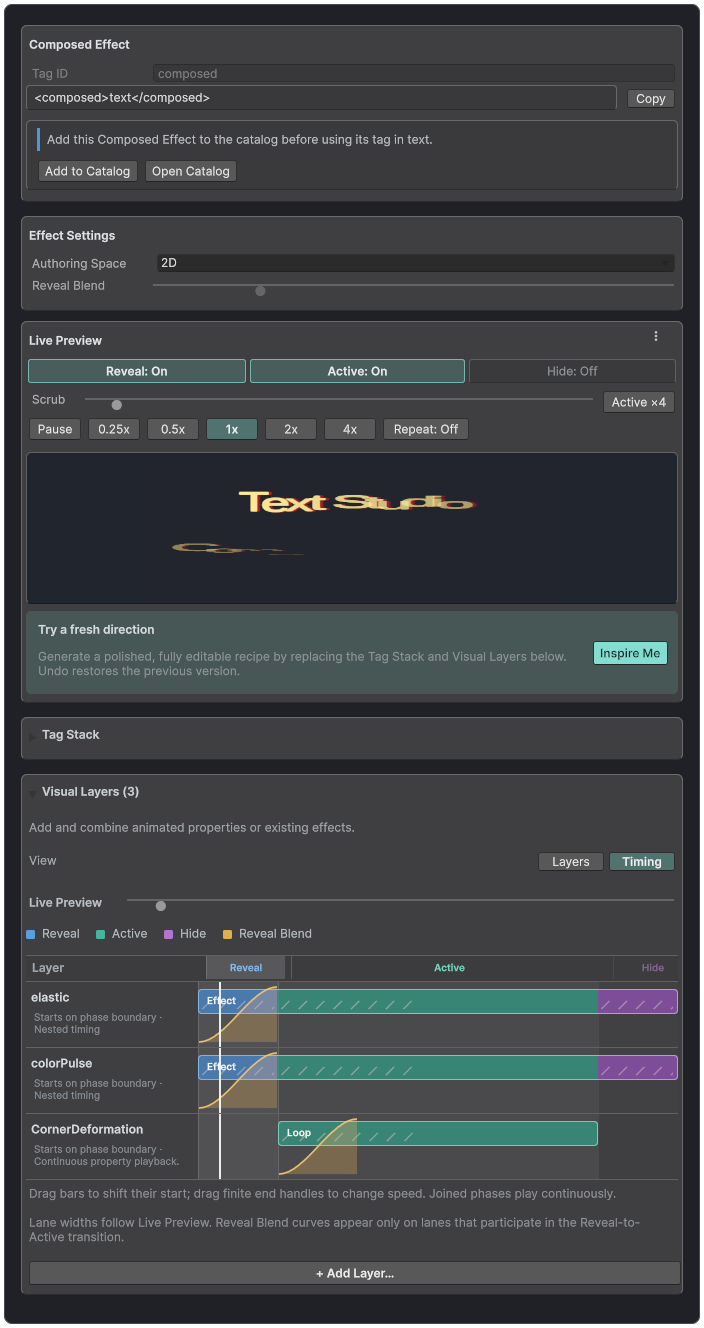
The shared Timing view coordinates compatible Text Studio layers and native 3D channels against one Live Preview lifecycle.
Base Effects and Output Compatibility
Text Studio continues to evaluate position, rotation, scale, color, alpha, corner deformation, areas, sequences, influence fields, and motion policy. Combined, Chunked, Hybrid, and LOD output report the complete shared channel set. Per Letter and Physical output currently support position, rotation, and scale through their isolated object paths.
Use renderer diagnostics when a Composed Effect contains a channel that the selected output cannot represent. Do not assume that switching output is a performance-only choice, because it can also change interaction and channel capabilities.
Native 3D Effects
- Neon Chase: travelling emission and color highlight without material instances.
- Chrome Sweep: metallic, smoothness, and emissive highlight across polished text.
- Hologram Scan: emission, transparency, color, and restrained depth shimmer.
- Facet Pulse: bevel or edge illumination selected by a surface mask.
- Glass Reveal: shader dissolve, smoothness, and luminous reveal edge.
- Depth Wave: topology-stable scaling of existing extrusion depth.
- Contour Bloom: quantized topology refresh that expands the glyph contour.
- Bevel Pulse: quantized topology refresh that scales authored bevel geometry.
- Material Morph: moves one coherent boundary between two complete material states in the existing draw.
- Frost Growth: grows branching crystalline frost, a cool emissive rim, sparse glints, and bounded retained accents.
- Molten Flow: pulses heat through stable branching mineral fractures in one fused material pass.
- Sparkle Field: adds deterministic view-responsive glints and edge-anchored star flares without sprites or particles.
- Refraction Ripple: sends stable concentric waves through selected surfaces and the existing glass-refraction path.
- Liquid Ripple: deforms the complete letter volume with continuous layered waves and a polished liquid response.
Contour Trace: follows the exact prepared outer silhouettes and counters with a travelling contour light. Use <3dContourTrace> and choose direction, starting offset, trail, and simultaneous or sequenced tracing. It is separate from Runic Inlay and uses the existing Writing path.
- Runic Inlay: seats sparse, face-conforming stave inscriptions into the selected glyphs as a metallic inlay with a restrained travelling highlight. Its canonical tag remains <3dRuneTrace>.
- Electric Arc: spans selected text with bounded coherent bolts and branches animated on the GPU.
- Exploded Assembly: separates generated regions into coherent front, body, and rear title plates.
- Edge Melt: softens the gravity-facing silhouette and grows bounded polished volumetric drips.
- Impact Wave: propagates a damped radial crest through selected surfaces with an optional polished ring.
- Volume Dissolve: applies directional volume coverage with matching depth and shadows, an emissive boundary, and bounded shards.
Contour Bloom and Bevel Pulse are rebuild channels. Topology Effect Refresh Rate and Quantization Steps cap their update cost. Use lower frequency and fewer visible hosts before reducing ordinary transform or material effects.
Snow, Moss, Flame, and Weather
Surface effects build on the final letter shapes and materials. Add them through Default Effects for an entire title, Composed Effects for a reusable combination, or a scoped effect tag for a passage. For example, <3dSnowAccumulation>WINTER</3dSnowAccumulation> coats only that passage. These effects do not require a separate particle component.
Snow Accumulation forms rounded powder on exposed surfaces, including inner ledges. Choose world-space Direction for gravity-facing accumulation, then tune Slope and Thickness. Moss Growth adds irregular cushions and fine growth rooted to the surface. Its Directional Bias is a coverage preference; reduce Bias when the growth should wrap around more sides.
Living Flame attaches rising tongues, hot cores, and embers to selected letter surfaces. Tune Amount, Height, Direction, and Emission to preserve the underlying title. It animates by default; speed=0 freezes the flame for a static composition. Use <3dLivingFlame>IGNITE</3dLivingFlame> for a scoped treatment.
Ice Glaze adds crystalline translucency and fine refraction. Ash Deposit settles charcoal powder and soot onto upward-facing surfaces. Rust Bloom creates organic oxide islands and raised mineral grain. Rain-Wet Surface adds rivulets, pooling, substrate darkening, and gloss. Their tag IDs are 3dIceGlaze, 3dAshDeposit, 3dRustBloom, and 3dRainWetSurface.
Frost, Snow, Moss, Ice, Ash, Rust, and Rain-Wet default to settled coatings with speed=0. Amount controls coverage. A nonzero growth, accumulation, or wetting speed enables an optional cycle up to that amount; preserve an explicitly authored speed when reusing a design. Choose semantic Surfaces rather than submesh indices, and check material capability diagnostics when using a custom shader.
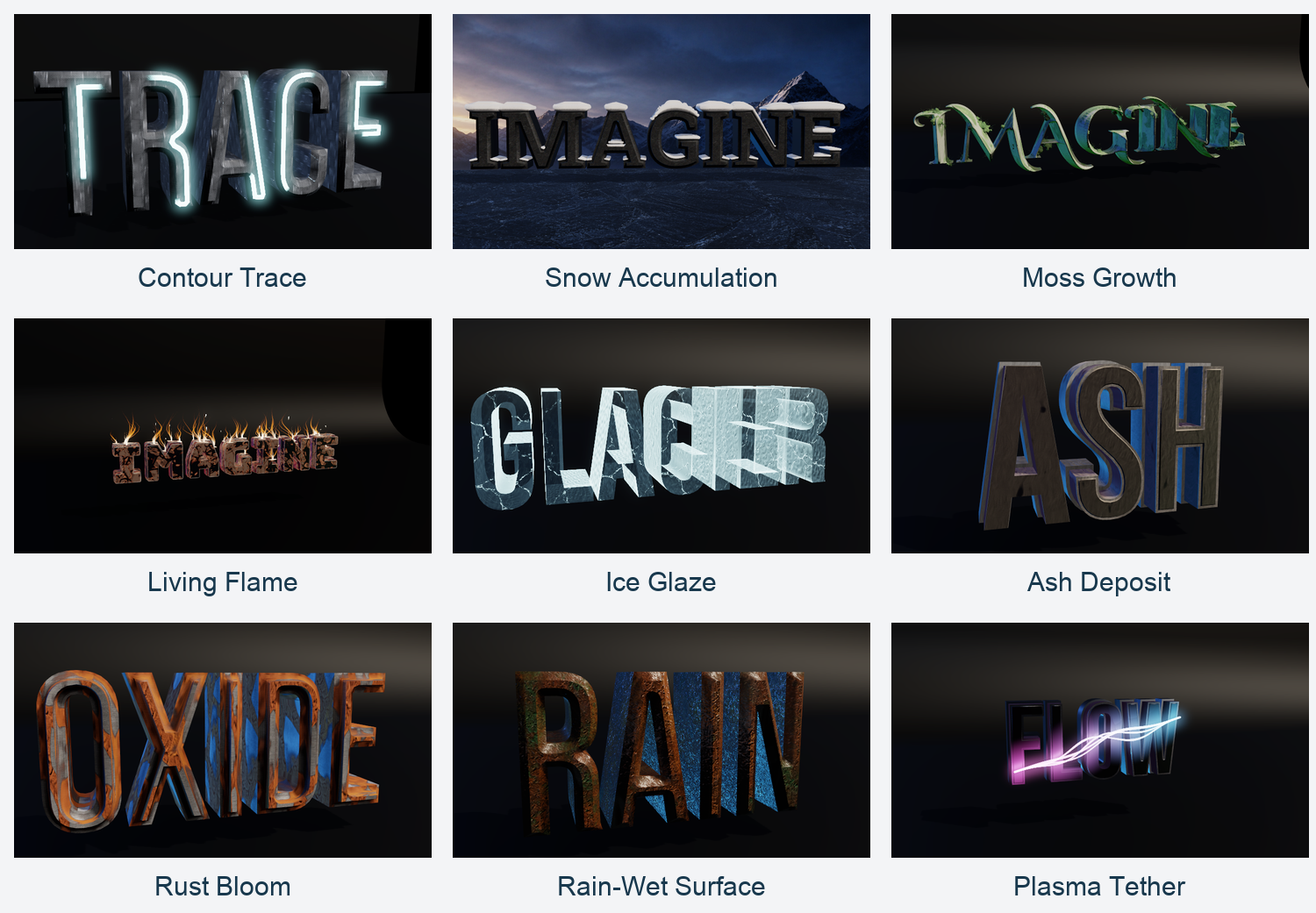
Native 3D effects from the rendered Style Gallery. Appearance depends on the chosen text, surfaces, material, and effect settings.
Plasma Tether
Plasma Tether suspends smooth, flexible energy strands across selected text. Add <3dPlasmaTether>PLASMA</3dPlasmaTether>, or choose the same native effect in Default or Composed Effects. Tune Tension and Amplitude first, then Source and Target colors. Keep Speed low for a smooth tensile motion. Optional endpoint transforms can pin the main strand to world-space attachments through SetPlasmaEndpoints.
Electric Arc and Plasma Tether expose an independent animation Seed, Cycle, and Variation. Use variation=evolving for changing motion, variation=loop for an exactly repeating cycle, and speed=0 to freeze a chosen cycle position. Reduce segment or radial detail for distant titles before removing the effect. Appearance presets remain separate from these effects; ApplyPreset changes the extrusion recipe without silently assigning Behavior.
Physical Letters
Physical output creates one logical Rigidbody root per visible glyph and parents every authored layer mesh and collider beneath it. Selecting Physical Letters prepares kinematic bodies without releasing them. Use Release Physical Letters to hand them to Unity physics and Reset Physical Letters to restore their authored poses. Scripts can access each logical body through TryGetPhysicalBody. Decoration geometry remains visible but is excluded from generated convex collision proxies. Advanced live simulation belongs to Text Studio Dynamics.
Runtime Overrides
Runtime overrides can change visibility, depth, tint, material, and quality without rewriting the authored style. Material and tint changes can remain visual updates. Text, font, contour, bevel, body, sweep, decoration, grouped scope, and topology modules may require a topology build. Property setters request the correct work; explicit in-place asset edits finish with RebuildGeometry.