Arrange Text in Space
The Spatial 3D placement extension adds Helix, Cylinder, Sphere Band, Tunnel, Staircase, and Spatial Grid forms. Curated presets include DNA Helix, Hero Carousel, Globe Band, Tunnel Spiral, Dimensional Stair, and Voxel Wall.
Cylinder and Sphere Band normally read left to right from the outside. Face Inward reads from the center; Keep Original preserves reading from the original -Z side. Reverse flips the order deliberately. An angular position of 180 degrees faces a default camera on the -Z side.
- Keep Original preserves each glyph orientation.
- Follow Path turns glyphs with the arrangement.
- Face Outward and Face Inward orient glyphs around a volume.
- Reverse and fine rotation controls correct reading direction and camera alignment.
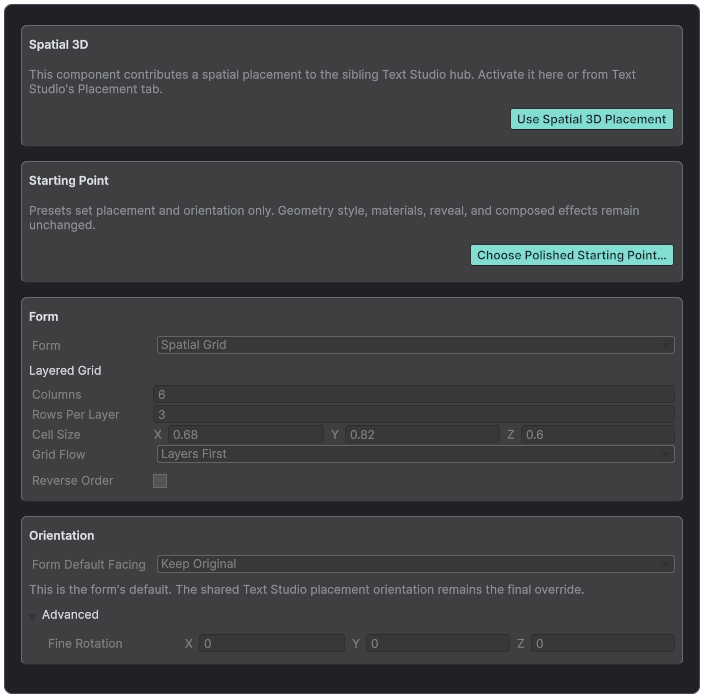
Spatial Placement chooses a form, starting point, orientation, and form-specific values.
Placement Versus Extrusion Sweep
Base Placement moves each complete glyph instance through a line, arc, circle, wave, grid, spline, or installed spatial form. A spatial field does not move the baseline by itself; it samples those glyph positions to vary effect strength. Extrusion Sweep bends one glyph's front-to-back body. A Deformer reshapes finished geometry. All four can be active, but they answer different design questions.
- Placement: where does each glyph live?
- Spatial field: where is this effect strong?
- Extrusion sweep: how does the glyph body travel through depth?
- Deformer: how is the completed geometry reshaped?
Quadratic Bezier Extrusion Path
Use the built-in quadratic asset for Straight, Side Bend, Lift, or Ribbon starting points. Configure start, control, and end offsets, samples, banking, accumulated roll, and front or back scale. The asset carries a deterministic cache identity that changes when sampled output changes. Scene handles edit the selected asset consumer, while component-local controls remain available without an asset.
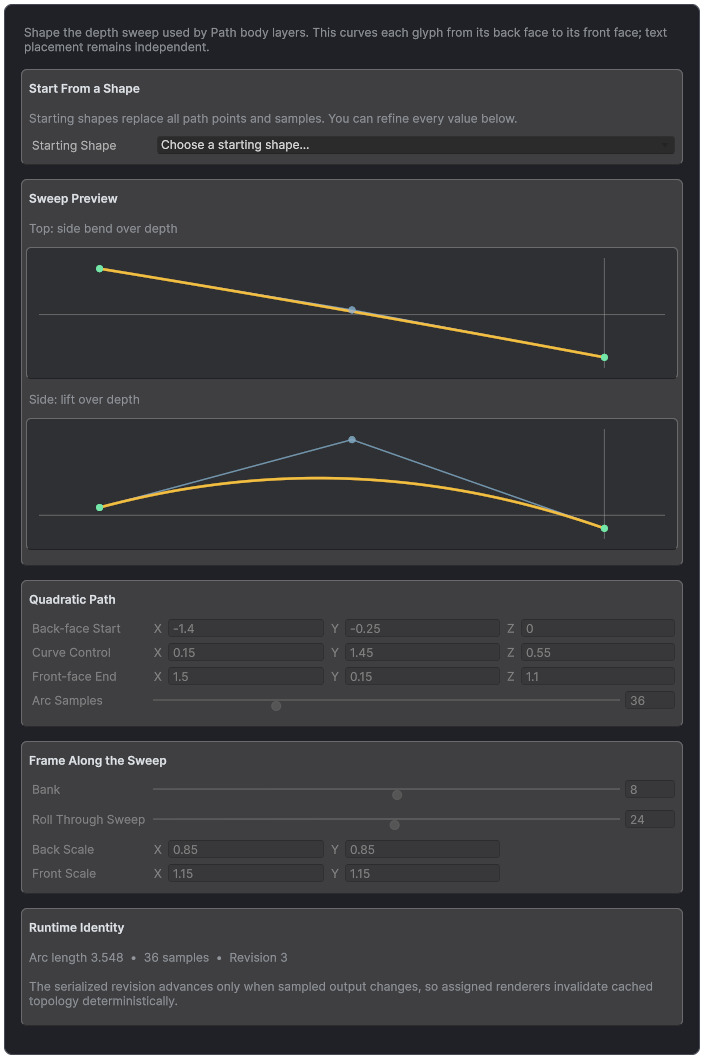
The quadratic extrusion path previews top and side curvature, sampling, bank, roll, and endpoint scale in one asset.
Unity Splines Extrusion
Install Unity Splines 2.0.0 or newer and import the Text Studio 3D Unity Splines integration. SplineExtrusionPathProvider samples one child spline into renderer-local immutable path data, including rotation-minimizing frames, optional knot banking, roll, endpoint scale, and closed seams. It refreshes after relevant knot, collection, or transform changes and clears only the snapshot it assigned.
Spatial Placement Reference
- Helix: radius, turns, height or depth, and orientation.
- Cylinder: radius, angular range, rows, and facing.
- Sphere Band: radius, longitude, latitude band, and facing.
- Tunnel: radius, turns, depth, and view direction.
- Staircase: step size, rise, turn, and orientation.
- Spatial Grid: columns, rows, layers, and 3D spacing.
Curated presets provide DNA Helix, Hero Carousel, Globe Band, Tunnel Spiral, Dimensional Stair, and Voxel Wall. Keep Original, Follow Path, Face Outward, and Face Inward control orientation. Reverse and fine rotation correct reading direction and camera alignment.
Deformer Stacks
Bend, Arc, Shear, Pinch, Flare, Spherize, Cylindrical Wrap, Wave, Noise, and Twist can be ordered in Glyph, Word, Line, Text, Object, or World space. Automatic or custom bounds and edge falloff localize the result. In stable combined, chunked, or hybrid output, warmed built-in deformation can rewrite visual buffers without replacing topology.
- Order broad structural deformation before small surface variation.
- Use the narrowest semantic space that matches the intended result.
- Preview normals and silhouettes, not only front-facing color.
- Use custom bounds when a world or object-space effect should remain fixed as text changes.