Create Logos, Backings, and Custom Contours
Choose a Contour Source
Start from the input glyph, fitted text bounds, or a reusable contour asset. Generated contour assets include rounded rectangles, pills, plates, shields, badges, banners, frames, and bounds-driven shapes.
Import an SVG
SVG import supports line, cubic, quadratic, smooth, and arc commands, nested transforms, compound holes, and normalized coordinates. Use it for logos and custom silhouettes, then tune curve sampling for the target size.
Build a Contour Program
Contour programs combine ordered Union, Subtract, Intersect, and Clip operations with transforms. Use them for logo cutouts, inset plates, grouped outlines, and reusable backing recipes.
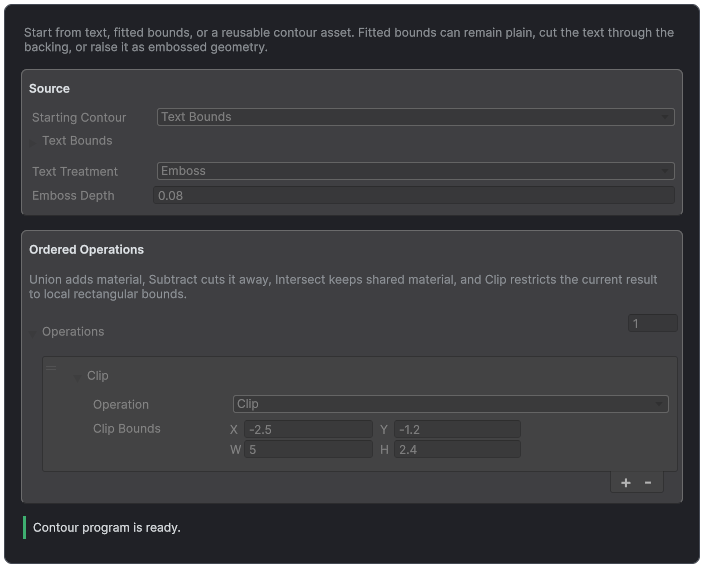
A Contour Program starts from text, bounds, or an asset, then applies ordered shape operations.
Compose a Backing
Text-bounds backings can remain plain, cut the text out, or raise it as an embossed face. Padding, depth, corner radius, frame width, and grouped word, line, or whole-text scope make the result adaptable to signs and title cards.
Generated Contours
Generated Contour assets provide Rounded Rectangle, Pill, Plate, Shield, Badge, Banner, and Frame shapes. Text Bounds fits one of those forms around a glyph, word, line, or the complete text using signed XY padding. Radius, detail, and frame width participate in topology identity.
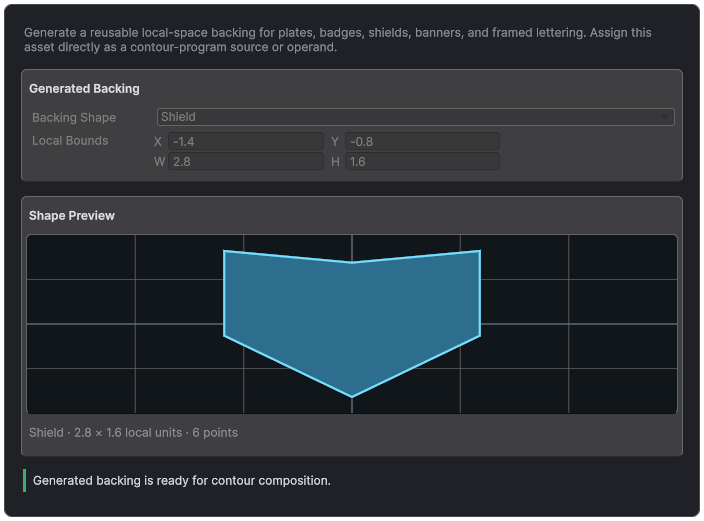
Generated Contour assets combine a validated procedural shape with a live silhouette preview.
SVG Import
The editor importer accepts SVG path text with line, cubic, quadratic, smooth, and arc commands, nested transforms, compound holes, and normalized coordinates. Choose scale, optional Y flip, centering, and curve sampling deliberately. The importer rejects unsafe external XML resolution and returns validated contour data.
- Remove invisible duplicate paths and self-intersections before import.
- Confirm outer and hole loop direction in Live Preview diagnostics.
- Use enough sampling for the final size, but do not turn a simple logo into excessive topology.
- Test the contour alone before adding bevel, body, or boolean operations.
Custom contour assets also have an Edit Polygon section. Edit points there, then choose Apply Polygon Changes to validate them and store them as straight segments; Reload Stored Outline discards staged edits.
Contour Programs
A Contour Program starts from the input glyph, a reusable source asset, or fitted Text Bounds, then applies ordered Union, Subtract, Intersect, and Clip operations with transforms. Operation order matters. Inspect the result after each step when an empty, inverted, or fragmented contour appears.
Text-bounds composition can keep a plain backing, subtract the text for a through-cut, or emit the backing and raised text as an embossed compound. Emboss attaches text to the measured front surface and currently requires a linear body sweep.
Backing Tutorial
- Create a Generated Contour using Pill and fit it to Whole Text bounds.
- Add positive XY padding and a restrained corner radius.
- Choose Plain for a solid plate, Cutout for through-cut lettering, or Emboss for raised text.
- Assign distinct Front Face, Sides, and Back materials.
- Inspect the result from both sides and validate the boolean result before adding decorations.