Design Materials and Surfaces
Materials are assigned by meaning rather than by mesh order. The nine built-in regions are Front Face, Front Relief, Front Bevel, Outer Sides, Inner Walls, Back Bevel, Back Face, Trim Rim, and Decorations. Custom modules can add more regions.
Start with a Material Set
Ten beginner Material Sets provide coordinated starting points. The Material Set browser previews materials as lit spheres before they are applied. Regions that share one material are compacted into fewer render passes automatically.
Choose Texture Mapping
- Generated for robust default coordinates.
- Planar Glyph or Planar Whole Text for fronts and graphic treatments.
- Side Distance or Depth for extrusion-aware surfaces.
- Object or World Triplanar for stone, metal, and large environmental text.
- Cylindrical for wrapped surfaces.
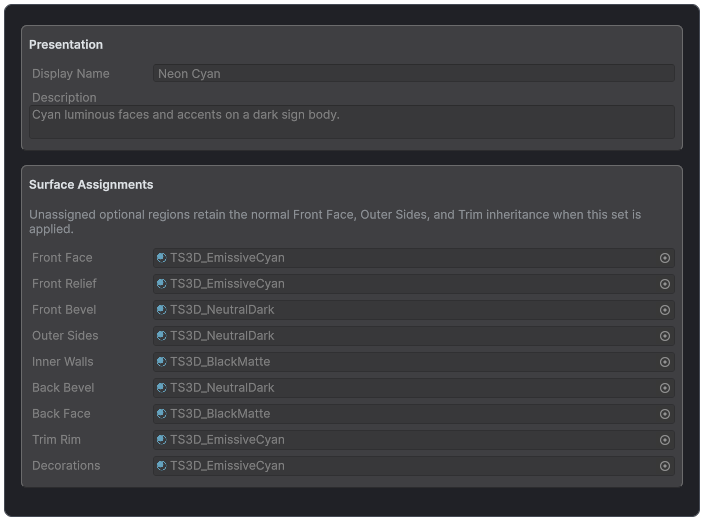
A Material Set maps reusable materials to semantic regions.
Each mapping can adjust scale, rotation, offset, anchor, and physical density. Built-in shaders support Built-in, URP, and HDRP, including lit, glass, frosted, emissive, instanced, and motion-vector-aware materials. Mesh baking can create lightmap UVs.
Material Regions and Fallback
The nine built-in regions are Front Face, Front Relief, Front Bevel, Outer Sides, Inner Walls, Back Bevel, Back Face, Trim Rim, and Decorations. Shaped front caps use Front Relief, outer bevels use the bevel regions, counter walls use Inner Walls, and tubes or repeats use Decorations.
Unassigned Front Relief inherits Front Face. Front Bevel, Back Bevel, and Inner Walls inherit Outer Sides. Decorations inherit Trim Rim, which retains the ordinary face fallback. This keeps simple styles usable while allowing deliberate separation.
Material Sets
A Material Set stores assignments for every built-in region without changing geometry or mapping. Start from one of the ten beginner sets, inspect the lit-sphere previews, apply it, then duplicate before project-specific editing. Exact material reuse lets the renderer compact compatible regions into fewer material sections.
Surface Mapping
- Generated preserves provider coordinates.
- Planar Glyph normalizes each glyph independently.
- Planar Whole Text uses one continuous rectangle across the complete text.
- Side Distance maps contour distance and depth along side surfaces.
- Depth projects horizontal position against local extrusion depth.
- Cylindrical wraps around the glyph axis.
- Triplanar Object blends projections in object space.
- Triplanar World blends projections in world space.
Scale, clockwise rotation, offset, and normalized anchor apply after projection. Consistent World Scale keeps physical coordinates instead of per-bounds normalization where applicable. Choose mapping based on the intended pattern continuity, then inspect fronts, counters, sides, and back.
Render Pipeline Material Families
Bundled material families cover Built-in, URP, and HDRP with lit, glass, frosted, emissive, instanced, and motion-vector-aware variants. After changing pipeline assets or shaders, validate real lit and glass text in the target render pipeline, including shadows, depth, motion vectors, transparency, and baked lighting. Mesh baking can create lightmap UVs for static lighting.
Custom Shaders
Custom shaders can render 3D text like any other material. Prepared 3D effects, Writing, and packed vertex upload run on a custom shader only when a Shader Contract declares what it supports; without one, those material slots keep their CPU fallback output and Text Studio 3D reports a compatibility warning.
Create one with Assets > Create > Text Studio > 3D > Setup > Shader Contract. Assign the Shader and a stable Contract ID, then add one Render Pipelines entry per supported pipeline: Pipeline Tag (empty for Built-in, UniversalPipeline, or HDRenderPipeline), Execution, Prepared Transport, Vertex Layouts, Features, Coverage, Freeze Behavior, and the shader's actual Passes with each Pass Name and Light Mode. Increase Contract Revision whenever the declared capabilities change. The inspector compares the declaration with the imported shader and reports passes or pipelines that do not match.
Keep Shader Contract assets in a folder named Resources/TextStudio3D/ShaderContracts so they register automatically in the Editor and in players, or register a contract from script with TextStudio3DShaderRegistry.Register.
Player builds check every Shader Contract in those folders. An invalid contract, or declared passes that do not match the first SubShader Unity uses for that pipeline, stops the build with a [TextStudio3D] Shader contract error; fallback SubShaders, such as the Standard fallback used on mobile targets, do not need Text Studio passes. A declared pipeline without an imported SubShader is only logged.
For a worked example, open the Animated Materials lesson: its CHROME specimen uses the Prepared Lit example shader registered from script, with a saved Prepared Only geometry library, in Examples/02_Effects/Recipes/Animated Materials/Custom Shader.
Material Recipes
- Chrome: readable bevels, high metallic and smoothness, directional lighting, and restrained Chrome Sweep.
- Frosted glass: enough body thickness to read refraction, a distinct inner wall, and a non-glass backing or environment.
- Neon: a contour tube (Automatic Stroke draws it along the middle of each stroke) or outline geometry, emissive Decorations or Trim, and a darker non-emissive body.
- Painted metal: moderate bevel, painted Front Face, metal Sides, and controlled roughness.
- Stone: sufficient bevel and relief to catch light, triplanar mapping, and restrained surface scale.
- Holographic glass: transparent material, readable silhouette, Hologram Scan, and a Reduced Motion still state.
- Marquee: independent bulb geometry and emissive Decorations with a stable readable letter face.