Prepare Fonts and Languages
The font selected by the active Text Studio backend is authoritative. Setup Status can prepare matching embedded Font 3D data when runtime outlines are required. TextMeshPro uses its selected font and fallbacks; UniText supplies shaped glyphs and visual order from standard TTF or OTF sources. Prebuilt glyph coverage, fallbacks, spacing, metrics, kerning, and mesh quality remain inspectable on the prepared font asset.
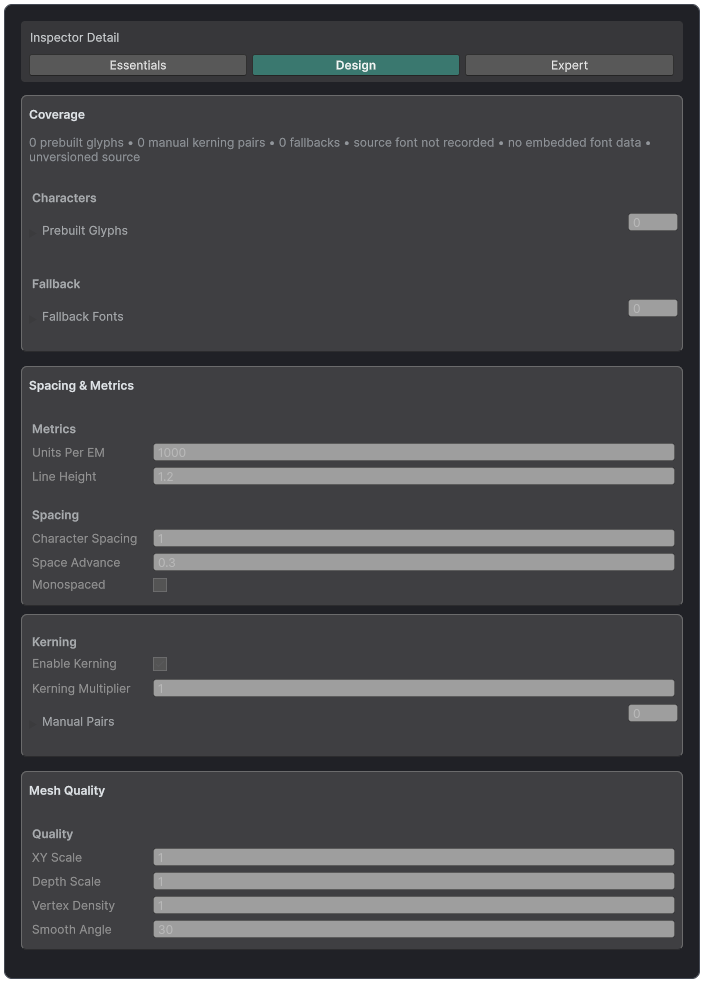
Prepared Font assets show coverage, fallbacks, spacing, kerning, and mesh quality.
Bundled fonts and Type Foundry
Text Studio 3D includes Bebas Neue Regular, Bungee Regular, Monoton Regular, Audiowide Regular, Cinzel Decorative Bold, Press Start 2P Regular, and ZCOOL QingKe HuangYou Regular. Each family includes its original OFL source, a matching dynamic TextMeshPro asset, and prepared player-ready 3D outline data.
Open the Type Foundry showroom to compare all seven as live editable extrusion. The ZCOOL station renders genuine Chinese lettering from the complete bundled font source, without a phrase subset, fallback font, or replacement mesh.
Font Baker
Choose a TTF, OTF, or TMP source, a target Font 3D asset, a built-in or custom character set, curve tolerance, extrusion depth, bevel, smooth angle, embedded source option, and kerning. TrueType and CFF1 OpenType outlines, the default instance of variable fonts, supplementary Unicode, combining marks, fallbacks, and multilingual content are supported. Color-only and CFF2-only sources require another font source.
Font ownership and prepared data
The active Text Studio backend chooses the font. TextMeshPro supplies its font asset and fallbacks. UniText supplies shaped glyph IDs, visual order, and font faces. Font3D is matching technical data for runtime outline access and prebuilt meshes, not a second typography choice.
Prepared Font inspector
Inspect character coverage, prebuilt glyphs, fallback chain, units per em, ascent, descent, line gap, spacing, monospace behavior, kerning, XY and Z scale, density, smoothing, source font identity, embedded bytes, and schema version. A prepared asset must match the active source font before the renderer consumes it.
Font Baker workflow
- Choose a TTF, OTF, or TMP source and a target Font3D asset.
- Choose a built-in or custom character set that matches the shipped languages.
- Set curve tolerance and preview depth, bevel, and smooth angle at the target display size.
- Choose whether to embed source bytes for runtime outline generation and include kerning.
- Bake, inspect coverage and fallbacks, then test missing glyph diagnostics in a player-compatible setup.
TrueType and CFF1 OpenType outlines, the default instance of variable fonts, supplementary Unicode, combining marks, fallbacks, and multilingual content are supported. Color-only bitmap or layered glyphs and CFF2-only sources require another outline-capable font source.
Language validation
- Latin, Greek, and Cyrillic: verify coverage, accents, kerning, and fallback transitions.
- CJK: bake a deliberate production range or provide runtime outlines rather than an impractical unbounded set.
- Arabic and Hebrew: validate shaping, ligatures, bidirectional visual order, punctuation, and mixed-script content through UniText.
- Combining marks: confirm the mark follows its base glyph through extrusion and animation.
- Fallbacks: verify that the chosen fallback face exposes standard TTF or OTF outline bytes.