Prepare Fonts, Glyphs, and Builds
A successful Edit Mode preview can use editor-only font access that is unavailable in a player. Runtime Preparation turns the runtime policy and glyph coverage into inspectable project assets before a build. Open Tools > Text Studio > Runtime Preparation, or use Open Runtime Preparation in the component's Runtime Preparation section.
Typography Ownership
The active Text Studio backend is authoritative. Font Source defaults to Text Object, so TextMeshPro or UniText chooses typography, shaping, fallback faces, and visual order. Choose Theme only for deliberate theme inheritance. Font3D is matching technical data for outline access and prepared glyph geometry. It is not a second font picker and must match the active source face.
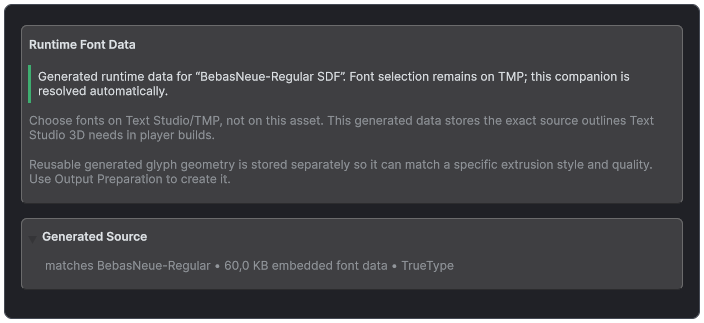
Font3D shows the prepared runtime outline source that matches the authoritative Text Studio font.
Choose a Runtime Policy
- Generate if missing allows runtime outline generation when prepared data is absent. Use it for genuinely dynamic content when the player has durable access to the correct outline source.
- Prepared only forbids surprise geometry generation. It is the predictable choice for controlled builds, consoles, strict memory plans, or content whose exact glyph set can be prepared ahead of time.
Prepared only preflights the exact visible request. When data is missing or incompatible, Text Studio 3D reports the blocker and keeps the last valid mesh instead of replacing readable output with a partial or corrupt result.
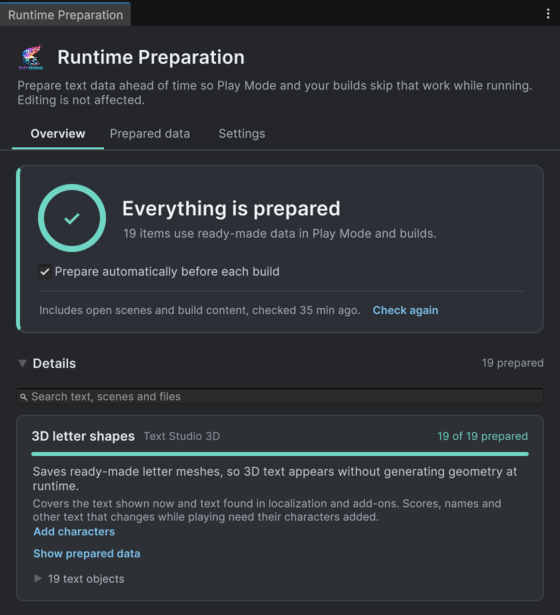
Runtime Preparation connects the shared project overview to readiness, future character coverage, and saved data.
Choose Coverage
- Prepare this text in the 3D inspector prepares the selected object without changing the visible wording. Normal inactive TextMeshPro targets can prepare without activating them. Inactive custom backends, unapplied theme-global fonts, and path-swept targets can need one activation before preparation; follow the reported blocker or keep Generate if missing.
- The shared Overview checks open scenes and build content and offers one Prepare action. Prepared data lists saved assets and their status; Settings holds the checking scope and Characters shown at runtime. Add character sets and representative phrases for scores, names, languages, and other text that changes while playing. Whole project includes unsaved open scenes, enabled build scenes, Resources, and preloaded assets. Addressables and custom content prepare through their own content build.
Coverage is not a bag of plain characters. Preparation tracks Unicode scalar, resolved glyph index, fallback face, and shaped identity. Ligatures, bidirectional order, combining marks, fallbacks, and supplementary Unicode therefore prepare the geometry that the backend will actually request.
What Runtime Preparation Creates
Prepare missing glyph variants builds the runtime font and fallback data required by the chosen policy, then stores compatible raw topology in the reusable geometry store. The window reports ready, missing, and blocked coverage before you commit the change.
Project settings
Assets/Text Studio/Resources/TextStudio/TextStudio3DProjectSettings.asset

Reusable geometry
Assets/Text Studio/Resources/TextStudio/Prepared Geometry/Text Studio 3D Reusable Geometry.asset

Generated runtime font data
Assets/Text Studio 3D/Generated Font Data
Reusable geometry contains raw topology rather than a finished scene appearance. Placement, material mapping, material assignment, supported deformation, spatial effects, and other presentation remain local to the consuming text object.
Prepared Only Compatibility
- A mutable extrusion path without a durable identity cannot safely address reusable geometry. Snapshot it, provide stable identity, or use Generate if missing.
- Word, Line, and Whole Text contour geometry depends on the complete current text. Use Per Glyph, freeze the final object, or keep runtime generation available.
- A pre-geometry module changes the reusable input. A topology-changing post-geometry module changes the reusable result. Both must declare truthful cache impact and may require Generate if missing or a frozen final output.
- Topology-preserving placement, mapping, material, effect, and compatible deformation work can remain outside the reusable topology and apply after retrieval.
- Body Depth on a straight solid layer is also applied after retrieval, so one prepared shape serves every depth. Layers with face relief, taper, twist, bulge, an extrusion path, a hollow body, trim, contour tubes or repeats, contour programs, stroke rings, or per-region mapping overrides store geometry for each exact depth; prepare every depth they use, or keep Generate if missing.
Build validation turns missing preparation into a warning or error according to the selected runtime policy. Resolve the reported glyph, font, style, path, grouping, or module condition before shipping rather than relying on editor success.
Bundled Fonts and Type Foundry
Text Studio 3D includes Bebas Neue Regular, Bungee Regular, Monoton Regular, Audiowide Regular, Cinzel Decorative Bold, Press Start 2P Regular, and ZCOOL QingKe HuangYou Regular. Each family includes its OFL source, matching dynamic TextMeshPro data, and prepared player-ready 3D outline data.
Open the Typography example to compare all seven as live editable extrusion. The ZCOOL station renders genuine Chinese lettering from the complete bundled font source rather than a phrase subset or replacement mesh.
Language and Shaping Validation
- Latin, Greek, and Cyrillic: verify coverage, accents, kerning, and fallback transitions.
- CJK: prepare the deliberate production ranges and representative shaped lines required by the shipped languages.
- Arabic and Hebrew: validate shaping, ligatures, bidirectional visual order, punctuation, and mixed-script content through UniText.
- Combining marks and supplementary Unicode: confirm that resolved glyph identity and placement survive preparation, extrusion, and animation.
- Fallbacks: verify that every resolved face exposes compatible outline data and appears in the prepared runtime chain.