Shape Faces, Edges, and Depth
Front and Back Faces
Front and back caps can be open or closed and use Automatic or Regular refinement. Flat keeps the source face. Chisel creates a carved or faceted surface. Inflate produces smooth rounded crowns without chiseled center ridges, and front and back can use different choices. Foil Balloon pairs matching front and back inflation around a narrow crimped seam for a balanced profile from every angle.
Bevel Profiles
Choose from 22 starting profiles, then edit points, Bezier tangents, snapping, smoothing, mirroring, reversal, and baked rings. Use scene handles when the profile needs to be judged on the finished word.
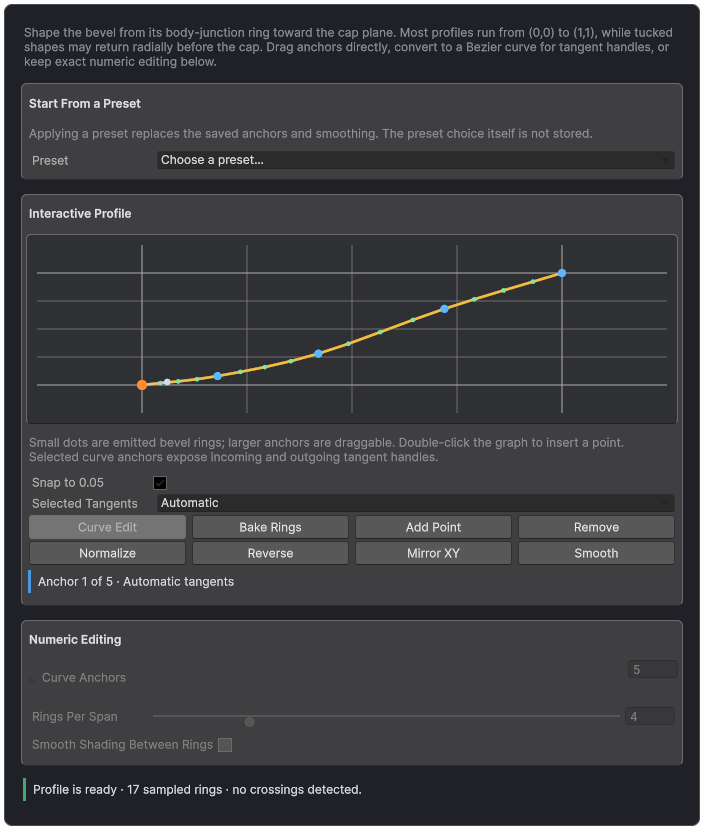
The Bevel Profile graph gives direct control over the edge silhouette and generated rings.
Bodies and Depth Sweeps
Use a straight body for ordinary extrusion. Use a quadratic or spline sweep when depth should bend, bank, roll, or scale from front to back. Closed sweeps and path-space mapping support complete dimensional forms. Solid and Hollow body modes control whether an inner shell is generated.
Deformer Stacks
Bend, Arc, Shear, Pinch, Flare, Spherize, Cylindrical Wrap, Wave, Noise, and Twist can be ordered and scoped in Glyph, Word, Line, Text, Object, or World space. Bounds and falloff keep the result localized.
Caps and Relief
Front and Back independently choose whether the cap is closed and whether it is Flat, Chiseled, or Inflated. Open caps retain body and optional bevel rims but emit no face region. Relief and refinement settings remain stored and become active again when the cap is closed. When Front Face or Back Face changes from Flat to Chisel or Inflate before any relief height is set, it starts at a relief height of 0.03 with enough surface detail to show the shape; a height you already set is kept.
Flat preserves the source face. Chisel creates a carved or faceted center treatment. Inflate creates a smooth crown. Regular refinement adds bounded interior topology for deformation. Use the smallest subdivision count that holds the silhouette at the real viewing distance.
Body Extrusion and Shells
Body Depth controls the front-to-back distance. Linear sweep is the normal extrusion. Path sweep samples an Extrusion Path for curved depth. Minimum Rings controls how many cross-sections are available for bending, banking, roll, scale, and deformation.
Solid produces the ordinary filled body. Hollow creates an inner shell and Inner Walls material region; choosing Hollow for Body Fill on a body without Wall Thickness starts at a Wall Thickness of 0.05. Shell thickness and joins must leave enough space around narrow counters. If holes collapse, reduce thickness, bevel, contour expansion, or miter pressure before increasing mesh detail.
Bevels
Edge controls the front and back bevels, counter behavior, profile, width, segments, joins, and smoothing. Automatic resolves appropriate ends across a layer stack. Both, Front Only, Back Only, and None are explicit choices for a single layer. Counter bevels remain part of the Inner Walls region.
- Miter keeps a sharp join but can extend strongly at acute corners.
- Round adds curvature and usually needs more detail.
- Bevel cuts the corner and is stable for graphic shapes.
- Smooth Angle controls normal continuity, not geometric width.
Bevel Profile Assets
Begin with one of the 22 profiles, then edit anchors, Bezier tangents, snapping, smoothing, mirroring, reversal, and baked rings. The runtime consumes the resolved deterministic samples. Use scene handles on a selected consumer to judge the profile against the actual word, depth, lighting, and material.
Decoration Profile
Trim, Groove, Bead, and Lip add material-addressable bands around the cap boundary. Width sets the lateral footprint. Height controls relief, with zero selecting a width-relative automatic value. Detail affects curved profiles but remains dormant for a simple Trim band. Decoration profile triangles use the Trim Rim region.
Depth Shaping and Deformation
Taper changes cross-section scale through depth. Twist rotates it. Bulge expands or contracts the middle of the body. Apply restrained values first and inspect counters and concave corners from the side. A Deformer Stack acts on finished geometry and can be ordered after the authored depth shape.
True Outlines and Stroke Inheritance
Contour expansion and stroke rings create real outline geometry, not a duplicated offset text object. A foreground layer can remain per-glyph while a grouped layer behind it creates a connected word outline. Stroke inheritance reduces repeated authoring, but a disabled source layer no longer participates in inheritance or depth stacking.