Build Reveals and Typewriter Experiences
Choose a Source
Typewriter can be None, Built-In, Custom, or Inline. Built-In is the fastest start. Custom points to a reusable preset. Inline exposes the complete settings on this text object. A built-in or custom choice can be converted to Inline when this one line needs a local variation.
Shape the Pace
- Reveal by glyph, word, or line.
- Use a timing preset or assign custom character and word timings.
- Choose forward, reverse, center-out, edges-in, all-at-once, or seeded-random order.
- Add reveal and hide motion without changing the content.
- Choose start, loop, delay, skip, and input behavior deliberately.
- Use punctuation-aware audio and marker cues for dialogue rhythm.
Runtime dialogue code can check IsWaitingForAction before calling SkipCurrentWait(). This distinguishes a timed or input action wait from an ordinary paused reveal.
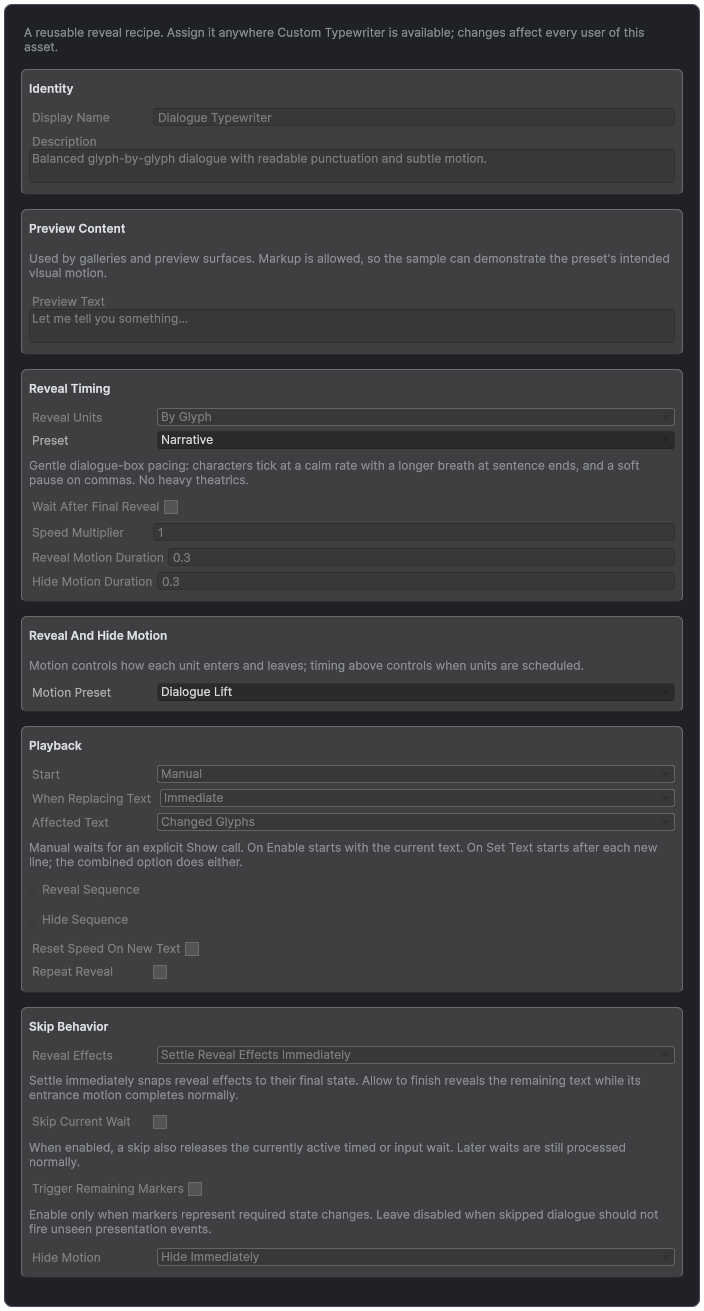
A reusable Typewriter Preset keeps pacing, motion, playback, and skip behavior consistent.
Reveal Units and Settings Sources
Instant displays the complete line. By Glyph produces the familiar character-by-character reveal. By Word is often better for fast subtitles because it preserves reading rhythm without turning a sentence into a stream of isolated letters. By Line stages instructions, credits, and multi-line announcements. Region and Custom remain available for specialized providers.
The Typewriter Source is always explicit. None disables typewriter behavior. Built-In chooses a curated recipe. Custom assigns a reusable Typewriter Preset. Inline exposes the complete local recipe. Convert a built-in or custom choice to Inline when this object needs a deliberate exception.
A Behavior Profile can optionally provide the Typewriter domain for many objects. That choice does not erase local work: the component retains its complete local settings and restores them when the profile is cleared or stops providing Typewriter behavior. The profile can provide Default Effects independently, so a project may share one domain without coupling it to the other.
Timing Presets
- Uniform: predictable mechanical pacing.
- Fast: responsive HUD, notifications, and short interactions.
- Slow: deliberate reveals with room for voice or atmosphere.
- Expressive: stronger punctuation rhythm for dialogue.
- Cinematic: longer beats for titles and staged presentation.
- Staccato: clipped rhythm for alerts, terminals, or stylized speech.
- By Word: word-level pacing without extremely fast glyph ticks.
- Typist: familiar keyboard-like timing variation.
- Narrative: readable prose pacing with punctuation-aware pauses.
Character and Word Timings
Character Timings read the complete text context. They recognize abbreviations, punctuation runs, neighboring units, words, lines, paragraphs, instant ranges, newlines, and the final visible unit. The first chosen unit appears immediately; punctuation waits begin after the mark is visible; adjacent punctuation can collapse into one deliberate beat.
Word and Line reveal apply one boundary delay per group while retaining authored cadence when the sequence is reordered. Word Timings control word pacing and punctuation-aware boundaries. Wait After Final Reveal decides whether the trailing delay is part of completion. Use <instant>...</instant> when a marked span must appear atomically.
Dialogue test: "Dr. Vale... wait!"
Test abbreviations and ellipses together. Dr. should not receive a sentence-ending pause, while the ellipsis should still create one intentional beat. Confirm the result in the timing preview and Debug summary before adding explicit wait tags.
Scramble, Seeking, and Restarts
Scramble is deterministic for the same source, seed, and evaluated time. Its substitutions are reveal-relative, which means a glyph changes in relation to its own reveal state instead of an unrelated global clock. Seeking backward, restarting, or jumping to a discontinuous time reconstructs the same visible result instead of accumulating random history.
This matters for inspector scrubbing, Timeline, recorded previews, save-state restoration, and tests. Pause freezes the current substitutions with every other preview system. Restart clears the lifecycle and returns the scramble sequence to its beginning.
Clock and Update Behavior
Choose scaled time for gameplay-bound presentation and unscaled time for menus, pause screens, or dialogue that must continue while Time.timeScale is zero. Update phase determines when Text Studio advances relative to gameplay and UI. Maximum Delta prevents a long suspended frame from instantly consuming an entire reveal. Edit Mode ticking exists for preview, not as a substitute for runtime testing.
Reveal and Hide Motion
Reveal timing decides which unit is current. The Reveal & Hide Effects section decides how that unit enters and leaves: Reveal Effect and Hide Effect take a shared effect asset such as a Composed Effect, and Inline Reveal Tags and Inline Hide Tags take built-in or inline effect tags. A Composed treatment is phase-clamped to Reveal and Hide, so drop, scale, and settle motion ends after arrival while normal Active effects continue. An assigned effect asset replaces the inline tags of its phase. These effects do not replace source tags or the composition's Tag Stack.
Reveal Appearance Duration and Disappearance Duration control the visual transition around the timing point. Sequence settings can run forward, reverse, center-out, edges-in, all at once, or seeded random. Loop Reveal restarts the complete experience after its delay. Start behavior decides whether reveal begins automatically or waits for an explicit call.
Skip, Continue, Waits, and Hide Policy
SkipReveal completes the current line according to the configured settle policy. AdvanceOrSkip is intended for continue buttons: it first completes an active wait or reveal, then returns true only when the owning dialogue system may advance. SkipCurrentWait cancels a cooperative timed, input, or audio wait without confusing it with an ordinary paused reveal.
public void ContinuePressed()
{
    if (dialogueSource.AdvanceOrSkip())
        ShowNextLine();
}
Choose whether skipping triggers remaining markers, skips the current wait, settles reveal motion, or jumps to the final visible state. Hide can play its configured sequence, be skipped to its end, or be stopped. Test rapid repeated input, non-skippable custom actions, and a continue press during the first frame of a new line.