How Text Studio Thinks
Source, Live Preview, and Backends
Source is the text you author, including effect and action tags. Live Preview is the player-facing result after Text Studio resolves tags, profiles, external sources, and the active renderer. Edit in Raw and judge the experience in Live.
Text Studio automatically uses an attached compatible backend such as UniText 3 and falls back to TextMeshPro when needed. Raw mirrors direct component edits as authoring input. In Live Preview and Play Mode, direct backend writes warn and are rejected by default so rendered plain text cannot silently replace tagged source. The Expert Direct Backend Writes setting can deliberately Import or Ignore those writes; editor imports participate in Undo.
Reveal, Active, and Hide
Reveal controls how text enters. Active controls what continues after the text is readable. Hide controls how it leaves. A treatment can use one phase or move smoothly through all three. Reveal-to-Active Blend prevents a hard visual jump when an entrance becomes a looping effect.
Choose the Owner Before the Effect
Text Studio keeps several authoring routes because they answer different production questions. Choose by ownership and scope first; the renderer can still share the same low-level primitive, buffer, shader, or draw path underneath.
- Appearance is the persistent whole-object finish: fills, edges, depth, materials, editorial treatments, and title animation.
- Typewriter treatment shapes Reveal and Hide arrival. It settles when the glyph is typed, while independent Active effects continue.
- Default Effects apply untyped effect tags quickly, either to uncovered text with Fallback or to the complete text with Constant coverage.
- Writing converts reveal progress into honest ink coverage, outline tracing, or authored stroke playback when matching path data exists.
- A Composed Effect owns a reusable range- and lifecycle-aware layer stack. Its normal invocation is a source tag; its Tag Stack remains an optional direct tag source inside the asset.
- A complete Design is an apply-once recipe that assigns established Appearance, Writing, and Behavior Profile assets. It is not another runtime owner.
Area and Sequence
An effect can act on each glyph, grouped glyphs, words, lines, paragraphs, authored ranges, or spatial fields. Sequence controls the order: forward, reverse, center-out, edges-in, all at once, or repeatable random.
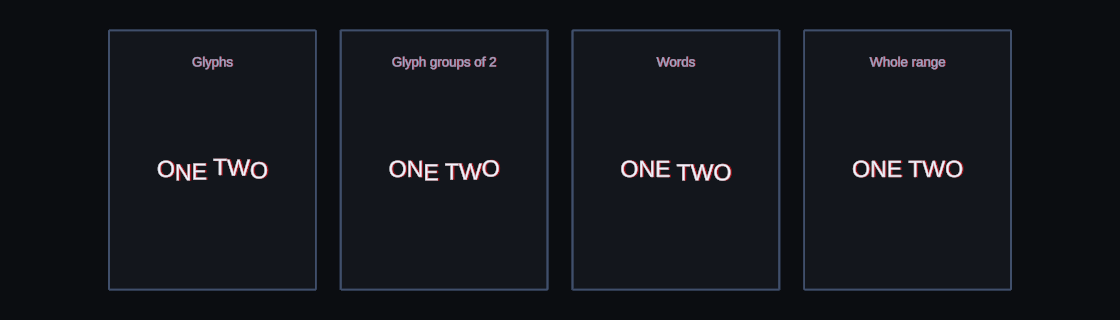
The same Bounce effect grouped by glyphs, pairs, words, and the whole range.
Motion Policy
Project settings and each text object can choose Full, Reduced, or No Motion. Reduced Motion keeps the meaning while lowering displacement, rotation, flashing, or depth travel. No Motion keeps a stable readable result. Warnings appear when authored flashing can exceed three flashes per second.
Read the Inspector as a Workflow
The main inspector follows the order in which most text is built. Its preview stays available above the workflow tabs, so you can change one decision and immediately judge the complete player-facing result.
- Content owns Source, Raw and Live authoring, the active backend, the + Tag workflow, Behavior Profile assignment, default effects, and markup diagnostics.
- Typewriter owns its explicit source, reveal unit, cadence, sequencing, Reveal and Hide treatment, loop, skip, waits, and hide behavior. Arrival treatment can use built-in or inline effect tags, or a shared effect asset such as a Composed Effect, without creating a general Motion stack.
- Placement owns the baseline, orientation, extension providers, and the Shared Spatial Target used by target-aware effects.
- Appearance owns the persistent 2D finish, Writing assignment and progress, effective execution route, bounds, cost estimate, and visual diagnostics.
- Events owns lifecycle callbacks, glyph callbacks, waits, markers, relays, and dialogue handoff.
- Debug explains resolved text, semantic ranges, active bindings, action markers, source ownership, timing, and current state. The capability report combines the active backend, output readiness, supported channels, motion policy, and actionable add-on diagnostics. Unknown metadata does not prove that a capability is unsupported.
Use the Preview Transport
Reveal, Active, and Hide select the lifecycle segment you are examining. Drag the scrubber to evaluate an exact state; scrubbing pauses playback so the frame remains stable while you inspect it. Play or Pause resumes or freezes the complete preview, including reveal, actions, substitutions, effects, placement, and renderer time.
Use 0.25x, 0.5x, 1x, 2x, or 4x speed to study timing without rewriting the authored recipe. For Active effects, the x1, x2, x4, and x8 duration multiplier gives long loops more room in the scrubber and remains preview-only. Repeat is also transient. Restart returns the preview to the beginning and resets lifecycle state, visibility, waits, and actions before playing again.
Glyphs, Groups, Ranges, and Sequences
A semantic glyph is one complete Unicode 17 grapheme cluster or atomic inline object. It may contain several UTF-16 characters, including combining marks or an emoji sequence. Renderer shaping, ligatures, and fallback fonts remain backend responsibilities. Semantic unit indices are distinct from source character offsets and mesh-glyph indices; use the retained mappings when writing integrations. Word segmentation follows Unicode boundaries, with optional language-specific tailoring.
Area chooses the unit that receives one effect evaluation. Glyph treats every glyph independently. Word, Line, and Paragraph share one state across the corresponding semantic group. Range uses the authored tag range. Group Size combines consecutive units. Sequence then chooses the order in which those resolved units receive progress.
- Forward follows the source order. Reverse starts from the end.
- Center Out starts near the middle. Edges In starts at both ends.
- All At Once gives every unit the same progress.
- Seeded Random produces a stable shuffled order for the same source and seed.
The Three Visual Phases
Reveal describes how a range enters, Active describes what continues after it becomes readable, and Hide describes how it leaves. A layer can participate in any combination. A reveal treatment should normally settle to the authored layout before an Active loop takes over, and a Hide treatment should begin from the current visible state.
Reveal-to-Active Blend crossfades the outgoing reveal contribution and incoming Active contribution for 0 to 5 seconds. Use a short blend when an entrance and a loop affect the same channel. Set it to zero only when an immediate handoff is intentional.
Time, Playback, and Motion Policy
Timing answers when a unit receives progress. A curve answers how that progress changes. Playback answers whether an effect runs once, loops, ping-pongs, follows an external weight, or holds a final value. These choices are independent of area and sequence.
Full Motion uses the authored treatment. Reduced Motion retains meaning while lowering travel, rotation, depth, flashing, or procedural instability. No Motion keeps a stable readable result. Author every production recipe with a restrained fallback, especially subtitles, warnings, and interactive UI.