Reference and Developer Appendix
Performance and Frequent Updates
Frequently changing TextMeshPro counters, labels, documents, chat text, and UI Toolkit labels can coalesce replacements until the next update. Request an immediate update only when same-call visibility is required. For temporary text, prewarm the emitter during a loading or setup moment and size inactive retention separately from Maximum Active. The emitter uses one Unity object pool per complete host prefab, keeps returned hosts hidden so renderer state can stay warm, and releases every retained instance when the emitter is disabled or destroyed. Feature-free persistent text still uses a direct backend path, animated TextMeshPro can reuse the freshly generated source mesh, compatible whole-text and multi-effect stacks avoid duplicate glyph work, and stepped effects refresh only when their visible state changes.
Preview Export
Preview export can produce 960 by 540 MP4 at 60 frames per second on Windows and macOS, or transparent GIF at 50 frames per second. Linux supports GIF but not MP4. Export can use flat text or the installed renderer, including lit perspective 3D. Frame planning distinguishes the last visible glyph, reveal completion after its trailing wait, and the point when appearance effects settle, with Reveal Speed scaling applied to each milestone.
Runtime Control
Keep one owner for text content and lifecycle commands. ShowText explicitly restarts reveal even when the text is unchanged; SetText is an idempotent content update. SetTextDeferred coalesces updates, and ShowTextInstant bypasses the transition. UI Toolkit bindings share these replacement semantics; an overlap request uses a sequential fallback where the backend cannot retain an outgoing mesh.
Temporary text uses the same small surface. EmitValue and EmitText return a generation-safe TextStudioEmissionHandle. A live handle can update text or value and request dismissal; after release or pool reuse, the same calls safely return false.
TextStudioEmissionHandle score = emitter.EmitValue(scorePreset, 1250, target);
score.SetValue(1500);
score.SetText("NEW HIGH SCORE");
score.Dismiss();
Custom Effects and Channels
Create a custom Code Effect only when built-in effects and Composed channel layers cannot express the algorithm. Use an asset-backed Code Effect for serialized typed defaults, ranges, aliases, and catalog identity; use a runtime factory when the effect depends on scene objects, services, or live game state. Code Effects own behavior and isolated invocation state. Composed Effects own lifecycle, playback, curves, timing, sequence, scope, and reusable authoring. Declare channels, supported renderer spaces, motion behavior, determinism, and flash characteristics so the editor can give accurate compatibility guidance.
Support
When requesting support, include the Unity version, Text Studio version, render pipeline, a minimal sample, the Health Check result, and the exact source text that reproduces the issue.
Essential Scripting API
TextStudioText is the authoritative component facade. TextStudioApi is the task-oriented convenience layer for common setup and playback. Both accept normal Unity lifecycle rules and must be called from the main thread when they touch components or Unity objects. TextStudioApi treats a missing hub as a safe no-op.
using TextStudio;

public void ShowReward(TextStudioText label, string itemName)
{
    TextStudioApi.ConfigureReveal(label, RevealMode.ByGlyph, 1.25f);
    TextStudioApi.ShowText(label,
        $"You found a <shimmer>{itemName}</shimmer>!");
}
SetText changes the authored source. StartReveal restarts from the beginning. ContinueReveal continues current progress. SkipReveal completes the line. PauseReveal and ResumeReveal use a balanced pause depth. SkipCurrentWait requests cooperative cancellation for a timed, input, or audio wait. AdvanceOrSkip returns true only when the caller may request the next line.
if (text.IsWaitingForAction)
    text.SkipCurrentWait();
else if (text.IsRevealing)
    text.SkipReveal();
else
    RequestNextLine();
SetRevealSpeed clamps the multiplier to at least 0.01. SetRevealProgress and DriveRevealProgress accept normalized progress. SetGlyphVisibility, SetWordVisibility, and SetTextVisibility override visibility without changing typewriter progress and report invalid requests with false. ClearVisibilityOverrides returns ownership to reveal.
Drive Effects from External Time
Use External Effect Driver when another system owns time. Add it beside a Text Studio host, assign one Composed Effect or asset-backed Code Effect (wrap a built-in effect in a Composed Effect to drive it), then provide exact Progress and Intensity values. Set Range to the text units it affects; the end is exclusive, and .. covers all text. The component does not create another clock, reveal lifecycle, or animation stack.
Use Signal Driver when a normalized value, AudioSource amplitude, or beat phase should drive an Effect or Composed Effect in Play Mode. Choose progress or intensity, then tune the response curve and attack/release smoothing. Audio uses a reusable 256-sample RMS window. Beat signals use DSP time; share BeatOriginSeconds to synchronize several drivers. Text Studio still applies the host's motion policy.
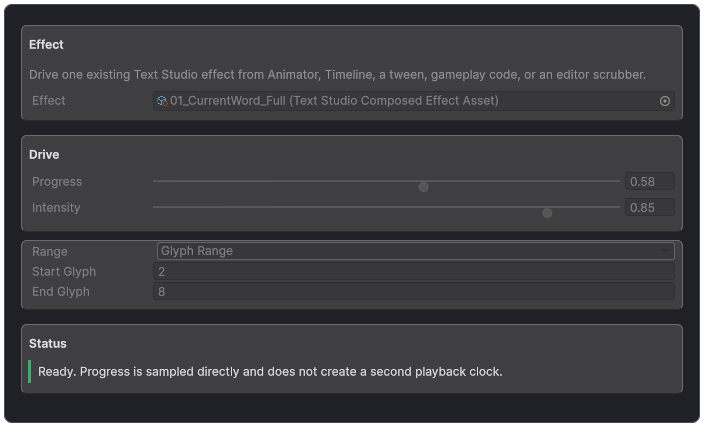
External Effect Driver exposes exact, clock-free control for animation systems that already own time.
Drive the Same Path from Code
ApplyExternalEffect submits one renderer-neutral layer for the current evaluated frame. Resubmit while active. Finite progress and intensity are clamped; non-finite inputs are rejected. An omitted range addresses all semantic units, and an explicit TextStudioTextRange has an exclusive end. The outer intensity blends the complete effect contribution once. Reuse TextStudioCapabilityReport with CollectCapabilities when backend, effect, or add-on configuration changes.
void Update()
{
    float progress = Mathf.Repeat(Time.time, 1f);
    text.ApplyExternalEffect(effect, progress, 1f);
}
UI Toolkit Essentials
Use UI Builder's Add Binding command to add TextStudioBinding, a UI Toolkit CustomBinding extension, to the text property of an ordinary Label. In code, call AttachTextStudio on an existing TextElement. Automatic mode owns one scheduled item, advances at most once per Unity frame, sleeps when no time-dependent feature is active, and stops on panel detach. Manual mode is for deterministic host clocks, tests, or custom scheduling.
TextStudioBinding binding = label.AttachTextStudio();
binding.BehaviorProfile = profile;
binding.SetTextDeferred("Score <pulse>1250</pulse>");
// In Manual mode only:
binding.UpdateFromHost(deltaTime);
Text Studio labels work in a UIDocument on every supported Unity version and in a PanelRenderer on Unity 6.5 or newer; both hosts use the same UXML, styles, and label binding. On Unity 6.2 or newer, the binding's Text Generator setting chooses Project Default, Standard, or Prefer Advanced, and Prefer Advanced falls back to Standard when the panel disables Advanced Text.
The reusable sample controllers of the Renderer Comparison, Whisperwood, PrimeTween, and Unity Localization samples take their host in a UI Panel field that accepts a UIDocument or, on Unity 6.5 or newer, a PanelRenderer. An empty field finds the host on the controller's GameObject. If you reused one of these controllers with its host on another GameObject, assign the host to UI Panel again, because references saved in the earlier document field are not carried over. Script calls to their Configure methods that pass a UIDocument by position still work, while named arguments are now called uiPanel. The UI Toolkit Panels And Migration readme in Text Studio's Documentation folder has the details.
Registration and Extension Essentials
Register custom effects, actions, curves, playbacks, timings, expansion sheets, extension tags, renderers, text sources, and placement providers only through their documented interfaces. Use stable namespaced IDs. Parameter parsing belongs at bind time, not inside per-glyph Evaluate calls. Transient plan and frame views must not be retained beyond their callback.
TextStudioEffects.Register(new OrbitEffect());
TextStudioActions.Register(customAction);
TextStudioEffects.RegisterCurve("studio.ease", curve);
Inspector and Asset Reference
- TextStudioText inspector: persistent preview plus Content, Typewriter, Placement, Appearance, Events, and Debug tabs.
- Content authoring: Raw and Live Source, + Tag browser, caret-aware help, active backend, Behavior Profile, default effects, and diagnostics.
- TextStudioBehaviorProfile: independent Default Effects, Typewriter, and Reactions domains with retained local fallback behavior.
- TextStudioTypewriterPreset: reusable pacing, lifecycle, Reveal and Hide effects, skip, wait, and hide behavior.
- CharacterTimings and WordTimings: context-aware delay, punctuation, boundary, and final-wait rules.
- TextStudio2DStyleAsset: persistent layered Appearance, inheritance, selectors, masks, route and bounds diagnostics, paints, surfaces, editorial treatments, and title animation.
- TextStudioWritingStyleAsset, WritingFontAsset, and WritingPhraseAsset: explicit writing promise, reveal schedule, prepared glyph or phrase paths, and diagnosed fallback.
- TextStudioDesignPresetAsset: apply-once Appearance, Writing, and Behavior Profile references with non-destructive selection application.
- TextStudioComposedEffectAsset: ordered layers, phases, curves, playback, semantic Area, spatial fields, surface masks, sharing, and preview.
- Spatial Effect Target: one shared scene target, consumer status, filtered creation and browsing, and a scene radius handle.
- External Effect Driver: one exact externally clocked effect with Progress, Intensity, and a Range with an exclusive end.
- Markup Syntax and Tag Expansion Sheet: authoring grammar, escaping, and reviewed project vocabulary.
- Audio Set, Audio Player, actions, relays, Dialogue Source, Page Navigator, and Auto Scroll Follower: production sound and flow helpers.
- Project Settings, Health Check, Migration, Visual Designs Gallery, Recipes, Examples, and Effect Code: project-wide authoring, learning, sharing, and diagnostics.
Inspector or surface | Controls and ownership | Primary manual coverage |
|---|---|---|
TextStudioText main inspector | Persistent preview plus Content, Typewriter, Placement, Appearance, Events, and Debug tabs. | First result; runtime model; reveal; placement; appearance; actions; troubleshooting |
Persistent preview controls | Raw or Live, Reveal or Active or Hide, Play or Pause, speed, Active duration range, repeat, scrub, restart, skip, and hide. | Authoring modes; runtime model; Read the Inspector as a Workflow; preview and export |
Content tab | Source, + Tag, caret-aware help, Behavior Profile, default effects, backend state, and diagnostics. | Markup; effects; Behavior Profiles; backends |
Typewriter tab | None, Built-In, Custom, or Inline source; unit, timings, clocks, motion, start, loop, skip, waits, and hide. | Build Reveals and Typewriter Experiences |
Placement tab | Built-in placement modes, orientation, extension providers, and Shared Spatial Target with consumer status and scene radius. | Place and Influence Text |
Appearance tab | Persistent 2D Appearance, Writing assignment and progress, execution route, bounds, cost, and visual diagnostics. | Design Persistent 2D Text |
Events tab | Reveal lifecycle, markers, relays, payloads, and dialogue handoff. | Sound, Input, Events, and Interaction |
Debug tab | Resolved source, parsed ranges, active bindings, renderer channels, waits, and ownership. | Diagnose Problems |
TextStudioDefaultSettings | Project-wide built-in defaults and fallback behavior. | Project Settings and Behavior Ownership |
CharacterTimings | Character categories, punctuation delay, whitespace behavior, and overrides. | Character and Word Timings |
WordTimings | Word pacing, punctuation-aware pauses, and readable rhythm. | Character and Word Timings |
Inspector coverage, part 2 of 5
Inspector or surface | Controls and ownership | Primary manual coverage |
|---|---|---|
TextStudioTypewriterPreset | Complete reusable reveal and hide recipe. | Reveal Units and Settings Sources; Behavior Profiles |
Typewriter Reveal Effect and Hide Effect | Shared effect asset, such as a Composed Effect, or inline effect tags applied while units appear or disappear, without changing timing. | Reveal and Hide Motion |
TextStudioBehaviorProfile | Independent Default Effects, Typewriter, and Reactions domains, with complete local behavior retained behind supplied domains. | Reuse Your Work; Behavior Profiles |
TextStudioProjectSettings | Catalogs, syntax, expansion sheets, defaults, motion policy, capability discovery, and validation. | Project Settings and Behavior Ownership |
TextStudioMarkupSyntax | Delimiter pair, native angle-tag acceptance, and literal escaping. | Custom Delimiters and Syntax Assets |
TextStudioTagExpansionSheet | Short project vocabulary expanded into reviewed markup stacks. | Tag Expansion Sheets |
TextStudioCodeEffectAsset | Programmable leaf effect identity, one typed default parameter set, metadata, catalog state, and renderer compatibility. | Custom Effects; Reference and Developer Appendix |
TextStudioComposedEffectAsset | Layer order, channels, phases, targeting, blends, influence, sharing, and diagnostics. | Create Composed Effects |
TextStudioCurveProfile | Reusable normalized progress shape and custom curve. | Phases, Curves, Playback, and Phase Shift |
EffectPlaybackAsset | Once, loop, ping-pong, persistence, duration, delay, and phase behavior. | Phases, Curves, Playback, and Phase Shift |
Inspector coverage, part 3 of 5
Inspector or surface | Controls and ownership | Primary manual coverage |
|---|---|---|
TextStudioAudioSet | Glyph clips, marker cues, source choice, pitch, volume, and cooldown policy. | Audio Sets and Audio Player |
TextStudioAudioPlayer | Runtime clip selection, overlap, interruption, marker routing, and ownership. | Audio Sets and Audio Player |
Play Sound asset and component | Authored one-shot sound, optional wait for completion, and scene-local ownership. | Built-in action tags; Audio Sets and Audio Player |
Custom action asset and component | Reusable or scene-local authored action with cooperative wait and skip behavior. | Actions Inside the Line; Developer Appendix |
InputSystemWaitInputAction | Named InputActionReference mapping, enable policy, timeout, and fallback. | Input System integration |
TextStudioDialogueSource | Stable content bridge for dialogue, quest, subtitle, or cutscene systems. | Dialogue Source and Long Text |
TextStudioMarkerEventRouter | Marker-name routing to UnityEvents or code. | Events, Markers, and Relays |
TextStudioTypewriterEventRelay | Reveal and wait lifecycle forwarded without a custom subscriber. | Events, Markers, and Relays |
TextStudioPageNavigator | Visible-page navigation without recompiling the complete document. | Long Text, Codex Pages, and Credits |
TextStudioAutoScrollFollower | Keeps the newest revealed content visible in a ScrollRect. | Long Text, Codex Pages, and Credits |
Inspector coverage, part 4 of 5
Inspector or surface | Controls and ownership | Primary manual coverage |
TextStudioSingleEventSystemGuard | Avoids duplicate EventSystems in additive-scene samples. | Samples; Diagnose Problems |
TMP setup inspectors | Add Text Studio while preserving source, font, layout, material, and renderer role. | Adopt an Existing TextMeshPro Object |
Gallery | Search effects and visual designs, inspect production-rendered cards, and apply selected workflows. | Design Persistent 2D Text; Learn Through the Samples; Effect Gallery |
Recipes | Focused copyable setups for dialogue, HUD, long text, audio, markers, and integrations. | Common Game Scenarios |
Examples | Numbered learning path and sample map. | Learn Through the Samples |
Welcome | First-run navigation and package verification. | Requirements, Installation, and Verification |
Health Check | Project setup, missing resources, renderers, event systems, integrations, and clickable asset or scene-object results. | Start with Health Check |
Migration | Reviewed markup preview and additive guided Text Animator project migration. | Move an Existing Project to Text Studio |
Effect Code | Portable treatment payload, dependencies, conflict handling, and import safety. | Effect Code |
Preview export | Real renderer, camera, quality, motion, and platform format behavior. | Preview Export |
Inspector coverage, part 5 of 5
Inspector or surface | Controls and ownership | Primary manual coverage |
|---|---|---|
UI Toolkit adapters | TextStudioBinding on an ordinary Label, automatic or manual scheduling, UIDocument or PanelRenderer hosts, and panel lifecycle. | UI Toolkit |
Runtime public API | Text, reveal, waits, visibility, external effects, registration, and transient views. | Essential Scripting API |
External Effect Driver | One exact effect, Progress, Intensity, a Range with an exclusive end, and ordered clock-free submission. | Drive Effects from External Time |