Sound, Input, Events, and Interaction
Actions Inside the Line
Wait, speed, input, event, marker, and sound actions let authored text control pacing without splitting the sentence across scripts. A Play Sound action can use an asset or component, stop on skip, and optionally wait for completion with a timeout.
First beat<wait seconds=.35> waits. <speed x=2>Then the pace changes.</speed>
Open the tag browser for a guided setup when an action has parameters. Required values stay enabled, optional values can be included deliberately, and Select offers compatible routes or identifiers discovered from the current text. Generated Markup is type-checked before Copy or Insert, and browsing never invokes runtime-only callbacks.
Audio Sets and Players
An Audio Set defines the available clips and marker cues. The Audio Player decides how glyphs, words, punctuation, and markers trigger them. Keep frequent glyph sounds short and varied enough to avoid fatigue.
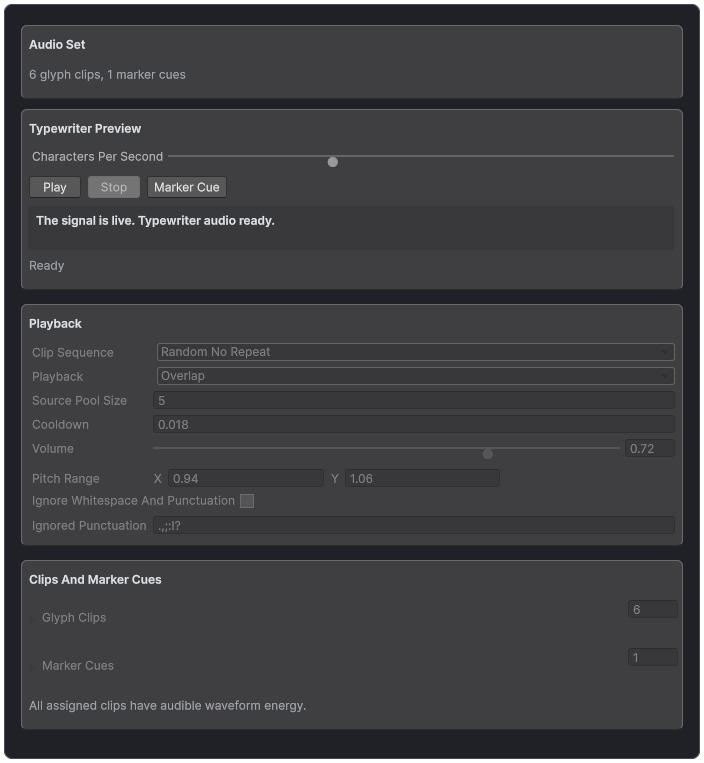
Audio Sets preview glyph clips and marker cues before they are connected to dialogue.
Built-in Action Tags
- <wait=0.5> pauses reveal for a cooperative timed wait. Named form: <wait seconds=0.5>.
- <pause> pauses indefinitely until code or a later action resumes reveal.
- <resume> releases an ordinary pause.
- <speed=1.25> sets the reveal multiplier. <speedUp=2> and <speedDown=2> change it relative to the current pacing.
- <waitForInput input=submit timeout=5> waits for a keyed or any-input provider and may time out.
- <event=doorOpen,cellar> raises a named route with optional payload values.
- <playSound> invokes a registered Play Sound asset or component and can optionally wait, time out, and stop on skip.
Actions are point-in-time markers and do not wrap visible text. They run when reveal reaches their compiled position. Self-closing syntax is accepted, but the short non-closing form is common because the action itself has no range.
The searchable tag browser keeps its catalog compact. Select an action that needs parameters, then choose Configure to open the guided setup only when it is useful. The setup validates required values, offers contextual route choices, and shows the exact markup that will be inserted before it changes the source.
Input System Waits
The built-in waitForInput action falls back to the legacy any-advance provider. Install Input System 1.4.0 or newer to use InputActionReference mappings. Create named mappings such as submit, cancel, or next, decide whether each action should auto-enable, and use the same key in markup. A timeout greater than zero resumes automatically; zero or less waits until input or a cooperative skip.
Audio Sets and Audio Player
An Audio Set owns reusable glyph clips and named marker cues. The Audio Player decides when to play them, how to choose clips, whether sounds overlap or interrupt, the cooldown, punctuation policy, pitch and volume variation, and the AudioSource pool. Preview assets before placing them in a scene, then test a fast reveal and a full skip so multiple glyphs revealed in one frame do not overwhelm the mix.
Play Sound action assets and components are for authored one-shot cues that may wait for completion. Glyph audio is for the continuing texture of a typewriter. Marker cues are for semantic beats. Use the smallest mechanism that owns the desired timing.
Events, Markers, and Relays
The Events tab exposes typewriter start, shown, disappeared, glyph-revealed, wait-started, wait-finished, and marker messages. Use TextStudioMarkerEventRouter to map named event routes to UnityEvents and choose whether a binding receives the route, first parameter, or joined payload.
The door opens.<event=doorOpen,cellar> Stay close.<event=music,tense>
Use TextStudioTypewriterEventRelay when designers need inspector-wired callbacks without a custom subscriber. Per-glyph events can fire frequently, so keep expensive work, allocations, and scene searches out of those listeners.
Author Finite Reactions
Use Reactions for a bounded response to text appearing, disappearing, changing, reaching a marker, or receiving a named signal. A sparkle when a letter arrives, a completion flash, an audio cue, and an outgoing counter letter are typical examples. Reactions observe the text lifecycle; Typewriter still owns reveal and hide, while Appearance, Writing, Default Effects, and Composed Effects retain their existing jobs.
Open the host's Reactions section. Choose Built-In for a ready-made response, Custom for a reusable Reaction Set, Inline for a local recipe, or None to disable reactions. Built-In choices follow the host's configured output. An incompatible saved recipe remains assigned with a warning, so changing a renderer does not silently rewrite your work.
Create a shared asset with Assets > Create > Text Studio > Reactions > Reaction Set. Each layer chooses When, Which, and Action. Begin with one event and one finite response. Play Effect reuses an existing effect; Send Signal connects gameplay; Play Audio Cue routes through the host's Audio Set; custom actions can provide pooled particles, retained-letter motion, or optional physics. Set overlap, cooldown, chance, and capacity when the event rate calls for them.
For replacement feedback, use Text Changed with Changed Outgoing Units and an appropriate retained-motion action. The response keeps the old rendered letter while the new text arrives. Renderer diagnostics report unsupported capture instead of substituting incomplete geometry. Assign Target Objects only when the recipe needs a named scene or panel target.
Test reveal, skip, replacement, interruption, hide, replay, and disable in Play Mode. Quiet skip suppresses per-unit responses while preserving completion. Replacing a recipe or disabling its owner releases active output. The Reaction Set inspector also provides an isolated Before/After preview for supported outgoing-motion layers; scene particles, audio, and other actions require Play Mode.
For named events from C#, call PlayReaction(signal, intensity, unitIndex) on TextStudioText or TextStudioBinding. StopReactions drains finite work; CancelReactions cancels it. Use a Behavior Profile's separate Reactions domain when several hosts should share the same response recipe.
Dialogue Source and Long Text
TextStudioDialogueSource is the stable bridge for dialogue, quest, subtitle, or cutscene systems. ShowLine stores the line, updates the hub, and optionally restarts reveal. AdvanceOrSkip completes the current wait or reveal before asking the owning system for another line.
TextStudioPageNavigator works with TMP Page overflow and can follow the revealed glyph without changing reveal progress. TextStudioAutoScrollFollower keeps logs, subtitle history, tutorials, and credits visible inside a ScrollRect. Test page changes after localization, font fallback, and narrow layout changes.